Can You Get A Radio With Bluetooth And Stream Music
Yes, you can absolutely get a radio with Bluetooth and stream music directly to it. Modern bluetooth radio options range from compact portable units to full-size car stereos. This guide walks you through every type, feature, and buying tip so you can pick the right wireless radio for your needs.
Have you ever wanted to listen to your favorite songs through a radio but still keep that classic radio feel? The good news is that you can get a radio with Bluetooth and stream music without any hassle. These devices give you the best of both worlds. You get to tune into your local FM or AM stations, and you also get to play music from your phone, tablet, or laptop.
The idea of wireless streaming through a radio might sound high-tech, but it is actually very simple. Most modern radios come with built-in Bluetooth. This means you just turn on Bluetooth on your device, pair it with the radio, and start playing music. It works just like connecting to a bluetooth speaker. The difference is that you also get all the radio features built in.
In this article, we will explore every type of bluetooth radio you can buy. We will look at how they work, what to look for, and which ones are worth your money. Whether you want something for your kitchen, your car, or your backyard, we have you covered. Let us dive in.
Key Takeaways
- Bluetooth radios exist in many forms: portable, desktop, car, and internet models.
- Wireless streaming is simple: pair your phone in seconds and play any song.
- You get the best of both worlds: traditional FM/AM stations plus on-demand music.
- Key features to look for: battery life, sound quality, range, and extra inputs.
- Price ranges vary widely: great options exist from budget to premium.
- Setting up is easy: most radios follow a simple pairing process.
- Maintenance matters: keep your radio clean and charged for the best experience.
📑 Table of Contents
- What Is A Bluetooth Radio?
- Types Of Radios With Bluetooth
- Benefits Of Getting A Radio With Bluetooth
- What To Look For When Buying A Bluetooth Radio
- How To Set Up Bluetooth On Your Radio
- Common Mistakes People Make With Bluetooth Radios
- Popular Brands And Models To Consider
- Can You Use A Bluetooth Radio Without A Phone?
- Frequently Asked Questions
- Final Thoughts
What Is A Bluetooth Radio?
A bluetooth radio is simply a radio that has Bluetooth built into it. This lets it connect to other devices without any wires. You can think of it as a regular radio that also acts as a wireless speaker. You get FM and AM stations, and you also get the ability to stream music wirelessly from your phone or computer.
These radios come in all shapes and sizes. Some are small and portable. Others are big and meant to stay on a desk or shelf. The main idea is the same. You get radio reception plus wireless audio streaming in one device. It is a very handy combo.
How Does Bluetooth Work In A Radio?
Bluetooth uses short-range radio waves to send data between devices. When you pair your phone with a bluetooth enabled radio, your phone sends the music signal through the air. The radio picks it up and plays it through its speakers. There are no cables needed. The connection is secure and uses very little battery power.
The range is usually about 30 feet. This means you can leave your phone on a table and walk around the room while music plays. Some models have a longer range. But for most home use, 30 feet is more than enough.
Types Of Radios With Bluetooth
Not all bluetooth radios are the same. They come in different types, each designed for a specific use. Let us look at the main categories so you can find the one that fits your life.
Portable Bluetooth Radios
Portable bluetooth radios are small and lightweight. You can carry them anywhere. Many of them run on batteries, so you can take them to the beach, the park, or on a camping trip. They usually have a built-in speaker and sometimes an auxiliary input too.
These radios are great for people who want flexibility. You get FM and AM stations on the go. And when you want a break from radio, you just switch to music playback mode. Some models even have a built-in flashlight or emergency features. They are very versatile.
Desktop Bluetooth Radios
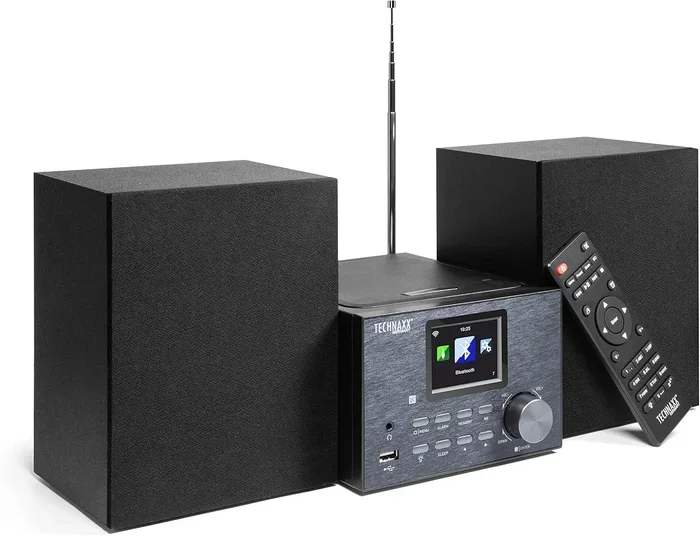
Desktop bluetooth radios are bigger and meant to stay in one place. They sit on a desk, shelf, or countertop. These radios often have better sound quality than portable ones. They also tend to have more features, like a larger display, better antennas, and more tuning options.
If you want a radio for your kitchen, office, or bedroom, a desktop model is a great pick. The sound is usually richer and fuller. And because they plug into the wall, you never have to worry about the battery dying.
Car Radios With Bluetooth
A car radio bluetooth setup is one of the most popular options. Many modern cars come with bluetooth connectivity built right into the factory stereo. But if your car is older, you can still add Bluetooth. There are simple adapter kits that plug into your car radio and add wireless streaming.
Having Bluetooth in your car means you can take calls hands-free and stream music from your phone. It makes driving safer and more fun. You do not need to fumble with cables anymore. Just pair once and your car stereo connects automatically every time you get in.
Internet Radios With Bluetooth
Internet radios are a step up from traditional radios. They connect to your Wi-Fi and give you access to thousands of stations from around the world. Many of them also have Bluetooth connectivity built in. This means you can stream internet radio stations or play music from your phone.
These radios are perfect for music lovers who want variety. You can tune into a jazz station in New York or a rock station in London. And when you want a change, you switch to your own playlist. The combination is powerful.
Benefits Of Getting A Radio With Bluetooth
Why should you choose a bluetooth radio over a regular one? There are several strong reasons. Let us break them down.
Wireless Convenience
The biggest benefit is wireless convenience. You do not need to plug anything in. You do not need any cables. Just turn on Bluetooth and connect. This makes the whole experience feel easy and modern. You can control your music from across the room.
Two Devices In One
A bluetooth enabled radio gives you two devices in one box. You get a radio and a wireless speaker. This saves space and saves money. Instead of buying a separate Bluetooth speaker, you get both functions in a single unit. It is a smart and efficient choice.
Better Sound Than Phone Speakers
Let us be honest. Phone speakers are small and not very loud. A radio with speakers and Bluetooth will almost always sound better. The speakers in these radios are bigger and designed for music. You get richer bass, clearer highs, and a fuller sound overall.
Classic Radio Features Plus Modern Tech
One of the best things about these radios is the blend of old and new. You still get the classic radio experience. You can tune into live news, weather, sports, and music. But you also get modern wireless streaming for podcasts, music apps, and more. It is the perfect mix.
What To Look For When Buying A Bluetooth Radio
Not every bluetooth radio is created equal. There are several things you should check before you buy. Here is what matters most.
Sound Quality
Sound quality should be your top priority. Listen to how the radio handles different types of music. Does it sound clear at low volume? Does it distort at high volume? Look for radios with good speaker size and quality drivers. A bluetooth speaker radio with a subwoofer will give you the best bass.
Battery Life
If you want a portable model, battery life matters a lot. Some radios last only a few hours. Others can go all day on a single charge. Think about how you will use the radio. For short trips, a smaller battery might be fine. For all-day use, look for something that lasts at least 8 to 10 hours.
Bluetooth Range
The Bluetooth range tells you how far your phone can be from the radio and still stay connected. Most radios have a range of about 30 feet. Some premium models go further. If you plan to use the radio in a large room or outdoors, a longer range is helpful.
Extra Inputs
Even though Bluetooth is the main feature, extra inputs are still useful. Look for radios with an AUX port, USB input, or SD card slot. These give you more ways to play music. They also let you charge your phone or use the radio as a backup speaker when Bluetooth is not available.
Build Quality And Design
A portable radio bluetooth should feel sturdy and well-made. Check the materials. Is it waterproof or water-resistant? Does it have a carrying handle or a strap? These small details can make a big difference in how much you enjoy the radio over time.
How To Set Up Bluetooth On Your Radio
Setting up Bluetooth connectivity on your radio is usually very easy. Most radios follow a similar process. Here is a quick step-by-step guide.
- Turn on the radio and make sure it has power.
- Go to the Bluetooth settings on the radio. This is usually found in the menu or by pressing a dedicated Bluetooth button.
- Put the radio in pairing mode. The display should show “Pairing” or a Bluetooth symbol flashing.
- Open Bluetooth on your phone or other device.
- Look for the radio’s name in the list of available devices.
- Tap on the radio name to connect.
- Once connected, start playing music on your phone. The sound will come through the radio.
The whole process usually takes less than a minute. After the first pairing, most radios will remember your device. So the next time you turn it on, it connects automatically. This makes music playback effortless.
Some radios also support multiple device pairing. This means you can connect your phone and a friend’s phone to the same radio. You can take turns playing music without having to unpair and re-pair. It is a nice feature for gatherings and parties.
Common Mistakes People Make With Bluetooth Radios
There are a few common mistakes that people make when using a bluetooth radio. Avoiding these can save you a lot of frustration.
Not Keeping The Radio Close Enough At First
When you first pair a device, keep it close to the radio. About 3 to 5 feet away is ideal. Once paired, you can move further away. Trying to pair from across the room can lead to connection problems.
Forgetting To Turn Off Bluetooth On Old Devices
If you have multiple Bluetooth devices nearby, they can interfere with the connection. Make sure to turn off Bluetooth on devices you are not using. This keeps the connection clean and stable.
Ignoring Firmware Updates
Some bluetooth enabled radio models receive firmware updates. These updates can fix bugs and improve performance. Check the manufacturer’s website or app for updates now and then. It is a quick and easy way to keep things running smoothly.
Using Low-Quality Audio Files
Bluetooth streams music at a certain quality level. If your music files are very low quality, the radio will just play them as they are. Use good quality files or streaming services for the best sound. The radio cannot make bad audio sound good.
Popular Brands And Models To Consider
The market for bluetooth radios has grown a lot in recent years. There are now many brands offering great options. Some of the most popular and trusted names include brands like Sangean, Roberts, Tivoli, and Roberts Radio. These companies have a long history of making quality radios and have added Bluetooth to their newer models.
Budget options are also available. Many generic brands offer solid bluetooth connectivity at lower prices. These are great if you just need the basics. But if you want premium sound and build quality, investing in a well-known brand is usually worth it.
When choosing a model, read reviews from real users. Look for feedback on sound quality, battery life, and Bluetooth reliability. A portable radio bluetooth with high ratings is usually a safe bet. And do not be afraid to visit a store and listen to the radio in person before you buy.
Can You Use A Bluetooth Radio Without A Phone?
Yes, you can use a bluetooth radio without a phone, but with some limitations. The radio will still work for FM and AM stations. You can tune in to your favorite shows and music channels just like a regular radio. However, you will not be able to stream music wirelessly without a Bluetooth source device.
Some radios have a USB port or an SD card slot. This lets you play music files stored on a USB drive or memory card. So even without a phone, you can still enjoy your own music library through the radio. It is not the same as full wireless streaming, but it works well for many people.
Frequently Asked Questions
Can I connect any phone to a bluetooth radio?
Yes, almost any phone with Bluetooth can connect to a bluetooth radio. This includes iPhones, Android phones, and even some tablets. The pairing process is the same for all devices. Just turn on Bluetooth, find the radio, and connect. It works across all major operating systems.
Does Bluetooth streaming use a lot of battery?
Bluetooth streaming does use some extra battery on both your phone and the radio. But it is not a huge drain. Most modern devices handle it very well. A portable radio bluetooth will typically last several hours on a full charge while streaming. Your phone battery will also last longer if you lower the screen brightness while streaming.
Can I use a bluetooth radio in the shower?
Some bluetooth enabled radio models are waterproof or water-resistant. These are perfect for bathroom use. Check the IP rating on the radio before you buy it. An IPX7 rating means the radio can handle water splashes and even brief submersion. Always check the product details to be sure.
Is Bluetooth audio quality good enough for music?
Yes, Bluetooth audio quality is very good for most listeners. Modern Bluetooth versions support high-quality codecs that deliver clear and rich sound. While audiophiles might prefer a wired connection, the average listener will not notice a big difference. A bluetooth radio is more than good enough for everyday music listening.
Can I connect multiple devices to one bluetooth radio?
Many bluetooth radios support multiple device pairing. This means you can link your phone, tablet, and laptop to the same radio. You can switch between devices easily without having to unpair. Check the product specs to confirm this feature before you buy.
What is the difference between a bluetooth radio and a bluetooth speaker?
The main difference is that a bluetooth radio also receives FM and AM stations. A Bluetooth speaker only plays audio from connected devices. A bluetooth speaker radio gives you both options. You get wireless streaming plus traditional radio in one device. This makes it more versatile than a speaker alone.
Final Thoughts
Can you get a radio with Bluetooth? Absolutely. The answer is a clear yes. Bluetooth radios are widely available, easy to use, and offer a fantastic listening experience. You get the best of both worlds. Classic radio stations and modern wireless streaming all in one device.
Whether you choose a portable model for your adventures, a desktop unit for your home, or a car stereo with bluetooth connectivity, you will not be disappointed. These radios are convenient, versatile, and fun to use. They make it easy to enjoy your favorite music and radio shows without any wires or hassle.
Take your time when shopping. Consider what features matter most to you. Think about where you will use the radio and how often. With the right bluetooth radio, you can turn any room into a personal listening space. So go ahead, explore your options, and find the perfect radio with Bluetooth for your life. You will be glad you did.