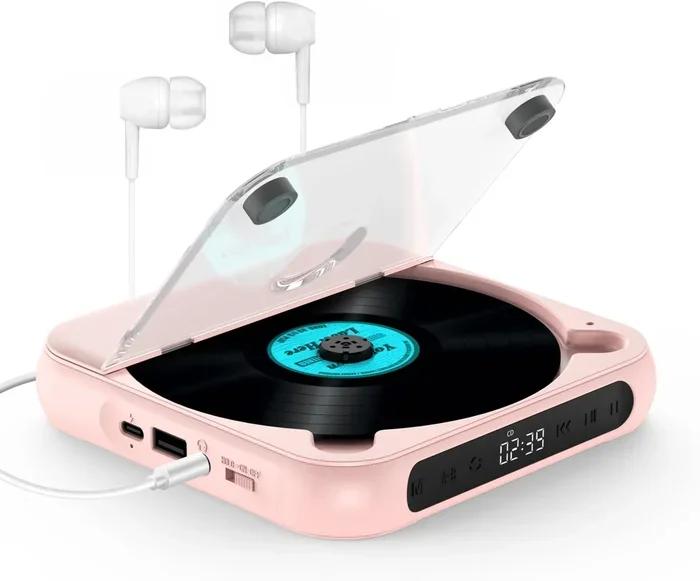
How Do Bluetooth Headphones Work With Your Cd Player
Bluetooth headphones can work with any CD player using a Bluetooth transmitter, adapter, or a CD player with built-in wireless support. This guide walks you through every method step by step so you can enjoy your favorite CDs without wires. You will learn how Bluetooth pairing works, which method suits your setup best, and how to fix common connection issues.
This is a comprehensive guide about How Do Bluetooth Headphones Work With Cd Player.
Key Takeaways
- Bluetooth transmitters are the most popular way to connect wireless headphones to older CD players that lack built-in Bluetooth.
- A 3.5mm audio cable or RCA connection is all you need to link a Bluetooth transmitter to your CD player’s headphone jack.
- Some modern CD players include Bluetooth right out of the box, making wireless listening instant and effortless.
- Bluetooth codecs like aptX and AAC affect audio quality, so choosing the right transmitter matters for audiophiles.
- Pairing issues are common but fixable with simple steps like resetting the transmitter and ensuring both devices are close together.
- Battery life and range vary across Bluetooth transmitters, so check specs before buying one for your CD player setup.
[FEATURED_IMAGE_PLACEHOLDER]
How Do Bluetooth Headphones Work With Your CD Player
There is something special about listening to a CD. The sound is warm, the track selection is yours, and the experience feels intentional. But let us be honest. Wires get tangled. They catch on things. They limit how far you can move from your stereo. Bluetooth headphones solve all of that.
The question is simple. How do Bluetooth headphones work with your CD player? The answer depends on your CD player model and what kind of Bluetooth transmitter or adapter you use. In most cases, you need a small Bluetooth transmitter that plugs into your CD player’s audio output. This transmitter sends the audio signal wirelessly to your headphones. It is quick, affordable, and works with almost any CD player made in the last 30 years.
In this guide, we will cover every method you can use. We will talk about Bluetooth transmitters, adapters, built-in Bluetooth CD players, and even how to get the best sound quality from your wireless setup. Whether you have an old portable CD player or a home stereo system, this article has you covered. By the end, you will know exactly what to buy and how to set it up in minutes.
Think of this as your complete guide to going wireless with your CD collection. No more cables. No more frustration. Just great music from your CDs delivered straight to your ears through Bluetooth headphones.
What Is Bluetooth and How Does It Send Audio
Before we get into the specifics of connecting headphones to a CD player, let us understand what Bluetooth actually does. Bluetooth is a wireless technology that sends data between devices over short distances. It uses radio waves instead of cables. This is the same technology that lets you connect wireless headphones to your Roku or pair a phone with a car stereo.
When it comes to audio, Bluetooth takes the sound signal from one device and streams it to another. The device sending the signal is called the source. The device receiving it is called the sink. Your CD player is the source. Your Bluetooth headphones are the sink. A Bluetooth transmitter sits between them and bridges the gap.
How Bluetooth Pairing Works
Pairing is the process two devices go through to recognize each other. When you turn on your Bluetooth headphones and put them in pairing mode, they broadcast a signal. The transmitter or CD player picks up that signal. You confirm the connection on both ends. After that, the devices remember each other and reconnect automatically most of the time.
The pairing process usually takes less than 30 seconds. You press a button on the transmitter. You select your headphones from a list on the transmitter screen. Done. The audio starts flowing wirelessly. It is really that simple once you have the right equipment.
Bluetooth Versions and What They Mean
Not all Bluetooth is the same. Bluetooth has gone through several versions over the years. Bluetooth 5.0 is the current standard and offers the best range and stability. Older versions like Bluetooth 4.2 still work fine for audio streaming but may have a shorter range. When shopping for a transmitter, look for one that supports at least Bluetooth 4.0 or higher for the best experience.
The version also affects how many devices you can pair at once. Some transmitters support dual pairing, meaning you can connect two pairs of headphones to the same CD player. This is great for sharing music with a partner or a friend on the couch.
Methods to Connect Bluetooth Headphones to a CD Player
There are three main ways to make your Bluetooth headphones work with a CD player. Each method has its pros and cons. The right choice depends on your CD player model, your budget, and how much effort you want to put into setup.
| Method | Best For | Cost Range | Setup Difficulty |
|---|---|---|---|
| Bluetooth Transmitter | CD players with 3.5mm or RCA jacks | $15 – $60 | Easy |
| Bluetooth Adapter | CD players with USB or digital outputs | $20 – $80 | Moderate |
| Built-in Bluetooth CD Player | Those buying a new CD player | $50 – $300+ | Very Easy |
Using a Bluetooth Transmitter
A Bluetooth transmitter is the most popular and affordable option. It is a small box that connects to your CD player using a cable. The transmitter then sends the audio signal to your wireless headphones. You can find them on Amazon, at electronics stores, or even at some department stores for under $30.
Most Bluetooth transmitters have a 3.5mm headphone jack. Some also have RCA red and white audio outputs. You simply plug the transmitter into your CD player, turn it on, and pair your headphones. It works with portable CD players, home stereo systems, and even boomboxes.
This is the same basic idea behind making older devices wireless. It is similar to how you would make an old Bose Wave Radio Bluetooth or connect a record player to wireless headphones. The transmitter does all the heavy lifting.
Using a Bluetooth Adapter
Some CD players have USB ports or digital audio outputs. In those cases, a Bluetooth adapter might work better than a transmitter. A Bluetooth adapter plugs directly into a USB port or uses a digital optical cable to connect to the CD player. It converts the digital signal to Bluetooth and sends it to your headphones.
Bluetooth adapters tend to offer better audio quality because they work with digital signals. There is less conversion loss compared to analog transmitters. If you care about sound quality and have a CD player with digital outputs, an adapter is worth the extra cost.
Buying a CD Player with Built-in Bluetooth
If you do not already own a CD player or are thinking about replacing an old one, consider buying a model with built-in Bluetooth. Many modern CD players and stereo systems now include wireless connectivity right out of the box. You just turn on Bluetooth, pair your headphones, and start listening.
Brands like Sony, Panasonic, and Roberts make CD players with built-in Bluetooth at various price points. Some also include features like FM radio, USB playback, and even Wi-Fi streaming. This is the most convenient option if you want a simple, all-in-one solution for wireless listening.
Step-by-Step Setup Guide
Setting up Bluetooth headphones with your CD player is easier than you might think. Follow these steps and you will be listening to wireless audio in under five minutes.
- Choose your connection method. Decide whether you will use a Bluetooth transmitter, adapter, or a CD player with built-in Bluetooth.
- Connect the transmitter or adapter to your CD player. Plug a 3.5mm cable into the headphone jack on your CD player and into the transmitter. If your CD player has RCA outputs, use an RCA-to-3.5mm cable instead.
- Turn on the transmitter. Most transmitters have a power button or switch. Flip it on and wait for the indicator light to start blinking.
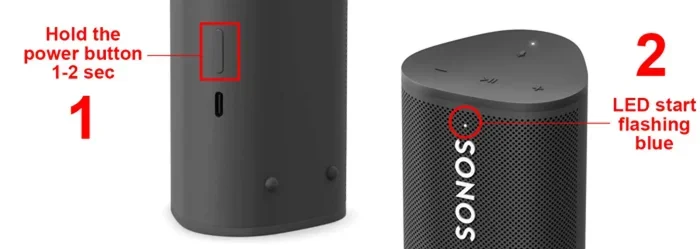
- Put your Bluetooth headphones in pairing mode. Refer to your headphones manual. Usually, you hold down the power button for a few seconds until the LED light flashes.
- Select your headphones on the transmitter. Press the pairing button on the transmitter. The LED should show that it is searching. Once your headphones appear, select them.
- Confirm the connection. You should hear a confirmation tone or see a solid light on both the transmitter and headphones. Play a CD and test the audio.
That is it. You are now listening to your CD collection without a single wire. The whole process takes less time than it took to read those steps.
Quick Tips for a Smooth Setup
- Keep both devices within 3 feet during the initial pairing process. Once paired, you can move further apart.
- Turn the CD player volume to about 70% and use the headphones volume for fine-tuning. This prevents distortion.
- Charge your headphones fully before the first pairing session. Low battery can cause connection drops.
- Remove other Bluetooth devices from the area during setup. Too many signals can interfere with pairing.
Getting the Best Audio Quality from Your Wireless Setup
One concern people have about Bluetooth audio is quality. Will the sound be as good as a wired connection? The short answer is yes, mostly. Modern Bluetooth technology supports high-quality audio codecs that deliver excellent sound. But there are a few things you can do to get the best possible experience.
First, look for a transmitter that supports aptX or aptX Low Latency codecs. These codecs compress and transmit audio with minimal loss. Standard Bluetooth SBC codec works fine for casual listening, but aptX makes a noticeable difference for music lovers.
Understanding Bluetooth Codecs
A Bluetooth codec is the method used to compress and send audio wirelessly. Think of it like a language the devices use to communicate. The most common codecs are SBC, aptX, AAC, and LDAC. SBC is the basic standard and works with almost all devices. aptX offers better quality and is supported by most mid-range and high-end headphones. AAC is common on Apple devices. LDAC is Sony’s codec and offers near-lossless quality.
For CD player audio, aptX is usually the sweet spot. It provides rich, detailed sound without requiring expensive equipment. If your headphones and transmitter both support aptX, you will hear a clear improvement over standard Bluetooth audio.
Placement Matters
Where you place the Bluetooth transmitter affects your experience. Keep it close to your listening position. Avoid placing it behind walls or inside closed cabinets. Bluetooth uses radio waves and obstacles weaken the signal. A clear line of sight between the transmitter and your headphones gives the best results.
The Bluetooth range is typically around 30 feet in open space. In a room with furniture and walls, expect around 15 to 20 feet. If you move too far from the CD player, the audio may stutter or cut out. This is normal Bluetooth behavior and not a defect.
Some people also ask whether Bluetooth headphones work well for extended listening sessions. The answer is yes. Modern Bluetooth headphones are comfortable for hours of use. They also have good battery life, often lasting 20 to 40 hours on a single charge. You can listen to an entire album collection on one charge.
Common Problems and How to Fix Them
Bluetooth connections are reliable, but they are not perfect. From time to time, you may run into issues. Here are the most common problems and how to solve them quickly.
Headphones Will Not Pair with the Transmitter
This is the most common issue and it is usually easy to fix. First, make sure your headphones are in pairing mode. The LED should be flashing. Second, reset the transmitter by turning it off and on again. Third, move the devices closer together. Fourth, check if your headphones are already connected to another device. Disconnect them from other devices and try again.
Audio Cuts Out or Stutters
Interference is the main cause of audio dropouts. Wi-Fi routers, microwaves, and even other Bluetooth devices can cause interference. Move your CD player and transmitter away from these sources. Also, make sure your headphones are within range of the transmitter. If you are using a cheap transmitter, upgrading to a better model with a stronger antenna can solve this problem.
Audio Delay or Lag
Some people notice a slight delay between the CD spinning and the audio reaching the headphones. This is called latency. Using a transmitter with aptX Low Latency reduces this delay significantly. For most CD listening, latency is not a big deal since there is no video to sync with. But if you notice it, upgrading your transmitter is the fix.
Low Audio Volume
If the volume seems low, check the CD player volume first. Set it to around 70 to 80 percent. Then adjust the volume using your headphones controls. Some Bluetooth transmitters also have their own volume knobs. Experiment with all three to find the sweet spot.
For more troubleshooting tips on Bluetooth audio issues, you can also check our guide on talking through Bluetooth headphones which covers common Bluetooth audio problems.
Frequently Asked Questions
Can I connect any Bluetooth headphones to any CD player?
Yes, as long as you use a Bluetooth transmitter or adapter. The headphones do not need to be a specific brand. As long as your headphones support Bluetooth and your CD player has an audio output (like a headphone jack or RCA outputs), you can make them work together. The transmitter bridges the gap between the two devices.
Do Bluetooth transmitters reduce audio quality from CDs?
Most modern Bluetooth transmitters support aptX or similar codecs that preserve audio quality very well. You will not notice a significant difference compared to wired listening for most people. Audiophiles who demand the absolute best may notice a slight difference, but for everyday CD listening, Bluetooth transmitters deliver excellent sound.
Can I use Bluetooth headphones with a portable CD player?
Absolutely. Portable CD players usually have a standard 3.5mm headphone jack. You can plug a small Bluetooth transmitter into that jack and pair your wireless headphones. Some portable CD players even come with built-in Bluetooth, which makes the setup even easier. Just pop in a CD and enjoy wireless music anywhere.
How far can I walk away from my CD player while using Bluetooth headphones?
In an open space, Bluetooth headphones typically work within 30 feet of the transmitter. In a home with walls and furniture, the effective range is usually around 15 to 20 feet. If you go beyond this range, the audio may start to stutter or disconnect. For most home listening, this range is more than enough to move around comfortably.
Is a Bluetooth transmitter expensive?
Not at all. You can find a solid Bluetooth transmitter for between $15 and $40. Higher-end models with aptX support or dual pairing capability may cost $50 to $80. Considering how much convenience and freedom they add to your CD listening experience, they are a great value. Many people consider them one of the best affordable audio upgrades you can make.
Can I connect two pairs of Bluetooth headphones to one CD player?
Yes, if you buy a Bluetooth transmitter that supports dual pairing. These transmitters can connect to two pairs of headphones at the same time. This is perfect for sharing music with a partner, a child, or a friend. Both people can listen to the same CD at the same volume without any extra equipment.
Final Thoughts
Using Bluetooth headphones with your CD player is one of the best upgrades you can make to your listening setup. It frees you from wires. It lets you move around your home while enjoying your favorite albums. And it works with almost any CD player you already own.
The key is choosing the right connection method. A Bluetooth transmitter is the most versatile and affordable option for most people. If your CD player has digital outputs, a Bluetooth adapter may give you even better sound. And if you are in the market for a new CD player, one with built-in Bluetooth saves you the hassle of extra equipment entirely.
Remember the steps we covered. Connect the transmitter. Pair your headphones. Adjust the volume. Enjoy the music. The whole process takes just a few minutes and the result is worth it. You will wonder how you ever listened to CDs with wires in the first place.
So go ahead. Grab your favorite CD. Plug in a Bluetooth transmitter. Put on your wireless headphones. And let the music play without limits. Your CD collection was meant to be enjoyed freely. Now it can be.
Frequently Asked Questions
What is How Do Bluetooth Headphones Work With Cd Player?
How Do Bluetooth Headphones Work With Cd Player is an important topic with many practical applications.