Does Roku Smart Soundbar Have Bluetooth Connectivity
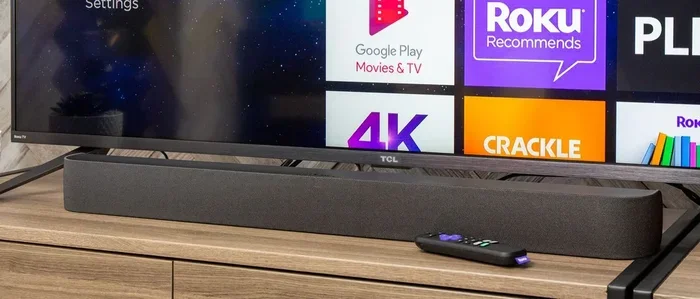
Yes, most Roku Smart Soundbars come with Bluetooth connectivity built right in. You can wirelessly stream audio from your phone, tablet, or laptop directly to your soundbar without needing extra cables or apps. Bluetooth pairing on a Roku soundbar is quick, simple, and works with most devices.
This is a comprehensive guide about Does Roku Smart Soundbar Have Bluetooth.
Key Takeaways
- Built-In Bluetooth: Most Roku Smart Soundbars include Bluetooth for wireless audio streaming from any compatible device.
- Easy Pairing Process: Connecting your phone or tablet takes just a few steps through the Roku remote or the Roku app.
- Multiple Connectivity Options: Roku soundbars also support HDMI ARC, optical audio, and Wi-Fi streaming for flexible setup choices.
- Common Issues Are Fixable: Bluetooth lag, pairing failures, and range problems can usually be solved with simple troubleshooting steps.
- Works with Other Devices: You can pair Bluetooth headphones, speakers, and other audio devices with your Roku soundbar for private listening.
- Check Your Model: Not all Roku soundbar models have the same features, so always confirm Bluetooth support before purchasing.
[FEATURED_IMAGE_PLACEHOLDER]
Does a Roku Smart Soundbar Have Bluetooth?
The short answer is yes. Most Roku Smart Soundbars come equipped with Bluetooth technology. This lets you wirelessly send audio from your phone, tablet, or computer straight to your soundbar. It is one of the most convenient features for anyone who wants to improve their home audio without dealing with cables.
Bluetooth connectivity on a Roku soundbar means you can stream music, podcasts, and even take phone calls through your soundbar. You do not need a Wi-Fi connection for basic Bluetooth use. It works directly between your device and the soundbar using a short-range wireless signal.
However, not every single Roku soundbar model is the same. Some older or budget models may not include Bluetooth. Always check the specifications of your specific model before you buy. If you already own a Roku soundbar, you can usually find the Bluetooth details in the user manual or on the product page.
For those wondering about other wireless options, many people also ask Can I Make My TV Have Bluetooth. The answer depends on your TV model, but a Roku soundbar with Bluetooth can often fill that gap nicely.
How Bluetooth Works on a Roku Smart Soundbar
Understanding how Bluetooth works on your Roku soundbar helps you get the most out of it. Bluetooth is a short-range wireless technology that sends audio data between two devices. On a Roku soundbar, it acts as a wireless speaker that receives audio from your phone or other device.
When you pair your device to the soundbar, they create a direct connection. This connection does not need your home Wi-Fi network. That means you can stream audio even if your internet is down. The Bluetooth range is typically around 30 feet, so you can move around your room while staying connected.
Most Roku soundbars use Bluetooth version 4.0 or higher. Newer versions offer better range and less audio delay. The connection is stable and works well for casual listening. If you want to learn more about using Bluetooth with your Roku setup, check out our guide on Can I Use Bluetooth Headphones With Roku for tips on wireless audio with Roku devices.
Bluetooth Pairing Steps
Pairing your device to a Roku Smart Soundbar is straightforward. Here is how to do it:
- Turn on your Roku soundbar and make sure it is in Bluetooth pairing mode.
- On your phone or tablet, go to Settings and tap Bluetooth.
- Make sure Bluetooth is turned on and your device is set to be visible.
- Look for your Roku soundbar in the list of available devices.
- Tap on the soundbar name to connect.
- Wait for the confirmation tone or message on your soundbar.
Once paired, your device will remember the soundbar. You can reconnect automatically next time you turn on Bluetooth. If you run into issues, try turning Bluetooth off and back on again. Restarting both devices also helps clear up most connection problems.
What You Can Stream Using Bluetooth on a Roku Soundbar
One of the best things about Bluetooth on a Roku soundbar is the flexibility. You can stream almost anything from your phone or tablet. Here are some popular uses:
- Music Streaming Apps: Play Spotify, Apple Music, Amazon Music, or YouTube Music directly through your soundbar.
- Podcasts: Listen to your favorite podcasts with richer, fuller sound than your phone speakers provide.
- Videos and Movies: Stream audio from apps like Netflix or YouTube when watching on a non-Roku device.
- Phone Calls: Take calls through your soundbar with clear, amplified sound.
- Games: Get immersive audio from mobile games without holding your phone close to your ear.
- Audiobooks: Listen to audiobooks from apps like Audible with better sound quality.
Bluetooth makes your Roku soundbar a versatile audio hub. You are not limited to just TV audio. You can use it for any wireless audio source in your home. For more ideas on using Bluetooth audio in your entertainment setup, see our article on Can I Play Radio Using Bluetooth for creative streaming ideas.
Roku Soundbar Connectivity Options Beyond Bluetooth
While Bluetooth is a great feature, it is not the only way a Roku Smart Soundbar connects to your devices. Roku soundbars offer multiple connectivity options. Each one serves a different purpose and gives you more flexibility.
HDMI ARC
HDMI ARC (Audio Return Channel) is the most common way to connect a soundbar to a TV. It sends audio from your TV to the soundbar through a single HDMI cable. This connection also lets you control the soundbar with your TV remote. HDMI ARC supports high-quality audio formats and is ideal for watching TV shows and movies.
Optical Audio Output
An optical cable uses light to transmit audio from your TV to the soundbar. It is a reliable option if your TV does not have HDMI ARC. Optical audio delivers good sound quality, though it may not support the latest audio formats like Dolby Atmos on all models.
Wi-Fi Streaming
Many Roku soundbars also connect to your home Wi-Fi network. Wi-Fi streaming allows you to use the Roku app and access thousands of streaming channels. Wi-Fi generally offers a stronger and more stable connection than Bluetooth. It also supports higher audio quality and multi-room setups.
Comparison Table
| Connection Type | Range | Audio Quality | Best For |
|---|---|---|---|
| Bluetooth | Up to 30 feet | Good | Wireless streaming from phones and tablets |
| HDMI ARC | Cable length | Excellent | TV audio and CEC remote control |
| Optical Audio | Cable length | Very Good | Reliable TV audio connection |
| Wi-Fi | Depends on network | Excellent | Streaming channels and multi-room audio |
Having multiple connectivity options means you can choose the best method for each situation. Bluetooth is perfect for quick, wireless connections from your personal devices. HDMI ARC or optical cables work best for your TV. Wi-Fi is ideal for streaming music and accessing the Roku channel store.
Can You Pair Bluetooth Headphones to a Roku Soundbar?
Yes, you can pair Bluetooth headphones to most Roku Smart Soundbars. This is a great feature for late-night watching or when you do not want to disturb others. The process is similar to pairing your phone. You put the headphones in pairing mode, then select them from the Bluetooth settings on the soundbar.
If you want to use Bluetooth headphones with your Roku setup, you may also want to check out our guide on Can I Pair Bluetooth Headphones To My Lg Tv. Many of the same principles apply across different soundbar and TV brands.
Keep in mind that audio latency can be a factor with Bluetooth headphones. Latency is the small delay between the video and audio. Most modern Roku soundbars and Bluetooth headphones handle this well. But if you notice a delay, try adjusting the audio sync settings in your soundbar menu.
Common Bluetooth Issues and How to Fix Them
Bluetooth connections are generally reliable, but problems can happen. Here are the most common issues and their solutions:
Soundbar Does Not Show Up in Bluetooth List
If your Roku soundbar does not appear when you search for Bluetooth devices, try these steps. First, make sure the soundbar is in pairing mode. Check the user manual for the exact steps to enter pairing mode. Also, make sure Bluetooth is turned on in your phone or tablet settings. Restarting both devices often resolves this issue.
Audio Cuts Out or Drops
Interference from other wireless devices can cause audio dropouts. Move closer to the soundbar to improve the connection. Keep your phone within 30 feet of the soundbar. Avoid placing the soundbar near microwaves, baby monitors, or other Bluetooth devices that may cause interference.
Audio Lag or Delay
Audio lag happens when the sound does not match the video. This is common with Bluetooth connections. To reduce lag, make sure both devices are close together. Some Roku soundbars have an audio sync setting you can adjust. If the lag persists, try using an HDMI ARC or optical cable instead for a wired connection.
Paired Device Will Not Connect Automatically
If a previously paired device does not reconnect, go to the Bluetooth settings on the soundbar. Remove the device from the paired list and pair it again. This refreshes the connection and often fixes the problem. Also, make sure the device you are trying to connect has Bluetooth turned on and is not connected to another audio output.
Expert Insight: For the best Bluetooth experience with your Roku soundbar, keep your devices updated. Firmware updates for your soundbar and software updates for your phone can improve Bluetooth performance. Check for updates regularly through the Roku settings menu or your device’s app store.
Quick Tips for the Best Bluetooth Experience
Get the most out of your Roku soundbar’s Bluetooth with these simple tips:
- Keep Devices Close: Stay within 30 feet of the soundbar for a stable connection.
- Reduce Interference: Move away from other wireless devices that might cause signal issues.
- Update Firmware: Regularly check for Roku soundbar software updates for the best performance.
- Use the Roku App: The Roku mobile app gives you extra control over your soundbar settings.
- Reset When Needed: A factory reset can fix stubborn Bluetooth issues. Use this as a last resort.
- Check Compatibility: Make sure your phone or device supports Bluetooth before trying to pair.
- One Device at a Time: Most Roku soundbars can only connect to one Bluetooth device at a time.
Do All Roku Soundbar Models Have Bluetooth?
Not all Roku soundbar models include Bluetooth. Newer models from the Roku lineup generally come with Bluetooth as a standard feature. However, some older or entry-level models may not have it. Always check the product specifications before you buy.
If you are shopping for a new Roku soundbar and Bluetooth is important to you, look for it in the product details. The box or product page should clearly list Bluetooth as a supported feature. If you are unsure, you can contact Roku customer support or check the user manual online.
If your current TV or setup does not support Bluetooth, you might want to explore options like Can I Make My TV Have Bluetooth to add wireless capabilities to your existing setup.
Final Thoughts
A Roku Smart Soundbar with Bluetooth is a fantastic addition to any home entertainment setup. The wireless connectivity gives you freedom and flexibility. You can stream music, take calls, and enjoy audio from your personal devices without any cables.
The pairing process is simple and fast. Most users can connect their device in under a minute. And with multiple connectivity options like HDMI ARC, optical audio, and Wi-Fi, your Roku soundbar is a versatile hub for all your audio needs.
If you run into any Bluetooth issues, the troubleshooting steps above should help you resolve them quickly. Keeping your firmware updated and your devices close together will give you the best experience. Overall, Bluetooth on a Roku Smart Soundbar is a feature that adds real value to your daily entertainment.
Whether you are listening to your favorite playlist, watching a late-night movie with headphones, or streaming a podcast, Bluetooth makes it all possible. Embrace the wireless convenience and enjoy richer, better sound from your Roku soundbar every day.
Frequently Asked Questions
Can I connect multiple Bluetooth devices to my Roku soundbar at once?
Most Roku soundbars can only connect to one Bluetooth device at a time. If you want to switch devices, you will need to disconnect the current device first. Some newer models may support multipoint Bluetooth, but this is not standard across all Roku soundbars.
Does Bluetooth on a Roku soundbar affect audio quality?
Bluetooth audio quality is good but not as high as a wired connection like HDMI ARC or optical. For most casual listening, the difference is minimal. If you are an audiophile who demands the highest quality, a wired connection will give you better results.
Can I use Bluetooth on my Roku soundbar without Wi-Fi?
Yes, Bluetooth works independently of your Wi-Fi network. You do not need an internet connection to use Bluetooth on your soundbar. The connection is direct between your device and the soundbar using wireless radio signals.
Why is there a delay when using Bluetooth with my Roku soundbar?
Audio delay, or latency, is common with Bluetooth connections. It happens because Bluetooth takes a moment to transmit audio data. You can reduce this by keeping your device close to the soundbar. Some Roku soundbars also have an audio sync setting to help fix the delay.
Can I use a Roku soundbar as a Bluetooth speaker for my computer?
Yes, you can pair your computer with a Roku soundbar via Bluetooth. This works the same way as pairing a phone. Your computer will recognize the soundbar as a Bluetooth audio output device, and you can select it as your default speaker.
Is Bluetooth on a Roku soundbar secure?
Bluetooth connections use encrypted signals, making them generally safe for everyday use. However, Bluetooth range is limited, which adds a layer of security. You should not pair your soundbar in public places where strangers could potentially connect to it.