How Can I Use Two Bluetooth Devices At Once Easily
Using two Bluetooth devices at once is easier than you think. Whether you want to connect Bluetooth headphones and a speaker simultaneously or pair multiple devices to your phone, this guide has you covered. We will walk you through Bluetooth multipoint technology, step-by-step setup instructions, compatibility tips, and common fixes for connection issues.
Key Takeaways
- Bluetooth Multipoint: Lets you connect two devices to one Bluetooth accessory without constant re-pairing.
- Phone Settings Matter: Most modern smartphones support dual Bluetooth connections natively or through settings tweaks.
- Compatibility Is Key: Not all devices support simultaneous connections, so check specs before buying.
- Audio Sharing Features: Many newer TVs and phones offer built-in audio sharing for dual Bluetooth output.
- Troubleshooting Helps: Simple resets and firmware updates fix most dual Bluetooth connection problems.
- Adapter Solutions: A Bluetooth adapter can add dual-device support to older hardware.
📑 Table of Contents
- How Can I Use Two Bluetooth Devices At Once?
- Understanding Bluetooth Multipoint Technology
- How to Connect Two Bluetooth Devices to Your Phone
- Using Two Bluetooth Devices for Audio Output
- Bluetooth Device Compatibility and Limitations
- Troubleshooting Common Dual Bluetooth Issues
- Best Devices for Using Two Bluetooth Devices At Once
- Quick Tips for a Smooth Dual Bluetooth Experience
- Conclusion
How Can I Use Two Bluetooth Devices At Once?
Have you ever wanted to listen to music through your Bluetooth headphones while also connecting a Bluetooth speaker in another room? Maybe you need to pair Bluetooth headphones to your TV while your phone stays connected too. The good news is that using two Bluetooth devices at the same time is totally possible. And it is not as complicated as it might sound.
In this guide, we will break down everything you need to know about dual Bluetooth connections. You will learn how Bluetooth multipoint works, how to set it up on your phone or TV, and what to do when things go wrong. Whether you are a tech beginner or a seasoned user, this guide will help you get the most out of your Bluetooth enabled devices.
We will also cover the best devices for this setup and share practical tips to avoid common pitfalls. By the end, you will feel confident connecting multiple Bluetooth audio sources without any hassle. Let us dive right in.
Understanding Bluetooth Multipoint Technology
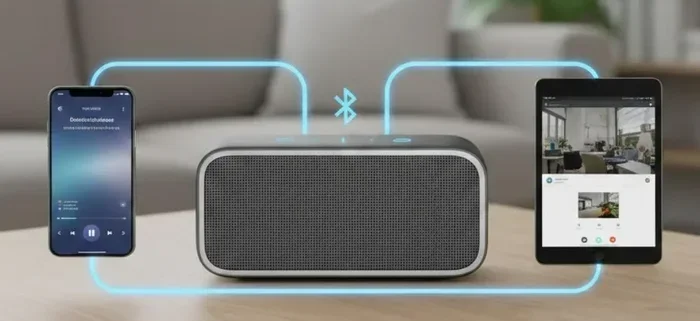
If you want to use two Bluetooth devices at once, you need to understand Bluetooth multipoint. This technology allows a single Bluetooth accessory to stay connected to two source devices simultaneously. For example, your Bluetooth headphones can be connected to both your phone and your laptop at the same time.
How Does Bluetooth Multipoint Work?
Here is how it works in simple terms. Your Bluetooth headphones maintain two active connections at once. When a call comes in on your phone, the headphones automatically switch from your laptop to your phone. After the call ends, they switch back. This seamless switching is what makes multipoint Bluetooth so convenient.
Not all Bluetooth devices support this feature. It depends on the Bluetooth profile and the hardware inside the device. Most premium Bluetooth headphones from brands like Sony, Jabra, and Apple support multipoint connectivity. Budget headphones may not offer this feature.
Benefits of Bluetooth Multipoint
- Seamless switching between devices without re-pairing.
- Time-saving since you do not need to disconnect and reconnect manually.
- Better productivity for users who switch between phone and computer often.
- Improved user experience with fewer Bluetooth connectivity issues.
Limitations to Keep in Mind
While multipoint Bluetooth is great, it does have limits. Some devices only support one audio stream at a time. This means you cannot play different audio on two Bluetooth speakers from the same phone. Also, Bluetooth multipoint can sometimes increase battery drain on your accessories. Always check if your specific device supports this feature before purchasing.
How to Connect Two Bluetooth Devices to Your Phone
Connecting two Bluetooth devices to your phone is straightforward on most modern devices. Both Android and iPhone offer ways to manage multiple Bluetooth connections. Here is how to do it step by step.
On Android Phones
Most Android phones support connecting to multiple Bluetooth devices at the same time. However, you usually cannot play audio through two devices simultaneously without extra help. Here is the process:
- Open your Bluetooth settings from the quick settings panel.
- Turn on Bluetooth and make sure it is visible.
- Put your first Bluetooth device in pairing mode.
- Tap the device name to connect.
- Repeat the process for your second device.
Once both devices are connected, you can switch between them in your Bluetooth settings. Some Android phones also support audio sharing, which lets you split audio between two Bluetooth headphones. This feature is available on Samsung and Google Pixel phones.
On iPhones
iPhones handle dual Bluetooth connections a bit differently. Apple devices can connect to multiple Bluetooth accessories but with more restrictions. You can connect a keyboard and headphones at the same time, but playing audio through two Bluetooth speakers is not natively supported.
However, Apple introduced Share Audio in iOS 13. This feature lets you share audio between two Bluetooth headphones or between your iPhone and Apple TV. To use it:
- Connect your first pair of Bluetooth headphones.
- Open the Control Center and tap the audio output icon.
- Select Share Audio and follow the prompts to connect the second pair.
This is a great way to listen to Bluetooth audio with a friend without buying extra equipment.
Using Two Bluetooth Devices for Audio Output
Sometimes you want to send Bluetooth audio to two different devices at the same time. This is useful for sharing music with a friend or setting up a multi-room audio system. Let us explore how to do this.
Audio Sharing on Smartphones
As mentioned above, both Android and iPhone offer audio sharing features. On Android, look for Dual Audio or Audio Sharing in your Bluetooth settings. On iPhone, use the Share Audio feature. These tools let you connect two Bluetooth headphones or speakers to one phone and split the audio evenly.
You can also play radio using Bluetooth through this method. Simply open your radio app, start playing, and the audio will stream to both connected devices. This works great for outdoor gatherings or shared listening sessions.
Using a Bluetooth Adapter
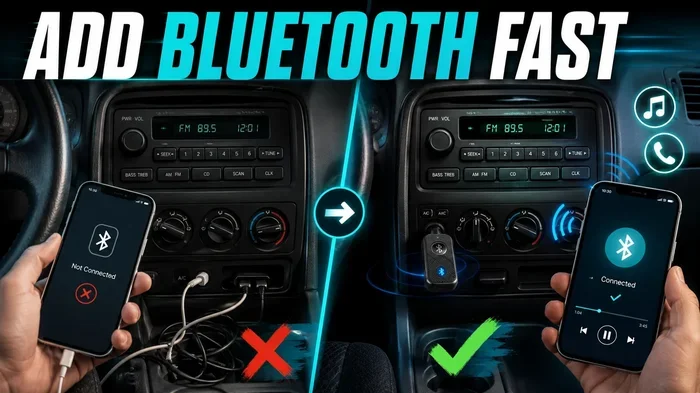
If your phone does not support dual audio, you can use a Bluetooth adapter. This small device plugs into your phone or computer and creates a second Bluetooth connection. Some adapters support multipoint connectivity, allowing you to connect two Bluetooth speakers or headphones at once.
Look for adapters that support Bluetooth 5.0 or higher for the best range and stability. Cheap adapters may introduce Bluetooth latency, which causes audio delays. Spend a little extra for a quality adapter to avoid frustration.
Connecting to Your TV with Bluetooth
Want to pair Bluetooth headphones to your TV while also using your phone? Many modern TVs support Bluetooth audio output. If your TV does not have built-in Bluetooth, you can make your TV Bluetooth enabled with a simple adapter.
Once your TV has Bluetooth, you can connect your Bluetooth headphones for private listening. Meanwhile, your phone can stay connected to a Bluetooth speaker in another room. This setup works well for households where different people want different audio sources.
Some smart TVs also support Bluetooth device switching. This means you can seamlessly switch between your phone and TV audio without disconnecting either device. Check your TV manual for multipoint or dual audio support.
Bluetooth Device Compatibility and Limitations
Not every Bluetooth device plays nicely with others when it comes to dual connections. Understanding compatibility helps you avoid disappointment and wasted money.
What Devices Support Dual Bluetooth?
Most modern smartphones support connecting to multiple Bluetooth devices. However, the ability to play audio through two devices simultaneously depends on the manufacturer. Here is a quick breakdown:
- Samsung phones: Support Dual Audio for splitting audio between two Bluetooth devices.
- Google Pixel phones: Offer audio sharing for connecting two Bluetooth headphones.
- iPhones: Support Share Audio for two pairs of AirPods or Bluetooth headphones.
- Windows laptops: Can connect to multiple Bluetooth devices but may need third-party software for dual audio output.
- Smart TVs: Many support one Bluetooth audio output at a time. Some premium models support two.
Common Compatibility Issues
Even if your devices claim to support dual Bluetooth, you may run into problems. Here are some common issues:
- Bluetooth range limits: Most Bluetooth devices work within 30 feet. Going beyond this range causes disconnections.
- Profile conflicts: Different Bluetooth profiles (like A2DP for audio and HFP for calls) can conflict when two devices are connected.
- Firmware updates: Outdated firmware on your Bluetooth devices can cause connection drops.
- Interference: Wi-Fi signals and other Bluetooth devices nearby can cause interference and audio stuttering.
To avoid these issues, keep your Bluetooth devices close together and update firmware regularly. Also, try to use devices that support the same Bluetooth audio codec for the best performance.
Troubleshooting Common Dual Bluetooth Issues
Even with compatible devices, you might face problems when using two Bluetooth devices at once. Here are the most common issues and how to fix them.
One Device Keeps Disconnecting
This is the most common Bluetooth connectivity issue. Usually, it happens because one device has priority over the other. To fix this, go to your Bluetooth settings and forget the problematic device. Then re-pair it from scratch. Also, make sure both devices have enough battery power, as low battery can cause disconnections.
Audio Delay or Lag
Bluetooth latency can be annoying, especially when using two devices. This happens because Bluetooth audio takes time to encode and transmit. To reduce lag, keep your devices close together and avoid walls or obstacles between them. Also, make sure you are using Bluetooth 5.0 or higher for the lowest latency.
Cannot Connect to Both Devices Simultaneously
If your phone will not connect to two Bluetooth devices at once, try turning Bluetooth off and back on. Restart both devices and try again. If the problem persists, check for software updates. Sometimes a simple firmware update fixes compatibility issues between devices.
Audio Quality Drops with Two Devices
When you connect two Bluetooth audio devices, the quality may drop. This is because the phone has to split its Bluetooth bandwidth between two connections. To improve quality, use devices that support high-quality Bluetooth codecs like aptX or LDAC. Also, avoid using Bluetooth 4.0 devices, as they have lower bandwidth and more latency.
Best Devices for Using Two Bluetooth Devices At Once
Choosing the right Bluetooth devices makes a huge difference. Here are some recommendations for devices that handle dual Bluetooth connections well.
Top Phones for Dual Bluetooth
- Samsung Galaxy S24: Excellent Dual Audio support with stable connections.
- Google Pixel 8: Great audio sharing feature and reliable Bluetooth connectivity.
- iPhone 15 Pro: Seamless Share Audio integration with AirPods and other Bluetooth headphones.
Top Bluetooth Headphones for Multipoint
- Sony WH-1000XM5: Supports multipoint Bluetooth with excellent range and audio quality.
- Jabra Elite 85h: Great for dual device connections with strong call quality.
- Apple AirPods Pro 2: Works perfectly with Share Audio on iPhones.
Top Bluetooth Speakers for Dual Audio
- JBL Flip 6: Compact and great for Bluetooth audio sharing.
- Sony SRS-XB43: Supports dual device pairing for seamless switching.
When shopping for Bluetooth devices, always check the product description for multipoint or dual audio support. This feature makes using two Bluetooth devices at once much smoother and more enjoyable.
Quick Tips for a Smooth Dual Bluetooth Experience
Here are some quick tips to keep your dual Bluetooth setup running smoothly:
- Always keep your Bluetooth devices updated with the latest firmware.
- Restart your phone and devices if you notice connection issues.
- Keep devices within Bluetooth range (about 30 feet) for the best signal.
- Use Bluetooth 5.0 or higher devices for better speed and stability.
- Avoid placing Bluetooth devices near Wi-Fi routers to reduce interference.
- Charge your Bluetooth accessories regularly, as low battery affects performance.
- If you are talking through Bluetooth headphones while streaming music, multipoint makes this much easier.
These simple habits will save you from frustrating disconnections and audio glitches. A little maintenance goes a long way with Bluetooth technology.
Conclusion
Using two Bluetooth devices at once is a game changer for multitasking and sharing audio. Whether you want to connect two Bluetooth headphones to your phone, pair a Bluetooth speaker with your TV, or use multipoint Bluetooth for seamless device switching, the technology is ready for you.
Remember to check compatibility before buying, keep your devices updated, and use the right settings on your phone or TV. With the right setup, you can enjoy Bluetooth audio on multiple devices without any hassle. Start experimenting with your dual Bluetooth connections today and enjoy a more connected, convenient listening experience.
Frequently Asked Questions
Can I connect two Bluetooth headphones to my phone at the same time?
Yes, most modern phones support connecting two Bluetooth headphones simultaneously. Android phones with Dual Audio and iPhones with Share Audio make this easy. Simply pair both headphones in your Bluetooth settings and enable audio sharing.
Does using two Bluetooth devices drain battery faster?
Yes, maintaining two Bluetooth connections uses more power than one. Your phone and accessories may drain faster when running dual Bluetooth. Keep your devices charged and consider turning off Bluetooth on unused devices to save battery.
Can I use Bluetooth on my hearing aid while also connecting headphones?
Some Bluetooth hearing aids support multipoint connectivity, allowing you to connect to both your phone and a second device. Check your hearing aid manual for Bluetooth enabled features and multipoint support.
Why does my Bluetooth audio keep cutting out when two devices are connected?
Bluetooth interference is the most common cause. Wi-Fi signals, physical obstacles, and distance can all disrupt your Bluetooth connection. Keep your devices close together, update firmware, and avoid placing devices near Wi-Fi routers.
Can I make my old TV Bluetooth enabled for dual audio?
Yes, you can make your TV Bluetooth enabled using a Bluetooth adapter. Simply plug the adapter into your TV’s audio output and pair your Bluetooth headphones. Some adapters also support dual audio for connecting two devices at once.
What is the best Bluetooth codec for dual device connections?
Bluetooth 5.0 and higher offer the best performance for dual device connections. Codecs like aptX and LDAC provide higher audio quality and lower latency. Avoid Bluetooth 4.0 devices for the best Bluetooth audio streaming experience.