How Can I Lower My Cox Bill and Pay Less Each Month
Want to know how to lower your Cox bill? This guide covers everything from plan downgrades and equipment swaps to negotiating with customer service and cutting rental fees. You will learn proven ways to reduce your Cox internet bill and keep more money in your pocket every month.
Are you tired of staring at your Cox internet bill every month and wondering where all that money is going? You are not alone. Thousands of households across the country are searching for ways to lower their internet costs and reduce monthly expenses. The good news is that there are real, actionable steps you can take right now to pay less for Cox internet each month.
This guide walks you through every practical method to bring down your Cox bill. Whether you want to negotiate a better rate, change your plan, or even ditch Cox altogether, you will find clear and honest advice here. Let us dive in.
Key Takeaways
- Buy your own router: Eliminating the monthly equipment rental fee can save you $10-$15 per month.
- Downgrade your plan: Switching to a slower speed tier can significantly reduce your Cox internet bill without affecting most daily tasks.
- Negotiate with Cox: Calling customer service and asking for a promotional rate often leads to real savings.
- Cut the cord: Becoming your own internet provider through alternative options can slash your monthly bill in half.
- Connect directly to your modem: Dropping extra equipment simplifies your setup and removes hidden fees.
📑 Table of Contents
Understand Your Current Cox Bill
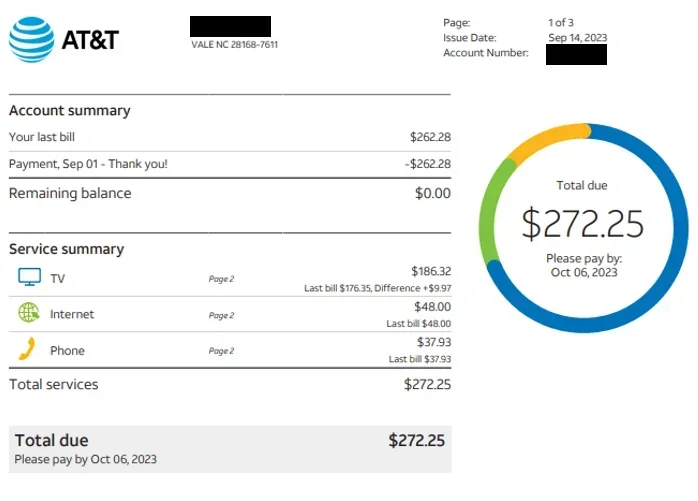
Before you can lower your Cox bill, you need to understand what you are paying for. Most people have no idea what their bill actually includes. Taking five minutes to review it can reveal hidden fees and unnecessary charges.
Break Down the Line Items
Grab your latest Cox bill and look at each line item. You will typically see several categories:
- Base service fee: This is the cost of your internet plan itself.
- Equipment rental fee: Cox charges you monthly for their modem and router.
- Broadcast TV fee: If you have cable TV, this is an added charge.
- Taxes and regulatory fees: These are mandatory government charges.
- Administrative fee: A sneaky line item that many customers overlook.
- Promotional pricing: Any discount you are currently receiving.
Once you see all these pieces, it becomes much easier to identify where you can save money on internet. The equipment rental fee alone can cost you $10 to $15 every month. Over a year, that adds up to $120 to $180. That is money you could keep.
Know What Speed You Actually Need
Many Cox customers pay for speeds they do not even use. If you are not a heavy gamer or a large family streaming on multiple devices at once, you probably do not need the fastest plan available. Lowering your internet speed tier is one of the simplest ways to reduce your Cox bill.
Here is a quick look at how speed needs break down:
- Basic browsing and email: 25 to 50 Mbps is plenty.
- HD streaming on 2 to 3 devices: 100 to 200 Mbps works well.
- 4K streaming and gaming: 300 Mbps or higher makes sense.
If you are paying for 1,000 Mbps but only use 100 Mbps, you are wasting money. Downgrading your Cox plan can cut your bill by $20 to $40 per month depending on your current tier.
Negotiate Your Way to a Lower Bill
Here is a secret that most people do not know: internet providers want to keep you as a customer. Cox would rather give you a discount than lose you to a competitor. The key is knowing how to ask.
Call Cox Customer Service
Pick up the phone and call Cox customer service. When you reach a representative, be polite but direct. Tell them you are considering switching providers because your current monthly internet bill is too high. Ask if they have any promotional offers or loyalty discounts available.
Many customers have reported saving $15 to $30 per month simply by making this one phone call. It takes about 15 minutes, and the results can last for 6 to 12 months.
Use the Threat of Switching
Internet providers keep close tabs on their competitors. When you mention that you are looking at alternative internet providers, Cox takes notice. Mentioning providers like T-Mobile Home Internet, Verizon 5G Home, or even local ISPs gives you leverage.
Do not be aggressive. Simply state that you are exploring your options. A good representative will often pull up a better deal for you right away.
Timing Matters
The best time to negotiate is when your promotional rate is about to expire. Cox often locks in a low rate for 12 months, and then the price jumps. Call a week or two before your promo ends. You are in a much stronger position when you are not yet overpaying.
Also, calling at the beginning of the month can help. Representatives are less rushed and may have more flexibility to help you.
Cut Equipment Costs
Equipment fees are one of the biggest hidden costs on any internet bill. Cox charges customers a monthly rental fee for their modem and gateway device. Over time, this adds up to a significant amount of money.
Buy Your Own Router
One of the most effective ways to lower your Cox bill is to buy your own router. A good third-party router typically costs between $80 and $200 upfront. At $12 per month in rental fees, you will recoup your investment in just a few months and then save money every month after that.
Before buying a router, check whether your Cox modem already has built-in Wi-Fi. Some Cox gateways combine the modem and router in one device. If yours does, you may only need to replace the router portion and keep the modem.
You can also connect straight to your modem if you prefer a simpler setup. This eliminates the need for a separate router entirely and removes another monthly fee from your bill.
Return Unused Equipment
Do you have old Cox equipment sitting in a closet? Maybe a router you switched from months ago or a set-top box you no longer use. Return it immediately. Cox continues charging for equipment that you are not using, and that is money leaking from your wallet every month.
Call Cox or visit a local store to return any unused devices. You should also check your bill to confirm the charges have stopped.
Explore Alternative Internet Options
Sometimes the best way to pay less for internet is to step outside the Cox ecosystem entirely. The broadband landscape has changed dramatically, and there are now more options than ever.
Consider 5G Home Internet
5G home internet providers like T-Mobile and Verizon offer competitive speeds at lower prices than traditional cable. Plans often start around $50 per month, which is significantly less than many Cox tiers. The setup is simple too, since there is no equipment rental fee in most cases.
5G home internet works best in areas with strong 5G coverage. Check coverage maps before switching to make sure it will work at your address.
Look Into Fixed Wireless
Fixed wireless internet uses cell towers to deliver internet to your home. It is similar to 5G home internet but may come from different providers. This option is especially popular in rural areas where cable internet is limited.
Fixed wireless can offer reliable speeds at a fraction of the cost of traditional cable plans. It is worth exploring if you live outside a major city center.
Check Local ISPs
Your area might have a local internet service provider that offers better pricing than Cox. Smaller ISPs often compete aggressively on price and customer service. A quick search for internet providers in your area can reveal options you never knew existed.
Some local providers also offer no-contract plans, which gives you the freedom to switch whenever you want without penalty.
Optimize Your Cox Plan for Savings
If you decide to stay with Cox, there are still several strategies to bring down your bill and keep it low going forward.
Bundle Smartly
Cox often offers discounts when you bundle internet with TV or phone service. However, bundling only saves money if you actually use those services. If you barely watch cable TV, adding it to your plan just to get a discount is a waste of money.
On the other hand, if you do use both internet and TV, a bundle can offer genuine savings. Compare the standalone price of each service with the bundled price before committing.
Watch for Seasonal Promotions
Cox runs promotions throughout the year, especially during holiday seasons and back-to-school periods. Signing up during these windows can lock in a lower rate for the first 12 to 24 months.
Even if you are already a customer, it is worth checking Cox’s website periodically for new offers. Sometimes existing customers can take advantage of promos that are advertised to new subscribers.
Remove Unnecessary Add-Ons
Go through your Cox account and remove any add-on services you do not use. These might include:
- Security suites that come with your modem
- Premium Wi-Fi hotspots you never access
- Extra TV channels you do not watch
- Cloud storage features you do not need
Each add-on might only cost a few dollars per month, but they add up fast. Removing even two or three of these can shave $10 to $20 off your monthly bill.
Long-Term Strategies to Keep Bills Low
Lowering your Cox bill is not just about one-time fixes. Building smart habits will help you maintain low internet costs for years to come.
Set a Bill Reminder
Mark your calendar every three months to review your Cox bill. Look for unexpected fee increases or expired promotions. Catching these early gives you time to call and resolve them before they become permanent.
Stay Informed About Competitor Pricing
Internet providers change their pricing frequently. Keeping an eye on what competitors like T-Mobile, Verizon, and local ISPs are offering gives you leverage when negotiating with Cox.
Consider Becoming Your Own Provider
For tech-savvy users, becoming your own internet provider is a real option. This can involve setting up a fixed wireless connection using directional antennas or even sharing a neighbor’s network (where legal). While this requires some technical knowledge, it can eliminate your monthly internet bill entirely.
Many people have successfully cut their internet costs to zero by exploring these creative alternatives. It takes effort upfront but pays off in the long run.
Common Mistakes That Increase Your Cox Bill
Avoiding these common mistakes can help you keep your Cox bill as low as possible:
- Staying on a plan past its promo period: This is the #1 reason bills increase unexpectedly.
- Not returning old equipment: Forgotten devices keep generating charges.
- Paying for speeds you do not need: Upgrading unnecessarily costs extra every month.
- Ignoring bill changes: Small fee increases add up if you do not notice them.
- Never negotiating: Many customers simply accept the bill as-is without ever calling to ask for a better deal.
By staying proactive and reviewing your bill regularly, you can avoid these traps and keep your monthly internet payment under control.
Final Thoughts
Lowering your Cox bill is absolutely within your reach. You do not need to be a tech expert or spend hours on hold with customer service. The strategies in this guide give you practical, proven ways to pay less for Cox internet starting this month.
Whether you choose to buy your own equipment, negotiate a better rate, downgrade your plan, or explore alternative providers, every step you take moves you closer to significant monthly savings. Start with one or two of these tips and build from there. Your wallet will thank you.
The internet is a necessity in today’s world, but paying too much for it does not have to be. Take control of your Cox internet bill today and enjoy the savings all month long.
Frequently Asked Questions
Can I really lower my Cox bill by calling customer service?
Yes, many customers have successfully lowered their bills by calling Cox and asking for a promotional rate or loyalty discount. The key is to be polite, mention competitor options, and ask directly if a better deal is available.
How much can I save by buying my own router?
Buying your own router can save you between $10 and $15 per month, which adds up to $120 to $180 per year. The upfront cost of a good router is typically recovered within a few months.
What is the fastest way to reduce my Cox bill?
The fastest way is to call Cox customer service and negotiate a lower rate. You can also immediately remove any unused add-ons or services from your plan. Both actions can take effect right away.
Is it worth switching from Cox to another provider?
It can be worth it if you find a competitor offering similar speeds at a lower price. 5G home internet providers and local ISPs are increasingly competitive. Compare plans in your area before making a switch.
Will downgrading my internet speed affect my daily use?
For most households, a downgrade from a high-speed plan to a mid-tier plan will not cause any noticeable difference. Basic browsing, streaming, and video calls work perfectly fine at speeds between 50 and 200 Mbps.
Can I return Cox equipment and still keep my internet service?
Yes, you can return Cox equipment like extra routers or set-top boxes and keep your core internet service. Just make sure you are not returning equipment that is required for your plan to function properly.