How Can I Get Ethernet In A Room Without A Port At Home
Getting ethernet in a room without a wall port is easier than you think. You can use powerline adapters, MoCA technology, mesh WiFi systems, or even run a new cable yourself. Each method has pros and costs, but all deliver a strong wired connection without needing an existing Ethernet outlet.
Ever walked into a room and realized there is no ethernet port in sight? Maybe you are trying to set up a home office, a gaming setup, or a smart TV in the bedroom, and the nearest wall jack is in a completely different room. It is frustrating, right? The good news is that you have several practical options to bring a wired connection into any room in your home.
Whether you live in a new build or an older house with limited wiring, getting ethernet in a room without a port is totally doable. You do not need to be a tech expert or spend a fortune. In this guide, we will walk you through every method, from simple plug-and-play adapters to running your own cable. By the end, you will know exactly which solution fits your home and your budget.
Wired connections still beat WiFi when it comes to speed, stability, and latency. If you game, stream in 4K, or work from home, a direct LAN connection can make a huge difference. So let us dive into the best ways to get that connection where you need it.
Key Takeaways
- Powerline adapters let you send internet through your home’s existing electrical wiring — no new cables or ports needed.
- MoCA adapters use coaxial cables already in your walls for fast, stable ethernet in any room.
- Mesh WiFi systems offer a wireless alternative that can still deliver near-ethernet speeds in hard-to-reach rooms.
- Running a new Ethernet cable works best for permanent setups and gives you the most reliable connection.
- Network switches and extenders can expand your existing port coverage to nearby rooms.
- Each option varies in cost and setup difficulty, so choose based on your home layout and budget.
- You can combine methods for the best results in tricky home layouts.
📑 Table of Contents
- Why You Might Need Ethernet In A Room Without A Port
- Option 1 — Powerline Ethernet Adapters
- Option 2 — MoCA Adapters (Best For Homes With Coaxial Cables)
- Option 3 — Mesh WiFi Systems (A Wireless Alternative)
- Option 4 — Running A New Ethernet Cable
- Option 5 — Network Switches And Ethernet Extenders
- Which Method Should You Choose?
- Final Thoughts
Why You Might Need Ethernet In A Room Without A Port
Most homes have Ethernet ports in common areas like the living room or home office. But what about the guest bedroom, the basement, or the attic? These rooms often lack any wired connection. Here is why that matters:
- WiFi can be unreliable in rooms far from the router. Walls, floors, and distance all weaken the signal.
- Online gaming needs low latency. A wireless connection can cause lag, even if your speed test looks fine.
- Streaming 4K content uses a lot of bandwidth. WiFi often struggles to keep up consistently.
- Video calls and remote work benefit from a stable, uninterrupted connection.
- Smart home devices sometimes perform better on a wired network.
If you have ever wondered can I get internet in my home without a phone line, the answer is yes — and similarly, you can get ethernet without a wall port. The key is choosing the right method for your space.
Before we get into the solutions, it helps to understand what you are working with. Look at your home and identify where your existing router or modem is. Then think about which room needs the connection. The distance between these two points will influence which method works best.
Option 1 — Powerline Ethernet Adapters
This is probably the easiest and most popular way to get ethernet in a room without a port. Powerline adapters use your home’s existing electrical wiring to carry the internet signal. No drilling, no new cables, no mess.
How Powerline Adapters Work
A powerline kit comes with two adapters. You plug one adapter into an electrical outlet near your router and connect it with a short Ethernet cable. Then you plug the second adapter into an outlet in the room that needs the connection. That room now has a wired internet source.
The signal travels through your home’s wiring, which means it follows the path of least resistance. It does not matter if there is no phone line or coaxial cable in that room. As long as both outlets are on the same electrical circuit, the connection should work.
Setting Up Your Powerline Kit
Setting up a powerline adapter system is straightforward. Here is what you do:
- Buy a powerline adapter kit. Popular brands include TP-Link, Netgear, and Devolo.
- Plug one adapter into an outlet next to your router.
- Connect that adapter to your router using an Ethernet cable.
- Plug the second adapter into an outlet in the target room.
- Connect your device to the second adapter using another Ethernet cable.
- Wait a minute or two for the adapters to sync up.
That is it. No software installation needed in most cases. Some kits even come with built-in WiFi, so the second adapter also acts as a small wireless access point.
Quick tip: Plug the adapters directly into the wall outlet, not into a power strip. Power strips can reduce the signal quality and slow down your connection.
Pros and Cons of Powerline Adapters
- Pros: Easy setup, no drilling, affordable, works with any home wiring.
- Cons: Speed can vary depending on your home’s wiring quality, older homes may have slower performance.
If you are also wondering can I buy a WiFi router and not pay monthly, powerline adapters work great with any router. You just need the adapter kit and a couple of Ethernet cables.
Option 2 — MoCA Adapters (Best For Homes With Coaxial Cables)
If your home has coaxial cables (the same cables used for cable TV), MoCA adapters are an excellent option. They use your existing TV wiring to create a high-speed wired network. This method often delivers faster and more stable speeds than powerline adapters.
What Are MoCA Adapters?
MoCA stands for Multimedia over Coax Alliance. It is a technology that sends data signals through coaxial cables. A MoCA kit works similarly to a powerline kit — you have two adapters, one near the router and one in the room that needs the connection.
Because coaxial cables are designed for high-frequency signals, MoCA adapters can deliver speeds up to 2.5 Gbps or more, depending on the version. That is faster than most powerline kits and comparable to a direct Ethernet run.
MoCA vs Powerline: Which Is Better?
Here is a quick comparison:
- Speed: MoCA is generally faster and more consistent than powerline.
- Latency: MoCA has lower latency, which is great for gaming.
- Setup: Both are equally easy to set up.
- Availability: Powerline works in any home. MoCA requires coaxial cables in the walls.
- Cost: MoCA adapters tend to cost a bit more than powerline kits.
If your home was built with cable TV wiring, MoCA is often the best choice for getting ethernet in a room without a port. It gives you a near-wired experience without running a single new cable.
Expert insight: MoCA adapters also work well in homes where powerline adapters struggle. If you have older wiring or are on a different electrical circuit in the target room, MoCA bypasses those issues entirely by using a different type of cable.
Option 3 — Mesh WiFi Systems (A Wireless Alternative)
Not every room needs a physical cable. Mesh WiFi systems spread a strong wireless signal throughout your home using multiple units placed in different rooms. While this is not a true wired connection, modern mesh systems can deliver speeds close to ethernet for most everyday tasks.
Why Mesh Systems Work Well
A mesh system replaces your single router with a network of nodes or satellites. Each node talks to the others and to your devices, creating a seamless web of coverage. No more dead zones or weak signals in faraway rooms.
Mesh systems are especially helpful if you cannot run cables through walls or if you rent and cannot make permanent changes. You simply place a node in each room that needs coverage and let the system do the work.
Can You Get True Ethernet From Mesh?
Some mesh systems include a backhaul connection that uses a dedicated radio band to communicate between nodes. This is not the same as a wired Ethernet connection, but it comes close for most uses.
If you want the best of both worlds, look for mesh systems that support wired backhaul. You can connect the nodes to each other using Ethernet cables, which gives you a much faster and more stable network than wireless-only setups.
Keep in mind that mesh WiFi is not a replacement for a true wired connection if you need the absolute lowest latency or highest speeds. But for most households, it is a fantastic solution that eliminates the need for ethernet in a room without a port.
Quick tip: If you already have a router and do not want to buy a whole new mesh system, you can also look into WiFi extenders or access points. These are simpler and often cheaper, though they may not cover your entire home as smoothly as a mesh setup.
Option 4 — Running A New Ethernet Cable
If you want the most reliable and fastest connection possible, nothing beats running a new Ethernet cable. This method requires a bit more effort, but it gives you a permanent, high-quality solution.
When To Consider Running New Cables
Consider this option if:
- You are building a new home or doing major renovations.
- You have access to attic spaces, crawl spaces, or basement areas where you can route cables.
- You need the absolute best performance for gaming, streaming, or home office work.
- You plan to stay in your home for several years and want a permanent setup.
Tips For Running Ethernet Through Walls
Running a cable through walls might sound intimidating, but it is very doable with the right approach. Here are some tips:
- Use Cat6 or Cat6a cables for the best speed and future-proofing.
- Plan your route before you start. Use a stud finder to avoid hitting pipes or wires.
- Use Ethernet cable rated for in-wall use (plenum-rated cables are safer for spaces with air circulation).
- Label both ends of the cable so you know which room it connects to.
- Consider hiring a professional if you are not comfortable with drilling holes or routing cables through walls.
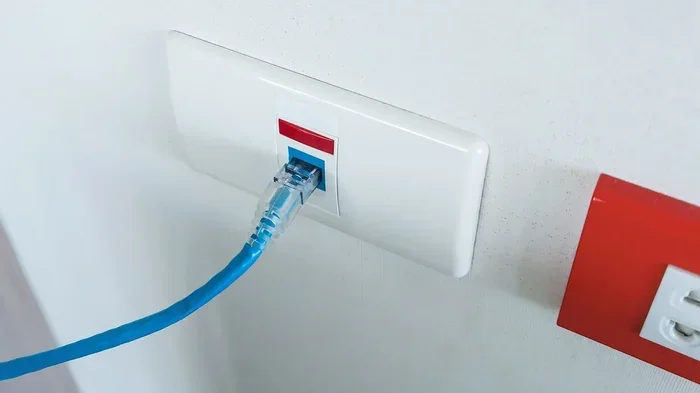
Once the cable is in place, you can install a wall plate with an Ethernet port in the target room. This gives you a clean, permanent connection that looks professional and works perfectly.
Running a new cable is the most labor-intensive option, but it is also the most future-proof. You will not need to worry about adapter compatibility or signal degradation. It is the gold standard for home networking.
Option 5 — Network Switches And Ethernet Extenders
If your home already has an Ethernet port in one room but not the next, you have another option. You can use a network switch or an Ethernet extender to bring the connection closer to the room you need.
What Is A Network Switch?
A network switch is a small device that lets you connect multiple devices to a single Ethernet port. You plug the switch into your existing wall port, and then connect as many devices as the switch allows (usually 4 to 8).
This is a great solution if your router is in a central location and you just need to extend the connection a short distance. You can run a single cable from the router to the switch, and then place the switch near the devices that need the connection.
Ethernet Extenders Explained
Ethernet extenders (also called range extenders for wired connections) boost an existing Ethernet signal over longer distances. They work similarly to powerline adapters but use a dedicated cable instead of your home’s wiring.
These are useful when you need to bridge a gap of 50 to 100 meters or more. They are simple to set up and do not require any special wiring in your walls.
Quick tip: If you are renting or cannot make permanent changes, a network switch or extender is a non-invasive way to expand your wired coverage. Just plug it in, connect the cables, and you are good to go.
Which Method Should You Choose?
Choosing the right method depends on your home, your budget, and your needs. Here is a quick guide:
- Easiest setup: Powerline adapters — just plug and play.
- Fastest wireless alternative: Mesh WiFi system — great for whole-home coverage.
- Best for homes with coax cables: MoCA adapters — fast and reliable.
- Most permanent and reliable: Running a new Ethernet cable — the gold standard.
- Best for extending an existing port: Network switch or Ethernet extender.
You can also combine methods. For example, use a mesh system for general coverage and a powerline adapter in the home office for the fastest gaming connection. The best setup is the one that fits your lifestyle and your home.
Remember, getting ethernet in a room without a port is not a one-size-fits-all problem. Every home is different, and the best solution is the one that works for your specific layout, needs, and budget. Start with the simplest option and upgrade if needed.
If you are dealing with broader internet access challenges, you might also want to explore options like can I get WiFi without an internet provider or look into can I get a free router from Optimum if you are working with a specific provider. These resources can help you build the foundation for a better home network.
Final Thoughts
Getting a wired connection into any room in your home is more achievable than most people think. Whether you choose powerline adapters, MoCA, mesh WiFi, or a dedicated cable run, the goal is the same: a fast, stable connection where you need it most.
Start by assessing your home layout and identifying which method makes the most sense. Then pick up the right equipment and give it a try. Most solutions take less than an hour to set up, and you will notice the difference immediately in your internet speed and reliability.
Do not let the lack of a wall port stop you from enjoying the best possible internet experience. With the right approach, every room in your home can have a strong, dependable wired connection. Ethernet in a room without a port is not just possible — it is simple.
Frequently Asked Questions
Can I get ethernet in a room without any existing wiring?
Yes, absolutely. Powerline adapters are the best solution for this situation. They use your home’s electrical wiring to carry the internet signal, so you do not need any existing network cables or wall ports. Just plug two adapters into wall outlets, and you have a wired connection in minutes.
Are powerline adapters as fast as a direct Ethernet connection?
Not quite. Powerline adapters typically deliver speeds that are 50 to 80 percent of a direct Ethernet connection. The exact speed depends on your home’s wiring quality, the age of the electrical system, and how far apart the adapters are. For most households, this is more than enough for streaming, gaming, and video calls.
Do MoCA adapters need a coaxial cable in every room?
Yes, MoCA adapters require a coaxial cable outlet in both the router room and the target room. If your home has cable TV wiring, there is a good chance you already have coax outlets in multiple rooms. Check your walls for the round cable connectors before buying a MoCA kit.
Is mesh WiFi as good as a wired Ethernet connection?
Mesh WiFi is excellent for overall home coverage, but it cannot fully match a direct wired connection in terms of speed and latency. For most everyday tasks like browsing, streaming, and video calls, mesh WiFi performs very well. For competitive gaming or large file transfers, a wired connection is still superior.
How much does it cost to run a new Ethernet cable in my home?
If you do it yourself, the cost is very low — usually under $50 for the cable and a few wall plates. If you hire a professional, expect to pay anywhere from $200 to $500 or more depending on the complexity of the installation and your local labor rates. The DIY route is well worth the effort for most homeowners.
Can I use multiple methods together for better coverage?
Yes, combining methods is a smart approach. For example, you could use a mesh WiFi system for general whole-home coverage and add a powerline adapter in the home office for the fastest possible connection. There is no rule that says you can only use one method — mix and match to find what works best for your home.