Does Wi Fi Bandwidth Matter for Your Internet Speed
Wi-Fi bandwidth is the amount of data your connection can handle at one time. It directly impacts your internet speed, streaming quality, and how many devices you can use at once. In this guide, we break down everything you need to know about Wi-Fi bandwidth and how to get the most out of your network.
Does Wi-Fi Bandwidth Matter for Your Internet Speed
Have you ever wondered why your internet feels slow even though you pay for a fast plan? The answer often comes down to one thing: Wi-Fi bandwidth. Bandwidth is like the width of a highway. A wider highway lets more cars pass at the same time. A wider bandwidth lets more data flow through your connection.
In this article, we will answer the question, “Does Wi-Fi bandwidth matter?” in plain, simple language. You will learn what bandwidth is, how it affects your daily internet use, and what you can do to improve it. Whether you stream movies, work from home, or just browse the web, this guide has something for you.
Let us start with the basics.
What Is Wi-Fi Bandwidth?
Wi-Fi bandwidth refers to the maximum amount of data that can travel through your wireless connection in a given time. Think of it as a pipe. A bigger pipe lets more water flow through. A bigger bandwidth lets more data move from your router to your devices.
Bandwidth is measured in megabits per second, or Mbps. If your plan offers 100 Mbps, that means your connection can handle up to 100 megabits of data every second. Some plans now offer even faster speeds, like 500 Mbps or 1 Gbps (gigabit per second).
It is important to note that bandwidth is not the same as speed. Speed is how fast data moves. Bandwidth is how much data can move at once. A connection with high bandwidth can handle many tasks at the same time without slowing down.
How Does Bandwidth Affect Internet Speed?
Your internet speed depends on bandwidth more than you might think. When you have enough bandwidth, everything feels fast. Pages load quickly. Videos play without buffering. But when bandwidth is low, things slow down fast.
Here is a simple way to think about it. Imagine a road with one lane. Only one car can pass at a time. Now imagine a road with four lanes. Many more cars can pass at once. More lanes mean smoother traffic. More bandwidth means smoother data flow.
When you open a web page, your device sends a small request to a server. That request uses very little bandwidth. But when you start streaming a 4K movie, the demand goes way up. A single 4K stream needs about 25 Mbps. Two people streaming at the same time? That is 50 Mbps right there.
If your total bandwidth is only 50 Mbps, you are already at your limit. Anything else — a phone downloading updates, a laptop on a video call — will slow everything down.
This is why bandwidth matters so much. It sets the ceiling for your wireless network performance.
How Many Devices Share Your Bandwidth?
Most homes today have many connected devices. Smart TVs, phones, laptops, tablets, smart speakers, and even doorbell cameras all use the same Wi-Fi connection. Each device takes a share of your total bandwidth.
The more devices you have online at the same time, the less bandwidth each one gets. Here is a quick look at how much bandwidth common activities use:
– Web browsing: 1 to 5 Mbps
– HD video streaming: 5 to 10 Mbps
– 4K video streaming: 25 Mbps or more
– Video calls (Zoom, Teams): 2 to 4 Mbps
– Online gaming: 3 to 6 Mbps
– Large file downloads: Uses all available bandwidth
If you have five devices doing different things at once, your bandwidth usage adds up fast. This is where many people notice real problems. Pages take longer to load. Videos start buffering. Calls get choppy.
The good news is that you can manage this. More on that below.
Does Your Wi-Fi Router Affect Bandwidth?
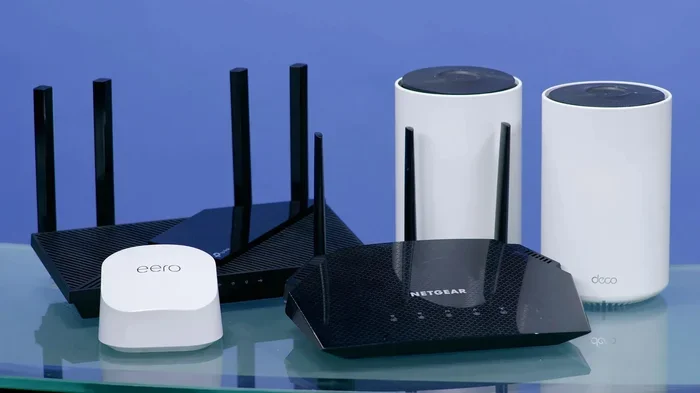
Yes, your router plays a big role in how well your bandwidth works. An old or cheap router may not be able to handle the full speed of your internet plan. Think of it like a narrow funnel. Even if your internet pipe is wide, a slow router will limit the flow.
Newer routers support Wi-Fi 6 and Wi-Fi 6E standards. These offer much better performance than older Wi-Fi 5 routers. They handle multiple devices better and deliver faster real-world speeds.
If you are thinking about upgrading, check out our guide on Can I Change My Wi-Fi Router to learn what to look for.
Dual-Band vs. Single-Band Routers
Most modern routers are dual-band. This means they broadcast two Wi-Fi frequencies: 2.4 GHz and 5 GHz. Each band has different strengths.
The 2.4 GHz band covers a wider area and passes through walls better. But it is slower and more crowded. Many household devices use this band, like microwaves and baby monitors.
The 5 GHz band is faster and less crowded. But it has a shorter range. It works best when you are close to the router.
Using the right band for the right task can make a huge difference in your network performance. For example, you might use 5 GHz for streaming and gaming. You can use 2.4 GHz for smart home devices that are farther away.
How to Check Your Current Bandwidth
Before you can improve your bandwidth, you need to know what you have. You can test your current bandwidth speed using free online tools. Speedtest.net is one of the most popular options.
Here is how to do it:
1. Connect your device to your Wi-Fi network.
2. Close any apps or downloads running in the background.
3. Go to Speedtest.net or a similar tool.
4. Click the “Go” or “Start” button.
5. Wait for the results.
The test will show your download speed, upload speed, and ping (latency). Compare these numbers to what your internet plan promises.
If your speeds are much lower than expected, your bandwidth may be the problem. But it could also be your router, your signal strength, or network congestion from your internet service provider.
Common Mistakes That Waste Your Bandwidth
Many people lose bandwidth without even realizing it. Here are some common mistakes to avoid:
Placing your router in a bad spot. Walls, metal objects, and even fish tanks can block your signal. Keep your router in a central, open location for the best signal strength.
Letting too many devices connect at once. Every device uses a piece of your bandwidth. Disconnect devices you are not using.
Running old firmware on your router. Router manufacturers release updates that improve performance and fix bugs. Check for updates regularly.
Not using Quality of Service (QoS) settings. QoS lets you prioritize certain devices or activities. For example, you can give your work laptop more bandwidth than a smart speaker.
Ignoring background apps. Apps on your phone or computer often use bandwidth without you knowing. Check your settings and close apps that run in the background.
Avoiding these simple mistakes can free up a lot of your bandwidth capacity.
Can You Increase Your Wi-Fi Bandwidth?
You cannot increase bandwidth beyond what your internet plan offers. But you can make the most of what you have. Here are some practical tips:
Upgrade your internet plan. If your family has grown or you work from home, you may need a plan with higher Mbps.
Use a mesh Wi-Fi system. Mesh systems spread your signal throughout your home. They reduce dead zones and improve real-world bandwidth.
Update your router firmware. This keeps your router running at peak performance.
Use Ethernet cables for key devices. A wired connection always beats Wi-Fi for speed and stability. If your TV supports it, you can connect your Wi-Fi directly to your TV with an Ethernet cable for the best streaming experience.
Enable QoS on your router. This helps prioritize the devices and activities that matter most to you.
Limit devices on your network. Remove old or unused devices from your Wi-Fi connection.
If you want to learn more about getting the most out of your setup without paying extra each month, check out our guide on Can I Buy a Wi-Fi Router and Not Pay Monthly.
The Role of Bandwidth in Streaming and Gaming
Streaming and gaming are the two activities that feel the most impact from low bandwidth. Let us look at each one closely.
For streaming, Netflix recommends at least 5 Mbps for HD and 25 Mbps for 4K. If your bandwidth drops below these numbers, you will see buffering or lower video quality. If multiple people in your home stream at the same time, the demand multiplies quickly.
For gaming, bandwidth is not the only factor. Latency (ping) matters a lot too. But if your bandwidth is too low, games can lag, freeze, or disconnect. Online multiplayer games typically need 3 to 6 Mbps, but that is per player. Add streaming or other devices, and the numbers add up.
If you want to improve your home setup for better performance, you might also want to read about boosting your Wi-Fi signal outside your home for better coverage.
Expert Insights on Bandwidth and Speed
Network experts agree that bandwidth is the foundation of a good internet experience. Without enough of it, no amount of router tweaking will fix slow speeds. The key is to match your bandwidth to your household needs.
A single person who mostly browses and checks email may be fine with 25 Mbps. A family of four who streams, games, and works from home should aim for 200 Mbps or more.
Experts also recommend testing your speed at different times of day. Internet traffic changes throughout the day. If your speeds drop in the evening when everyone is home, that is a sign your bandwidth is shared too thin.
One final tip from experts: do not confuse bandwidth with data caps. Some internet plans limit how much data you can use each month. Once you hit the cap, your provider may slow your connection. This is called bandwidth throttling. Check your plan details to see if this applies to you.
Also, keep in mind that Wi-Fi interference from neighboring networks can reduce your effective bandwidth. Using a less crowded channel on your router can help. Many modern routers do this automatically, but it is worth checking your settings.
Summary of Key Points
To wrap things up, let us go over the most important points. Wi-Fi bandwidth is the total amount of data your connection can handle at once. It directly affects your internet speed and how smoothly everything runs. More devices mean more demand on your bandwidth. Your router and Wi-Fi frequency also play a role in real-world performance. You can take simple steps to make better use of the bandwidth you already have. And if your needs have grown, upgrading your plan or router may be the best move.
Understanding bandwidth helps you make smarter choices about your internet setup. It saves you money, reduces frustration, and keeps your home network running smoothly.
If you ever find yourself without a regular internet connection and need to get online, you might want to check out our article on Can I Get Wi-Fi Without Internet Provider for alternative options.
Key Takeaways
- Bandwidth controls how much data flows: More bandwidth means faster speeds and smoother performance.
- Your internet plan sets the limit: Even the best router cannot give you more speed than your plan allows.
- Multiple devices share your bandwidth: Each device reduces the speed available to others.
- Wi-Fi bands matter: 5 GHz offers faster speeds, while 2.4 GHz covers longer distances.
- Router placement affects real-world bandwidth: Walls, distance, and interference all reduce performance.
- You can boost bandwidth: Simple steps like updating firmware and using QoS settings make a big difference.
Frequently Asked Questions
What is the difference between bandwidth and speed?
Bandwidth is how much data can flow through your connection at once. Speed is how fast that data moves. Think of bandwidth as the width of a road and speed as how fast the cars drive on it.
How much bandwidth do I need for streaming 4K video?
A single 4K stream needs about 25 Mbps. If more than one person streams at the same time, you need to add those numbers together. A household with two 4K streams should have at least 50 Mbps of bandwidth.
Can I increase my Wi-Fi bandwidth without changing my internet plan?
You cannot go above the bandwidth your plan offers. But you can optimize your existing bandwidth by updating your router, using QoS settings, reducing interference, and limiting connected devices.
Does more bandwidth mean less lag in online games?
Bandwidth helps, but it is not the only factor. Latency, or ping, is what causes lag in games. However, low bandwidth can make lag worse when other devices are using the network at the same time.
What is bandwidth throttling?
Bandwidth throttling happens when your internet provider slows down your connection after you use a certain amount of data. Check your plan for data caps to see if this applies to you.
How can I test my Wi-Fi bandwidth at home?
Use a free online speed test tool like Speedtest.net. Connect to your Wi-Fi, close background apps, and run the test. Compare your results to the speeds your internet plan promises.
=== CONCLUSION ===
Wi-Fi bandwidth absolutely matters for your internet speed. It controls how much data your network can handle and how well everything runs at the same time. From streaming movies to video calls and online gaming, your bandwidth shapes every online experience.
The good news is that you do not need to be a tech expert to improve it. Simple steps like testing your speed, placing your router wisely, and managing connected devices can make a big difference. And if your needs have outgrown your current setup, upgrading your plan or router is always an option.
Take charge of your Wi-Fi bandwidth today. Your internet experience will thank you.