Does Optimum Have A Live Chat Feature You Should Know
Does Optimum Have A Live Chat feature? Yes, Optimum offers a live chat support option on its website and app, making it easy to get help without making a phone call. This guide walks you through everything you need to know about accessing Optimum customer service live chat, what topics it covers, and how to get the best results from your chat session.
Have you ever stared at your screen wondering, “Does Optimum Have A Live Chat option?” You are not alone. Many Optimum customers want a quick and easy way to get help without waiting on hold for hours. The good news is that Optimum does offer a live chat feature, and it can save you a ton of time and frustration.
In this guide, we will walk you through everything you need to know about Optimum live chat support. We will cover how to access it, what kinds of questions you can ask, and how to get the best results from your chat session. Whether you are dealing with a billing issue, a WiFi problem, or just have a quick question about your account, this article has you covered.
Let us dive right in and explore the world of Optimum customer service. By the end, you will know exactly how to use the live chat feature and when it makes the most sense to reach out.
Key Takeaways
- Optimum does offer live chat support through its website and mobile app for customer convenience.
- You can use live chat for billing, technical, and account-related questions without waiting on hold.
- Have your account details ready before starting a chat to speed up the process.
- Live chat is best for simple to moderate issues, while complex problems may need a phone call.
- The chat feature is available on both desktop and mobile devices, so you can get help anywhere.
- Avoid common mistakes like being vague about your issue to get faster resolutions.
📑 Table of Contents
- What Is Optimum Live Chat and How Does It Work?
- How To Access Optimum Live Chat Support
- What Can You Ask Optimum Live Chat About?
- Optimum Live Chat vs Phone Support: Which Is Better?
- Tips for Getting the Best Help From Optimum Live Chat
- Common Issues People Solve With Optimum Live Chat
- Does Optimum Offer Live Chat on Mobile Devices?
- Frequently Asked Questions
- Final Thoughts
What Is Optimum Live Chat and How Does It Work?
What Is Optimum Customer Service Live Chat?
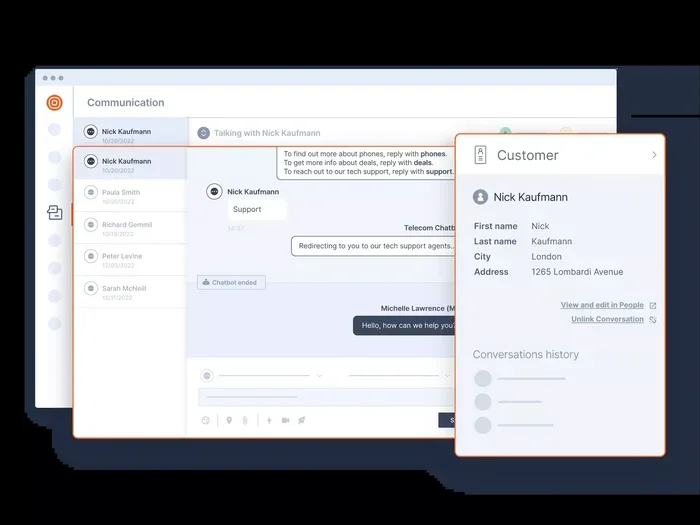
Optimum live chat is an online support feature that lets you communicate with an Optimum representative in real time. Instead of calling a phone number and listening to hold music, you type your questions into a chat window on the Optimum website or app. A chat agent responds to your messages and helps you solve your issue.
This type of online customer service has become very popular. Many people prefer typing over talking on the phone. It gives you time to think about what you want to say. You can also multitask while waiting for a response. And you have a written record of the conversation, which is handy for future reference.
Optimum uses live chat as part of its broader customer support system. The goal is to give customers more ways to get help. Some people love phone calls, and others prefer text-based support. Live chat fills that gap perfectly.
How Does the Optimum Chat Feature Work?
The Optimum live chat feature works through a chat window on the Optimum website. You do not need to download anything special to use it. Here is a simple breakdown of how it works:
- Go to the Optimum website and navigate to the support or help section.
- Look for the live chat icon or button on the page.
- Click on it to start a new chat session.
- You may be asked to sign in to your Optimum account first.
- A chat agent will join the conversation and ask how they can help.
- Type your question or describe your issue clearly.
- Wait for the agent to respond and follow their guidance.
The whole process is straightforward and user-friendly. You do not need any special technical skills to use it. Even if you are not very tech-savvy, the chat interface is designed to be simple and easy to navigate.
One nice thing about Optimum live chat support is that it is available during specific hours. Make sure to check the website for current availability times. The chat feature may not be available 24/7, so plan your chat accordingly.
How To Access Optimum Live Chat Support
Step-by-Step Guide to Starting a Chat
Getting started with Optimum live chat is easy. Follow these steps to connect with a support agent quickly:
- Open your web browser and go to the official Optimum website.
- Sign in to your account using your username and password. This helps the agent pull up your account faster.
- Navigate to the Help or Support section of the website.
- Look for the chat icon. It is usually a small speech bubble or a “Chat with Us” button.
- Click the icon to open the chat window.
- Type your question or select from any pre-written options the system may offer.
- Wait for a response from a live agent. Response times can vary, but it is usually faster than a phone call.
If you are having trouble finding the chat option, try looking at the bottom right corner of the website. That is a common spot for live chat widgets. You can also try searching for “live chat” on the Optimum site directly.
Another option is to use the Optimum mobile app. The app often includes the same chat feature, and it is even more convenient if you are on the go. If you are wondering whether you can get a free router through Optimum, you can check out our guide on Can I Get A Free Router From Optimum while you are at it.
What Devices Can You Use for Optimum Live Chat?
You can use Optimum live chat on several different devices. This flexibility is one of the best things about the feature. Here is a quick look at what works:
- Desktop computers: Use any web browser like Chrome, Firefox, or Safari on a laptop or desktop.
- Tablets: iPads and Android tablets work well with the chat feature through a browser.
- Smartphones: Both iPhone and Android users can access live chat through the Optimum app or a mobile browser.
The chat experience is pretty much the same across all devices. The interface adjusts to fit your screen size, so it looks clean and easy to use no matter what device you are on.
What Can You Ask Optimum Live Chat About?
One of the most common questions people have is what exactly they can discuss through Optimum live chat. The answer is pretty broad. The chat feature covers a wide range of topics and issues.
Internet and WiFi Troubleshooting
Many people use Optimum live chat for internet troubleshooting. If your WiFi is slow, not working, or dropping connections, a chat agent can walk you through steps to fix the problem. They can help you reset your modem, check your network settings, and run through basic diagnostics.
For example, if you are setting up a new internet connection at home and do not have a phone line, you might wonder about your options. You can learn more about getting internet without a phone line in our article Can I Get Internet In My Home Without A Phone Line.
Here are some common internet-related topics you can discuss through live chat:
- Slow internet speeds and how to improve them
- WiFi password resets and network name changes
- Modem and router setup guidance
- Checking for outages in your area
- Understanding your internet plan and data limits
Billing and Account Questions
Optimum live chat is also great for billing and account questions. You can ask about your current bill, payment due dates, and available payment methods. If you notice a charge you do not recognize, a chat agent can help look into it.
Here are some billing-related topics you can bring up:
- Questions about your monthly bill or statement
- Payment history and upcoming due dates
- Requesting a bill adjustment or clarification
- Changing your payment method or plan
- Understanding fees or charges on your account
Equipment and Installation Support
If you need help with your Optimum equipment, live chat can help there too. Whether it is setting up a new modem, understanding how your equipment works, or troubleshooting a device issue, a chat agent can guide you through the process.
You can also ask about WiFi equipment options. If you are considering getting a new router or WiFi card for your computer, the agent can point you in the right direction. For instance, if you are looking into WiFi cards, check out our article on Can I Get A Wi Fi Card For My Computer for additional insights.
Optimum Live Chat vs Phone Support: Which Is Better?
When you need help from Optimum, you usually have two main options: live chat or phone support. Both have their strengths. Let us compare them so you can decide which works best for your situation.
Speed and Wait Times
In most cases, Optimum live chat is faster than calling. When you call, you might wait on hold for 10, 20, or even 30 minutes. With live chat, you typically get a response within a few minutes. Some chat sessions connect you almost instantly.
However, wait times for chat can vary depending on the time of day. During peak hours, you might experience a short delay. Overall, though, live chat tends to be the quicker option for getting help.
Complex Issues: When to Call Instead
While live chat handles many issues well, it is not always the best choice. Very complex technical problems might be better handled over a phone call. When a chat agent needs to walk you through multiple steps, typing back and forth can feel slow.
Here is a simple way to decide:
- Use live chat for: Simple questions, billing issues, password resets, basic troubleshooting, and account changes.
- Use phone support for: Complex technical problems, equipment failures, service outages, and situations where you need real-time voice communication.
For more complex tech issues, you might also want to explore other support options. For example, if you are dealing with a networking device issue, our article on Can I Have Microsoft Firewall Enabled While Running Avg Free might offer some helpful troubleshooting tips.
Tips for Getting the Best Help From Optimum Live Chat
To get the most out of your Optimum live chat experience, a little preparation goes a long way. Here are some practical tips to help you get faster and better support.
Have Your Account Info Ready
Before you start a chat, gather your account information. Have your account number, service address, and any relevant details handy. When the agent asks for this information, you can provide it right away. This saves time and helps the agent pull up your account faster.
Think of it like walking into a store. If you know exactly what you need, the staff can help you much more quickly. The same idea applies here.
Be Clear and Specific With Your Issue
One of the biggest mistakes people make in live chat is being vague. Instead of saying “My internet is not working,” try something like “My WiFi connection drops every 10 minutes on my laptop.” The more specific you are, the better the agent can help you.
Here are some tips for writing clear messages:
- Describe the problem in simple, direct language.
- Mention when the problem started.
- Note any error messages you have seen.
- Explain what you have already tried to fix it.
- State what you want the outcome to be.
Use Screenshots When Possible
If your issue involves an error message or a confusing screen, take a screenshot before starting the chat. You can paste the image directly into the chat window. This helps the agent understand your problem much faster than trying to describe it in words.
Most devices make it easy to take screenshots. On a computer, you can usually press the Print Screen key or use a built-in snipping tool. On a phone, the method depends on your device model.
Stay Patient and Polite
Live chat agents are people too. They handle many customers each day, and some issues can be frustrating. Being polite and patient goes a long way. If you stay calm and respectful, the agent is more likely to go the extra mile to help you.
Common Issues People Solve With Optimum Live Chat
Optimum live chat handles a wide variety of customer issues every day. Here are some of the most common problems people bring up in their chat sessions:
- Internet outages: Customers report when their service goes down and want to know if there is an outage in their area.
- Slow internet speeds: People notice their connection is not as fast as they expected and want help improving it.
- Billing disputes: Customers question a charge on their bill or need clarification on a fee.
- Password resets: People forget their account password or WiFi password and need help getting back in.
- Equipment questions: Customers want to know about new equipment, upgrades, or how to set up their devices.
- Plan changes: People want to switch plans, add services, or understand their current plan details.
- Installation help: New customers need guidance setting up their service for the first time.
As you can see, the live chat feature covers a lot of ground. For most day-to-day issues, it is a very effective way to get help from Optimum.
Does Optimum Offer Live Chat on Mobile Devices?
Yes, Optimum does offer live chat on mobile devices. Whether you are using an iPhone, an Android phone, or a tablet, you can access the chat feature through the Optimum mobile app or your mobile web browser.
The mobile chat experience is designed to be clean and easy to use. The chat window fits nicely on smaller screens, and you can type, send, and receive messages just like you would on a desktop. You can also multitask while waiting for a response, which is a big advantage over phone support.
If you are out and about and need quick help with your Optimum service, the mobile live chat is a great option. You do not need to find a quiet place to make a phone call. You can chat discreetly wherever you are.
Frequently Asked Questions
Is Optimum Live Chat Available 24/7?
Optimum live chat availability can vary. It is not always available around the clock. Check the Optimum website for the most current hours of operation. During peak times, you might experience slightly longer wait times, but the chat is generally available during regular business hours and some evening times.
Do I Need to Create an Account to Use Optimum Live Chat?
In most cases, you will need to sign in to your Optimum account before starting a chat. This helps the agent access your account details and provide personalized support. If you do not have an account yet, you may need to create one first or the agent might direct you to a different support channel.
Can I Get Help With Technical Issues Through Live Chat?
Yes, you can get help with many technical issues through Optimum live chat. Agents can guide you through troubleshooting steps for internet connectivity, WiFi problems, and equipment setup. However, very complex technical issues might require a phone call or a technician visit.
Is Optimum Live Chat Free to Use?
Absolutely. Optimum live chat is a free support service. You do not pay any extra fees to use the chat feature. It is included as part of your Optimum customer support options, just like phone support and email support.
Can I Share Files or Images During an Optimum Live Chat?
Yes, most Optimum live chat sessions allow you to share screenshots and files. This is very helpful when you are dealing with error messages or billing issues. Sharing visual information can help the agent understand your problem faster and provide more accurate solutions.
What Should I Do If Optimum Live Chat Is Not Available?
If the live chat option is not available, you can try Optimum phone support, email support, or the Optimum help center. The help center often has articles and guides that can answer common questions. You can also check back later when the chat feature is active again.
Final Thoughts
So, does Optimum Have A Live Chat feature? Yes, it absolutely does. Optimum offers a convenient and user-friendly live chat option that can help you resolve many issues quickly and without the hassle of waiting on hold. Whether you need help with billing, technical troubleshooting, or account questions, the chat feature is a great resource.
The key is to be prepared. Have your account details ready, be clear about your issue, and use the chat during available hours. With these tips, you can get the most out of every chat session. Optimum has built a solid support system that includes live chat, phone support, and online resources. Knowing how to use each one effectively puts you in a great position to get quick and helpful solutions.
Next time you need help from Optimum, skip the phone line and give live chat a try. You might be surprised at how fast and easy it is. And remember, the more specific and prepared you are, the better your experience will be. Happy chatting!