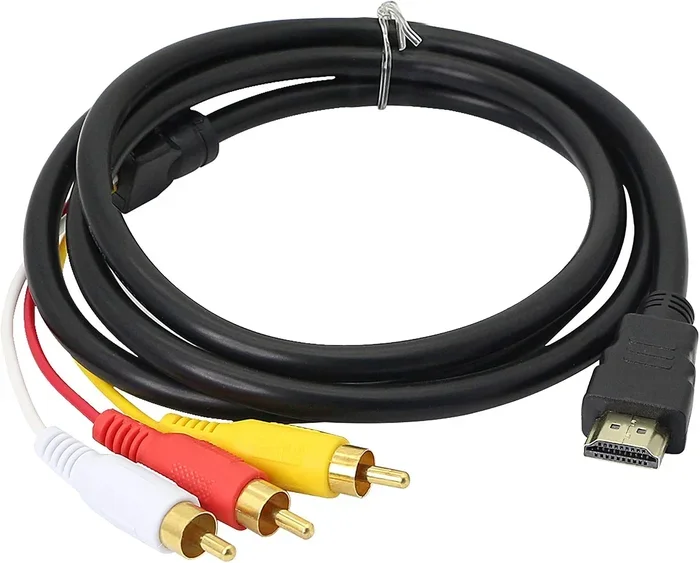
Do Hdmi To Rca Adapters Work Heres Everything You Need
Yes, HDMI to RCA adapters work and let you connect modern devices to older TVs and displays. These simple converters transform digital HDMI signals into analog composite or component outputs. Whether you want to use a retro setup or connect legacy gear, understanding how these adapters function saves time, money, and frustration.
Key Takeaways
- HDMI to RCA adapters do work: They convert digital signals to analog for older displays.
- You need the right type: Composite (yellow, red, white) and component (green, blue, red) are different.
- Active adapters are better: They boost the signal and provide clearer output than passive ones.
- Check compatibility first: Not all devices play nice together without the right adapter model.
- Common mistakes cause problems: Wrong cable type, missing power, and poor quality adapters lead to frustration.
- You can use adapters for more than TVs: Projectors, monitors, and retro gaming setups benefit too.
- Signal quality drops with distance: Keep cables short for the best picture and sound.
📑 Table of Contents
- Do HDMI to RCA Adapters Work? The Short Answer Is Yes
- How HDMI to RCA Adapters Work
- Types of HDMI to RCA Adapters
- What Devices Work with HDMI to RCA Adapters
- Common Problems and How to Fix Them
- How to Choose the Right HDMI to RCA Adapter
- Quick Tips for Best Results
- Expert Insights on HDMI to RCA Adapters
- Frequently Asked Questions
- Conclusion
Do HDMI to RCA Adapters Work? The Short Answer Is Yes
If you have an older TV or display and want to hook up a newer device, you have probably wondered about HDMI to RCA adapters. The good news is they do work. These small but mighty converters bridge the gap between modern digital outputs and older analog inputs. They make it possible to use your favorite devices with equipment that was built years ago.
But here is the thing. Not all adapters are created equal. Some deliver a great picture. Others leave you with a fuzzy screen and no sound. Knowing what to look for makes all the difference. This guide covers everything you need to know about HDMI to RCA adapters, from how they work to which one you should buy.
We will walk through signal conversion, cable types, common problems, and practical tips. By the end, you will feel confident choosing the right adapter for your setup. Let us dive in.
How HDMI to RCA Adapters Work
The Basics of Signal Conversion
HDMI carries a digital signal. RCA connectors carry an analog signal. An HDMI to RCA adapter converts one into the other. This process is called signal conversion. Inside the adapter, a small chip takes the digital data and translates it into analog waves that an older TV can understand.
Think of it like a translator between two people who speak different languages. The adapter takes the “digital language” of HDMI and converts it into the “analog language” of RCA. Without this translation, your new device and old TV simply cannot communicate.
The conversion process handles both video and audio. Composite cables use three RCA connectors for this purpose. The yellow connector carries video. The red and white connectors carry right and left audio. Understanding this helps you set up your system correctly the first time.
Composite vs Component RCA Connections
Not all RCA connections are the same. There are two main types you will encounter. Composite RCA uses three cables. It delivers standard definition video. Component RCA uses five cables and can carry higher quality video signals. Both work with HDMI to RCA adapters but produce different results.
Composite cables have yellow, red, and white connectors. They are the most common and easiest to find. Component cables add green and blue connectors for better color accuracy. If you want a sharper picture, component connections are the way to go.
Here is a quick comparison to help you understand the differences.
- Composite RCA: 3 cables, standard definition, yellow connector for video, easiest setup.
- Component RCA: 5 cables, enhanced definition, better color separation, slightly more complex setup.
When shopping for an HDMI to RCA adapter, check which type of RCA output it supports. Some adapters only support composite. Others handle both composite and component. Choosing the right one prevents disappointment later.
Types of HDMI to RCA Adapters
Passive Adapters
Passive adapters are the simplest type. They do not need external power. They rely on the signal coming from the HDMI source to do the conversion work. These adapters are cheap and easy to find. But they have limitations.
Passive HDMI to RCA adapters work best with devices that output a strong signal. They also work better with older HDMI versions. Newer devices sometimes send signals that passive adapters cannot handle properly. If you get a black screen or no sound, a passive adapter might be the culprit.
Active Adapters
Active adapters include built-in circuitry and often need external power. They boost the signal during conversion. This means a clearer picture and more reliable sound. Active adapters handle a wider range of devices and signal types.
If you are connecting a modern gaming console or streaming device, an active HDMI to RCA adapter is the smarter choice. Yes, they cost more. But they save you from the frustration of a poor-quality connection. The extra investment pays off in reliability and picture quality.
Converter Boxes vs Adapter Cables
There is another option beyond simple adapter cables. Converter boxes are standalone units that do the same job but with better performance. They often include additional features like resolution scaling and signal boosting. A converter box sits between your HDMI device and the RCA cables.
Converter boxes work well for permanent setups. If you are connecting a retro gaming console to a vintage TV, a converter box gives you the best results. Adapter cables are better for temporary or portable use. Think about how you plan to use the setup before deciding.
What Devices Work with HDMI to RCA Adapters
Gaming Consoles and Retro Gaming
Retro gaming is hugely popular right now. Many classic consoles output HDMI natively. But if you want to play on a CRT television for that authentic feel, you need an HDMI to RCA adapter. These adapters let you connect modern retro consoles to old-school displays.
Devices like the RetroN series and Analogue Pocket can benefit from proper signal conversion. The adapter takes the digital HDMI output and turns it into analog RCA signals. This gives you that warm, nostalgic picture quality that CRT screens are known for.
Quick tip: Always test your setup before a gaming session. Nothing ruins the mood like discovering the adapter does not work mid-game.
Older TVs and Home Theater Systems
Many households still have older TVs that only have RCA inputs. If you want to watch content from a streaming stick or modern cable box, an HDMI to RCA adapter makes it possible. This is a budget-friendly way to use older equipment without replacing it.
Some people use these adapters with AV receivers that have RCA inputs. The adapter connects to the receiver, which then sends audio and video to the TV. This setup works well for home theater enthusiasts who prefer older gear.
For those looking to cut the cord on expensive cable subscriptions, alternatives to Dish Network and DirectTV often involve using older TVs with streaming devices. An HDMI to RCA adapter can be part of that setup, letting you watch modern streaming content on a vintage television.
Security Cameras and Baby Monitors
Some security cameras and baby monitors still use RCA outputs for video. If you want to connect these to a modern HDMI display or recording device, the reverse process matters too. While this article focuses on HDMI to RCA, the concept of signal conversion applies in both directions.
For baby monitor setups, baby monitors connected to Wi-Fi have become more common. But many parents still prefer the reliability of analog monitors with RCA outputs. Understanding how signal conversion works helps you integrate both old and new monitoring technologies into your home.
Common Problems and How to Fix Them
No Picture or Fuzzy Image
The most common complaint with HDMI to RCA adapters is a poor picture quality. A fuzzy or snowy image usually means the signal conversion is not working properly. Several factors can cause this.
- Wrong adapter type: Using a passive adapter with a device that needs active conversion.
- Loose connections: RCA cables not fully inserted into the adapter or TV.
- Incompatible resolution: The HDMI source outputs a resolution the adapter cannot process.
- Low-quality adapter: Cheap adapters often produce weak or distorted signals.
Start by checking your connections. Make sure every cable is firmly plugged in. If that does not work, try a different adapter. Upgrading from passive to active often solves picture quality issues.
No Sound
Sometimes you get a picture but no sound. This happens more often than you might think. The RCA cables carry audio through the red and white connectors. If either one is loose or faulty, you lose sound.
Another common cause is audio format mismatch. Some modern devices output audio in formats that older RCA setups cannot decode. Check your device settings and look for audio output options. Switching to stereo or PCM audio often fixes this problem.
Adapter Not Recognized by Device
Occasionally, the HDMI source simply does not recognize the adapter. This can happen with newer devices that use HDCP protection. HDCP is a copy protection system that can block signal output through adapters.
To fix this, try restarting both devices. Unplug the adapter, wait a few seconds, and plug it back in. If the problem persists, the adapter may not be HDCP compliant. Look for adapters that specifically mention HDCP support.
How to Choose the Right HDMI to RCA Adapter
Check Your Device Compatibility
Before buying anything, check what your devices support. Look at the HDMI output on your source device. Check the RCA inputs on your TV or display. Make sure both sides match the adapter you are considering.
Not all HDMI to RCA adapters work with every device. Some are designed specifically for certain brands or models. Reading the product specifications carefully prevents buying the wrong one.
Consider Signal Quality
Signal quality matters more than most people realize. A cheap adapter might seem fine at first glance. But over time, poor signal conversion can lead to degraded picture and sound quality. Look for adapters with good reviews and solid build quality.
Active adapters generally provide better signal quality than passive ones. If you care about picture clarity and sound fidelity, spend a little extra on a quality converter. Your eyes and ears will thank you.
Think About Your Setup Needs
Consider how you plan to use the adapter. Is it a temporary setup? A permanent installation? Do you need portability? These questions help you choose the right type of adapter.
For temporary use, a simple adapter cable works fine. For permanent setups, consider a converter box with better build quality and signal processing. Think about cable length too. Longer cables can weaken the signal, so keep them as short as practical.
Quick Tips for Best Results
- Use short cables: Keep RCA cables under 6 feet for the strongest signal.
- Upgrade to active adapters: They provide better conversion and more reliable performance.
- Check resolution settings: Set your HDMI device to 480p or 720p for best compatibility with RCA outputs.
- Secure all connections: Loose cables are the number one cause of setup problems.
- Read reviews before buying: Real user experiences help you avoid low-quality products.
- Test before committing: If possible, test the adapter before making a permanent setup.
Expert Insights on HDMI to RCA Adapters
Audio video conversion technology has come a long way. Modern HDMI to RCA adapters handle the conversion process much better than early models. The chips inside them are more efficient and produce cleaner output signals.
Experts recommend always matching your adapter to your specific use case. A gaming setup has different needs than a home theater installation. Understanding what you want to achieve helps you pick the right product from the start.
One thing professionals agree on. The quality of your RCA cables matters just as much as the adapter itself. Good cables with solid shielding reduce interference and improve signal strength. Do not skimp on cables just to save a few dollars.
Also, keep your firmware updated on HDMI source devices. Manufacturers sometimes release updates that improve compatibility with adapters and converters. A simple firmware update can solve problems you did not even know you had.
Frequently Asked Questions
Do HDMI to RCA adapters work with all TVs?
Most TVs with RCA inputs work fine with HDMI to RCA adapters. However, the TV must have the correct RCA input type. Check if your TV uses composite or component connections. Matching the adapter output to your TV input ensures the best results.
Can I use an HDMI to RCA adapter for gaming?
Yes, you can. Many gamers use HDMI to RCA adapters to connect modern consoles to older CRT TVs. For the best experience, use an active adapter. It provides stronger signal conversion and a clearer picture. Retro gaming setups benefit greatly from quality adapters.
Why does my HDMI to RCA adapter have no sound?
No sound usually means the RCA audio cables are not connected properly. Check that the red and white cables are firmly plugged in. Also, check your device audio settings. Switching the audio output to stereo or PCM often resolves sound issues with HDMI to RCA adapters.
Do I need a powered adapter or will a passive one work?
It depends on your devices. Passive adapters work with some setups but have limitations. Active adapters with power support handle more devices and produce better signal quality. If you experience picture or sound problems, upgrading to an active HDMI to RCA adapter usually helps.
Can I convert RCA back to HDMI?
Yes, reverse converters exist. They take RCA signals and convert them to HDMI output. These are called RCA to HDMI converters or upconverters. They work on the same principle but in the opposite direction. Make sure to buy the correct type for your needs.
Are HDMI to RCA adapters worth buying?
Absolutely. They are affordable and solve a real problem. If you have older equipment or want to use retro displays, HDMI to RCA adapters are essential. They let you get more life out of older TVs and devices. For the price, they offer excellent value.
Conclusion
HDMI to RCA adapters do work, and they open up a world of possibilities for connecting modern devices to older displays. Whether you are setting up a retro gaming station, using an older TV with a streaming device, or integrating legacy audio video equipment, the right adapter makes all the difference.
Remember to choose the right type for your setup. Active adapters generally outperform passive ones. Check your device compatibility before buying. And do not overlook the importance of quality cables and secure connections.
With the right HDMI to RCA adapter, you can enjoy modern content on classic displays. The technology is simple but effective. Take your time choosing the right product, follow the tips in this guide, and you will have a working setup in no time. Happy connecting.