Psuedocode And Flowcharts Key Differences Explained
Pseudocode and flowcharts are two essential tools used in programming and algorithm design. Pseudocode uses plain language to write step-by-step instructions, while flowcharts rely on visual diagrams and symbols. Both help programmers plan code before writing it, but they serve different purposes and suit different learning styles. Understanding their differences helps you choose the right approach for your project.
Pseudocode and flowcharts are two of the most important tools in any programmer’s toolkit. Whether you are a beginner learning to code or a seasoned developer planning a complex system, these tools help you think through your logic before you write a single line of real code. Many people wonder which one is better, but the truth is that each has its own strengths. In this article, we will break down the pseudocode and flowcharts key differences in simple terms. You will learn what each tool is, when to use it, and how they compare side by side.
If you have ever sat down to plan a program and felt stuck, you are not alone. Programming logic can be tricky to organize in your head. That is exactly why pseudocode and flowcharts exist. They give you a way to map out your ideas clearly. Some people prefer writing text-based steps, while others think better with pictures. Both approaches fall under the broader umbrella of algorithm design and program planning. By the end of this guide, you will know exactly which tool fits your needs best.
Key Takeaways
- Pseudocode is text-based: It uses simple English-like statements to outline logic without strict syntax rules.
- Flowcharts are visual: They use shapes and arrows to map out the flow of a program or process.
- Both tools serve the same goal: They help programmers plan, design, and communicate algorithms clearly.
- Different audiences prefer different formats: Beginners often find flowcharts easier, while experienced developers lean toward pseudocode.
- They work great together: Using both pseudocode and flowcharts in your workflow leads to stronger program design.
- Mistakes are common with both: Avoid overcomplicating your designs and always keep your audience in mind.
📑 Table of Contents
What Is Pseudocode?
Pseudocode is a plain-language way of writing out the steps of a program. It is not a real programming language. Instead, it uses simple English-like statements that anyone can read. You do not need to worry about strict syntax rules or punctuation. The goal is to communicate your program logic clearly and quickly.
How Pseudocode Works
When you write pseudocode, you are essentially creating a rough draft of your code. You write statements like “IF the user enters a password, THEN check if it matches.” There are no curly braces, no semicolons, and no compiler errors to worry about. It is just you and your ideas on paper or screen.
Here is a simple example of pseudocode:
- START
- INPUT the user’s age
- IF age is greater than or equal to 18
- PRINT “You are an adult”
- ELSE
- PRINT “You are a minor”
- END IF
- STOP
Notice how easy it is to follow? You do not need any technical background to understand this step-by-step instruction format. That is the beauty of pseudocode. It strips away all the technical noise and focuses purely on the logic flow of your program.
Benefits of Using Pseudocode
Pseudocode offers several advantages that make it a favorite among developers. First, it is incredibly fast to write. You can jot down your ideas in seconds without opening any software. Second, it is easy to modify. If your logic changes, you simply rewrite a few lines instead of redrawing an entire diagram.
Another big benefit is portability. Pseudocode is not tied to any specific programming language. Whether you plan to write your code in Python, Java, or C++, the pseudocode stays the same. This makes it a great tool for software development teams where different members use different languages. It also helps when you are learning about structured programming concepts because it forces you to think in clear, logical blocks.
Many computer science courses teach pseudocode as a foundational skill. It helps students understand programming concepts without getting bogged down by syntax. If you are studying for a coding interview, practicing pseudocode can give you a serious edge. Interviewers love candidates who can clearly articulate their coding methods before writing any actual code.
What Is a Flowchart?
A flowchart is a visual diagram that represents the steps of a process or program. Instead of writing text, you use shapes like rectangles, diamonds, and ovals connected by arrows. Each shape has a specific meaning, and the arrows show the direction of the flow.
Common Flowchart Symbols
Flowcharts use a standard set of symbols that are recognized worldwide. Here are the most common ones you will encounter:
- Oval (Terminator): Represents the start or end of the process.
- Rectangle (Process): Represents a step or action in the program.
- Diamond (Decision): Represents a yes/no question or branching point.
- Parallelogram (Input/Output): Represents data being entered or displayed.
- Arrow (Flow Line): Shows the direction of movement between steps.
These flowchart symbols make it easy to see the big picture of your program at a glance. You can trace the path from start to finish by following the arrows. This visual approach is especially helpful for spotting logical errors or missing steps before you start coding.
Advantages of Flowcharts
Flowcharts shine in situations where visual clarity matters most. They are excellent for presenting your algorithm visualization to a team or a client. A well-designed flowchart can communicate complex logic in seconds, even to people who have no programming experience.
Another advantage is that flowcharts help you spot problems early. When you see your logic laid out visually, it is easier to notice loops that go on forever or decisions that are missing. This makes flowcharts a powerful debugging aid during the program planning phase.
Flowcharts also work well for documenting processes outside of pure coding. Business analysts, engineers, and even teachers use flowcharts to map out workflows. So while they are rooted in computer programming, their applications extend far beyond code. They are a universal tool for process mapping and clear communication.
Key Differences Between Pseudocode and Flowcharts
Now that you understand what each tool is, let us dive into the pseudocode and flowcharts key differences. These two approaches may serve the same ultimate purpose, but they go about it in very different ways.
Format and Representation
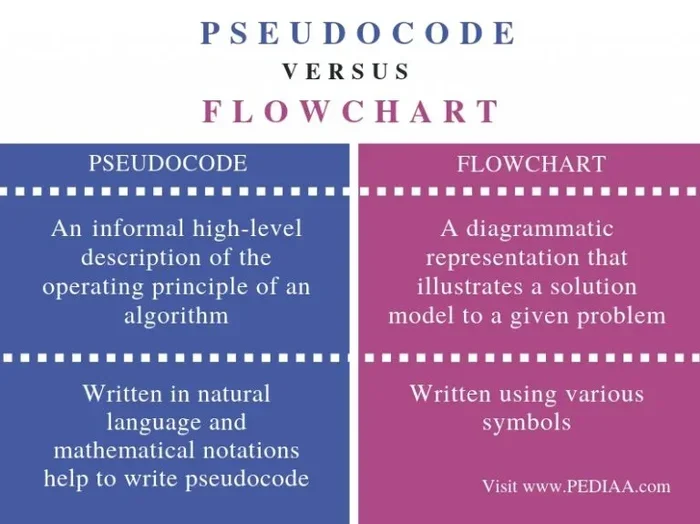
The most obvious difference is the format. Pseudocode is text-based. You read it line by line, just like a book. Flowcharts are visual. You read them by following shapes and arrows on a diagram. This difference shapes how people interact with each tool.
Some people are natural readers and prefer to absorb information through text. For these individuals, pseudocode feels intuitive and straightforward. Others are visual thinkers who need to see the big picture. For them, a flowchart with its colorful shapes and connecting lines is much easier to digest.
Level of Detail
Pseudocode allows for very detailed descriptions of each step. You can write out exactly what happens at every point in your program. Flowcharts, on the other hand, tend to show the high-level structure. They are great for showing the overall flow, but they can become cluttered if you try to pack too much detail into them.
This means pseudocode is often better for detailed code structure planning, while flowcharts excel at showing the broader logic diagram of a program. Think of pseudocode as a detailed recipe and a flowchart as a map of the cooking process.
Ease of Creation and Modification
Writing pseudocode is fast and requires nothing more than a text editor or even a pen and paper. You can draft it in minutes. Modifying it is equally simple, since you just edit or rewrite a few lines.
Flowcharts take more time to create, especially if you are drawing them by hand. Even with digital tools, arranging shapes and connecting arrows takes more effort. However, once created, a flowchart is very easy to share and present. It also makes it simple for an entire team to review the logic together.
Interestingly, the way we plan technology has evolved over time. Just as there are key differences between analog and digital computers that shaped how we process information, the shift from text-based planning to visual tools reflects how development tools continue to adapt to different thinking styles and workflows.
Audience and Communication
Who will be reading or reviewing your work? This question matters a lot when choosing between pseudocode and flowcharts. Pseudocode is best suited for other programmers or people with some technical background. It uses conventions that developers recognize immediately.
Flowcharts are more universal. A manager, a client, or a student with no coding experience can understand a well-made flowchart. This makes flowcharts the better choice when you need to communicate your design notation to a non-technical audience.
Pseudocode vs Flowcharts Comparison
Here is a side-by-side comparison of the two tools:
- Format: Text (pseudocode) vs Visual diagram (flowchart)
- Learning Curve: Easy for readers (pseudocode) vs Easy for visual thinkers (flowchart)
- Detail Level: High detail possible (pseudocode) vs Best for high-level overview (flowchart)
- Modification Speed: Quick edits (pseudocode) vs Slower to redraw (flowchart)
- Audience: Technical teams (pseudocode) vs Mixed or non-technical audiences (flowchart)
- Tools Needed: Any text editor (pseudocode) vs Diagramming software or paper (flowchart)
- Error Detection: Good for logic review (pseudocode) vs Excellent for spotting visual gaps (flowchart)
This comparison shows that neither tool is objectively better. They are simply different approaches to the same goal: making your coding workflow clearer and more organized.
When to Use Pseudocode vs Flowcharts
Choosing between pseudocode and flowcharts depends on your situation. Here are some practical guidelines to help you decide.
Use Pseudocode When…
- You need to write out detailed logic quickly
- Your audience is a fellow developer or technical team member
- You are preparing for a coding interview or technical assessment
- You want to plan code for a specific programming language later
- You are working alone and prefer a fast, flexible planning method
Use Flowcharts When…
- You need to present your logic to non-technical stakeholders
- You are mapping out a complex process with many branches
- You want a visual overview of the entire program structure
- You are teaching programming concepts to beginners
- You need to document a process for official records or manuals
In many real-world projects, experienced developers use both tools at different stages. You might start with a flowchart to map out the big picture, then write detailed pseudocode for each major section. This combination gives you the best of both worlds.
It is also worth noting that the technology landscape is always changing. Just as people explore alternatives to traditional cable providers like Dish Network and DirectTV to find better solutions for their entertainment needs, developers often experiment with different planning tools to find what works best for their unique projects.
How Pseudocode and Flowcharts Work Together
While pseudocode and flowcharts are different, they are not competitors. They are complementary tools that strengthen each other when used together. Many professional developers build their algorithm design process around both.
The workflow often looks like this. First, you create a rough flowchart to visualize the overall process. This helps you identify the main steps and decision points. Next, you write pseudocode for each section of the flowchart. This adds the detail and precision that a visual diagram alone cannot provide.
Finally, you translate your pseudocode into actual code. Because you have already planned everything so thoroughly, the coding phase goes much faster and smoother. You spend less time debugging and more time building. This three-step approach is a hallmark of strong software development practice.
Think of it like building a house. The flowchart is the blueprint that shows the overall layout. The pseudocode is the detailed construction plan that tells the workers exactly what to do at each stage. The actual code is the finished building. Each step is essential, and skipping any of them leads to problems.
Common Mistakes to Avoid
Even experienced programmers make mistakes when working with pseudocode and flowcharts. Here are some pitfalls to watch out for:
- Overcomplicating your designs: Do not try to cram every tiny detail into a single flowchart or pseudocode block. Keep things simple and modular.
- Ignoring your audience: If you are presenting to a non-technical group, do not use heavy pseudocode. Switch to a flowchart or simplify your language.
- Skipping the planning phase: Some developers jump straight into coding without any planning. This often leads to messy, hard-to-maintain code. Always take the time to plan with pseudocode or flowcharts first.
- Using inconsistent symbols: In flowcharts, stick to standard symbols. Mixing custom shapes creates confusion and defeats the purpose of visual clarity.
- Treating pseudocode as real code: Remember that pseudocode is a planning tool, not executable code. Do not worry about language-specific rules when writing it.
Avoiding these mistakes will save you time and frustration. It will also make your program planning sessions much more productive.
Expert Insights on Pseudocode and Flowcharts
Many seasoned developers agree that the best programmers are not the fastest typists. They are the best planners. Taking a few extra minutes to sketch out your logic with pseudocode or a flowchart can save hours of debugging later.
One widely shared tip from industry professionals is to always start with the end in mind. Before you write a single line of pseudocode or draw a single shape in a flowchart, ask yourself: “What should this program produce when it is finished?” Having a clear goal makes the planning process much smoother.
Another expert recommendation is to practice both tools regularly. Like any skill, your ability to create clear pseudocode and effective flowcharts improves with repetition. Try solving small coding challenges on paper using both methods. Over time, you will develop an intuition for which approach fits each situation best.
Some developers also recommend using digital tools for flowcharts, such as Lucidchart, Draw.io, or Microsoft Visio. These tools make it easy to rearrange shapes, add color coding, and share diagrams with your team. For pseudocode, a simple text editor or even a note-taking app works perfectly fine.
The beauty of these tools is that they are free or low-cost, and they remove the friction from the planning process. When planning feels effortless, you are more likely to do it consistently. And consistent planning is one of the strongest habits you can build as a developer.
Ultimately, the choice between pseudocode and flowcharts comes down to personal preference and project needs. There is no single right answer. The best approach is the one that helps you think clearly and communicate your ideas effectively. Whether you prefer the precision of text or the clarity of visuals, both tools are invaluable in your development toolkit.
Conclusion
The differences between pseudocode and flowcharts come down to format, audience, and level of detail. Pseudocode gives you a fast, text-based way to outline detailed logic. Flowcharts provide a visual overview that is easy to share and understand. Both tools support algorithm design, program planning, and better software development practices.
You do not have to choose just one. The most effective developers use both tools together, leveraging the strengths of each at the right moment. Start by sketching a flowchart to map out the big picture, then write pseudocode to fill in the details. This combination will make you a more organized, confident, and efficient programmer.
Now that you understand the pseudocode and flowcharts key differences, it is time to put this knowledge into practice. Pick your next project and try planning it with both tools. You will be surprised at how much clearer your logic becomes and how much smoother the coding process flows. Happy planning!
Frequently Asked Questions
What is the main difference between pseudocode and a flowchart?
Pseudocode is a text-based way of writing program logic using plain English-like statements. A flowchart is a visual diagram that uses shapes and arrows to represent the same logic. The main difference is format: one is written, and the other is drawn.
Can beginners use pseudocode and flowcharts?
Absolutely. Both tools are beginner-friendly. Pseudocode uses simple language that anyone can understand, and flowcharts use visual symbols that make logic easy to follow. They are both excellent starting points for new programmers.
Which is better for coding interviews, pseudocode or flowcharts?
Pseudocode is generally preferred in coding interviews because it allows you to explain your logic quickly and precisely. However, a quick sketch of a flowchart can also help you organize your thoughts before diving into the verbal explanation.
Do professional developers still use pseudocode and flowcharts?
Yes, many professional developers use both tools regularly. They are especially useful for complex projects where clear planning prevents costly mistakes. Even senior engineers rely on these tools when designing new systems or onboarding new team members.
What tools can I use to create flowcharts?
Popular flowchart tools include Lucidchart, Draw.io, Microsoft Visio, and even simple tools like Google Drawings. For quick sketches, pen and paper work perfectly fine. The tool matters less than the clarity of your logic.
Is pseudocode a real programming language?
No, pseudocode is not a real programming language. It has no syntax rules, no compiler, and no executable output. It is a planning tool that helps you outline your logic in plain language before writing actual code.