Does Lg Tv Support Bluetooth Speakers For Better Sound
Yes, most LG TVs support Bluetooth speakers, giving you a simple way to upgrade your audio without wires. You can connect wireless speakers directly to your LG smart TV and enjoy richer sound for movies, shows, and music. This guide covers pairing steps, compatible devices, common issues, and quick fixes. We also share expert tips to get the best Bluetooth audio from your TV setup.
Do you want better sound from your LG TV without dealing with messy cables? The answer might already be in your pocket or on your shelf. Does Lg Tv Support Bluetooth Speakers? The short answer is yes, and it is simpler than you think.
Many LG smart TVs come with built-in Bluetooth. This means you can pair wireless speakers, soundbars, and even headphones directly to your TV. You do not need extra boxes or fancy equipment. Just turn on your Bluetooth speaker, go to your TV settings, and connect. It is that easy.
In this guide, we will walk you through everything you need to know. We will cover which LG TVs have Bluetooth, how to pair speakers, what to do when things go wrong, and how to get the best audio quality. Whether you are watching a movie, playing a game, or streaming music, Bluetooth speakers can transform your TV sound in minutes.
Key Takeaways
- LG TVs with Bluetooth: Most LG smart TVs from 2018 onward have built-in Bluetooth support for wireless speakers.
- Pairing is simple: You can connect Bluetooth speakers through your TV’s settings menu in just a few steps.
- Audio latency can be an issue: Some Bluetooth connections cause a slight delay between video and audio, but fixes exist.
- Multiple speaker options: You can pair portable speakers, soundbars, and even home theater systems to your LG TV.
- Troubleshooting helps: Common Bluetooth problems like disconnections or no sound have straightforward solutions.
- Alternative options exist: If your LG TV lacks Bluetooth, you can add a Bluetooth adapter or use a wired connection.
📑 Table of Contents
- Does Lg Tv Support Bluetooth Speakers?
- How to Pair Bluetooth Speakers With Your LG TV
- Best Bluetooth Speakers for LG TVs
- Common Bluetooth Problems With LG TVs and How to Fix Them
- Alternatives to Bluetooth for LG TV Audio
- Expert Tips for the Best Bluetooth Audio From Your LG TV
- Quick Tips for Bluetooth Speaker Success
- Final Thoughts
Does Lg Tv Support Bluetooth Speakers?
The quick answer is yes for most models. LG has been adding Bluetooth to its smart TVs for several years now. If you own an LG TV from 2018 or newer, there is a very good chance it has Bluetooth built in. This feature lets you connect wireless speakers without any extra hardware.
But not all LG TVs are the same. Some budget models may skip Bluetooth to keep costs low. And older models from before 2017 might not have it either. So before you try to pair a speaker, it helps to check if your TV supports it.
How to Check If Your LG TV Has Bluetooth
Checking for Bluetooth on your LG TV takes just a few seconds. Follow these simple steps:
- Press the Home button on your LG remote.
- Go to Settings. This looks like a gear icon.
- Select Sound or All Settings, depending on your TV model.
- Look for Sound Out or Bluetooth.
- If you see a Bluetooth option, your TV supports it.
Some LG TVs also let you check through the Quick Settings menu. Just swipe down from the top of the screen and look for the Bluetooth icon. If it is there, you are good to go.
Can not find Bluetooth in your settings? Your TV might not have it. But do not worry. You can still add Bluetooth to your TV using a transmitter. We will cover that later in this guide.
How to Pair Bluetooth Speakers With Your LG TV
Once you confirm your TV has Bluetooth, pairing a speaker is straightforward. The process takes about two minutes. Here is exactly how to do it step by step.
Step-by-Step Pairing Guide
- Turn on your Bluetooth speaker. Make sure it is in pairing mode. Most speakers flash a light or say “pairing” when they are ready.
- Go to your LG TV settings. Press the Home button, then go to Settings.
- Select Sound Out or Bluetooth. This option is usually under the Sound settings.
- Choose Bluetooth Connection. Your TV will start searching for nearby devices.
- Select your speaker from the list. Tap on the speaker name when it appears.
- Wait for the connection. You should hear a confirmation sound or see a checkmark on screen.
That is it. Your LG TV is now connected to your Bluetooth speaker. Play any video or music to test the sound. You should hear audio coming from your speaker instead of the TV built-in speakers.
One thing to keep in mind. Bluetooth audio works best when your speaker is within about 30 feet of your TV. Walls and other obstacles can weaken the signal. So try to keep your speaker in the same room as your TV for the best experience.
Connecting Multiple Bluetooth Speakers
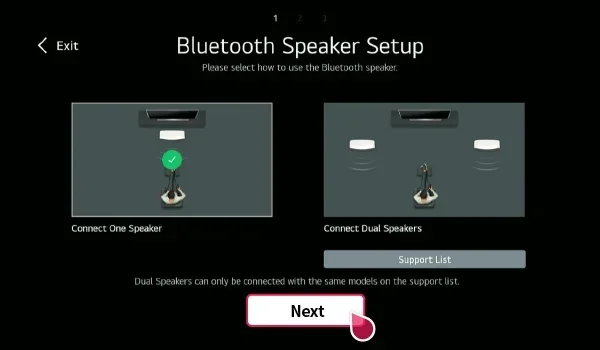
Want an even bigger sound? Some LG TVs let you connect more than one Bluetooth speaker at a time. This is great for filling a large room with sound. Check your TV settings for an option called “Multi-point” or “Dual Audio.” Not all LG models support this, but many newer ones do.
If your TV does not support multiple speakers, you can still use a Bluetooth transmitter that splits the signal. This is a small device that plugs into your TV and sends audio to two speakers at once.
Best Bluetooth Speakers for LG TVs
Not all Bluetooth speakers are the same. Some work great with LG TVs, while others may cause audio delay or sound quality issues. Here are a few things to look for when choosing a speaker.
What to Look For in a Bluetooth Speaker
- Low latency support: This reduces the delay between video and audio. Look for speakers that advertise “aptX Low Latency” or similar tech.
- Good battery life: A speaker that lasts 10 hours or more is ideal for long movie nights.
- Clear mids and highs: For TV dialogue, you want a speaker that handles voices well.
- Compact size: A small speaker is easier to place near your TV without cluttering your space.
- Built-in microphone: This lets you use the speaker for voice calls or as a Bluetooth speaker for TV with smart assistants.
Popular brands like JBL, Bose, Sony, and Anker make great Bluetooth speakers that pair easily with LG TVs. You do not need to spend a fortune either. Many affordable options sound fantastic and connect without any hassle.
You can also use a soundbar with Bluetooth as an upgrade. Soundbars give you deeper bass and clearer dialogue than portable speakers. They sit right below your TV and look clean and sleek.
Common Bluetooth Problems With LG TVs and How to Fix Them
Bluetooth connections are not always perfect. Sometimes the speaker will not connect, or the sound cuts out. Here are the most common issues and how to solve them.
No Sound After Pairing
This is the most common problem. Your TV and speaker connect, but you hear nothing. Try these fixes:
- Check the volume on both your TV and your speaker.
- Make sure your TV sound output is set to Bluetooth, not built-in speakers.
- Turn Bluetooth off and on again on your TV.
- Unpair the speaker and pair it again from scratch.
Usually, one of these steps fixes the problem right away. The TV sometimes forgets the speaker after a software update, so re-pairing solves it.
Audio Delay or Lag
Do you notice the sound does not match the video? This is called audio latency, and it happens with Bluetooth connections. The audio signal takes a tiny bit longer to travel wirelessly.
Here is how to reduce the delay:
- Move your speaker closer to your TV.
- Turn off other Bluetooth devices nearby that might cause interference.
- Use a speaker that supports aptX Low Latency codec.
- Check for LG TV software updates. New updates often improve Bluetooth performance.
If the delay is still noticeable, you might want to consider a wired connection or a Bluetooth transmitter with a built-in delay compensator. These small devices plug into your TV and send a cleaner audio signal to your speaker.
Speaker Keeps Disconnecting
A speaker that keeps dropping the connection is frustrating. This usually happens because of distance or interference. Try moving the speaker closer to the TV. Also, make sure nothing is blocking the signal between the two devices.
Another cause is a low battery on the speaker. When the battery drops below 20 percent, Bluetooth connections can become unstable. Keep your speaker charged for a steady connection.
Alternatives to Bluetooth for LG TV Audio
What if your LG TV does not have Bluetooth? Or what if Bluetooth is not giving you the sound quality you want? You still have great options. You do not need to settle for weak TV speakers.
Using a Bluetooth Transmitter
A Bluetooth transmitter is a small adapter that adds Bluetooth to any TV. You plug it into your TV’s audio output, and it sends sound to any Bluetooth speaker or headphones. These transmitters cost between $15 and $40. They are an easy and affordable way to add wireless audio to your LG TV.
Some transmitters also support aptX Low Latency, which cuts down on audio delay. This makes them a great choice for watching movies and playing games.
Wired Connections
Not ready for wireless? You can still connect external speakers with a cable. Most LG TVs have an audio output port, either a 3.5mm headphone jack or an optical output. You can plug in a powered speaker or a soundbar using these ports.
Wired connections give you zero latency and stable sound. The trade-off is a cable running across your room. But if sound quality matters most to you, a wired setup is hard to beat.
Can I Make My TV Have Bluetooth?
If your LG TV is older and does not have Bluetooth, you can still add it. A Bluetooth transmitter does the job. You plug it into your TV, and it sends audio wirelessly to any speaker. This is a popular solution for people who want wireless audio streaming without buying a new TV.
Some smart home devices can also act as Bluetooth bridges. For example, certain smart displays and smart speakers can receive audio from your TV and play it through their own speakers. Check if your existing smart home devices support this feature.
Expert Tips for the Best Bluetooth Audio From Your LG TV
Want to get the most out of your Bluetooth speaker and LG TV setup? These expert tips will help you enjoy better sound every time you watch.
Keep Your TV Software Updated
LG regularly releases software updates that improve Bluetooth performance. These updates fix bugs, add new features, and make connections more stable. Go to your TV settings and check for updates at least once a month. A quick update can solve many audio problems.
Place Your Speaker Strategically
Where you put your Bluetooth speaker matters. Place it near your TV for a strong signal. But also think about the room acoustics. Putting a speaker against a wall or in a corner can make the bass sound muddy. Try placing it on a table in the center of your room for clearer sound.
Use the Right Audio Settings
Your LG TV has audio settings that can make a big difference. Go to Settings and look for Sound Mode. Try different modes like Cinema, Music, or Voice to see which sounds best for your content. You can also adjust the equalizer settings to boost bass or make voices clearer.
For dialogue-heavy shows, try the “Voice” or “News” sound mode. This setting boosts the mid-range frequencies where human voices sit. You will hear every word clearly without turning the volume up too loud.
Turn Off TV Built-in Speakers
When you connect a Bluetooth speaker, make sure your TV built-in speakers are turned off. If both are playing at the same time, the sound will echo and sound muddy. Go to your TV sound settings and set the output to your Bluetooth speaker only.
Quick Tips for Bluetooth Speaker Success
- Keep your speaker charged. A low battery causes disconnections and poor audio quality.
- Stay within 30 feet. Bluetooth range drops with walls and furniture in the way.
- Unpair old devices. If your speaker connects to multiple devices, it might auto-connect to the wrong one.
- Restart both devices. A quick restart fixes most Bluetooth issues instantly.
- Use a dedicated speaker. Speakers designed for TV audio handle voices better than generic portable speakers.
Final Thoughts
Does Lg Tv Support Bluetooth Speakers? Yes, it does on most models, and the process is quick and easy. You can upgrade your TV audio in minutes by pairing a wireless speaker to your LG smart TV. No cables, no complicated setup, just better sound.
Whether you choose a portable Bluetooth speaker, a soundbar, or a home theater system, the connection process is the same. Go to your TV settings, find the Bluetooth option, and pair your device. If you run into issues, the troubleshooting tips in this guide should help you fix them fast.
Remember, Bluetooth speakers are a great way to improve your TV watching experience. They are affordable, easy to use, and deliver solid sound for movies, shows, and music. Try it out and see the difference for yourself. Your ears will thank you.
And if your LG TV does not have Bluetooth, do not worry. A simple Bluetooth transmitter can add this feature to almost any TV. It is one of the best small upgrades you can make for your home entertainment setup.
Frequently Asked Questions
Can I connect any Bluetooth speaker to my LG TV?
Most Bluetooth speakers work with LG TVs that have built-in Bluetooth support. Just make sure your TV has the Bluetooth feature enabled in its settings. Some speakers may have a slight audio delay, but the majority connect and work without issues.
Why is there no sound after pairing my Bluetooth speaker with my LG TV?
This usually happens when the TV sound output is still set to the built-in speakers. Go to your TV sound settings and change the audio output to your Bluetooth speaker. Also check that your speaker volume is turned up and not muted.
Can I use Bluetooth headphones with my LG TV?
Yes, many LG TVs support Bluetooth headphones just like they support speakers. The pairing process is the same. However, some LG TVs have a limitation where they only allow one Bluetooth audio device at a time. Check your TV model for dual audio or multipoint support.
Does Bluetooth audio on LG TV have a delay?
A small delay is normal with Bluetooth connections. This is called latency. To reduce it, keep your speaker close to the TV and use speakers that support low-latency codecs like aptX. If the delay bothers you, a wired connection or a Bluetooth transmitter can help eliminate it.
Can I add Bluetooth to an older LG TV that does not have it?
Yes, you can add Bluetooth using a Bluetooth transmitter. These small devices plug into your TV’s audio output and send sound wirelessly to any Bluetooth speaker or headphones. They are affordable and easy to set up.
How many Bluetooth speakers can I connect to my LG TV at once?
This depends on your TV model. Some newer LG TVs support connecting two Bluetooth speakers simultaneously. Check your TV settings for a multi-point or dual audio option. If your TV does not support it, a Bluetooth transmitter with dual output can connect two speakers.
=== CONCLUSION ===
Does Lg Tv Support Bluetooth Speakers? Absolutely. Most LG smart TVs come with Bluetooth built in, making it easy to connect wireless speakers and enjoy better audio. From simple pairing to troubleshooting common issues, this guide has covered everything you need to know. You now have the knowledge to set up Bluetooth audio with your LG TV in minutes.
Remember to keep your TV software updated, place your speaker wisely, and use the right audio settings for the best experience. Whether you are watching your favorite show or listening to music, a Bluetooth speaker can take your LG TV sound to the next level. Try it today and enjoy the difference wireless audio makes.
For more tips on connecting audio devices to your TV, check out our guide on pairing Bluetooth headphones to your LG TV. You will find helpful tips that work for speakers too.
Also, if you want to explore other ways to improve your TV setup, read about making your TV Bluetooth capable for older models that need a little help.
And for more audio tips, see how you can play radio using Bluetooth to get the most out of your wireless audio devices.