Does Bluetooth Use Radio Frequency to Connect Devices
Yes, Bluetooth uses radio frequency to connect devices wirelessly. Bluetooth technology relies on RF waves in the 2.4 GHz band to transmit data between devices. Understanding how Bluetooth radio frequency works helps you troubleshoot connections and get the most from your wireless gadgets.
Have you ever wondered how your phone connects to your headphones without any wires? Or how your TV can stream audio to a speaker across the room? The answer lies in Bluetooth radio frequency. Bluetooth is one of the most common wireless technologies we use every day, and it all works through radio waves.
In this article, we will break down exactly how Bluetooth uses radio frequency to connect devices. You will learn what RF really means, how Bluetooth signals travel, and why this matters for your everyday gadgets. Whether you are curious about Bluetooth enabled devices or trying to fix a weak connection, this guide has you covered.
Bluetooth radio frequency is the invisible force that powers wireless connections between your devices. It is the same basic science behind radio stations and walkie-talkies, but Bluetooth uses it in a much more targeted and efficient way. Let us dive into the details and explore how this technology shapes the way we connect.
Key Takeaways
- Bluetooth uses radio frequency: Bluetooth communicates through RF waves in the 2.4 GHz ISM band.
- Short-range wireless technology: Bluetooth is designed for short-range communication between devices.
- Frequency hopping keeps connections stable: Bluetooth uses frequency-hopping spread spectrum to reduce interference.
- Many devices use Bluetooth RF: Headphones, speakers, TVs, hearing aids, and more all rely on Bluetooth radio signals.
- Range varies by device: Bluetooth range depends on the class of the radio transmitter.
- Bluetooth is safe: The radio frequency levels used are well within safety limits for everyday use.
📑 Table of Contents
What Is Bluetooth Radio Frequency?
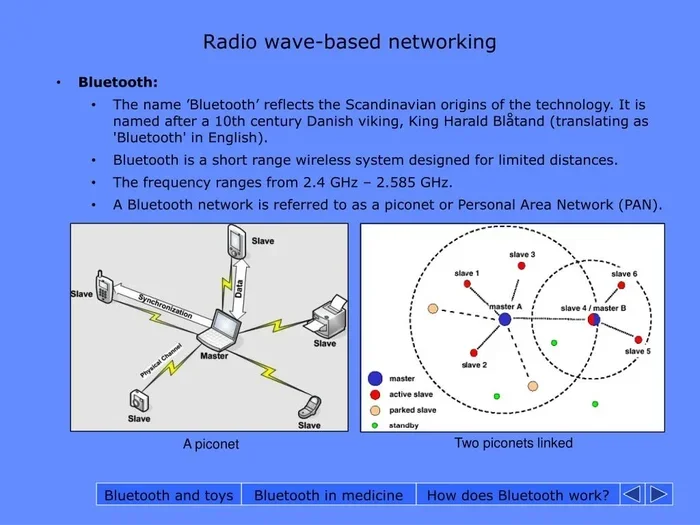
Bluetooth is a wireless communication technology that sends data between devices using radio waves. Radio frequency, or RF, refers to the electromagnetic waves that carry information through the air. Bluetooth operates in the 2.4 GHz frequency band, which is part of the Industrial, Scientific, and Medical (ISM) radio band.
This frequency band is shared by many devices, including Wi-Fi routers, microwaves, and baby monitors. Because so many devices use this band, Bluetooth has built-in mechanisms to avoid interference. Frequency hopping is one of the key features that keeps Bluetooth connections stable.
How Does Bluetooth RF Work?
When you pair two Bluetooth devices, they establish a short-range radio link. One device acts as the transmitter, and the other acts as the receiver. The transmitter sends radio waves at a specific frequency, and the receiver picks up those waves and converts them back into data.
Here is a simple way to think about it. Imagine you are whispering a message to a friend across a room. The sound waves carry your message through the air. Bluetooth works the same way, but instead of sound waves, it uses radio frequency waves. These waves travel at the speed of light and can pass through walls, furniture, and other obstacles.
The Bluetooth protocol defines how devices handshake, pair, and exchange data. This protocol operates on low-power radio waves, which is why Bluetooth devices can run for hours or even days on a single battery charge.
The Role of the 2.4 GHz Band
The 2.4 GHz band is globally available for unlicensed use. This means any manufacturer can build Bluetooth devices without needing a special license. It is a huge advantage that has helped Bluetooth become the standard for short-range wireless communication.
However, because the band is shared, congestion can be a problem. This is especially true in dense environments like apartments or offices where dozens of Wi-Fi networks and Bluetooth devices operate at the same time. Bluetooth addresses this challenge through a technique called Adaptive Frequency Hopping.
Bluetooth Frequency Hopping Explained
Frequency hopping is one of the most clever features of Bluetooth technology. Instead of staying on one frequency, a Bluetooth device jumps between 79 different frequencies within the 2.4 GHz band. It changes channels up to 1,600 times per second.
This rapid switching makes it very hard for interference to disrupt the connection. If one frequency is crowded with Wi-Fi traffic, the Bluetooth device simply moves to a clearer channel. This is why your wireless headphones keep playing music even when your microwave is running.
Frequency hopping also improves Bluetooth security. Because the transmission frequency changes constantly, it is much harder for outsiders to intercept the signal. This is especially important for devices like Bluetooth headphones that may carry sensitive audio or personal data.
Bluetooth Classes and Their RF Range
Not all Bluetooth devices are created equal. Bluetooth devices are grouped into three classes based on their radio transmitter power. The class determines how far the Bluetooth signal can travel.
Here is a quick comparison of the three Bluetooth classes:
- Class 1: Maximum range of about 100 meters (330 feet). These are typically used in industrial settings or high-power devices.
- Class 2: Maximum range of about 10 meters (33 feet). This is the most common class found in smartphones, headphones, and speakers.
- Class 3: Maximum range of about 1 meter (3 feet). These are low-power devices like some wearables and sensors.
Most of the devices you use every day fall into Class 2. This includes Bluetooth speakers, wireless earbuds, and smartwatches. The short range is actually a good thing because it keeps the signal focused and reduces interference with other devices.
Common Devices That Use Bluetooth RF
Bluetooth technology is everywhere. From your morning alarm to your evening workout, wireless Bluetooth devices surround you. Here are some of the most common devices that rely on Bluetooth radio frequency to function.
Wireless Headphones and Earbuds: This is probably the most popular use of Bluetooth. You can use Bluetooth headphones to listen to music, take calls, or watch videos without any wires. Devices like the Cardo brand even let you connect Bluetooth headphones to your motorcycle helmet for hands-free communication on the road.
Smart Speakers and Home Audio: Smart speakers like Amazon Echo and Google Home use Bluetooth to stream audio from your phone or tablet. You can also use Alexa as a Bluetooth speaker for your TV, turning any smart speaker into a wireless audio output device.
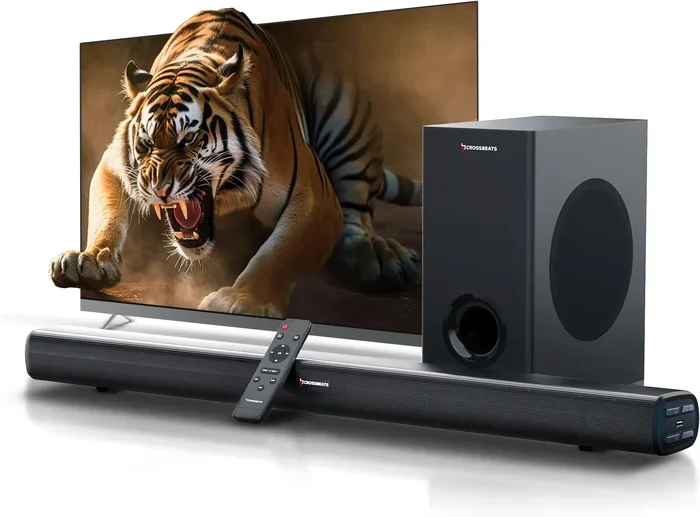
Televisions and Streaming Devices: Many modern TVs come with built-in Bluetooth. If your TV does not have it, you can add Bluetooth support using an adapter. You can even pair Bluetooth headphones to your LG TV for private listening without disturbing anyone else in the house.
Hearing Aids: Modern hearing aids increasingly use Bluetooth to connect to phones, TVs, and other audio sources. This allows users to stream phone calls and music directly to their hearing aids, improving both convenience and accessibility.
Printers and Peripherals: Wireless printers use Bluetooth to receive print jobs from your phone or computer. Bluetooth keyboards and mice also fall into this category, offering a clutter-free workspace.
Automotive Systems: Car infotainment systems use Bluetooth for hands-free calling and audio streaming. This is why you can answer a phone call through your car speakers without touching your phone.
Bluetooth RF vs. Wi-Fi: What Is the Difference?
People often confuse Bluetooth with Wi-Fi because both use radio frequency. While they share some similarities, they serve very different purposes. Understanding the difference helps you troubleshoot connection issues and choose the right technology for your needs.
Bluetooth is designed for short-range, low-power communication between devices. It is perfect for connecting a phone to headphones or a keyboard to a tablet. Wi-Fi, on the other hand, is designed for high-speed, longer-range internet access.
Here is a quick comparison of the two:
- Range: Bluetooth typically works within 10 meters, while Wi-Fi can reach up to 100 meters or more.
- Power Consumption: Bluetooth uses much less power than Wi-Fi, making it ideal for battery-powered devices.
- Data Speed: Wi-Fi is much faster than Bluetooth. Wi-Fi can handle gigabit speeds, while Bluetooth is optimized for smaller data packets.
- Connection Type: Bluetooth connects two devices directly (point-to-point). Wi-Fi connects devices to a network (point-to-multipoint).
Both technologies use the 2.4 GHz frequency band, which means they can interfere with each other. This is why you might experience slow Wi-Fi when streaming audio via Bluetooth to a speaker in the same room. The good news is that modern devices handle this interference better than ever before.
Is Bluetooth Radio Frequency Safe?
One of the most common questions people ask about Bluetooth is whether the radio frequency is safe. The short answer is yes. Bluetooth devices emit very low levels of non-ionizing radiation, which is far less powerful than X-rays or UV light.
The specific absorption rate (SAR) of Bluetooth devices is extremely low. SAR measures how much radio frequency energy your body absorbs when using a device. Bluetooth headsets and headphones have SAR levels that are well below the safety limits set by international health organizations.
Some people worry about sleeping with Bluetooth headphones or wearing them for long periods. The low power output of Bluetooth means the exposure is minimal. If you are concerned, you can always take breaks or use speaker mode instead. For more tips on using Bluetooth headphones safely, check out our guide on using AirPods as earplugs, which covers safe listening practices.
Bluetooth and Electromagnetic Interference
While Bluetooth itself is safe, electromagnetic interference can affect performance. Devices like microwaves, cordless phones, and even fluorescent lights can emit signals in the 2.4 GHz band. This interference can cause dropouts or reduced range in your Bluetooth connection.
To minimize interference, keep Bluetooth devices away from microwaves and other RF sources. If you notice connection problems, try moving closer to the source device or switching to a less crowded area. For more on how Bluetooth connects to specific devices, see our article on using Bluetooth on hearing aids for helpful tips on optimizing connections.
How to Improve Your Bluetooth Connection
Sometimes Bluetooth connections are not as strong as you would like. Fortunately, there are several things you can do to improve your Bluetooth signal strength and connection quality.
Keep Devices Close Together: The simplest fix is to reduce the distance between the two devices. Bluetooth works best within a few meters, so stay within range for the strongest connection.
Remove Obstacles: Walls, furniture, and even your body can block Bluetooth signals. Try to keep a clear line of sight between the transmitter and receiver. This is especially important for Class 2 and Class 3 devices with shorter ranges.
Reduce Interference: Turn off other wireless devices that are not in use. This frees up the 2.4 GHz band and reduces the chance of interference. If you are streaming audio, make sure your Wi-Fi is not competing for the same frequencies.
Keep Devices Updated: Firmware updates often include improvements to Bluetooth performance and stability. Check for updates regularly on your phone, laptop, and peripherals.
Reset and Re-pair: If you are having persistent connection issues, try unpairing the devices and pairing them again. This refreshes the Bluetooth connection and can resolve many common problems.
Check Battery Levels: Low battery levels can weaken Bluetooth signals. Make sure both devices are adequately charged before attempting a connection. This is especially important for wireless earbuds and headphones.
For more help with connecting Bluetooth to your TV setup, read our article on making your TV Bluetooth enabled for step-by-step instructions.
The Future of Bluetooth Radio Frequency Technology
Bluetooth technology continues to evolve. New versions of the Bluetooth protocol bring faster speeds, longer range, and better energy efficiency. The latest version, Bluetooth 5.3, offers significant improvements over older versions.
Bluetooth LE (Low Energy): This is a major advancement that allows devices to run for months or even years on a single coin cell battery. Bluetooth LE is used in fitness trackers, smartwatches, and medical devices.
Bluetooth Mesh: This technology allows devices to form a network, extending the range far beyond what a single Bluetooth connection can achieve. It is used in smart home lighting systems and industrial sensors.
LE Audio: The newest Bluetooth audio standard promises better sound quality and lower power consumption. It also introduces a feature called Auracast, which allows one audio source to broadcast to multiple receivers simultaneously. This could change how we share audio in public spaces like airports and gyms.
As more devices become wireless and Bluetooth enabled, the role of Bluetooth radio frequency will only grow. From smart homes to connected cars, Bluetooth is the invisible thread that ties our devices together.
Final Thoughts
Bluetooth radio frequency is the foundation of modern wireless connectivity. It allows your devices to communicate without cables, using low-power radio waves in the 2.4 GHz band. From headphones and speakers to hearing aids and car systems, Bluetooth connects the devices you use every day.
Understanding how Bluetooth RF works helps you make better decisions about your devices. You can troubleshoot weak connections, reduce interference, and choose the right Bluetooth class for your needs. The technology is safe, efficient, and constantly improving.
Next time you pair your Bluetooth headphones to your phone or stream audio to a smart speaker, remember the invisible radio waves making it all possible. Bluetooth has truly transformed the way we connect, and its radio frequency technology will continue to power the wireless future.
If you want to explore more about how Bluetooth works with different devices, check out our guide on talking through Bluetooth headphones for practical tips and insights.
Frequently Asked Questions
Does Bluetooth use the same radio frequency as Wi-Fi?
Both Bluetooth and Wi-Fi operate in the 2.4 GHz frequency band, but they use it differently. Bluetooth uses low-power, short-range signals optimized for device-to-device connections. Wi-Fi uses higher-power signals for internet access over longer distances.
Can Bluetooth radio frequency pass through walls?
Yes, Bluetooth radio waves can pass through walls and other obstacles. However, thick walls, metal objects, and large appliances can weaken the signal. The closer your devices are, the stronger the connection will be.
Is Bluetooth radio frequency harmful to your health?
No, Bluetooth radio frequency is considered safe. Bluetooth devices emit very low levels of non-ionizing radiation that are well below international safety limits. The power output is far too low to cause any health concerns.
How far can Bluetooth radio frequency travel?
The range depends on the Bluetooth class. Class 2 devices, which are the most common, have a range of about 10 meters. Class 1 devices can reach up to 100 meters. Class 3 devices have a range of about 1 meter.
Can Bluetooth frequency be jammed or intercepted?
Bluetooth uses frequency hopping to make interception very difficult. The signal jumps between 79 channels up to 1,600 times per second. While no wireless technology is completely immune to interference, Bluetooth is quite secure for everyday use.
What is the difference between Bluetooth and radio frequency?
Radio frequency is a broad term for electromagnetic waves used in wireless communication. Bluetooth is a specific wireless protocol that uses radio frequency technology. Think of RF as the highway and Bluetooth as a specific type of vehicle that travels on it.