Does Eero Mesh Spy On You The Truth You Need To Hear
Does Eero Mesh spy on you? The short answer is no, not in the way most people fear. Eero mesh systems collect some network data to improve performance and deliver features, but they do not monitor your browsing history or sell your personal information. Understanding what data Eero collects and how to control it can give you peace of mind and a safer home network.
Key Takeaways
- Eero does not spy on your browsing activity: Your internet traffic is encrypted, and Eero cannot see the websites you visit.
- Some data collection is necessary: Eero collects basic network diagnostics and device information to keep your mesh system running smoothly.
- You have control over your data: Eero offers privacy settings that let you limit what information is shared with the company.
- Eero uses industry-standard encryption: Your data is protected using WPA3 and other security protocols.
- Third-party integrations may share data: Connecting smart home devices to Eero could expose additional data to those partners.
- Regular firmware updates improve privacy: Eero frequently patches security vulnerabilities and enhances privacy features.
📑 Table of Contents
What Is Eero Mesh and How Does It Work?
Eero mesh WiFi systems have become one of the most popular choices for home networking. They promise easy setup, whole-home coverage, and reliable speeds. But with that convenience comes a big question: does Eero mesh spy on you?
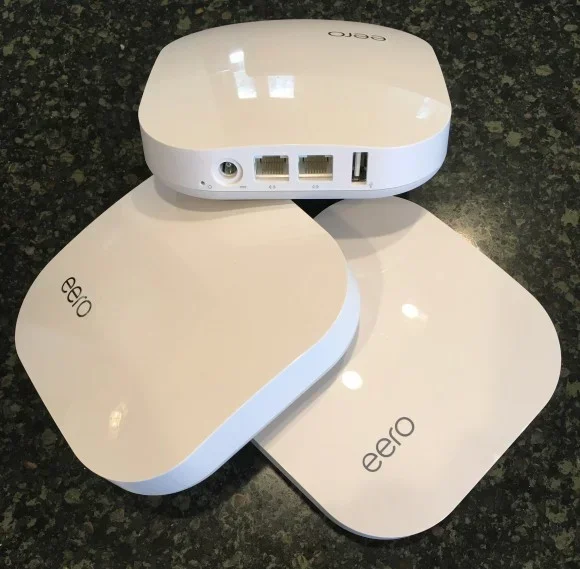
Before diving into privacy concerns, it helps to understand what Eero actually is. Eero is a mesh WiFi system made by Amazon. It replaces your traditional router with multiple units placed around your home. These units work together to create one seamless network. Each unit, called a beacon or node, talks to the others to distribute WiFi coverage evenly.
The main Eero unit connects to your modem. It acts as the gateway for all your internet traffic. The satellite beppers extend the signal to every room. You manage everything through the Eero app on your phone. The app lets you add devices, run speed tests, set up guest networks, and update firmware.
Mesh WiFi systems like Eero use multiple radios to communicate. They handle both the connection between your devices and the connection to the internet. This dual-band or tri-band setup helps reduce interference and keeps speeds strong throughout your home.
Many people choose Eero because it is simple. You do not need to be a tech expert to get it running. The app walks you through every step. But that ease of use also means you are trusting Amazon with your home network data. That trust is what raises the privacy questions so many people have.
Does Eero Mesh Collect Your Data?
What Data Does Eero Actually Gather?
The honest answer is yes, Eero collects some data. But the type of data matters a lot. Eero collects network-level information to keep your system functioning properly. This includes device names, connection times, and signal strength. The system also gathers diagnostic data to help troubleshoot problems.
Eero uses this information to optimize your mesh network performance. For example, if one beacon is struggling with interference, the system can adjust channels automatically. This kind of data collection is standard across most mesh WiFi providers.
However, Eero does not collect your browsing history. When you visit a website, your traffic is encrypted through HTTPS. Eero can see that you connected to a server, but it cannot see which pages you visited. This is an important distinction that many people misunderstand.
Here is a quick breakdown of what Eero can and cannot see:
- Can see: Device names, MAC addresses, connection durations, signal strength, and data usage per device.
- Cannot see: Browsing history, passwords entered on HTTPS sites, messages sent through encrypted apps, or the specific content of your internet traffic.
The Eero mesh system operates at the network level. It routes traffic between your devices and the internet. But it does not inspect the content of that traffic. This is similar to how your internet service provider handles data, though ISPs have more visibility in some cases.
How Eero Uses the Data It Collects
Eero states that it uses collected data for three main purposes. First, it improves network performance and stability. Second, it provides features like device prioritization and parental controls. Third, it helps with troubleshooting and customer support.
Eero also shares anonymized and aggregated data with partners. This means your personal identity is stripped away before any data leaves their systems. The company says this helps them improve products and develop new features.
It is worth noting that Amazon, the parent company, has its own data policies. When you connect an Eero system to your Amazon account, some data may be shared across Amazon services. This is outlined in their privacy policy, which users agree to during setup.
Eero Privacy Policy: What They Actually Say
Reading Between the Lines of Eero’s Privacy Policy
Eero’s privacy policy is lengthy, but the key points are clear. The company collects information about your device, your usage patterns, and your network configuration. They also collect location data if you enable location services in the app.
Eero says they do not sell your personal information to third parties. However, they do share aggregated and de-identified data. This is a common practice among tech companies. The distinction between personal data and aggregated data is where much of the privacy debate lives.
If you want to read the full policy, it is available on Eero’s website. But for most users, the key takeaway is this: Eero is not secretly spying on you. They are a legitimate company following standard data practices for the industry.
How Eero Handles Your Information
Eero stores your data on Amazon Web Services servers. These are the same cloud infrastructure used by millions of businesses worldwide. AWS has strong security standards, including encryption at rest and in transit.
The company retains data for as long as necessary to provide services. They also retain data as needed to comply with legal obligations. If you delete your Eero account, they commit to removing your personal data within a reasonable timeframe.
One thing that concerns many users is the Eero Secure subscription service. Eero Secure offers enhanced security features like ad blocking, malware protection, and advanced device monitoring. If you use Eero Secure, more data is processed through their systems. This is something to consider when evaluating your privacy.
How To Protect Your Privacy With Eero
Steps You Can Take Right Now
If you are worried about your privacy, there are several steps you can take. These are simple but effective ways to limit what Eero and others can see on your network.
1. Use a VPN on Your Devices. A virtual private network encrypts all traffic from your devices before it reaches your Eero router. This means even Eero cannot see which domains you are visiting. Popular VPN services like NordVPN, ExpressVPN, and Surfshark are easy to set up on phones, laptops, and tablets.
2. Review Your Eero App Permissions. Go into your phone settings and check what permissions the Eero app has. Disable location tracking if you do not need it. Limit background data usage if you want to reduce data sharing.
3. Enable Network-Level Encryption. Eero supports WPA3 encryption on newer models. Make sure your network is using the strongest encryption available. You can check this in the Eero app under Network Settings.
4. Use Eero’s Built-In Privacy Features. Eero offers options to limit data sharing in the app settings. Look for privacy controls under the Settings menu. You can opt out of certain diagnostic and usage data collection.
5. Keep Your Firmware Updated. Eero regularly releases updates that patch security vulnerabilities. Keeping your system updated ensures you have the latest privacy protections. The app will notify you when updates are available.
Advanced Privacy Tips for Power Users
For users who want even more control, there are advanced options. You can set up a separate VLAN for IoT devices like smart locks and cameras. This isolates them from your main network. Some users also run Pi-hole or AdGuard Home on their network for additional ad and tracker blocking.
If you are setting up a mesh network for the first time, consider how you connect your devices. For example, if you are converting a smart garage door opener to MyQ, make sure you understand what data that device shares. Smart home devices often collect more data than people realize. Check the Can I Convert My Garage Door Opener On To Myq guide for tips on managing smart home device privacy.
Eero vs Other Mesh Systems: Privacy Comparison
Eero is not the only mesh WiFi system on the market. Comparing privacy practices across brands helps you make an informed choice. Here is how Eero stacks up against some popular alternatives.
| Feature | Eero (Amazon) | Google Nest WiFi | Netgear Orbi | TP-Link Deco |
|---|---|---|---|---|
| Data Collection | Network diagnostics and device info | Usage data and device info | Minimal, diagnostic only | Basic network data |
| Browsing History Access | No | No | No | No |
| Parent Company Data Sharing | Yes, Amazon ecosystem | Yes, Google ecosystem | No | No |
| VPN Support | Yes | Yes | Yes | Yes |
| Encryption Standard | WPA3 | WPA3 | WPA3 | WPA3 |
| Privacy Controls in App | Yes | Yes | Limited | Yes |
As you can see, most mesh systems follow similar data collection practices. The main difference with Eero is its connection to the Amazon ecosystem. If you are already an Amazon user, your data may be more integrated across services.
If you are also concerned about your mesh network compatibility, you might want to check whether you can connect Wi-Fi 6 mesh to a WiFi 5 router for better performance and security. Similarly, if you are expanding an existing setup, you can learn more about connecting Deco mesh WiFi to an existing router for alternative mesh options.
Common Myths About Eero Mesh and Privacy
Myth: Eero Records Everything You Do Online
This is perhaps the most common misconception. Eero does not record your online activity. Your internet traffic is encrypted end-to-end for most websites. Eero simply routes that traffic between your devices and the internet. They do not have the ability to decrypt HTTPS traffic.
Myth: Amazon Uses Eero to Monitor You
There is no evidence that Amazon uses Eero data to target ads or build user profiles. Eero operates as a separate product line within Amazon. While Amazon has access to some aggregated data, they do not use it for surveillance or personal tracking.
Myth: Eero Sells Your Personal Data
Eero’s privacy policy states they do not sell personal information. They share aggregated, de-identified data for business purposes. This is different from selling your personal data. Aggregated data cannot be traced back to you as an individual.
Myth: Mesh WiFi Is Inherently Insecure
Mesh WiFi systems are not inherently insecure. In fact, they often include better security features than traditional routers. Eero uses automatic updates, WPA3 encryption, and secure cloud management. The real risk comes from how users configure their networks and what devices they connect.
Final Verdict: Should You Be Worried?
So, does Eero mesh spy on you? The answer is no, not in any meaningful way that should concern the average user. Eero collects some network data to improve performance and deliver features. This is standard practice across the mesh WiFi industry. Your browsing history remains private thanks to HTTPS encryption.
If you take basic privacy precautions, your Eero system can be both convenient and secure. Use a VPN if you want extra protection. Review your app permissions regularly. Keep your firmware updated. And be mindful of the smart home devices you connect to your network.
For most households, Eero offers a reliable and reasonably private mesh WiFi experience. The key is staying informed and taking control of your settings. You do not need to fear your Eero system. Just be smart about how you use it and what you connect to it.
Remember, no technology is 100% private. But with the right settings and habits, you can enjoy the benefits of mesh WiFi without sacrificing your peace of mind. Stay proactive, stay informed, and your home network will serve you well for years to come.
Frequently Asked Questions
Can Eero see my browsing history?
No, Eero cannot see your browsing history. Most websites use HTTPS encryption, which prevents your router from seeing the specific pages you visit. Eero can only see that your device connected to a domain, not what you did on that site.
Does Eero share my data with Amazon?
Eero shares some aggregated and de-identified data. Personal information is not sold to third parties. However, connecting your Eero to your Amazon account may result in some data sharing across Amazon services as outlined in their privacy policy.
Is Eero mesh WiFi safe to use?
Yes, Eero mesh WiFi is safe to use. It supports WPA3 encryption, provides automatic firmware updates, and follows industry-standard security practices. Taking additional steps like using a VPN can further enhance your security.
How do I stop Eero from collecting data?
You can limit data collection by reviewing your Eero app settings, disabling location services, opting out of diagnostic data sharing, and using a VPN on your devices. These steps give you more control over your privacy.
Is Eero better for privacy than Google Nest WiFi?
Both systems have similar data collection practices. The main difference is the parent company ecosystem. Eero is tied to Amazon, while Nest WiFi is tied to Google. Neither system spies on your browsing activity, but both collect some network-level data.
Can I use a VPN with Eero mesh?
Yes, you can use a VPN with Eero mesh. You can install a VPN directly on your devices or set up a VPN on your Eero network. This encrypts all traffic and adds an extra layer of privacy to your home network.