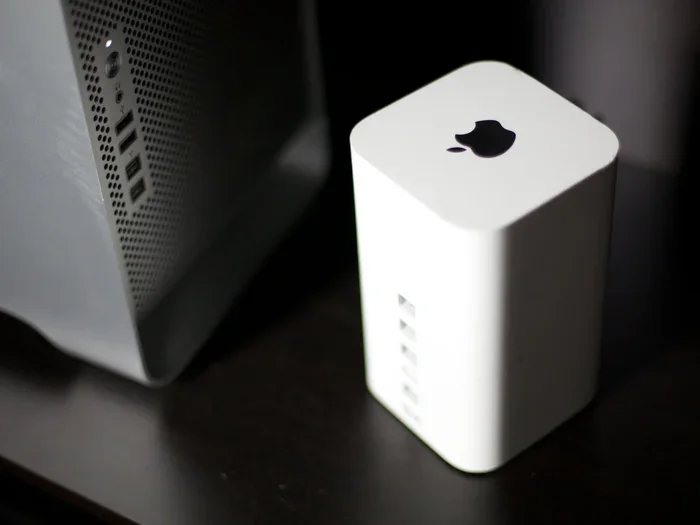
Does Apple Still Make Wireless Routers for Your Home
Apple does not currently make wireless routers. The company discontinued its AirPort router line in 2018 and has not returned to the router market since. If you are looking for Apple wireless router options today, you will need to explore third-party alternatives that work well with the Apple ecosystem.
Does Apple still make wireless routers? This is a question many Apple fans ask, especially those who remember the sleek AirPort devices that once dominated home networking. The short answer is no. Apple stopped making wireless routers several years ago, and the company has no plans to return to the router market anytime soon. But the full story is much more interesting than a simple yes or no.
For over a decade, Apple was a serious player in the home networking space. The company designed beautiful, user-friendly routers that worked perfectly with Macs, iPhones, and iPads. Then, in 2018, Apple made a surprising move. It discontinued the entire AirPort product line. Since that day, the company has focused its energy elsewhere. Today, if you want a Wi-Fi router for your Apple devices, you have plenty of options from other brands.
In this article, we will explore the full history of Apple routers, find out why the company walked away from this market, and look at the best alternatives you can use today. Whether you are setting up a new home network or just curious about Apple’s networking past, this guide has everything you need.
Key Takeaways
- Apple Discontinued Its Routers: The company stopped making the AirPort line in 2018 and has not released a new router since.
- AirPort Routers Were Innovative: Products like the AirPort Express and AirPort Time Capsule set high standards for home networking.
- No Current Apple Router Exists: There is no Apple wireless router available for purchase today.
- Great Alternatives Are Available: Many third-party routers work seamlessly with Apple devices and offer better features.
- Apple Focuses on Software: The company now prioritizes software ecosystem integration over hardware networking products.
- Wi-Fi 6 and Mesh Options Dominate: Modern alternatives offer faster speeds, better coverage, and easier setup than old AirPort models.
📑 Table of Contents
- The History of Apple Wireless Routers
- Why Did Apple Stop Making Routers?
- What Apple Replaced Routers With
- Best Router Alternatives for Apple Users
- Can You Still Use Old AirPort Routers?
- What to Look for in a Router for Apple Devices
- Quick Tips for Setting Up Your Apple-Friendly Router
- Common Mistakes to Avoid
- Expert Insights on Apple and Networking
- Final Thoughts
The History of Apple Wireless Routers
Apple had a remarkable run in the router business. The company started its AirPort journey in 1999 with a wireless card for Macs. But it was the introduction of the AirPort Base Station in 2000 that changed everything. This was one of the first consumer wireless routers on the market. It was a big deal.
The AirPort Base Station Era
The original AirPort Base Station was a groundbreaking product. It offered wireless internet access at a time when most people were still using wired connections. Apple made setup incredibly simple. You did not need to be a tech expert to get your home Wi-Fi up and running. The device was small, elegant, and matched Apple’s design philosophy perfectly.
Over the years, Apple released several versions of the AirPort Base Station. Each new model brought faster speeds and better features. The AirPort Extreme arrived in 2003 and offered 802.11g connectivity. Then came the AirPort Express in 2004, a compact and affordable option that many people loved. The AirPort Time Capsule launched in 2008 and combined a router with a built-in backup drive. This was a game-changer for home networking.
AirPort Express: A Fan Favorite
The AirPort Express deserves special mention. It was a tiny router that packed a big punch. People used it to extend their wireless coverage, stream music to AirPlay speakers, and print wirelessly. Many Apple fans still hold a special place in their hearts for this little device. Even though it is discontinued, the AirPort Express remains a cult favorite among home users.
Apple also made the AirPort Extreme and AirPort Time Capsule in updated versions over the years. These later models supported Wi-Fi 5 and offered better range and speed. The company also introduced dual-band support, which allowed routers to use both 2.4 GHz and 5 GHz frequencies. This was a big step forward for wireless coverage in homes.
Why Did Apple Stop Making Routers?
This is the question everyone wants answered. Why would a company known for its hardware walk away from the router market? There are several reasons, and they all make sense when you look at the bigger picture.
Low Profit Margins
Routers are not very profitable. The networking equipment market is highly competitive, and margins are thin. Apple is a company that thrives on high-margin products like iPhones, Macs, and services. Routers simply did not fit that business model. The company could make much more money selling software and services than it could selling a Wi-Fi router.
Focus on the Software Ecosystem
In recent years, Apple has shifted its focus toward software and services. The company invests heavily in its ecosystem. Things like iCloud, Apple Music, and the App Store drive much of its revenue. Hardware products like routers do not fit neatly into this strategy. Apple would rather spend its resources on products that strengthen its Apple ecosystem and keep users loyal.
The Rise of Better Alternatives
The router market became crowded with excellent competitors. Companies like Eero, Google Nest Wi-Fi, and Netgear started offering mesh network systems that were easier to set up and more powerful than Apple’s AirPort devices. Apple likely realized it could not compete in this space. Why pour resources into a product category where others were doing a better job?
AirPort Firmware Updates Stopped
Another telltale sign was the end of firmware updates. Apple stopped updating AirPort router software in 2018. This meant the devices would not receive security patches or new features. For a company that prides itself on security and user experience, this was a clear signal that the AirPort line was on its way out.
What Apple Replaced Routers With
Even though Apple left the router business, it did not abandon networking entirely. The company found other ways to help users connect to the internet. Understanding these alternatives helps explain Apple’s overall strategy.
Relying on ISP Routers
Most Apple users today rely on the router provided by their internet service provider. These devices, often called gateway routers, handle both modem and router functions. While they are not as elegant as Apple products, they get the job done. Apple has always believed that its devices should work seamlessly with whatever networking equipment you use.
Apple TV as a Network Hub
Apple TV also plays a role in home networking. It connects to your router and serves as a hub for streaming, gaming, and HomeKit accessories. While it is not a router itself, it shows how Apple thinks about networking. The company prefers to build devices that connect to networks rather than devices that create them.
At events like the Apple WWDC 2023 and the annual Apple Event, the company has focused on software updates, new services, and devices like the Vision Pro. Networking hardware has never been a priority at these events.
The Thread and HomeKit Connection
Apple has also invested in smart home standards like Thread. Thread is a low-power wireless protocol that connects smart home devices. While it is not a router replacement, it shows Apple’s interest in wireless connectivity. The company is building the infrastructure for a connected home, just not through traditional routers.
Best Router Alternatives for Apple Users
If you are an Apple user looking for a great router, you have many excellent options. These routers work beautifully with iPhones, Macs, and iPads. They offer features that go far beyond what the old AirPort devices could do.
Eero Mesh Systems
Eero is one of the most popular mesh router systems available. It is known for its simple setup and reliable performance. The Eero Pro 6E supports Wi-Fi 6E, which offers faster speeds and less congestion. The Eero app makes it easy to manage your network, set up guest access, and run speed tests. For Apple users, Eero integrates well with Apple HomeKit and works seamlessly across all your devices.
Google Nest Wi-Fi
Google Nest Wi-Fi is another strong choice. It offers a clean, minimalist design that fits well in any home. The system is easy to set up and manage through the Google Home app. While it is not as tightly integrated with the Apple ecosystem as Eero, it provides solid internet connectivity and good coverage for most homes.
Netgear Orbi
Netgear Orbi is a premium mesh system designed for larger homes. It offers excellent speeds and wide coverage. The Orbi Pro line is also available for small businesses. If you need serious wireless coverage and do not mind a higher price tag, the Orbi is worth considering.
TP-Link Deco
TP-Link Deco offers great value for the price. The system is affordable yet powerful. It supports Wi-Fi 6 and comes with a user-friendly app. For budget-conscious Apple users, the Deco line is an excellent choice. It proves that you do not need to spend a fortune to get a great home Wi-Fi experience.
ASUS ZenWiFi
ASUS ZenWiFi systems are packed with features. They offer advanced customization options, parental controls, and strong performance. The ASUS app is comprehensive and gives you fine-grained control over your network. If you like to tweak your network setup and want maximum performance, ASUS is a great brand to explore.
Can You Still Use Old AirPort Routers?
Yes, you can still use old AirPort routers. Many people still have them in their homes and they continue to work. However, there are some important things to keep in mind.
First, security is a concern. Since Apple stopped updating AirPort firmware, these devices do not receive security patches. This could leave your network vulnerable over time. If you still use an AirPort router, consider replacing it with a newer model for better security.
Second, older AirPort devices do not support the latest Wi-Fi standards. They max out at Wi-Fi 5 at best. Newer devices like smartphones and laptops use Wi-Fi 6 and Wi-Fi 6E, which offer much faster speeds and better performance. Your old AirPort router may be limiting your network speed without you realizing it.
On the other hand, some users love their AirPort devices for their simplicity and reliability. If you have a basic home network and do not need the latest features, an old AirPort router can still do the job. Just be aware of the limitations.
It is also worth noting that devices like the AirPort Time Capsule can still serve as a network-attached storage device. Even without the routing function, the built-in hard drive can be used for backups and file sharing. This is a clever way to get more life out of an old Apple router.
What to Look for in a Router for Apple Devices
When shopping for a router to pair with your Apple devices, there are a few key factors to consider. Not all routers are created equal, and some work better with Apple products than others.
Wi-Fi Standard
Look for a router that supports at least Wi-Fi 6. This standard offers faster speeds, better efficiency, and improved performance in crowded areas. If you can afford it, go for Wi-Fi 6E, which adds support for the 6 GHz band. This means less interference and smoother performance for all your connected devices.
Mesh Compatibility
If you have a larger home, a mesh system is the way to go. Mesh routers use multiple nodes to extend coverage throughout your home. They eliminate dead zones and provide consistent wireless coverage everywhere. Look for a system that is easy to expand, so you can add nodes as your needs grow.
Apple HomeKit Integration
If you use Apple HomeKit for smart home automation, look for a router that supports HomeKit. This allows you to manage your smart home devices right from your iPhone or iPad. Some routers even offer built-in HomeKit hubs, which adds extra convenience.
Ease of Setup
Apple users value simplicity. Choose a router that is easy to set up and manage. Many modern mesh systems offer app-based setup that takes just minutes. You should not need a computer science degree to configure your home networking equipment.
Security Features
Look for routers with strong security features. WPA3 encryption is the latest standard and offers better protection than older protocols. Some routers also offer built-in firewall protection, intrusion detection, and automatic firmware updates. These features keep your network safe from threats.
Quick Tips for Setting Up Your Apple-Friendly Router
Getting your new router set up does not have to be complicated. Follow these quick tips for a smooth experience.
- Place your router centrally: This ensures the best wireless coverage throughout your home.
- Use the manufacturer’s app: Most modern routers have dedicated apps that make setup and management easy.
- Update firmware immediately: Always check for and install the latest firmware updates after setup.
- Set a strong password: Use a unique, complex password for your Wi-Fi network to keep it secure.
- Enable WPA3 encryption: This provides the best security for your home network.
- Name your network clearly: Give your network a recognizable name so you can easily identify it.
- Restart regularly: A simple restart can fix many common connectivity issues and keep things running smoothly.
Common Mistakes to Avoid
Setting up a router seems simple, but many people make avoidable mistakes. Here are a few to watch out for.
- Hiding the router in a closet: This weakens your signal and reduces coverage. Keep it in an open, central location.
- Ignoring firmware updates: Outdated firmware can leave your network vulnerable to security threats.
- Using the default admin password: Always change the default login credentials on your router for better security.
- Overloading a single router: If you have many devices, consider a mesh system instead of a single router.
- Skipping the manual: Even if setup seems straightforward, reading the manual can reveal important features and settings you might otherwise miss.
Expert Insights on Apple and Networking
Industry experts agree that Apple’s exit from the router market was a smart strategic move. The company recognized that its strengths lie in software and user experience, not in competing with dedicated networking hardware manufacturers. Apple has always believed in letting other companies specialize in areas where they excel.
According to networking analysts, the router market has evolved dramatically since Apple left. Modern mesh systems are far more capable than the old AirPort devices. They offer better speeds, wider coverage, and more features. For Apple users, this means there has never been a better time to invest in a quality router from another brand.
Some experts also point out that Apple’s focus on its own ecosystem has paid off. Products like AirPlay, AirDrop, and Handoff work seamlessly because Apple controls both the hardware and software. This level of integration is something that no router manufacturer can match. In a way, Apple’s decision to leave the router market has strengthened its position in the broader technology landscape.
When you compare the old AirPort devices to modern alternatives, the difference is clear. Newer routers offer Wi-Fi performance that is multiple times faster. They also support more devices simultaneously, which is important in today’s connected homes. A family with smartphones, tablets, laptops, smart TVs, and smart home devices needs a router that can handle the load.
Final Thoughts
So, does Apple still make wireless routers? The answer is clearly no. Apple discontinued its AirPort router line in 2018 and has not looked back. The company has shifted its focus to software, services, and devices that work within its broader ecosystem. While this might disappoint some Apple loyalists, the good news is that the router market has never been stronger.
Today, you have access to incredible routers from brands like Eero, Google, Netgear, and ASUS. These devices offer better performance, more features, and stronger security than anything Apple ever produced. They also work beautifully with your Apple devices. You do not need an Apple-branded router to enjoy a great home networking experience.
If you are still using an old AirPort router, now is a great time to upgrade. Modern routers are easier to set up, faster, and more reliable. They will future-proof your home network and ensure that all your devices stay connected. The era of Apple routers may be over, but the era of excellent home networking has never been better.
Remember, the best router is the one that fits your needs, your budget, and your home. Take the time to research your options, read reviews, and choose a system that will serve you well for years to come. Your home Wi-Fi experience depends on it.
Frequently Asked Questions
Did Apple ever make a wireless router?
Yes, Apple made wireless routers for many years under the AirPort brand. The AirPort Base Station launched in 2000, and Apple continued releasing AirPort models until 2018 when the entire line was discontinued.
Why did Apple stop making routers?
Apple stopped making routers because the networking hardware market offered low profit margins and fierce competition. The company decided to focus on its core strengths in software, services, and consumer electronics instead.
Can I still buy an Apple AirPort router?
You can find used or refurbished AirPort routers online, but Apple no longer manufactures or sells them. New AirPort routers are no longer available through Apple or authorized retailers.
What is the best router for Apple devices?
Some of the best routers for Apple devices include the Eero Pro 6E, Google Nest Wi-Fi, and Netgear Orbi. These routers offer excellent performance, easy setup, and strong compatibility with Apple products.
Do Apple routers still get security updates?
No, Apple stopped providing firmware updates for AirPort routers in 2018. This means they no longer receive security patches, which is a good reason to consider upgrading to a newer router.
Will Apple ever make a wireless router again?
There is no indication that Apple plans to re-enter the router market. The company has consistently focused on its core product lines and shows no signs of returning to networking hardware anytime soon.