How Can I Boost My Wifi Outside And Get Better Coverage
Boosting your WiFi outside is easier than you think. With the right router placement, a quality range extender, or a mesh network system, you can enjoy strong outdoor connectivity across your entire property. This guide walks you through proven methods to eliminate dead zones and get reliable internet in your yard, patio, and garage.
There is nothing worse than stepping outside and losing your WiFi connection the moment you cross the threshold of your back door. Whether you are trying to stream music on the patio, check emails on the porch, or set up a smart camera near the garage, weak outdoor WiFi is a real frustration. The good news is that boosting your WiFi outside does not require a degree in engineering or a huge budget.
In this guide, we will walk you through every practical method to improve your outdoor wireless coverage. From simple free fixes to gear upgrades, you will find exactly what works for your situation. By the end, you will know how to get strong, reliable internet outside your home.
Many people assume their router should handle everything. But standard indoor routers are not designed to push signal through walls, across lawns, and around corners. Understanding why your outdoor signal drops is the first step toward fixing it. Let us dive in.
Key Takeaways
- Router placement matters: Moving your router closer to windows or exterior walls can significantly improve outdoor signal strength.
- Range extenders and mesh systems work wonders: These devices expand your WiFi reach and eliminate dead zones outside your home.
- External antennas boost signal directionally: Adding an external antenna focuses your WiFi signal where you need it most.
- Outdoor WiFi extenders are built for weather: Dedicated outdoor units handle rain, heat, and humidity better than indoor equipment.
- DIY fixes are free and effective: Simple tweaks like adjusting router antennas or changing wireless channels can make a big difference.
- Portable WiFi hotspots offer a backup: When all else fails, a mobile hotspot keeps you connected outside.
📑 Table of Contents
- Why Your WiFi Signal Weakens Outside
- Best Methods to Boost Your WiFi Outside
- WiFi Equipment That Helps With Outdoor Coverage
- Placement Tips For Better Outdoor Signal
- Common Mistakes That Weaken Your Outdoor WiFi
- When To Upgrade Your Router For Better Outdoor Performance
- Quick Tips Summary
- Final Thoughts
Why Your WiFi Signal Weakens Outside
Before we fix the problem, it helps to understand what causes it. Your WiFi signal travels through the air using radio waves. These waves lose strength as they travel farther from the source. Walls, trees, and even weather can absorb or block the signal before it reaches your backyard.
Most home routers broadcast signal in all directions equally. This creates a nice round pattern indoors, but outside, the signal spreads thin quickly. The further you move from the router, the weaker it gets. This is why your living room gets full bars but your garden does not.
Physical Barriers That Block WiFi
Several things between your router and your outdoor space can weaken your connection. Brick walls, concrete foundations, and metal siding are major culprits. Even large trees with thick leaves can absorb wireless signals surprisingly well. Water features like ponds or fountains can also interfere with signal travel.
Windows coated with low-emissivity film, which many modern homes use for energy efficiency, can block WiFi signals too. If your router sits on the opposite side of your house from your patio, the signal has to fight through multiple barriers before reaching you.
Distance and Interference From Other Devices
Distance alone can kill your outdoor WiFi. A standard router might cover about 150 feet indoors but much less through walls and outdoor obstacles. Interference from neighboring networks, baby monitors, and even microwave ovens can make the problem worse. Your WiFi signal strength outside depends heavily on how clean the wireless environment is around your home.
Best Methods to Boost Your WiFi Outside
Now that you understand the problem, let us look at the solutions. These methods range from zero-cost adjustments to equipment upgrades. Each one targets a different aspect of outdoor coverage.
Method 1: Reposition Your Router
The simplest and cheapest fix is moving your router. If your router sits in a back bedroom or basement, the signal has to travel through multiple walls before reaching the outside. Try relocating it to a central spot in your home, preferably near a window that faces your outdoor area.
Even moving your router a few feet can make a noticeable difference. Place it on a high shelf rather than the floor. Keep it away from metal objects and large appliances that cause interference. This single change often solves mild outdoor coverage problems without buying anything new.
Method 2: Use a WiFi Range Extender
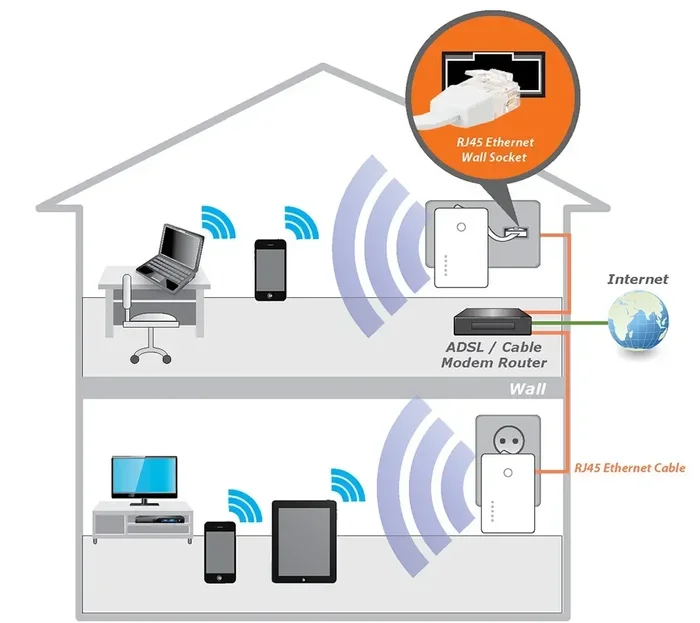
A WiFi range extender picks up your existing signal and rebroadcasts it further. Placing an extender halfway between your router and your outdoor area can bridge the gap effectively. These devices are affordable and easy to set up. Most plug directly into a wall outlet and work within minutes.
However, extenders do cut your speed in half because they use the same radio to receive and send data. For basic tasks like browsing or checking email, this is fine. For heavy streaming or video calls, you may want a stronger solution.
If you are exploring options, you might also want to check whether you can boost your WiFi signal outside using other methods that do not require extra hardware.
Method 3: Set Up a Mesh WiFi System
A mesh network is the gold standard for whole-home coverage including outdoors. Unlike a single router, a mesh system uses multiple nodes placed around your property. Each node talks to the others and creates one seamless network. You simply walk from room to room or house to yard without losing connection.
Mesh systems like Google Nest WiFi, Eero, or TP-Link Deco are designed for easy setup. You place one node near your modem and additional nodes in key spots. For outdoor coverage, placing a node near a window or in a weatherproof enclosure on the exterior works well. Mesh networks handle outdoor WiFi coverage far better than traditional routers.
If you already have a router and want to extend it, you may be able to connect a Deco mesh WiFi to your existing router and extend coverage to your outdoor spaces.
Method 4: Use a Portable WiFi Hotspot
When your home network simply cannot reach your outdoor area, a portable hotspot is a great alternative. These devices use cellular data to create a WiFi network wherever you go. They are perfect for backyard gatherings, camping trips, or outdoor work sessions.
Major carriers like Verizon, AT&T, and T-Mobile offer portable hotspot plans. You can also use your smartphone as a hotspot in a pinch. The downside is that you need a cellular data plan, and speeds depend on your local coverage. Still, for reliable outdoor internet access, a portable hotspot is hard to beat.
To learn more about portable options, check out our guide on getting portable WiFi for your outdoor needs.
WiFi Equipment That Helps With Outdoor Coverage
Sometimes repositioning your router or using an extender is not enough. In those cases, dedicated equipment designed for outdoor use makes all the difference. Let us look at the best options.
Outdoor WiFi Access Points
Outdoor access points are weatherproof devices built to withstand rain, sun, and temperature swings. You mount them on the exterior of your home and they broadcast a strong, focused signal into your yard. Brands like Ubiquiti, TP-Link, and Aruba make excellent outdoor access points.
These devices cost more than indoor extenders, but the performance difference is significant. They handle multiple connected devices, support modern WiFi standards, and maintain consistent speeds even at longer distances. If you host outdoor parties or work from a patio desk, an outdoor access point is a worthwhile investment.
External WiFi Antennas
Some routers support detachable antennas that you can replace with higher-gain models. An external antenna focuses your WiFi signal in a specific direction rather than spreading it everywhere. This is perfect when you need coverage in one area, like your backyard or a detached garage.
You can add an external antenna to your router if it has a compatible connector. Omni-directional antennas broadcast in all directions, while directional antennas focus the signal like a flashlight. For outdoor coverage, a directional antenna aimed at your patio or yard works best.
WiFi Extenders with Outdoor-rated Models
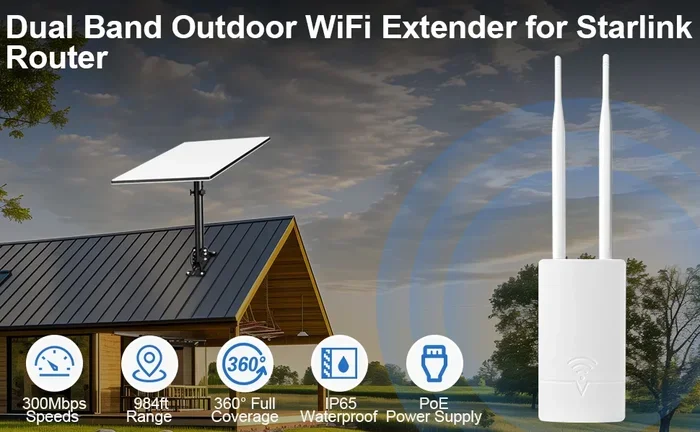
Not all range extenders are created equal. Standard indoor extenders can fail quickly when exposed to moisture or direct sunlight. Outdoor-rated extenders come with weatherproof enclosures and are designed to handle the elements. They plug into an outdoor outlet and extend your network exactly where you need it.
Look for models with an IP65 or higher rating, which means they are protected against dust and water jets. These devices typically cost between $50 and $150, making them an affordable way to add reliable outdoor connectivity.
| Equipment Type | Price Range | Best For | Weatherproof |
|---|---|---|---|
| Indoor Range Extender | $20 – $60 | Close outdoor areas near windows | No |
| Outdoor Access Point | $80 – $250 | Full backyard and patio coverage | Yes |
| External Antenna | $15 – $50 | Directional signal focus | Depends on model |
| Outdoor-rated Extender | $50 – $150 | Weather-resistant extended range | Yes |
| Mesh System Node | $100 – $200 | Seamless whole-home and outdoor | Some models |
Placement Tips For Better Outdoor Signal
Even the best equipment will underperform if placed incorrectly. Where you put your router and any extenders matters just as much as what you buy. Follow these placement tips to maximize your outdoor wireless coverage.
Move your router near a window facing your yard. This gives the signal a clear path outside without passing through multiple interior walls. If your router has adjustable antennas, point them vertically for horizontal coverage or angle them toward the outdoor area.
Place extenders halfway between your router and the dead zone. An extender too close to the router will not reach far enough. One too far will receive a weak signal and rebroadcast a poor connection. Find the sweet spot where the signal is still strong enough to repeat effectively.
Elevate your equipment. Signal travels downward better than upward. Mount routers and access points on shelves or walls at least three to five feet off the ground. Avoid placing them behind large furniture or inside cabinets that block the signal.
Keep equipment away from interference sources. Microwaves, cordless phones, baby monitors, and Bluetooth devices all operate on similar frequencies and can weaken your WiFi. Keep your router and extenders at least a few feet away from these devices.
Common Mistakes That Weaken Your Outdoor WiFi
Even with the right gear, people make mistakes that sabotage their outdoor signal. Avoid these common pitfalls to get the best results from your setup.
Placing the router in a closet or cabinet. Enclosed spaces block WiFi signals dramatically. Your router needs open air around it to broadcast effectively. Keep it in an open, central location.
Using outdated equipment. Older routers running WiFi 4 or 5 standards simply cannot compete with modern WiFi 6 devices. If your router is more than five years old, upgrading can dramatically improve both range and speed. You can change your WiFi router to a newer model without paying for a new internet plan.
Ignoring channel congestion. In dense neighborhoods, dozens of networks may compete for the same wireless channels. Use a WiFi analyzer app to find the least congested channel and set your router to use it. This simple change can reduce interference and strengthen your outdoor signal.
Overlooking firmware updates. Router manufacturers release updates that improve performance and fix bugs. Check your router settings periodically and install any available updates. An outdated firmware can cause slow speeds and dropped connections outside.
Expecting one device to solve everything. Every home is different. What works for a small apartment may not work for a large property with multiple outdoor areas. Be prepared to combine methods, like using a mesh system with an outdoor access point, for the best results.
When To Upgrade Your Router For Better Outdoor Performance
If you have tried all the tips above and still struggle with outdoor coverage, it may be time for a router upgrade. Modern routers with WiFi 6 or WiFi 6E technology offer significantly better range, speed, and device handling than older models.
WiFi 6 routers use advanced technologies like beamforming, which focuses the signal toward connected devices rather than spreading it everywhere. They also handle multiple devices simultaneously without slowing down, which is essential when you have outdoor cameras, smart lights, and phones all connected at once.
Before buying a new router, check whether your internet plan supports faster speeds. A WiFi 6 router will not help if your internet plan only delivers 25 Mbps. Contact your provider to confirm your plan speed, and consider upgrading your plan if needed. You can also buy your own router for internet and save on monthly rental fees from your ISP.
When shopping for a new router, look for models with external antennas, as they generally offer better range than internal antennas. Routers with dedicated backhaul bands also perform better in mesh setups, giving you a stronger connection between nodes and to your outdoor spaces.
Quick Tips Summary
- Move your router to a central, elevated location near a window facing outdoors.
- Use a WiFi range extender placed halfway between your router and the outdoor dead zone.
- Consider a mesh WiFi system for seamless whole-home and yard coverage.
- Add an external antenna to focus signal directionally toward your outdoor area.
- Use an outdoor-rated access point or extender for weather-resistant performance.
- Switch to a less congested wireless channel using a WiFi analyzer app.
- Upgrade to a WiFi 6 router if your current equipment is more than five years old.
- Use a portable hotspot as a backup when your home network cannot reach outside.
Final Thoughts
Boosting your WiFi outside does not have to be complicated or expensive. Start with the free fixes like repositioning your router and adjusting antennas. If those do not work, a range extender or mesh system can transform your outdoor connectivity. For the best results, invest in outdoor-rated equipment and place it strategically.
Remember that every home is different. What works perfectly for your neighbor may not work for your layout. Experiment with different placements and combinations of equipment until you find what delivers the best outdoor coverage for your space. With the right setup, you can enjoy strong, reliable WiFi everywhere outside your home.
The key takeaway is simple: do not settle for weak outdoor WiFi. You have options, from free adjustments to affordable gear upgrades. Start with one or two methods from this guide and build from there. Soon you will be streaming, browsing, and working from your patio with full bars and fast speeds.
Frequently Asked Questions
Can I boost my WiFi signal outside for free?
Yes, you can try several free methods first. Repositioning your router closer to a window facing your yard, adjusting the antenna angles, and switching to a less congested wireless channel all cost nothing. These simple changes often improve outdoor signal enough for basic use like browsing and email.
What is the best WiFi extender for outdoor use?
The best extender depends on your needs and budget. For mild outdoor coverage, a standard indoor extender placed near a window works well. For full backyard coverage, an outdoor-rated extender or access point is better. Look for weatherproof models with an IP65 rating if the device will be exposed to the elements.
Does a mesh WiFi system work better than a range extender outside?
Yes, mesh systems generally outperform range extenders for outdoor coverage. Mesh nodes create a seamless network with dedicated backhaul, which means you do not lose speed the way you do with standard extenders. They are also easier to manage and provide more consistent coverage across larger outdoor areas.
Can I use my phone as a WiFi hotspot outside?
Absolutely. You can turn on the hotspot feature on your phone and connect your laptop or tablet to it. This works well for temporary outdoor internet needs. Just be mindful of your cellular data usage, as streaming and large downloads can eat through your data plan quickly.
How far can a WiFi signal reach outside?
A standard indoor router can reach about 150 to 200 feet outside under ideal conditions. However, walls, trees, and other obstacles reduce this distance significantly. With a range extender or outdoor access point, you can push coverage to 300 feet or more depending on your property layout.
Do I need a special router to get WiFi outside?
You do not necessarily need a special router, but upgrading to a WiFi 6 model can improve outdoor range significantly. Many modern routers also support mesh add-on nodes that extend coverage outside. If your current router is older, replacing it with a newer model is often the most effective long-term solution.