Do You Need Wifi For Wireless Headphones Read This First
Most wireless headphones do not need WiFi to work. They use Bluetooth to connect directly to your devices, which means you can listen to music, take calls, and watch videos without ever touching a wireless router. However, some smart headphones and high-end models do rely on WiFi for specific features like streaming, firmware updates, and multi-room audio sync.
Do you need wifi for wireless headphones? It is one of the most common questions people ask when shopping for a new pair of wireless headphones. The short answer is no. Most wireless headphones work perfectly fine without any WiFi connection at all. They use Bluetooth technology to connect directly to your phone, laptop, or tablet.
But here is where it gets interesting. Not all wireless headphones are created equal. Some models actually do benefit from a WiFi connection, and in certain situations, WiFi can unlock features that Bluetooth simply cannot provide. If you have ever wondered why some headphones connect to your home network while others do not, you are in the right place.
In this article, we will break down exactly how wireless headphones connect, when you actually need WiFi, and what kind of headphones you should buy based on your needs. We will also clear up some common misconceptions that trip people up all the time. Whether you are a casual listener or an audiophile, this guide will help you understand wireless audio connectivity like a pro.
Let us start with the basics. Understanding how these devices actually work will make everything else much clearer.
Key Takeaways
- Bluetooth is the primary connection: The vast majority of wireless headphones use Bluetooth, not WiFi, to transmit audio.
- WiFi is only needed for certain features: Smart headphones may need WiFi for streaming from cloud services, app updates, or multi-device sync.
- Bluetooth works offline: You can use Bluetooth headphones anywhere without an internet connection or router.
- WiFi headphones offer longer range: WiFi-enabled models can connect over greater distances compared to standard Bluetooth.
- Battery drain differs: WiFi connectivity typically uses more battery than Bluetooth on wireless headphones.
- Check your needs before buying: Understand whether you need Bluetooth-only or WiFi-capable headphones based on how you plan to use them.
📑 Table of Contents
- How Wireless Headphones Actually Connect
- When Do You Actually Need WiFi for Wireless Headphones?
- Types of Wireless Headphones and Their Connectivity
- Common Misconceptions About Wireless Headphones and WiFi
- Pros and Cons of WiFi vs Bluetooth Headphones
- How to Choose the Right Wireless Headphones for Your Needs
- Final Thoughts on Wireless Headphone Connectivity
How Wireless Headphones Actually Connect
When we say wireless headphones, most people picture a pair of Bluetooth earbuds or over-ear headphones. And for good reason. Bluetooth is the dominant technology behind the vast majority of wireless audio devices on the market today. But Bluetooth is not the only way headphones can go wireless.
Bluetooth vs WiFi Headphones
Bluetooth and WiFi are both wireless technologies, but they serve very different purposes. Bluetooth is designed for short-range, low-power data transfer. It is perfect for sending audio from your phone to your headphones. WiFi, on the other hand, is designed for high-bandwidth internet access over longer distances.
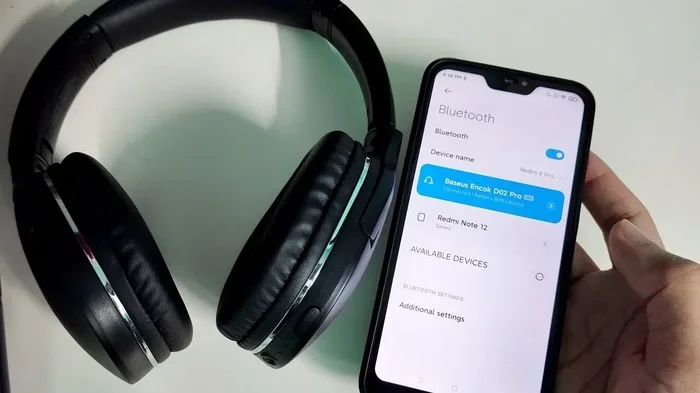
Most wireless headphones you buy off the shelf use Bluetooth. They pair directly with your device and stream audio without needing any internet connection. This is why you can use your Bluetooth headphones on an airplane, in a remote cabin, or in your backyard without any WiFi at all.
WiFi headphones, however, connect to your home or office network. They receive audio streams over the internet or your local network. This gives them some unique advantages that Bluetooth headphones simply cannot match. But it also means they need a WiFi signal to function at their best.
Understanding Bluetooth Technology
Bluetooth uses radio waves in the 2.4 GHz frequency band to transmit data. When you pair your headphones with your phone, they create a direct, point-to-point connection. No router is involved. No internet is needed. The audio signal travels directly from your device to your headphones.
Modern Bluetooth versions, like Bluetooth 5.0 and newer, offer impressive range and stability. Bluetooth 5.0 can reach up to 800 feet in open space, though real-world performance is usually much less. The audio quality has also improved dramatically over the years. Codecs like aptX and LDAC now deliver high-resolution sound over Bluetooth connections.
The beauty of Bluetooth is its simplicity. You do not need to configure anything. You do not need to know your network password. You just pair and play. This is why Bluetooth remains the go-to wireless technology for headphones, speakers, and other portable audio devices.
When Do You Actually Need WiFi for Wireless Headphones?
Now that you understand the basic difference between Bluetooth and WiFi, let us talk about when WiFi actually matters for your headphones. There are specific situations where a WiFi connection becomes important or even necessary.
Streaming Music from Online Services
If you use a music streaming service like Spotify, Apple Music, or Tidal, you might think your headphones need WiFi to access your library. But that is not entirely true. Most streaming apps cache music on your device. Once a song is downloaded, your Bluetooth headphones can play it without any WiFi or internet connection.
However, if you want to stream music in real time without downloading it first, then yes, your phone or tablet needs an internet connection. The headphones themselves still use Bluetooth to receive the audio. The WiFi connection is on your device, not the headphones. This is an important distinction that many people miss.
Some smart headphones, though, can connect directly to WiFi. These models can stream music on their own without needing your phone nearby. They have built-in apps and sometimes even standalone storage. This is common in higher-end models from brands like Sony and Bose.
Multi-Device Connectivity and Smart Features
WiFi becomes more important when you want your headphones to connect to multiple devices seamlessly. Some WiFi-enabled headphones can sync across your home network and switch between your phone, tablet, and computer without manual re-pairing. This is a huge convenience if you work from home or move between rooms frequently.
Smart headphones with WiFi can also receive firmware updates over the air. These updates improve performance, fix bugs, and sometimes add new features. Without WiFi, you would need to connect your headphones to a computer via USB to update them. This is a small hassle, but it matters for long-term use.
If you are setting up a multi-room audio system, WiFi headphones can play a role too. Some systems allow you to send audio to different rooms using your home network. In these setups, WiFi-connected headphones can join the party without needing a separate Bluetooth connection.
Gaming and Low-Latency Audio
Gamers know that latency is the enemy of a good experience. Bluetooth has improved, but it still introduces a small delay between the audio source and what you hear. For competitive gaming, even a few milliseconds of lag can make a difference.
WiFi headphones designed for gaming can offer lower latency because they use your home network for audio transmission. Some gaming headsets use proprietary WiFi protocols that are optimized for real-time audio. If you are a serious gamer, this is worth considering. You can learn more about using different devices for various tasks in our article on can a gaming laptop be used for everything, which covers how hardware choices affect performance across different use cases.
Types of Wireless Headphones and Their Connectivity
Not all wireless headphones are the same. Understanding the different types will help you decide whether you need WiFi or if Bluetooth will do the job perfectly well.
Bluetooth-Only Headphones
These are the most common wireless headphones on the market. They connect exclusively via Bluetooth and do not have WiFi capability. Examples include most true wireless earbuds, standard Bluetooth over-ear headphones, and sports headphones.
Bluetooth-only headphones are simple to use. They pair quickly, consume less battery, and work anywhere without needing a router. For 90% of users, these headphones are more than enough. You can use them for commuting, exercising, working, and relaxing without ever thinking about WiFi.
The main limitation is range. Bluetooth works best within about 30 feet of your device. Beyond that, you start experiencing dropouts and static. For most everyday use, this range is perfectly fine.
WiFi-Enabled Headphones
WiFi-enabled headphones are a different breed. They connect to your wireless network and can stream audio independently of your phone. These headphones often come with their own apps, touch controls, and smart features that require an internet connection.
Brands like Sony (with their LinkBuds and WH series) and certain smart headphone models from other manufacturers fall into this category. These headphones can access cloud-based music services, receive voice assistant commands over WiFi, and offer extended range compared to Bluetooth-only models.
The trade-off is battery life. WiFi uses more power than Bluetooth, so WiFi headphones typically have shorter playback times. They are also more expensive and more complex to set up. You need to enter your WiFi password, configure the app, and sometimes troubleshoot connection issues.
Hybrid Headphones: Bluetooth and WiFi
Some modern headphones support both Bluetooth and WiFi. They give you the flexibility to use whichever connection works best for your situation. When you are on the go, you switch to Bluetooth. When you are at home and want to stream high-quality audio, you switch to WiFi.
These hybrid models are becoming more popular as manufacturers recognize that users want versatility. The best wireless headphones in this category offer seamless switching between connections. You do not have to manually disconnect and reconnect. The headphones detect which connection is stronger and switch automatically.
Common Misconceptions About Wireless Headphones and WiFi
There are several myths floating around about wireless headphones and WiFi. Let us clear them up so you do not end up buying the wrong pair.
Myth 1: All wireless headphones need WiFi. This is simply not true. The word wireless just means there is no cable. Bluetooth is a wireless technology that does not require WiFi or internet. Your headphones can be fully wireless and still work completely offline.
Myth 2: WiFi headphones sound better than Bluetooth headphones. WiFi can carry more data, which means it has the potential for higher audio quality. But in practice, the difference is small for most listeners. Modern Bluetooth codecs like aptX HD and LDAC deliver excellent sound quality that is nearly indistinguishable from WiFi streaming for everyday listening.
Myth 3: You need a strong WiFi signal for Bluetooth headphones. Bluetooth and WiFi operate on different frequencies and use different protocols. Your Bluetooth headphones do not care about your WiFi signal strength. They connect directly to your device. However, if your WiFi signal is weak and your device is struggling to maintain a connection, that could indirectly affect your Bluetooth experience.
Myth 4: WiFi headphones are always more expensive. While WiFi headphones tend to cost more, the price gap is closing. As WiFi technology becomes more common in audio devices, prices are coming down. You can now find WiFi-enabled headphones at reasonable price points, especially from mid-range brands.
Pros and Cons of WiFi vs Bluetooth Headphones
Let us put it all side by side so you can see the real differences at a glance.
| Feature | Bluetooth Headphones | WiFi Headphones |
|---|---|---|
| Internet Required | No | Yes (for smart features) |
| Range | Up to 30 feet typical | Up to 100+ feet |
| Battery Life | Longer (20-40 hours) | Shorter (10-25 hours) |
| Setup Complexity | Very simple | Moderate |
| Audio Quality | Excellent with modern codecs | Slightly better potential |
| Price | Wide range, generally lower | Tends to be higher |
| Smart Features | Limited | Full app integration |
| Offline Use | Fully functional | Limited without internet |
As you can see, both types have their strengths. Your choice should depend on how and where you plan to use your headphones most often.
How to Choose the Right Wireless Headphones for Your Needs
Choosing between Bluetooth and WiFi headphones comes down to your lifestyle and listening habits. Here are some practical tips to help you decide.
If you mostly listen during your commute, at the gym, or while walking around town, Bluetooth headphones are the clear winner. They are portable, simple, and do not rely on any network. You can grab them and go without worrying about WiFi availability.
If you work from home, stream a lot of music, and want smart features like voice assistant integration and multi-room sync, WiFi headphones might be worth the investment. They offer more functionality and can connect to your home network for a richer listening experience.
For the best of both worlds, look for hybrid headphones that support both Bluetooth and WiFi. These give you flexibility and future-proof your investment. You get the simplicity of Bluetooth when you need it and the advanced features of WiFi when you want them.
Also consider the devices you will be connecting to. If your phone, tablet, and laptop all support Bluetooth 5.0 or newer, you will get excellent wireless audio quality without needing WiFi. But if you are building a smart home audio setup, WiFi headphones can integrate more seamlessly with your network.
One thing many people overlook is the importance of a strong WiFi connection at home if you do choose WiFi headphones. A weak signal can cause buffering, dropouts, and frustration. If you are struggling with WiFi coverage in certain areas of your home, you might want to look into solutions that extend your network. Check out our guide on extending WiFi to your shed for practical tips on improving your home network coverage, which can also benefit your WiFi headphones.
Another factor to keep in mind is security. When your headphones connect to WiFi, they become part of your home network. This means they could potentially be accessed by others on the same network. If you are concerned about privacy, you might want to learn more about WiFi security. Our article on can hotel WiFi see your browsing history offers valuable insights into how wireless networks can impact your privacy, which is relevant to any WiFi-connected device in your home.
Final Thoughts on Wireless Headphone Connectivity
So, do you need wifi for wireless headphones? For most people, the answer is no. Bluetooth handles the job beautifully for everyday listening, and it works everywhere without any internet connection. Your wireless headphones will pair with your phone, stream your music, and deliver great sound without ever touching your WiFi router.
But WiFi opens up a world of possibilities for power users. If you want standalone streaming, smart features, multi-room audio, or extended range, WiFi headphones are worth exploring. The key is understanding what you actually need before you spend your money.
The wireless audio landscape is evolving fast. New Bluetooth versions continue to close the gap with WiFi in terms of range and quality. At the same time, WiFi headphones are becoming more affordable and easier to set up. Whatever you choose, make sure it fits your listening habits and your lifestyle.
The bottom line is simple. Wireless headphones give you freedom from cables. Whether they use Bluetooth or WiFi, they free you from the frustration of tangled wires and limited mobility. Choose the technology that matches your needs, and you will enjoy your music wherever life takes you.
Frequently Asked Questions
Can wireless headphones work without WiFi?
Yes, absolutely. Most wireless headphones use Bluetooth, which does not require WiFi or an internet connection. You can use them offline anywhere, including on airplanes, in remote areas, or in locations without a router.
Do WiFi headphones sound better than Bluetooth headphones?
WiFi has the potential to carry higher-quality audio due to its greater bandwidth. However, modern Bluetooth codecs like aptX HD and LDAC deliver excellent sound quality that is nearly indistinguishable from WiFi streaming for most listeners. The difference is subtle and may not be noticeable in everyday use.
Can I use wireless headphones without a phone or computer?
It depends on the headphones. Bluetooth headphones need a paired device to send audio. WiFi headphones with standalone storage or cloud streaming capabilities can sometimes play music independently. Some WiFi models have built-in apps and smart features that work without a separate device.
Why do my Bluetooth headphones keep disconnecting?
Bluetooth disconnections are usually caused by distance, interference, or a weak connection between your headphones and your device. Walls, other wireless devices, and even microwave ovens can interfere with Bluetooth signals. Moving closer to your device or reducing interference often solves the problem.
Are WiFi headphones worth the extra cost?
If you value smart features, standalone streaming, multi-room audio, and extended range, WiFi headphones are worth considering. For casual listeners who just want to enjoy music on the go, Bluetooth headphones offer better value and longer battery life at a lower price point.
How far can WiFi headphones connect from my router?
WiFi headphones can typically connect within the range of your wireless network, which can be 100 feet or more indoors depending on your router and WiFi standard. This is significantly farther than the typical 30-foot Bluetooth range. However, walls and obstacles can reduce the effective range.