Do You Get A TV On A 4 Hour Flight And What To Expect
Yes, many airlines provide TVs or screens on 4-hour flights, but it depends on the carrier and aircraft type. You can expect seatback entertainment systems on most major airlines, while budget carriers may offer streaming to your personal device. Understanding what entertainment is available before you fly saves you from boredom at 30,000 feet.
Do you get a TV on a 4-hour flight? It is a question that crosses almost every traveler mind before boarding. The short answer is yes, most airlines provide some form of entertainment on flights this long. But the details matter. The type of screen, the quality of the library, and whether you need to pay extra all depend on the airline and the aircraft you are on.
This guide breaks down everything you need to know about inflight entertainment on a 4-hour flight. You will learn what to expect, how to make the most of it, and what to do if your airline does not offer screens at all.
Key Takeaways
- Most major airlines include seatback screens on flights of 4 hours or more, offering movies, TV shows, and music.
- Budget airlines often skip built-in screens and instead provide streaming options to your phone or tablet.
- Inflight Wi-Fi opens up streaming possibilities, but speeds vary by airline and route.
- Downloading content before your flight is the most reliable way to guarantee entertainment.
- Airlines like Delta, United, and American offer robust entertainment libraries on most domestic routes.
- Bring your own backup devices charged and loaded with content just in case.
📑 Table of Contents
- Do Airlines Provide TVs on 4-Hour Flights?
- What Kind of Entertainment Systems Are Available?
- How to Use Inflight Entertainment Systems
- What If Your Flight Does Not Have a TV?
- Tips for Maximizing Entertainment on a 4-Hour Flight
- What to Know About Inflight Wi-Fi and Streaming
- Common Mistakes Travelers Make With Inflight Entertainment
- Expert Tips From Frequent Flyers
- Final Thoughts
Do Airlines Provide TVs on 4-Hour Flights?
Most full-service airlines include entertainment screens on flights that are 4 hours or longer. This is standard practice for carriers like Delta, United, American Airlines, and Southwest. The screens are usually built into the seatback in front of you. They offer a selection of movies, TV episodes, games, and music channels.
However, not every airline follows this model. Budget carriers like Spirit and Frontier often do not include seatback screens. Instead, they rely on you to use your own device and connect to their inflight streaming service. This is an important distinction to understand before you book.
If you are flying internationally on a 4-hour route, the entertainment options are even better. Airlines like Emirates, Qatar Airways, and British Airways offer large personal screens with hundreds of hours of content. But for domestic 4-hour flights in the US, the experience varies more.
What Airlines Offer Seatback Screens?
Here is a quick look at what the major US airlines provide:
- Delta Air Lines: Offers seatback screens on most mainline aircraft. Regional jets may not have them. Delta also lets you stream entertainment to your personal device using the Delta app.
- United Airlines: Provides seatback screens on most domestic and international aircraft. United also has a streaming app called United Studio.
- American Airlines: Offers seatback screens on most planes. American also provides the AA inflight entertainment app.
- Southwest Airlines: Does not have seatback screens on most of its fleet. Instead, Southwest lets you stream content to your own device. You can learn more about this by checking if you need the Southwest app for inflight entertainment.
- Alaska Airlines: Offers seatback screens on most aircraft and also provides streaming to personal devices.
What Kind of Entertainment Systems Are Available?
When you sit down on a 4-hour flight, the entertainment system you encounter depends on the airline and the plane model. There are generally three types of systems you will run into.
Seatback Screens
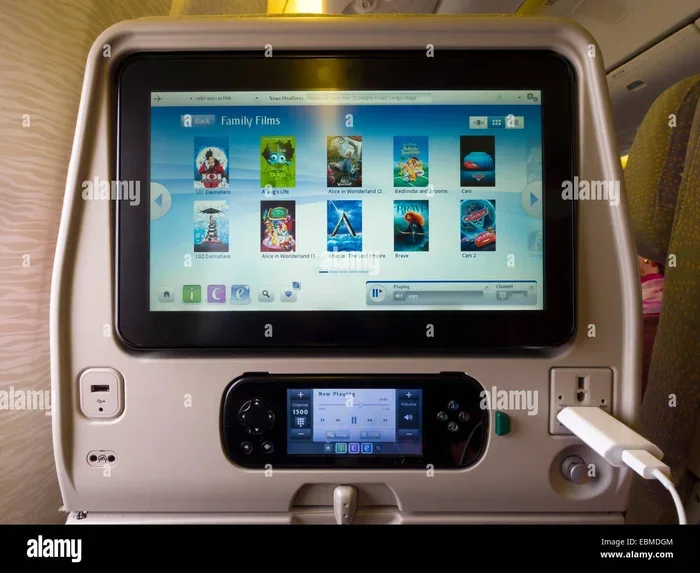
These are the classic airplane entertainment setups. A small screen is built into the back of the seat in front of you. You get a remote control or a touch-sensitive panel to navigate the menu. The content library typically includes:
- Recent movies and classics
- TV show episodes from popular networks
- Music channels and playlists
- Kids content and cartoons
- Games and puzzles
These systems work without any connection to the internet. You do not need Wi-Fi to watch the built-in content. This makes them very reliable. Even if the plane does not offer internet, you can still enjoy hours of entertainment.
Personal Device Streaming
Many airlines now offer entertainment that streams directly to your phone, tablet, or laptop. You connect to the airline’s Wi-Fi network, open their app, and browse the content library. This approach has become more popular because it saves airlines money on installing and maintaining seatback screens.
The quality of the stream depends on the inflight Wi-Fi connection. Some airlines offer fast enough speeds for smooth HD streaming. Others provide a slower connection that works for standard definition content at best. This is where understanding your airline’s Wi-Fi options matters a lot.
Bring Your Own Device
The third option is simply bringing your own entertainment. You download movies, shows, or podcasts before you leave home. This works on any flight regardless of what the airline provides. It is the most reliable method because you control the content and the device.
How to Use Inflight Entertainment Systems
Using the entertainment system on a 4-hour flight is usually straightforward. But there are a few things that can make the experience smoother.
Step-by-Step for Seatback Screens
- Once seated, look for a screen on the seatback in front of you.
- Press the power button. The system usually boots up within a few seconds.
- Browse the categories or use the search function to find something to watch.
- Plug in your headphones if the screen does not include them. Most planes have a standard 3.5mm headphone jack.
- Select your content and enjoy.
Step-by-Step for Streaming to Your Device
- Connect your device to the airline’s Wi-Fi network after takeoff.
- Open your browser and navigate to the airline’s entertainment portal.
- Alternatively, download the airline’s app before your flight and use it directly.
- Browse the content and start streaming.
- Keep your device charged. A 4-hour flight can drain your battery faster than you expect.
One thing to keep in mind: some airlines charge for inflight Wi-Fi. If you want to stream content on your own device, you may need to pay for the internet connection. You can check if your airline offers Wi-Fi pass options like buying Wi-Fi for a day on Delta to see how pricing works for specific carriers.
What If Your Flight Does Not Have a TV?
Not every 4-hour flight comes with a screen. This is especially true on regional jets, budget airlines, and older aircraft. If you find yourself on a flight without built-in entertainment, do not panic. You have several options.
Download Content Before You Fly
This is the single best thing you can do to prepare. Download movies, TV shows, or podcasts to your phone or tablet before you leave home. Most streaming services like Netflix, Hulu, and Disney Plus let you download content for offline viewing. A fully charged tablet with downloaded content can easily keep you entertained for 4 hours.
Use Your Phone as a Hotspot
If you have a good cellular signal during the flight, you can use your phone as a personal hotspot. This lets you connect your tablet or laptop to the internet and stream content. However, this only works if your carrier allows in-flight cellular use. Some airlines restrict this, so check their policies first.
Bring a Book or Magazine
Old school but effective. A good book or magazine never runs out of battery. Many travelers find that 4 hours is the perfect length to get through a solid chapter or two. This is a great backup plan when technology fails or when the airline offers no screens at all.
Listen to Podcasts or Audiobooks
Podcasts and audiobooks are excellent for flights. They do not require a screen, and you can listen through wireless earbuds or the plane’s headphone jack. Download a few episodes or a full audiobook before your trip. This works especially well if you are a light sleeper and want something to listen to during takeoff and landing.
Tips for Maximizing Entertainment on a 4-Hour Flight
A 4-hour flight is long enough to get bored if you are not prepared. Here are some practical tips to make the time pass quickly and enjoyably.
Charge Everything Before You Leave
Make sure your phone, tablet, earbuds, and any other devices are fully charged before you head to the airport. Airports have plenty of charging stations, but they are not always convenient. A full charge gives you a comfortable buffer for a 4-hour flight.
Bring a Backup Battery Pack
A portable power bank can be a lifesaver on longer flights. Look for one that is TSA-compliant and can charge your device at least once. This ensures you are not stuck with a dead tablet halfway through your movie.
Pack the Right Headphones
Not all planes provide headphones with their seatback screens. Even if they do, the quality is often basic. Bringing your own noise-canceling headphones improves the experience significantly. You can focus on your content without being distracted by engine noise or chatty neighbors.
Check Your Airline’s Entertainment Options Before Booking
Do some research before you book your ticket. Most airline websites list the entertainment options available on specific aircraft types. If you are booking through a third-party site, check the airline’s own website for details. Knowing what entertainment is available helps you decide whether to bring your own devices.
Consider the Time of Day
If your 4-hour flight departs in the evening, you might be able to sleep through part of it. This effectively shortens the time you need entertainment. On the other hand, a morning flight means you are awake for the entire duration, so plan accordingly.
What to Know About Inflight Wi-Fi and Streaming
Inflight Wi-Fi has improved dramatically over the past few years. Many airlines now offer connectivity that is fast enough for streaming video. But the experience is not always consistent.
Some airlines offer free basic Wi-Fi that is sufficient for messaging and browsing. Streaming video usually requires a paid plan. Other airlines offer free streaming to their own entertainment apps but charge for general internet access. The landscape varies a lot between carriers.
When the inflight Wi-Fi works well, it opens up a world of entertainment. You can stream Netflix, YouTube, or any app that supports offline or online playback. But when the connection is slow or drops, it can be frustrating. This is why downloading content before your flight remains the most reliable approach.
Some airlines also let you answer calls without Wi-Fi using cellular networks, though this is less common and depends on the airline’s policy. Always check with your carrier before making calls in the air.
One important thing to remember: not all flights offer Wi-Fi at all. Regional flights and some domestic routes may not have any internet connectivity. Do not assume you will have access to streaming just because you are on a 4-hour flight. Always have a backup plan.
Common Mistakes Travelers Make With Inflight Entertainment
There are a few mistakes that travelers make repeatedly when it comes to staying entertained on flights. Avoiding these can save you from a boring and frustrating experience.
- Assuming every flight has screens: Budget airlines and regional jets often do not. Always check before you fly.
- Not downloading content in advance: Relying on inflight Wi-Fi for streaming is risky. Download first, stream as a backup.
- Forgetting headphones: This is one of the most common oversights. Without headphones, you cannot use the seatback screen or listen to your own content.
- Not charging devices the night before: A dead phone or tablet on a 4-hour flight is miserable. Make charging part of your pre-flight routine.
- Relying on a single device: If your phone dies or your tablet runs out of battery, you have nothing. Bring a backup or use multiple devices.
Expert Tips From Frequent Flyers
Seasoned travelers know the importance of entertainment planning. Here are some tips from people who fly often.
First, always carry a pair of earbuds even if you think you will not need them. You never know when you will want to watch something on your phone or listen to music during a delay.
Second, create a playlist or download a few episodes of a show before every trip. Having content ready means you never have to worry about what to watch when you sit down.
Third, consider the seat you choose. Seats near the back of the plane or in the last rows of a section may have older or smaller screens. If entertainment is important to you, check seat reviews on sites like SeatGuru before booking.
Fourth, if you are on a flight that offers streaming to personal devices, connect to the inflight Wi-Fi as soon as the captain turns off the seatbelt sign. This gives you time to browse the content library and start streaming before you settle in for the long haul.
Final Thoughts
So do you get a TV on a 4-hour flight? In most cases, yes. The majority of major airlines provide some form of entertainment, whether it is a seatback screen or streaming to your personal device. But the experience varies widely depending on the carrier, the aircraft, and the route you are flying.
The best approach is always to prepare ahead of time. Download content, charge your devices, pack headphones, and have a backup plan. This way, even if the airline does not offer what you expected, you are still covered.
Flying does not have to be boring. With the right preparation, a 4-hour flight can be the perfect time to catch up on your favorite shows, watch a new movie, or simply relax with some music. The key is knowing what to expect and planning accordingly.
Next time you book a 4-hour flight, take a few minutes to check the airline’s entertainment options. You will be glad you did when you settle into your seat and have something great to watch from takeoff to landing.
Frequently Asked Questions
Do all airlines provide TVs on 4-hour flights?
No, not all airlines provide TVs. Full-service carriers like Delta, United, and American usually include seatback screens or streaming options. Budget airlines like Spirit and Frontier often skip built-in screens and rely on personal device streaming instead.
Can I stream Netflix on a 4-hour flight?
You can if the airline offers Wi-Fi and the speed is sufficient for streaming. Some airlines also partner with Netflix to offer content directly through their entertainment portal. However, downloading Netflix content before your flight is the most reliable option.
Do I need Wi-Fi to watch TV on a plane?
Not if the plane has seatback screens. Those systems work independently of Wi-Fi. If you plan to stream on your own device, you will need an internet connection, which may require a paid Wi-Fi plan from the airline.
What if my phone dies during a 4-hour flight?
Bring a portable charger or power bank to keep your devices powered. You can also use the seatback screen if the plane has one. Always have a backup plan like a book or downloaded content on a second device.
Are headphones provided on flights with seatback screens?
Some airlines provide headphones, but many do not. It is best to bring your own. A simple pair of wired earbuds works with the standard 3.5mm jack found on most seatback screens.
Can I use my own tablet for inflight entertainment?
Yes, most airlines allow you to use tablets for their streaming entertainment apps. Just connect to the airline’s Wi-Fi after takeoff and access their entertainment portal. Download content beforehand in case the Wi-Fi is unavailable or too slow.