Can You Use Bluetooth On PS5 With Wireless Controllers
Yes, you can use Bluetooth on PS5, but with limits. The PlayStation 5 supports Bluetooth connectivity for select devices, but it does not allow generic Bluetooth pairing like a PC or phone. You can connect wireless controllers, official Bluetooth headsets, and a few Bluetooth audio devices using specific methods. This guide walks you through every option, from DualSense wireless pairing to using a Bluetooth adapter for broader compatibility.
If you are a PS5 owner, you have probably wondered about Bluetooth on PS5. Can you pair your favorite wireless devices? Can you use a Bluetooth headset for late-night gaming sessions? The short answer is yes, but the full story is more nuanced than you might expect.
The PlayStation 5 is a powerful console, but Sony has kept its Bluetooth connectivity somewhat locked down. Unlike a smartphone or a PC, the PS5 does not let you freely pair any Bluetooth device you want. This guide breaks down exactly how PS5 Bluetooth works, what you can connect, and how to get the best wireless gaming experience.
Key Takeaways
- Native Bluetooth is limited: PS5 does not support free-form Bluetooth pairing for all devices.
- DualSense controllers connect wirelessly: The official PS5 wireless controller uses Bluetooth to link with the console.
- Bluetooth headsets work with USB dongles: Most wireless gaming headsets come with their own USB receiver for PS5 Bluetooth audio.
- A Bluetooth adapter expands options: You can add Bluetooth 5.0+ support to your PS5 for more device choices.
- Latency matters for gaming: Bluetooth latency can affect gameplay, so wired or USB-connected devices are often better.
- You cannot connect just any Bluetooth device: Bluetooth compatibility depends on the Bluetooth profile the PS5 supports.
📑 Table of Contents
- Understanding PS5 Bluetooth Capabilities
- Using Bluetooth Wireless Controllers on PS5
- Bluetooth Audio: Headsets and Speakers on PS5
- Using a Bluetooth Adapter with PS5
- Bluetooth Troubleshooting on PS5
- Comparing Bluetooth Options for PS5
- Can You Use Bluetooth on PS5 for Other Devices?
- Expert Tips for PS5 Wireless Gaming
- Common Mistakes to Avoid
- Final Thoughts
Understanding PS5 Bluetooth Capabilities
The PlayStation 5 uses Bluetooth technology in a very specific way. It is not a fully open Bluetooth system like you find on a computer or tablet. Sony designed the console to work with a curated list of devices to ensure stability and low Bluetooth latency during gameplay.
What Bluetooth Version Does PS5 Use?
The PS5 supports Bluetooth 5.1. This is a solid version that offers good range and speed. However, the console only uses Bluetooth for specific purposes. It does not act as a universal Bluetooth hub. This means you cannot just open your phone’s Bluetooth settings and expect to connect to the PS5.
How PS5 Handles Wireless Connections
The PS5 wireless connection system works in layers. The console uses a custom wireless protocol for its own DualSense controller. This is different from standard Bluetooth in some ways, but it still relies on Bluetooth technology at its core. For audio devices, the PS5 uses Bluetooth profiles that are limited to a few specific types.
Here is a quick look at what Bluetooth connectivity the PS5 supports natively:
- DualSense wireless controller (built-in Bluetooth)
- Official PlayStation wireless headsets
- Certain Bluetooth audio devices through the USB Bluetooth adapter method
- Remote Play connections for Bluetooth controller use on other devices
Using Bluetooth Wireless Controllers on PS5
The most common reason people ask about Bluetooth on PS5 is for controllers. You want to know if you can use a wireless controller without the USB cable. The answer depends on which controller you have.
DualSense Controller: The Official PS5 Wireless Controller
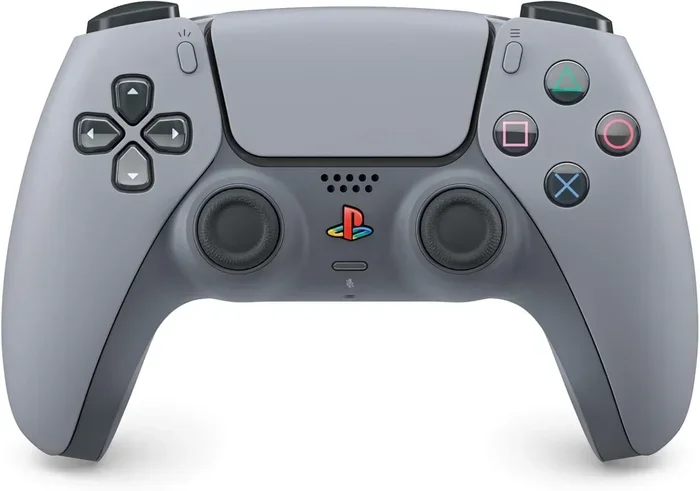
The DualSense controller is the star of PS5 wireless gaming. It connects to the console using Bluetooth when you are not using the USB cable. Here is how to pair it:
- Turn on your PS5 console.
- Press the PS button on the DualSense controller.
- The controller will appear on screen as a wireless device.
- Select it to complete the Bluetooth pairing.
Once paired, your wireless controller stays connected as long as it has battery power. You can also charge it while playing using the USB cable. The DualSense offers haptic feedback and adaptive triggers, which work wirelessly without any lag.
Third-Party Wireless Controllers
Not all wireless controllers work with the PS5. Sony has made it clear that only the DualSense controller and DualShock 4 (for PS4 games) are officially supported. Third-party Bluetooth controllers from brands like Xbox or generic manufacturers usually do not connect directly to the PS5.
If you want to use a different wireless controller, your best bet is a USB wired connection or a compatible adapter. Some gaming controllers come with their own USB receiver that works on the PS5. Always check Bluetooth compatibility before buying a third-party controller for PS5.
Can You Use A USB Controller On The Switch?
If you also game on the Nintendo Switch, you might wonder about cross-platform controller use. Check out our guide on Can I Use A USB Controller On My Switch for details on how USB controllers work across different consoles.
Bluetooth Audio: Headsets and Speakers on PS5
Audio is where PS5 Bluetooth gets tricky. The console does not support standard Bluetooth audio out of the box for most headsets. This surprises many gamers who expect to just pair their favorite Bluetooth headset and start playing.
Why PS5 Does Not Support Standard Bluetooth Audio
Sony kept Bluetooth audio support limited for a reason. Bluetooth latency is the biggest concern. When there is a delay between the game audio and what you hear through your Bluetooth headset, it ruins the gaming experience. Sony wants to keep audio sync perfect for competitive and immersive gaming.
Standard Bluetooth codecs like SBC and A2DP introduce lag. The PS5 does not support low-latency Bluetooth codecs like aptX or aptX LL for general audio output. This is why you need workarounds for Bluetooth audio on the console.
How to Connect Bluetooth Headsets to PS5
Even though direct Bluetooth pairing is limited, you still have options for wireless audio on the PlayStation 5:
- USB Wireless Dongle: Most wireless gaming headsets come with their own USB receiver. Plug it into the PS5 USB port and the headset connects instantly. This is the best method for low-latency wireless audio.
- 3.5mm Headphone Jack: The DualSense controller has a built-in 3.5mm audio jack. Plug in a wired headset and select it in the PS5 audio settings.
- Bluetooth Adapter: You can use a Bluetooth 5.0+ adapter with the PS5 USB port to add Bluetooth audio support. More on this below.
- TV Bluetooth: You can connect your headset to your TV instead of the PS5. This works if your TV supports Bluetooth audio output. Learn how to make your TV Bluetooth-capable here.
Best Bluetooth Headset Options for PS5
When choosing a headset for PS5, look for one that includes a USB wireless dongle. Here are some popular choices:
- Sony Pulse 3D Wireless Headset: Designed specifically for PS5. Uses its own USB receiver for wireless audio.
- SteelSeries Arctis Nova 7: Works with PS5 via USB dongle. Also supports Bluetooth connectivity for phone calls.
- HyperX Cloud II Wireless: Great wireless gaming headset with a USB receiver compatible with PS5.
- JBL Quantum 800: Bluetooth wireless headset with a USB dongle for PS5 use.
These headsets give you the freedom of wireless gaming without relying on the console’s limited Bluetooth support.
Using a Bluetooth Adapter with PS5
If you want to expand your PS5 Bluetooth options beyond what Sony allows natively, a Bluetooth adapter is the way to go. This small device plugs into the PS5 USB port and adds full Bluetooth connectivity to your console.
How Bluetooth Adapters Work with PS5
A Bluetooth adapter acts as a bridge between your PS5 and Bluetooth devices. It tells the console to recognize additional Bluetooth profiles that it would otherwise ignore. This opens up support for Bluetooth speakers, Bluetooth keyboards, and even some Bluetooth mice.
Here is what you need to know about Bluetooth adapters for PS5:
- Look for Bluetooth 5.0 or higher: This ensures better range and lower Bluetooth latency.
- Check for USB port compatibility: The PS5 has USB-A and USB-C ports. Make sure your adapter fits.
- Some adapters need drivers: The PS5 does not support all Bluetooth drivers. Stick with adapters that are plug-and-play.
- Performance varies: Not all Bluetooth adapters deliver the same wireless performance. Read reviews before buying.
Best Bluetooth Adapters for PS5
Not all Bluetooth adapters work well with the PS5. Here are a few reliable options:
- TP-Link UB500: A popular Bluetooth 5.0 USB adapter known for good PS5 compatibility.
- ASUS USB-BT500: Another solid choice with Bluetooth 5.0 and stable wireless connection.
- Kinivo BTD-400: A budget-friendly Bluetooth adapter that works with PS5 for basic Bluetooth devices.
Once you plug in the adapter, go to PS5 Settings > Bluetooth Accessories and start pairing your devices. The PS5 will scan for available Bluetooth devices and let you connect them.
Bluetooth Troubleshooting on PS5
Even with the right setup, you might run into Bluetooth issues on your PS5. Here are the most common problems and how to fix them.
Common Bluetooth Problems
- Device not showing up: Make sure your Bluetooth device is in pairing mode. Restart both the device and the PS5.
- Audio lag or delay: This is often caused by Bluetooth latency. Move closer to the console or use a USB dongle instead.
- Intermittent disconnection: Check for Bluetooth interference from other wireless devices. Remove the device and re-pair it.
- Controller not charging: A loose USB connection can cause this. Try a different USB cable or port.
Quick Tips for Better Bluetooth Performance
- Keep your Bluetooth devices within 10 feet of the PS5 for the best signal.
- Avoid placing the console near Wi-Fi routers or microwave ovens, which can cause Bluetooth interference.
- Update your PS5 firmware regularly. Sony often improves Bluetooth stability with software updates.
- Use a USB extension cable for your Bluetooth adapter if the signal is weak.
Comparing Bluetooth Options for PS5
Not all wireless options on the PS5 are created equal. Here is a comparison of the main Bluetooth methods you can use:
| Method | Latency | Compatibility | Setup Difficulty | Best For |
|---|---|---|---|---|
| DualSense Wireless | Very Low | PS5 native | Easy | Controller use |
| USB Wireless Dongle | Low | Supported headsets | Easy | Wireless audio |
| Bluetooth Adapter | Medium | Most Bluetooth devices | Moderate | Expanding Bluetooth options |
| 3.5mm Wired Connection | None | All wired headsets | Very Easy | Zero-lag audio |
| TV Bluetooth | Medium | TV-supported devices | Easy | Casual gaming |
As you can see, each method has its strengths. For competitive gaming, a wired connection or USB dongle is best. For casual listening, Bluetooth works just fine.
Can You Use Bluetooth on PS5 for Other Devices?
The PS5 Bluetooth system is not just for controllers and headsets. You can connect other Bluetooth devices with the right setup. For example, you can use a Bluetooth keyboard for text input or a Bluetooth speaker for shared audio during parties.
Keep in mind that the PS5 prioritizes gaming performance over Bluetooth convenience. If you notice lag or connection issues, a wired connection will always be more reliable. But for everyday use like chatting or listening to music, Bluetooth on PS5 works well enough.
If you are interested in using Bluetooth speakers or Bluetooth devices in other settings, check out our article on Can I Play Radio Using Bluetooth for tips on getting the most out of your Bluetooth audio devices.
Expert Tips for PS5 Wireless Gaming
Here are some pro tips to get the most out of wireless gaming on your PlayStation 5:
- Keep your controller charged: A low battery can cause wireless disconnections. Charge your DualSense regularly.
- Use the right Bluetooth profile: Make sure your headset supports the A2DP or HSP profile for best results.
- Test your Bluetooth range: Move around your room and check for signal drops. Stay within range for stable wireless connection.
- Update your devices: Keep both your PS5 and Bluetooth devices updated for the best compatibility.
- Consider a Bluetooth 5.0+ adapter: The newer Bluetooth versions offer better speed and range for PS5 use.
Sony continues to improve Bluetooth support on the PlayStation 5 through firmware updates. Stay tuned for future improvements that may expand Bluetooth compatibility even further.
Common Mistakes to Avoid
Before you go, here are some common mistakes people make with PS5 Bluetooth:
- Trying to pair unsupported devices: Not every Bluetooth device will work with the PS5. Check compatibility first.
- Ignoring firmware updates: Outdated PS5 software can cause Bluetooth problems. Always keep your console updated.
- Using cheap Bluetooth adapters: A low-quality adapter can introduce lag and disconnections. Invest in a reputable brand.
- Overcrowding the Bluetooth channel: Too many wireless devices near the PS5 can cause interference. Keep your wireless setup clean.
Final Thoughts
Can you use Bluetooth on PS5 with wireless controllers? Absolutely. The DualSense controller connects wirelessly right out of the box. For Bluetooth audio, you need either a USB wireless dongle or a Bluetooth adapter. The PS5 gives you enough options to enjoy wireless gaming without frustration.
Remember that Bluetooth latency and compatibility are the main limits. Choose the right method for your needs, keep your devices updated, and you will have a smooth wireless experience on the PlayStation 5. Whether you are playing solo or chatting with friends, PS5 Bluetooth has you covered for the essentials.
Explore more of our guides to get the most out of your gaming setup. If you want to learn about using Bluetooth headphones with other devices, check out Can I Talk Through My Bluetooth Headphones for helpful tips on Bluetooth audio across different platforms.
Frequently Asked Questions
Can I Connect Any Bluetooth Headset Directly to My PS5?
No, the PS5 does not support direct Bluetooth pairing for most headsets. You need a USB wireless dongle, a Bluetooth adapter, or a wired connection through the controller’s 3.5mm jack. This limitation exists because Sony wants to keep audio latency low for competitive gaming.
Why Does My Bluetooth Controller Keep Disconnecting From PS5?
Bluetooth disconnections on the PS5 are usually caused by low battery, interference from other devices, or outdated console firmware. Make sure your controller is charged, move closer to the console, and check for PS5 software updates. Re-pairing the device often fixes the issue too.
Can I Use A Bluetooth Speaker With My PS5?
Yes, but not directly. The PS5 does not natively support Bluetooth speakers without a Bluetooth adapter. Plug a compatible USB Bluetooth adapter into the console, then pair your speaker through PS5 Settings > Bluetooth Accessories. This gives you wireless audio without the lag of a direct connection.
Is There Any Latency When Using Bluetooth With PS5?
Bluetooth latency is real but varies by method. Using a USB wireless dongle with your headset keeps latency very low. A Bluetooth adapter adds a small amount of delay. For competitive gaming, a wired connection remains the best choice. Casual gaming is fine with Bluetooth audio on the PS5.
How Many Bluetooth Devices Can I Connect to My PS5?
The PS5 can typically handle a few Bluetooth devices at once. You can connect your DualSense controller and one or two Bluetooth audio devices simultaneously. However, connecting too many may cause interference or performance drops. Stick to the essentials for the best wireless experience.
Will Future PS5 Updates Add More Bluetooth Support?
Sony regularly updates the PS5 firmware to improve Bluetooth connectivity and add new features. While there is no official word on expanded Bluetooth support, the company has shown interest in improving wireless performance. Keep your console updated to get the latest Bluetooth improvements as they arrive.
=== CONCLUSION ===
Can you use Bluetooth on PS5 with wireless controllers? Yes, and now you know exactly how. The DualSense wireless controller connects effortlessly, and Bluetooth audio is possible with the right setup. Whether you use a USB dongle, a Bluetooth adapter, or a wired connection, the PS5 gives you flexible options for wireless gaming.
Keep these tips in mind, avoid the common pitfalls, and your PS5 Bluetooth experience will be smooth and enjoyable. Happy gaming!