Do You Need A WiFi Extender If You Already Have A Router
Many people wonder if a WiFi extender is necessary when they already own a router. The truth is, a standard router may not cover every corner of your home, especially if you have a large space or thick walls. A WiFi extender can solve this problem by boosting your signal and expanding your wireless coverage area. You might need one if you experience slow speeds, dead zones, or dropped connections in certain rooms. This guide walks you through everything you need to know to make the right choice for your home network.
Do you ever walk into a room and notice your phone shows full bars but the internet barely loads? Or maybe your smart TV keeps buffering during movie night even though the router is in the next room? If this sounds familiar, you are not alone. Millions of people face Wi-Fi range issues every single day.
The big question is simple: do you need a WiFi extender if you already have a router? The short answer is maybe. A lot depends on the size of your home, the number of devices you use, and where your router sits. In this guide, we will break it all down so you can make a smart choice for your home network.
A standard wireless router sends out a signal in all directions. But walls, floors, furniture, and even microwaves can weaken that signal. When the signal fades, your internet coverage drops. That is where a wireless range extender comes in handy. It picks up the existing signal and sends it further. Think of it like a megaphone for your Wi-Fi.
Before you buy anything, it helps to understand what your current setup can do. Not every home needs extra hardware. Some people just need to move their router to a better spot. We will cover all of that and more in this article. Let us dive in.
Key Takeaways
- A router alone may not provide full home coverage: especially in larger homes or multi-story buildings.
- A WiFi extender boosts your existing signal: it repeats and amplifies the wireless signal from your router.
- Dead zones are the biggest sign you need an extender: areas with no or weak signal are clear indicators.
- Mesh networks and repeaters are popular alternatives: each has its own pros and cons for home Wi-Fi setup.
- Router placement matters a lot: moving your router can sometimes solve range issues without extra hardware.
- Dual-band and tri-band extenders offer better performance: they reduce speed loss compared to single-band models.
- Setting up an extender is simple: most devices come with easy step-by-step instructions for home use.
📑 Table of Contents
- What Does a Router Do on Its Own?
- What Exactly Is a WiFi Extender?
- Signs You Need a WiFi Extender
- WiFi Extender vs. Router: What Is the Difference?
- Mesh Networks vs. WiFi Extenders
- How to Set Up a WiFi Extender
- Quick Tips to Improve Wi-Fi Without an Extender
- Common Mistakes People Make With WiFi Extenders
- Final Thoughts: Do You Really Need a WiFi Extender?
What Does a Router Do on Its Own?
Your router is the brain of your home Wi-Fi setup. It connects to your modem and sends out a wireless signal. This signal lets your phones, laptops, tablets, and smart home devices go online. Most modern dual-band routers send signals on two frequencies: 2.4 GHz and 5 GHz.
The 2.4 GHz band travels farther but is slower. The 5 GHz band is faster but does not reach as far. A good broadband connection paired with a solid router can cover a small to medium home pretty well. But here is the catch: no router is perfect.
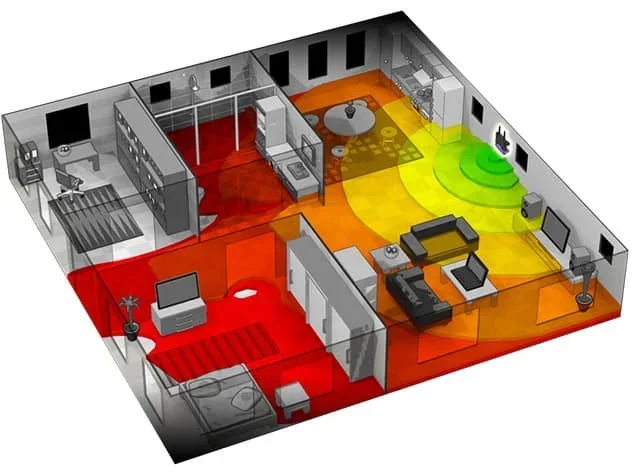
Even the best Wi-Fi signal strength drops over distance. Physical barriers like concrete walls, metal doors, and brick fireplaces block signals. If your router is tucked away in a closet or basement, the signal has to fight its way through. That is why many homes end up with internet dead spots in certain rooms.
When a Router Is Enough
There are times when your router handles everything just fine. If you live in a small apartment or a single-story home under 1,000 square feet, your router likely covers the whole space. If you use the internet in the same room where the router sits, you probably do not need extra hardware.
Also, if you only have a few devices connected at a time, the load is light. Your network speed stays strong because the router does not have to work too hard. In these cases, adding a Wi-Fi booster would be unnecessary.
When a Router Falls Short
On the other hand, larger homes need more coverage. If you have two or three floors, the signal weakens as it travels up the stairs. Thick walls make it worse. Houses with 2,000 square feet or more often struggle with full wireless coverage using just one router.
Another common problem is signal interference. Baby monitors, cordless phones, and even neighbor networks can mess with your Wi-Fi performance. When interference is high, your signal drops even if you are close to the router. This is a clear sign that you might need help from a Wi-Fi repeater or extender.
What Exactly Is a WiFi Extender?
A WiFi extender is a device that connects to your existing router and rebroadcasts its signal. It does not create a new network from scratch. Instead, it acts like a middleman. It receives the signal from your router and sends it out again with more reach.
People also call these devices Wi-Fi repeaters or signal boosters. They all do roughly the same job. The goal is simple: extend your wireless access point coverage so every room gets a strong connection.
How Does a WiFi Extender Work?
Here is how it works in plain terms. Your router sends out a Wi-Fi signal. The extender picks up that signal from where it still has strength. Then the extender sends that signal out again, but farther. It is like passing a baton in a relay race. The signal gets a second push so it can reach places it could not before.
Most extenders plug directly into a wall outlet. They are small and easy to move around. You place the extender halfway between your router and the area with weak signal. This way, it catches a good signal from the router and then pushes it into the dead zone.
Types of WiFi Extenders
Not all extenders are the same. Here are the most common types you will find on the market:
- Single-band extenders: These work on the 2.4 GHz frequency only. They are affordable but can slow down your Wi-Fi bandwidth because they share the same channel for receiving and sending.
- Dual-band extenders: These use both 2.4 GHz and 5 GHz. They perform better because they have a dedicated backhaul channel. This means less speed loss when the signal is extended.
- Tri-band extenders: These add a third band for even better performance. They are great for homes with many devices and heavy internet use.
- Mesh Wi-Fi systems: These are not traditional extenders but serve a similar purpose. They use multiple nodes placed around the home to create one seamless network.
Signs You Need a WiFi Extender
How do you know if your current setup is not cutting it? There are clear signs that point to a need for a WiFi extender. Let us look at the most common ones.
Slow Internet Speeds in Certain Rooms
If your internet is fast in the living room but crawls in the bedroom, that is a red flag. Your router signal strength is not reaching that room well. A speed test on your phone in different rooms can confirm this. If speeds drop significantly far from the router, an extender can help.
Devices Losing Connection Often
Does your phone keep disconnecting from Wi-Fi when you walk into the kitchen? Do your smart home devices go offline at random times? Frequent disconnections mean the signal is too weak to hold a steady connection. A wireless range extender can fill in the gaps and keep your devices online.
Buffering and Lag During Streaming or Gaming
Nothing ruins a movie night like constant buffering. If your streaming shows pause every few minutes or your online games lag, your signal might be the problem. These issues often happen when devices are far from the router. Boosting the signal with an extender can make a big difference.
Dead Zones in Your Home
A dead zone is an area where there is no Wi-Fi signal at all. You might see “No Network Available” on your phone in certain spots. Basements, garages, and far bedrooms are common dead zone locations. If you have one or more dead zones, a Wi-Fi booster or extender is probably your best fix.
WiFi Extender vs. Router: What Is the Difference?
It helps to understand the difference between a router and an extender. They are not the same thing. Each plays a different role in your home network.
Your router connects to the internet through a modem. It creates the Wi-Fi network and assigns IP addresses to your devices. Think of the router as the source of your wireless connection.
An extender does not connect to the internet directly. It connects to your router’s signal and then re-broadcasts it. It is like a helper that pushes the signal further. You still need a router for an extender to work.
Some people confuse extenders with new routers. They think buying an extender means replacing their router. That is not true. An extender works alongside your existing router. It simply extends the range. If your router is old or outdated, though, upgrading the router might be a better solution than adding an extender.
When to Upgrade the Router Instead
If your router is more than five years old, it might be time for an upgrade. Newer Wi-Fi 6 routers offer much better range and speed than older models. Before buying an extender, check if your router supports the latest standards. Sometimes a new router solves range issues on its own.
Also, if you have many smart home devices, a modern router handles them better. It manages network traffic more efficiently. This means fewer slowdowns and a more stable connection throughout your home.
Mesh Networks vs. WiFi Extenders
When people look for solutions to weak Wi-Fi, they often come across two options: WiFi extenders and mesh networks. Both aim to improve coverage, but they work differently.
A mesh network uses multiple nodes or units placed around the home. Each node talks to the others and to your modem. They create one big, seamless network. You can walk from room to room without noticing a switch between nodes. The connection stays smooth.
A WiFi extender connects to your existing router. It creates a second network, often with a slightly different name. Some extenders switch your device between networks automatically, but not always. This can cause brief interruptions.
Which One Is Better for You?
It depends on your needs. Here is a quick comparison:
| Feature | WiFi Extender | Mesh Network |
|---|---|---|
| Price | Lower cost | Higher cost |
| Setup | Easy and quick | Moderate setup |
| Seamless roaming | Sometimes | Always |
| Coverage | Good for one dead zone | Great for whole-home coverage |
| Performance | Some speed loss | Minimal speed loss |
| Best for | Small to medium homes | Large or multi-story homes |
If you have one or two rooms with weak signal, a WiFi extender is a simple and affordable fix. If your whole home has coverage problems, a mesh network might be a better long-term solution.
How to Set Up a WiFi Extender
Setting up a WiFi extender is easier than most people think. You do not need to be a tech expert. Most brands make the process simple with their apps or web dashboards.
Step-by-Step Setup Tips
- Plug in the extender halfway between your router and the weak signal area.
- Turn on the extender and wait for the power light to become solid.
- Connect your phone or computer to the extender’s default Wi-Fi network.
- Open the setup app or type the extender’s IP address into your browser.
- Select your main Wi-Fi network from the list and enter the password.
- Wait for the connection to complete. The extender light will usually turn solid or change color.
- Test the signal in the previously weak area to confirm improvement.
Quick tip: place your extender where it still gets a strong signal from the router. If you put it too far away, it will repeat a weak signal, and your speeds will suffer. The sweet spot is where the extender catches about 50 to 70 percent of your router’s signal strength.
Common Setup Mistakes to Avoid
- Placing the extender too far from the router: it will not get a good enough signal to repeat effectively.
- Hiding the extender behind furniture: walls and objects block the signal. Keep it in the open.
- Using an old extender with a new router: make sure the extender supports the same Wi-Fi standards as your router for best results.
- Not updating the extender firmware: check for updates regularly to keep it running smoothly.
Quick Tips to Improve Wi-Fi Without an Extender
Before you spend money on a WiFi extender, try these free fixes first. Sometimes simple changes make a huge difference in your wireless coverage.
- Move your router to a central location: place it in the middle of your home, not in a corner or closet.
- Elevate the router: put it on a shelf or table instead of the floor. Signals travel better upward.
- Keep it away from thick walls and metal objects: these block the signal and weaken Wi-Fi signal strength.
- Restart your router regularly: a simple reboot can clear glitches and improve network speed.
- Change the Wi-Fi channel: use your router settings to switch to a less crowded channel. This reduces interference from neighbor networks.
- Update your router firmware: manufacturers release updates that improve performance and fix bugs.
- Use the 5 GHz band for close devices: it is faster and less crowded than the 2.4 GHz band.
If you try all of these and still have dead zones, then it is time to consider a WiFi extender or another solution like a mesh system.
Common Mistakes People Make With WiFi Extenders
Even with the best intentions, people make mistakes when using WiFi extenders. Here are the most common ones and how to avoid them.
Expecting the Extender to Boost Internet Speed
An extender does not increase your internet speed from your provider. It only extends the range of your existing signal. If your base internet plan is slow, an extender will not fix that. It will just spread the same speed farther. For faster speeds, you need to upgrade your broadband plan or your router.
Placing the Extender Too Far Away
This is the number one mistake people make. If the extender is too far from the router, it picks up a weak signal and then rebroadcasts an even weaker one. The result is poor performance in the extended area. Always place the extender where it gets a strong signal from the router first.
Ignoring Dual-Band Support
Cheap single-band extenders can actually slow down your network. They cut your bandwidth in half because they use the same frequency to receive and send data. Always choose a dual-band or tri-band extender for better Wi-Fi performance.
Not Securing the Extended Network
Some extenders create a separate network with a default name and password. If you do not change these, anyone nearby can connect. Always set a strong password for your extended network to keep your home network safe.
Final Thoughts: Do You Really Need a WiFi Extender?
So, do you need a WiFi extender if you already have a router? The answer depends on your situation. If you live in a small space and your router covers everything well, you probably do not need one. But if you have dead zones, slow speeds in certain rooms, or a large home with multiple floors, a WiFi extender can be a game-changer.
Before buying, try the free fixes first. Move your router, change channels, and restart it regularly. If those steps do not work, a wireless range extender is an affordable and effective solution. For larger homes with many devices, consider a mesh Wi-Fi system instead.
The goal is simple: strong, reliable internet coverage everywhere in your home. Whether you use an extender, a mesh system, or just reposition your router, the right choice will make your daily internet experience much better. Take a look at your home today, test your signal in different rooms, and decide what your home network really needs.
With the right setup, you can say goodbye to buffering, dropped connections, and frustrating dead zones. Your Wi-Fi performance will improve, and every device in your home will stay connected. That is a win for everyone.
Frequently Asked Questions
Can a WiFi extender slow down my internet speed?
Yes, some extenders can reduce your speed, especially single-band models. They cut bandwidth in half because they use the same frequency to receive and send data. Dual-band and tri-band extenders minimize this speed loss and are a better choice for most homes.
Do I need a WiFi extender if my router is new?
Not necessarily. A new router with Wi-Fi 6 technology has better range and handles more devices. However, even new routers can struggle in large homes or multi-story buildings. Test your coverage first before deciding to add an extender.
Can I use more than one WiFi extender?
Yes, you can use multiple extenders if your home has several dead zones. Just make sure each extender connects directly to the router, not to another extender. Chaining extenders can cause more problems and reduce performance.
What is the difference between a WiFi extender and a WiFi repeater?
They are essentially the same thing. Both devices pick up your existing Wi-Fi signal and rebroadcast it. The terms are used interchangeably by most manufacturers and consumers. Some people prefer the term “extender” because it sounds more modern.
How far should I place the WiFi extender from my router?
Place the extender about halfway between your router and the area with weak signal. It needs to be close enough to get a strong signal from the router but far enough to push that signal into the dead zone. Check the signal indicator lights on the extender for guidance.
Will a WiFi extender work with any router?
Most extenders work with any standard router, regardless of brand. However, for the best performance, make sure the extender supports the same Wi-Fi standards as your router, such as Wi-Fi 5 or Wi-Fi 6. Check the specifications before purchasing.