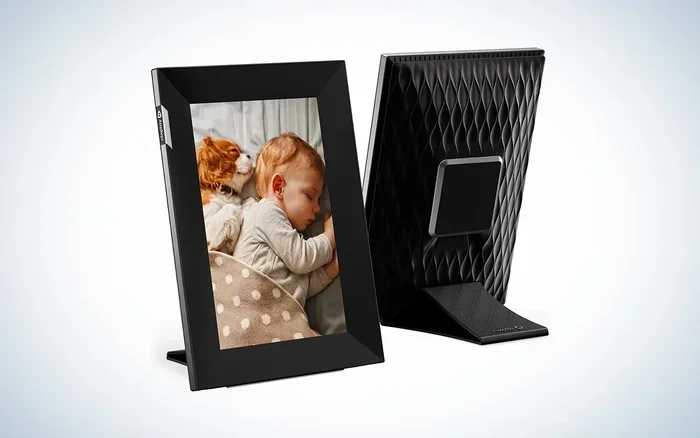
Do Digital Photo Frames Store Photos and Save Memories
Yes, digital photo frames store photos directly on internal memory, SD cards, or cloud services. These smart devices let you save, display, and share your favorite memories without needing a phone or computer nearby. Understanding how digital photo frame storage works helps you choose the right frame for your home and family.
Do digital photo frames store photos? It is a simple question, but the answer opens up a world of possibilities for saving and sharing memories. Digital photo frames have come a long way from the basic slideshow devices of the past. Today’s frames are smart, connected, and packed with features that make preserving memories easier than ever.
If you have ever wondered how these frames work or whether they can really replace the old photo album, you are in the right place. This guide covers everything you need to know about digital photo frame storage, the different types available, and how to pick the best one for your home.
Key Takeaways
- Built-in Storage: Most digital frames come with internal memory or SD card slots to save photos.
- Cloud Integration: Many modern frames sync with cloud services for unlimited photo storage.
- Multiple Formats: Digital frames support JPEG, PNG, and sometimes RAW image formats.
- Wireless Options: Wi-Fi and Bluetooth frames let you send photos from anywhere.
- Capacity Varies: Storage ranges from 128MB to 32GB depending on the frame model.
- Analog vs Digital: Traditional frames display one photo at a time, while digital frames store and cycle through hundreds or thousands.
📑 Table of Contents
- What Is a Digital Photo Frame?
- Do Digital Photo Frames Store Photos?
- How Much Storage Do You Really Need?
- Types of Digital Photo Frames and Their Storage Features
- Digital vs Traditional Frames: How They Compare
- Tips for Maximizing Your Digital Frame Storage
- Common Mistakes People Make with Digital Photo Frames
- How to Choose the Right Digital Photo Frame for Your Needs
- The Future of Digital Photo Frame Storage
- Final Thoughts
What Is a Digital Photo Frame?
A digital photo frame is an electronic device designed to display digital images without printing them. Instead of holding a single printed picture, these frames store and cycle through multiple photos on a screen. The technology inside a digital frame is quite similar to what you find in analog and digital computers, where digital systems process and store information in ways that older systems cannot.
Most digital frames have a LCD or LED screen, a built-in processor, and some form of storage. They can display photos in slideshows, adjust brightness, and even play music in the background. Some high-end models support video clips and audio files too.
The beauty of a digital frame is its simplicity. You load photos once, and the frame handles the rest. No printing, no cropping, and no worrying about fading pictures on a shelf.
Do Digital Photo Frames Store Photos?
The short answer is yes. Digital photo frames store photos using different methods depending on the model and brand. Let us break down the most common storage options available today.
Internal Memory
Many digital frames come with built-in internal memory. This is the simplest form of storage. You transfer photos directly to the frame, and they stay there until you delete them. Internal memory is usually small, ranging from 128MB to 2GB. That might not sound like much, but it can hold anywhere from 50 to 500 photos depending on image size.
Internal memory is great for people who want a simple setup. You do not need any extra equipment. Just plug in the frame, load your photos, and enjoy the slideshow. However, if you have a large photo library, internal memory alone may not be enough.
SD Card and Memory Card Slots
Most digital frames include an SD card slot or a USB port. This lets you expand storage significantly. A standard SD card can hold thousands of photos, and larger cards can store even more. This is one of the most popular ways people store photos in their digital frames.
To use an SD card, you simply load photos onto the card using a computer or phone, then insert the card into the frame. The frame reads the card and displays your photos. This method is flexible and easy to update whenever you want fresh content.
Cloud Storage and Wi-Fi Connectivity
Modern smart photo frames take storage to the next level with cloud integration. These frames connect to your home Wi-Fi network and sync photos from online services like Google Photos, Dropbox, or the frame manufacturer’s own app. The photos live in the cloud, not on the frame itself, which means you get almost unlimited storage.
Wi-Fi frames are incredibly convenient. You can send a photo from your phone to the frame from anywhere in the world. Grandparents can receive pictures from grandchildren in real time. This is a game-changer for families who want to share memories instantly.
USB and Direct Connection
Many frames also support direct USB connections. You can plug a USB drive or even a smartphone directly into the frame. The frame reads the files and displays them. This is a quick and easy way to share photos without dealing with cables or wireless setups.
How Much Storage Do You Really Need?
Storage needs depend on how many photos you want to display and how often you change them. Here is a simple breakdown to help you decide.
- Small frames (128MB to 2GB): Best for a handful of favorite photos. Great for a bedside table or office desk.
- Medium frames (4GB to 8GB internal or SD card): Ideal for a family living room. Can hold several hundred to a few thousand photos.
- Large frames with cloud sync: Perfect for sharing with family. Storage is virtually unlimited since photos live online.
As a rule of thumb, a standard JPEG photo takes up about 3 to 5 megabytes of space. A 4GB SD card can hold roughly 1,000 to 1,500 photos. If you rotate photos weekly, that is more than enough for most households.
Keep in mind that higher-resolution photos take up more space. If you want crisp, clear images on a large frame screen, expect to use more storage. A frame with good photo frame resolution and expandable storage gives you the best of both worlds.
Types of Digital Photo Frames and Their Storage Features
Not all digital frames are the same. Different types offer different storage capabilities. Here is a closer look at the most popular categories.
Basic Digital Frames
Basic frames are affordable and straightforward. They usually have internal memory and an SD card slot. You load photos manually, and the frame displays them in a loop. These frames are perfect for people who want a simple digital display without any extra fuss.
Basic frames do not connect to the internet, so you cannot sync photos wirelessly. You need to physically update the photos every time you want a change. This can be a downside for some users, but many people prefer the simplicity.
Smart Wi-Fi Frames
Smart frames are the most advanced option. They connect to your Wi-Fi network and sync with cloud services. You can send photos from your phone, and they appear on the frame within seconds. Brands like Aura, Nixplay, and Skylight are popular in this category.
Smart frames often come with dedicated apps that make photo management easy. You can create albums, schedule slideshows, and even add filters before sending photos to the frame. The storage is handled by the cloud, so the frame itself does not need large internal memory.
Digital Frames with Video and Audio
Some digital frames go beyond photos. They can play video clips and audio files. These frames usually have more storage and a more powerful processor. They are great for creating multimedia displays that combine pictures, music, and video memories.
These frames tend to be pricier, but they offer a richer experience. If you want to create a digital scrapbook on your mantle, a multimedia frame is worth considering.
Digital vs Traditional Frames: How They Compare
It helps to compare digital frames with traditional frames to understand what you are getting. The difference between analog and digital display methods is similar to the broader comparison between analog and digital technology in general.
| Feature | Traditional Frame | Digital Photo Frame |
|---|---|---|
| Photo Storage | One printed photo | Hundreds to thousands of digital photos |
| Display Method | Static image | Slideshow or rotating display |
| Updating Photos | Replace the printed photo | Upload new photos digitally |
| Storage Capacity | None | Internal memory, SD card, or cloud |
| Connectivity | None | Wi-Fi, Bluetooth, USB |
| Cost Over Time | Printing and replacement costs | One-time purchase, minimal upkeep |
Traditional frames have their charm. A printed photo on a shelf feels tangible and personal. But digital frames offer flexibility and convenience that printed photos simply cannot match. You can update your display anytime without buying new prints or rearranging frames.
Tips for Maximizing Your Digital Frame Storage
Getting the most out of your digital frame storage is easy with a few smart habits. Here are some practical tips to keep your frame running smoothly.
- Resize photos before loading: Large RAW files take up too much space. Resize images to match your frame’s screen resolution for optimal performance.
- Use JPEG format: Most frames work best with JPEG files. They are smaller and widely supported.
- Rotate photos regularly: Keep your display fresh by swapping out photos every week or two.
- Use cloud sync when available: Wi-Fi frames with cloud support free up local storage and make updating effortless.
- Format your SD card properly: Use FAT32 or exFAT format for best compatibility with most frames.
- Back up your photos: Even though frames store photos, always keep backups on your phone or computer.
Common Mistakes People Make with Digital Photo Frames
Avoid these common pitfalls to get the best experience from your digital frame.
- Overloading the frame: Trying to store too many high-resolution photos can slow down the frame. Keep your library manageable.
- Ignoring file formats: Some frames do not support PNG or RAW files. Stick to JPEG for compatibility.
- Skipping firmware updates: Manufacturers release updates that improve performance and add features. Keep your frame updated.
- Placing the frame in direct sunlight: Sunlight can wash out the screen and make photos hard to see.
- Forgetting to charge or plug in: Most digital frames need constant power. Forgetting to plug them in means your memories stay hidden.
How to Choose the Right Digital Photo Frame for Your Needs
Choosing the right frame depends on your storage needs, budget, and how you plan to use it. Here are some quick guidelines.
- For casual use: A basic frame with 2GB internal memory and an SD card slot works well.
- For family sharing: A Wi-Fi smart frame with cloud sync is the best choice. Everyone can send photos instantly.
- For large displays: Look for frames with at least 8GB storage or cloud integration to handle high-resolution images.
- For gift-giving: Smart frames with apps make wonderful gifts. They let loved ones share photos from afar.
Think about where the frame will live and who will use it. A frame in a nursery might need different features than one in a senior living room. Matching the frame to its purpose ensures you get the most value.
The Future of Digital Photo Frame Storage
Digital photo frame technology continues to evolve rapidly. New frames are coming with better storage, smarter AI, and more seamless connectivity. Some brands are experimenting with frames that use artificial intelligence to auto-organize and display your best photos.
In the near future, we may see frames that understand facial recognition and automatically prioritize photos of loved ones. Storage will likely become even more seamless with deeper cloud integration and smarter local caching. The goal is simple: make it effortless to relive your favorite moments every single day.
The shift from physical prints to digital displays mirrors the broader move from analog to digital life. Just as analog and digital computers transformed how we process information, digital frames are transforming how we preserve and share memories.
Final Thoughts
Do digital photo frames store photos? Absolutely. They offer flexible, convenient, and often generous storage options that make preserving memories easier than ever. Whether you choose a basic frame with an SD card or a smart Wi-Fi frame with cloud sync, you are investing in a better way to display and share your favorite moments.
The key is to understand your storage needs and pick a frame that matches them. Consider the size of your photo library, how often you want to update the display, and whether you want wireless sharing. With the right frame, your memories are always on display, always fresh, and always ready to bring a smile to your face.
Start exploring your options today. A digital photo frame is more than a gadget. It is a way to keep your most treasured moments alive and visible every day.
Frequently Asked Questions
Can a digital photo frame work without Wi-Fi?
Yes, many digital frames work perfectly without Wi-Fi. You simply load photos onto an SD card or USB drive and insert it into the frame. The frame does not need an internet connection to display stored photos. Wi-Fi is only needed for cloud syncing and wireless photo sharing.
How many photos can a digital frame store?
It depends on the frame’s storage capacity. A frame with 2GB of internal memory can hold roughly 400 to 600 standard JPEG photos. With a 32GB SD card, that number jumps to tens of thousands of photos. Cloud-connected frames have virtually unlimited storage since photos are stored online.
Do digital photo frames delete photos after displaying them?
No, digital frames do not delete photos after displaying them. The photos stay stored on the frame or the SD card until you manually remove them. Some frames offer a “random” or “shuffle” mode that shows photos in a different order each time, but the files remain intact.
What photo formats do digital frames support?
Most digital frames support JPEG, which is the most common format. Some models also support PNG and BMP files. High-end smart frames may support additional formats. Always check the frame’s specifications before loading photos to ensure compatibility.
Can I send photos to a digital frame from my phone?
Yes, if your frame has Wi-Fi connectivity and a companion app. You can send photos directly from your phone to the frame over your home network. Some brands even let you send photos from anywhere using their cloud service. This makes sharing family pictures incredibly easy.
Is it better to use a digital frame or print photos for long-term storage?
Digital frames are convenient and allow you to display many photos in rotation. Printed photos last physically for decades if stored properly. For everyday display and sharing, digital frames are the better choice. For archival purposes, printing important photos as backups is still a smart idea.
=== CONCLUSION ===
Digital photo frames are a wonderful way to store, display, and share your favorite memories. They offer flexible storage options, from internal memory to SD cards and cloud sync. Whether you prefer a simple setup or a smart Wi-Fi frame, there is a digital frame that fits your needs.
Understanding how digital photo frame storage works empowers you to make the best choice for your home and family. Pick a frame that matches your photo library size, your sharing preferences, and your budget. With the right frame, your memories stay alive, visible, and always within reach.