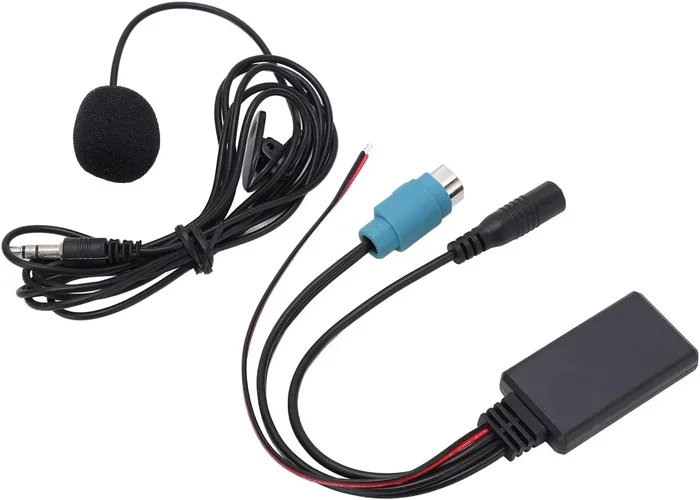
Do Bluetooth Adapters Play Through Your Car Speakers
Yes, Bluetooth adapters can play audio through your car speakers, transforming any vehicle into a wireless music hub. Whether you have an older car stereo or a modern system, a Bluetooth adapter lets you stream audio from your phone without wires. This guide walks you through how they work, the best types to buy, setup steps, and tips to improve sound quality on every drive.
Do Bluetooth adapters play through car speakers? The short answer is yes. A Bluetooth adapter bridges the gap between your phone and your car audio system. It sends music, podcasts, and calls wirelessly to your speakers. You do not need cables or fancy equipment. This simple device opens up a world of wireless audio for any vehicle.
Many people wonder about this because older cars often lack modern features. You might have a stereo that only plays CDs or radio. A Bluetooth adapter changes that. It brings wireless streaming to your dashboard. Bluetooth technology has made it easy to enjoy your favorite audio on the road without any hassle.
In this guide, we will cover everything you need to know. We will look at how these adapters work, the different types available, and how to set them up. We will also share tips to get the best sound quality. By the end, you will know exactly if a Bluetooth adapter is right for your car.
Key Takeaways
- Bluetooth adapters work with most car speakers: They send audio wirelessly from your phone to your car stereo system.
- Multiple types exist: FM transmitters, AUX adapters, and built-in head units all support Bluetooth connectivity.
- Setup is simple: Most adapters pair in minutes and require no technical skills.
- Sound quality varies: Your choice of adapter and car stereo setup affects audio performance.
- Hands-free calling is a bonus: Many adapters let you make and receive calls through your car speakers.
- Older cars benefit the most: If your car lacks built-in Bluetooth, an adapter is an affordable upgrade.
📑 Table of Contents
- What Is a Bluetooth Adapter for Car Speakers?
- Types of Bluetooth Adapters for Car Speakers
- How to Set Up a Bluetooth Adapter in Your Car
- Benefits of Using a Bluetooth Adapter with Car Speakers
- Common Problems and How to Fix Them
- Tips for Getting the Best Audio Quality
- Bluetooth Adapters vs. Other Car Audio Options
- Can Bluetooth Adapters Work with Any Car Speaker System?
- Final Thoughts
What Is a Bluetooth Adapter for Car Speakers?
A Bluetooth adapter is a small device that connects your phone to your car stereo wirelessly. It uses Bluetooth technology to send audio signals. Think of it as a bridge between your phone and your speakers. The adapter receives audio from your phone and sends it to your car stereo system.
There are many reasons people use these adapters. Maybe your car is older and does not have Bluetooth built in. Maybe your current stereo is broken but the speakers still work. Or maybe you just want a cleaner setup without tangled wires. Whatever the reason, a Bluetooth adapter solves the problem.
The way it works is simple. Your phone connects to the adapter through Bluetooth pairing. Once paired, any audio from your phone streams to the adapter. The adapter then sends that audio to your car speakers. You can play music, podcasts, audiobooks, and even take calls. It is a convenient way to upgrade your car entertainment system without replacing your entire stereo.
How Does Bluetooth Connectivity Work in Cars?
Bluetooth uses radio waves to send data between devices. When you pair your phone with an adapter, they create a short-range wireless connection. This connection sends audio files from your phone to the adapter. The adapter then converts those signals into sound through your car speakers.
The process happens fast. There is very little delay between pressing play on your phone and hearing the sound in your car. Modern Bluetooth versions offer better range and faster connections. Bluetooth 5.0 and newer provide stronger signals and higher quality audio. This means fewer dropped connections and clearer sound.
Most adapters use a class 2 Bluetooth signal. This gives you a range of about 30 feet. That is more than enough for a car. Your phone can stay in your pocket or on the dashboard. The connection stays strong as long as the devices are within range.
Types of Bluetooth Adapters for Car Speakers
Not all Bluetooth adapters are the same. Different types work in different ways. Some are simple plug-and-play devices. Others require a bit more setup. Let us look at the most common options.
FM Transmitter Bluetooth Adapters
FM transmitter adapters are the most popular type. They plug into your car’s cigarette lighter or USB port. The adapter broadcasts your phone’s audio over an FM frequency. Your car radio picks up that frequency and plays the sound through your speakers.
These adapters are easy to use. You just plug them in, choose an empty FM frequency, and pair your phone. They work with almost any car that has a radio. The downside is that FM signals can sometimes pick up interference. Static or buzzing can happen if you live in an area with crowded radio frequencies.
However, many people find them reliable. They are affordable and do not require any permanent changes to your car. If you want a quick and easy solution, an FM transmitter is a great choice. It is similar to the concept of playing radio using Bluetooth, but with your own phone as the source.
AUX Bluetooth Adapters
AUX adapters connect directly to your car’s auxiliary input. Most modern cars have an AUX port somewhere in the dashboard. You plug the adapter into this port, and it sends audio directly to your car stereo.
This type of adapter gives better sound quality than FM transmitters. There is no radio signal involved, so there is no static or interference. The audio stays clean and clear. AUX adapters are great for people who care about sound quality.
The only requirement is that your car needs an AUX input. Older cars from the 2000s and 2010s usually have one. Some newer cars have dropped the AUX port in favor of USB or wireless connections. Check your dashboard before buying this type of adapter.
Bluetooth Car Stereo Head Units
A more permanent solution is replacing your entire car stereo. A Bluetooth car stereo head unit replaces your old radio. It has Bluetooth built right in. You pair your phone directly to the new stereo, and it plays through your existing car speakers.
This option gives the best sound quality. It also adds features like hands-free calling, voice control, and smartphone integration. If you are willing to invest more time and money, a new head unit is worth considering. It completely upgrades your car audio system.
Some people also look into making older speakers Bluetooth-ready. For example, you can make an old Bose Wave Radio Bluetooth using similar adapter technology. The same principles apply to car speakers.
How to Set Up a Bluetooth Adapter in Your Car
Setting up a Bluetooth adapter is easier than you might think. Most adapters follow a simple process. Here is a step-by-step guide that works for most models.
First, plug the adapter into your car. If you have an FM transmitter, plug it into the cigarette lighter. If you have an AUX adapter, plug it into the AUX port. Make sure the adapter is powered on and ready to pair.
Next, turn on Bluetooth on your phone. Go to your phone’s settings and look for available devices. Your adapter should appear in the list. Tap on it to start the pairing process.
Once paired, play music on your phone. The sound should come through your car speakers. If you do not hear anything, check the volume on both your phone and your car stereo. You may also need to select the correct input source on your car radio.
Here are some quick tips to make setup smoother:
- Turn off other Bluetooth devices near your car. This prevents connection conflicts.
- Restart your phone if pairing fails. A fresh start often fixes connection issues.
- Keep your phone close to the adapter during pairing. This ensures a strong initial connection.
- Check the adapter’s manual for model-specific instructions. Every adapter is slightly different.
Once you complete the setup, your adapter will remember your phone. You do not need to pair again every time you get in the car. The connection happens automatically when both devices have Bluetooth turned on.
Benefits of Using a Bluetooth Adapter with Car Speakers
There are many reasons to use a Bluetooth adapter in your car. These benefits make the investment worthwhile for most drivers.
Wireless Convenience
The biggest benefit is going wireless. No more tangled cables or fumbling with aux cords. You just pair your phone once and enjoy wireless audio every time you drive. It is clean, simple, and modern.
Hands-Free Calling
Most Bluetooth adapters support hands-free calling. When you receive a call, the audio comes through your car speakers. You can answer and talk without touching your phone. This is safer and more convenient than holding your phone while driving.
Some adapters also have built-in microphones. You can make calls directly through the adapter. This feature turns your car into a hands-free calling hub. It is especially useful for people who spend a lot of time on the road.
Better Sound Quality Than Built-In Systems
Some car manufacturers skimp on the audio quality of built-in systems. A good Bluetooth adapter can actually improve your sound. It sends a clean digital signal to your speakers. The result is clearer music and better bass response.
If you care about audio quality, an adapter is an easy upgrade. It costs much less than replacing your entire stereo system. You get better sound without a big investment.
Compatibility with Multiple Devices
Bluetooth adapters work with more than just phones. You can connect tablets, laptops, and even portable music players. This makes your car a versatile audio hub. Friends and family can also connect their devices easily.
Some adapters can connect to two devices at once. This means you and your passenger can each play music from your own phone. It is a small feature that makes a big difference on long road trips.
Common Problems and How to Fix Them
Bluetooth adapters are reliable, but they can have occasional issues. Here are the most common problems and how to solve them.
Connection Drops or Interference
If your audio cuts out while driving, the connection may be dropping. This often happens with FM transmitter adapters. Other radio signals or electronic devices can cause interference.
To fix this, try changing the FM frequency on your adapter. Find a frequency with less radio traffic in your area. Also, keep your phone away from other electronic devices. Moving your phone closer to the adapter can strengthen the signal.
Poor Sound Quality
If the sound is crackly or distorted, check a few things first. Make sure your phone volume is turned up but not at maximum. Also check your car stereo volume. Sometimes the problem is simply too much volume on one end.
If the problem continues, try unpairing and re-pairing your devices. This refreshes the Bluetooth connection. You can also update your phone’s software. New updates often fix Bluetooth connectivity issues.
Adapter Not Showing Up on Your Phone
If your phone cannot find the adapter, try these steps. First, make sure the adapter is powered on and in pairing mode. Most adapters have a flashing light when they are ready to pair.
Turn off Bluetooth on your phone and turn it back on. This forces your phone to search for new devices. If that does not work, reset the adapter. Many adapters have a small reset button on the side or bottom.
Tips for Getting the Best Audio Quality
Want to get the most out of your Bluetooth adapter? Follow these expert tips to improve your listening experience.
Choose the Right Adapter for Your Car
Not every adapter works the same way in every car. Consider your car’s features before buying. If your car has an AUX port, get an AUX adapter. If it only has a radio, go with an FM transmitter. Matching the adapter to your car setup makes a big difference in performance.
Keep Your Adapter Firmware Updated
Some Bluetooth adapters have updatable firmware. Check the manufacturer’s website for updates. New firmware can improve connection stability and audio quality. It is a simple step that many people overlook.
Position the Adapter Properly
Where you place the adapter matters. For FM transmitters, keep it close to your car radio antenna. This gives the strongest signal. Avoid placing it near other electronics that might cause interference.
For AUX adapters, make sure the cable is securely plugged in. A loose connection causes crackling or intermittent sound. A snug fit ensures clean audio every time.
Use High-Quality Audio Files
The quality of your audio files affects what you hear. Streaming services like Spotify and Apple Music use compressed audio. This can sound fine on good speakers but may lack detail. If you want the best sound, download high-quality files or use lossless streaming options.
You can also check if your car supports playing music through a USB C connection. USB connections often provide better audio quality than Bluetooth. But a Bluetooth adapter still offers the most convenience for wireless streaming.
Bluetooth Adapters vs. Other Car Audio Options
There are several ways to play audio in your car. Let us compare Bluetooth adapters with other popular options.
| Feature | Bluetooth Adapter | AUX Cable | FM Transmitter (Standalone) | Car USB |
|---|---|---|---|---|
| Wireless Connection | Yes | No | Yes | No |
| Sound Quality | Good | Excellent | Fair | Good |
| Ease of Setup | Very Easy | Very Easy | Easy | Very Easy |
| Hands-Free Calling | Yes | No | Yes | No |
| Cost | Low to Medium | Very Low | Low | Low |
| Works with Older Cars | Yes | Yes | Yes | No |
Each option has its strengths. A Bluetooth adapter offers the best balance of convenience and quality. An AUX cable gives the purest sound but requires a wire. An FM transmitter is similar to a Bluetooth adapter but does not need a Bluetooth connection. And USB connections provide good audio but are limited to compatible devices.
For most people, a Bluetooth adapter is the best choice. It is wireless, easy to use, and works with almost any car. It brings modern audio features to older vehicles without expensive upgrades. If you want to learn more about car audio upgrades, you might also enjoy reading about putting a speaker on your car for additional audio options.
Can Bluetooth Adapters Work with Any Car Speaker System?
The short answer is almost any car. Bluetooth adapters are designed to be universal. They work with factory stereo systems and aftermarket units alike. As long as your car has speakers and a way to accept audio input, an adapter can work.
Here are some common car setups and how adapters fit in:
- Cars with AUX ports: Use an AUX Bluetooth adapter for the best quality.
- Cars with FM radio only: Use an FM transmitter Bluetooth adapter.
- Cars with USB ports: Some adapters plug directly into USB for charging and audio.
- Cars with Bluetooth already: You may not need an adapter at all.
Even if your car is very old, there is likely an adapter that works for you. The key is finding the right type for your car’s input options. A little research goes a long way in finding the perfect match.
Final Thoughts
So do Bluetooth adapters play through car speakers? Absolutely. They are a simple, affordable way to bring wireless audio to any vehicle. Whether you drive a new car or a classic, an adapter can upgrade your listening experience. The setup takes minutes, and the benefits last for years.
Bluetooth adapters give you wireless convenience, hands-free calling, and better sound quality. They work with almost every car on the road today. The wide range of adapter types means there is a solution for every budget and every car setup.
If your car does not have built-in Bluetooth, do not worry. A Bluetooth adapter fills that gap perfectly. You get all the wireless features of a modern car without replacing your stereo. It is one of the best small upgrades you can make to your vehicle.
Pick the right adapter for your car, follow the setup steps, and enjoy wireless audio on every drive. Your car speakers will thank you. And your daily commute or road trip will feel more modern and enjoyable. Start exploring Bluetooth adapter options today and transform the way you listen in your car.
Frequently Asked Questions
Do Bluetooth adapters work with all car speaker brands?
Yes, Bluetooth adapters work with virtually all car speaker brands. They send audio signals through your car’s existing stereo system, so the brand of your speakers does not matter. Whether you have Bose, Sony, JBL, or factory-installed speakers, a Bluetooth adapter will connect and play audio through them.
Can I use a Bluetooth adapter and charge my phone at the same time?
Many Bluetooth adapters come with a USB port for charging. You can plug your phone into the adapter while it plays audio through your car speakers. This is very convenient for long drives. Just make sure your car’s power outlet can handle both the adapter and your phone charger.
Is the sound quality as good as a wired connection?
Bluetooth audio is very close to wired quality with modern adapters. The difference is small and hard to notice for most listeners. AUX Bluetooth adapters provide the best wireless sound quality. FM transmitters may have slight static or compression compared to wired connections.
How far can my phone be from the Bluetooth adapter?
Most Bluetooth adapters have a range of about 30 feet. This is plenty for a car since your phone usually sits on the dashboard or in a cup holder. The signal stays strong as long as your phone is within that range. Going too far from the adapter will cause the connection to drop.
Do I need to buy a special app to use a Bluetooth adapter?
No, you do not need any special app. Bluetooth adapters work with your phone’s built-in Bluetooth settings. You pair the adapter through your phone’s Bluetooth menu and start playing audio. Some adapters may have companion apps for firmware updates, but they are not required for basic use.
Can I connect multiple phones to one Bluetooth adapter?
Most Bluetooth adapters can remember multiple paired devices. You can switch between phones by disconnecting one and connecting the other. Some newer adapters support multipoint connection, allowing two phones to stay connected at the same time. Check your adapter’s specifications to see if this feature is available.