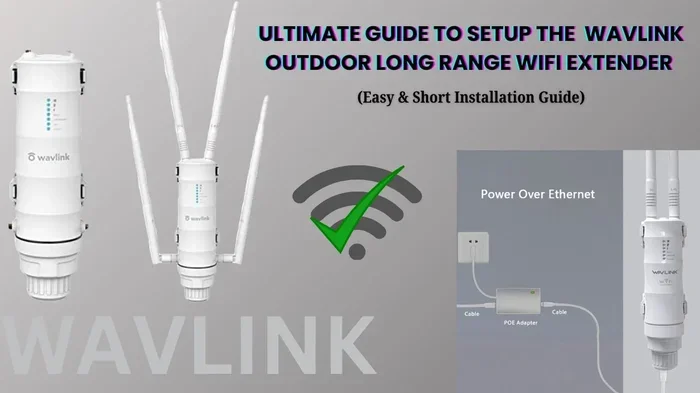
Can You Put A Wifi Extender Outside For Better Coverage
Yes, you can put a wifi extender outside to eliminate dead zones and boost your outdoor signal. A properly placed outdoor extender transforms your home network, delivering strong connectivity to patios, garages, and yards. However, you need the right type of extender, proper weatherproofing, and smart placement to make it work safely and effectively.
Have you ever tried to stream a movie on your patio only to watch it freeze every few seconds? Or maybe you have a backyard office and your wifi drops every time it rains. These frustrating moments happen to millions of people. The solution many consider is a wifi extender outside. But can you really put a wifi extender outside safely and effectively? The short answer is yes. The longer answer involves a few important details you need to know before you buy anything.
This guide covers everything you need to think about when placing a wifi extender outside. We will look at the types of extenders that work outdoors, how to set them up, common mistakes to avoid, and expert tips that make a real difference. Whether you want better coverage on your deck, in your garage, or across your entire yard, this article has you covered.
Key Takeaways
- Outdoor placement works: A wifi extender outside can significantly improve coverage in yards, patios, and detached buildings.
- Weatherproofing matters: You must protect your extender from rain, sun, and extreme temperatures to keep it running long-term.
- Placement is everything: The right spot between your router and the weak signal area makes all the difference.
- Not all extenders are equal: Outdoor-rated or weather-resistant models perform far better than indoor-only devices.
- Power and cabling need planning: You need a safe way to power the extender and connect it to your router.
- Security risks exist: An outdoor device exposes your network to new vulnerabilities if you don’t take precautions.
- Alternatives exist: Mesh systems and outdoor access points may be better solutions depending on your needs.
📑 Table of Contents
Why People Need Outdoor Wifi Coverage
Modern homes demand strong internet everywhere. Smart home devices, security cameras, streaming services, and remote work all require a solid connection. Unfortunately, most routers are placed inside the house. Walls, floors, and distance weaken the signal. This creates wifi dead zones in areas like backyards, side yards, and detached garages.
A wireless signal booster placed outside can bridge that gap. It picks up your existing signal and rebroadcasts it to areas your router cannot reach. Think of it as extending the reach of your home network beyond the walls. The result is smoother streaming, faster downloads, and fewer dropped connections in your outdoor spaces.
Common Areas That Need Better Outdoor Coverage
- Backyards and patios: For entertaining, grilling, or relaxing with smart speakers.
- Garages and workshops: Especially detached ones far from the main house.
- Pool areas: Where people often use tablets or phones by the water.
- Gardens and landscaping zones: For smart irrigation systems and security cameras.
- Driveways and walkways: Helpful for smart doorbells and outdoor lighting.
- Detached guest houses or studios: Where people work or stay away from the main router.
Can You Actually Put A Wifi Extender Outside
The short answer is yes, you can put a wifi extender outside. But not every extender is built for outdoor use. Putting an indoor extender outside without protection will lead to problems. Moisture, heat, cold, and dust can destroy the device quickly. So the real question is: how do you do it safely and effectively?
There are two main approaches. The first is using an outdoor-rated wifi extender. These devices are built with weather-resistant housings and can handle rain, sun, and temperature swings. The second approach is placing a standard indoor extender inside a weatherproof outdoor enclosure. This lets you use an indoor device in an outdoor setting with some extra protection.
Indoor vs Outdoor-Rated Extenders
Indoor extenders are not designed for direct exposure to the elements. They lack the sealing and materials needed to survive rain or humidity. Outdoor-rated extenders, on the other hand, come with an IP rating that tells you how well they resist water and dust. Look for at least an IP65 rating for reliable outdoor performance.
Indoor extenders placed in weatherproof enclosures can work well too. This option gives you more flexibility in terms of model choice. You can use a powerful indoor extender and protect it inside a NEMA-rated enclosure. Just make sure there is enough ventilation to prevent overheating.
What Happens If You Put An Indoor Extender Outside Without Protection
Rain and moisture will get inside the device. Humidity causes corrosion on the circuit boards. Direct sunlight heats the extender beyond safe operating temperatures. In winter, freezing temperatures can crack plastic housings and damage internal components. The result is a short lifespan and frequent signal drops. Never place an unprotected indoor extender outside.
Types Of Extenders That Work Outdoors
Not all wireless repeaters are created equal. Some are specifically designed for outdoor use, while others can be adapted. Understanding your options helps you choose the right device for your situation.
Weatherproof Outdoor Extenders
These are purpose-built for outdoor installation. They come in rugged housings that resist water, dust, and UV rays. Brands like Ubiquiti, TP-Link, and Netgear offer models rated for outdoor use. These extenders often include mounting brackets for poles, walls, or eaves. They also tend to have stronger antennas for longer range.
Mesh Network Systems With Outdoor Nodes
A mesh network uses multiple nodes placed around your property. Some mesh systems include outdoor-rated satellites or nodes. These work seamlessly with your indoor units to create a unified wireless access point network. Mesh systems are often easier to manage than traditional extenders because they use a single network name.
Powerline Extenders With Outdoor Adaptors
Powerline adapters use your home’s electrical wiring to transmit data. Some kits include outdoor powerline extenders that can be plugged into an exterior outlet. These are a great option if running an ethernet cable is not practical. However, performance depends on the quality of your home’s wiring.
Outdoor Access Points
An outdoor access point is similar to an extender but often more powerful. These devices connect directly to your router via ethernet and broadcast a new wifi signal in the outdoor area. They are ideal for large properties or commercial setups. Access points tend to deliver better speed and stability than traditional repeaters.
How To Set Up A Wifi Extender Outside
Setting up a wifi extender outside requires some planning. You cannot just plug it in and walk away. Proper setup ensures strong signal, safe operation, and long device life. Follow these steps for the best results.
Step 1: Choose The Right Location
Placement is the most important factor. You want the extender positioned halfway between your router and the area with weak signal. If the extender is too far from the router, it will not pick up a strong enough signal to rebroadcast. If it is too close, it will not extend coverage far enough.
Look for a spot that is elevated, like on a wall or under an eave. Avoid placing it on the ground where water can pool. Keep it away from metal objects that can block or reflect the signal. A signal strength meter app on your phone can help you find the sweet spot.
Step 2: Ensure Power Access
Your outdoor extender needs a power source. An exterior outlet near the mounting location is ideal. If you do not have one, you may need to hire an electrician to install an outdoor-rated outlet. Use a surge protector to shield the device from power surges caused by lightning or electrical storms.
Never use an indoor extension cord running through a window. This creates a safety hazard and can damage the cord over time. Weatherproof outdoor power solutions are the safest approach.
Step 3: Connect The Extender To Your Router
Most outdoor extenders connect wirelessly to your router. However, a wired connection using an ethernet cable is always better. A hardwired connection delivers faster speeds and more stable performance. If running a cable is not possible, make sure the extender is close enough to the router for a strong wireless link.
Step 4: Weatherproof The Device
Even outdoor-rated extenders benefit from extra protection. Mount the device under a roofline, eaves, or a weatherproof box. Avoid direct sunlight, which degrades plastic and electronics over time. Make sure all cable connections are sealed with waterproof connectors or electrical tape.
Step 5: Configure And Test
Access the extender’s settings through your phone or computer. Connect it to your router’s network and configure the wireless settings. Set the extender to the same network name and password if you want seamless roaming. Test the signal in the areas that previously had weak coverage. Walk around your yard and check for dead spots.
Quick Tips For Setup Success
- Place the extender where it can see your router clearly.
- Use a surge protector for all outdoor power connections.
- Mount the device at least 3 to 5 feet off the ground.
- Angle the antenna vertically for best horizontal coverage.
- Test signal strength at different times of day.
- Update the extender’s firmware regularly for best performance.
Common Mistakes To Avoid
Many people make avoidable mistakes when setting up a wifi extender outside. Learning from these errors saves time, money, and frustration.
Placing The Extender Too Far From The Router
This is the number one mistake. If the extender is too far from your router, it receives a weak signal. It then rebroadcasts that weak signal, resulting in slow speeds for connected devices. The extender needs a strong incoming signal to deliver a strong outgoing signal.
Ignoring Weather Protection
Even outdoor-rated devices can fail prematurely without proper shielding. Direct exposure to UV rays breaks down plastic housings. Rain seeps into unsealed cable connections. Moisture causes corrosion on internal components. Always provide some form of overhead protection and use sealed connectors.
Using The Wrong Channel Or Frequency
Wifi interference is a real problem, especially outdoors. Neighboring networks, baby monitors, and microwave ovens can all cause signal interference. Set your extender to the least congested channel. The 5GHz band offers faster speeds but shorter range. The 2.4GHz band travels farther but is more prone to interference. Choose based on your needs.
Forgetting About Security
An outdoor extender is physically accessible to others. Someone could tamper with the device or attempt to access your network. Always use strong network encryption like WPA3. Change the default admin password on the extender. Disable WPS if it is not needed. These simple steps protect your home network from unauthorized access.
Skipping Firmware Updates
Manufacturers release firmware updates that fix bugs, improve performance, and patch security vulnerabilities. An outdated extender is slower and less secure. Check for updates regularly through the extender’s admin panel or companion app.
Overlooking Heat Management
Outdoor enclosures can trap heat, especially in summer. Overheating causes the extender to throttle performance or shut down entirely. Choose a ventilated enclosure if you are using an indoor extender in an outdoor box. Avoid placing the device in direct sunlight for extended periods.
Expert Tips For Maximum Outdoor Coverage
Getting the most out of your wifi extender outside requires some insider knowledge. These tips come from networking professionals and experienced home users.
Use A High-Gain Antenna
If your extender has detachable antennas, swap them for high-gain models. A high-gain antenna focuses the signal in a specific direction. This is perfect for pointing the signal toward a backyard or detached garage. Standard omnidirectional antennas spread the signal in all directions, which wastes energy.
Consider A Wired Backhaul
Wireless backhaul means the extender connects to the router over wifi. This cuts your bandwidth in half because the device uses the same radio to receive and send data. A wired backhaul using an ethernet cable eliminates this problem. The extender gets full-speed data from the router and rebroadcasts it at full strength.
Pair Your Extender With A Good Router
An outdoor extender can only be as good as the router it connects to. If your router is old or low-end, upgrading it first may solve your coverage issues. Modern routers with MU-MIMO and beamforming technology deliver better, more targeted signals.
Add A Second Extender If Needed
For very large properties, one extender may not be enough. Adding a second wireless signal booster can cover a wider area. Just make sure each extender connects to the router or the previous extender in a chain. Avoid daisy-chaining more than two extenders, as this degrades speed.
Monitor Your Network Regularly
Use a network monitoring app to check signal strength, speed, and connected devices. This helps you spot problems early. If your outdoor speeds drop suddenly, it could be a sign of interference, a failing device, or a need for repositioning.
Key Takeaways For Outdoor Wifi Success
- Choose the right device: Use an outdoor-rated extender or protect an indoor one in a weatherproof enclosure.
- Placement matters: Position the extender halfway between your router and the weak signal area.
- Power safely: Use outdoor-rated outlets and surge protectors.
- Go wired when possible: An ethernet backhaul delivers the best performance.
- Protect against the elements: Shield the device from rain, sun, and extreme temperatures.
- Keep it secure: Use strong passwords and encryption to protect your network.
- Maintain regularly: Update firmware and monitor performance to keep everything running smoothly.
Conclusion
So, can you put a wifi extender outside? Absolutely. With the right device, proper placement, and adequate weather protection, an outdoor extender transforms your home network. You get strong, reliable connectivity in your yard, patio, garage, and anywhere else your indoor router cannot reach. The key is choosing a weather-resistant model or protecting your device properly, placing it at the right distance from your router, and keeping the setup secure and updated.
A wifi extender outside is not a magic fix, but it is a powerful tool when used correctly. Avoid the common mistakes outlined in this guide, follow the setup steps carefully, and you will enjoy seamless outdoor connectivity for years to come. Start with the tips in this article, test your setup, and adjust as needed. Your outdoor spaces deserve the same fast, reliable internet your indoor spaces enjoy.
Frequently Asked Questions
Can any wifi extender be used outside?
Not all extenders are suitable for outdoor use. Indoor extenders lack weatherproofing and will fail if exposed to rain or humidity. You need either an outdoor-rated extender or an indoor extender placed inside a weatherproof enclosure with proper ventilation.
What is the best placement for an outdoor wifi extender?
The best placement is halfway between your router and the area with weak signal. Mount it on a wall or under an eave at least 3 to 5 feet off the ground. Avoid placing it near metal objects or in direct sunlight.
Do outdoor wifi extenders need special power?
Outdoor extenders need a weatherproof power source. Use an exterior outlet with a surge protector. Never run an indoor extension cord through a window or use an unprotected indoor outlet for outdoor devices.
Will an outdoor wifi extender work in the rain?
Only if the extender has a proper IP rating for outdoor use. Look for at least an IP65 rating, which protects against rain and dust. Even weatherproof devices benefit from additional overhead protection like mounting under a roofline.
Can I use a mesh system instead of a wifi extender outside?
Yes, mesh systems with outdoor-rated nodes are an excellent alternative. They create a seamless network across your entire property. Mesh systems are often easier to manage and offer better performance than traditional extenders, though they tend to cost more.
How far can a wifi extender reach outside?
The range depends on the extender model, antenna strength, and obstacles. A typical outdoor extender can cover 100 to 300 feet in open space. Walls, trees, and other structures reduce this range significantly. Using a wired backhaul extends effective coverage further.