Can You Hook Up A Vcr To A Roku Tv And Watch Old Tapes
Yes, you can hook up a VCR to a Roku TV and watch your old tapes. You will need either a composite-to-HDMI converter or an RF modulator to make the connection work. This guide walks you through every step, from choosing the right cables to fixing common problems.
Can you hook up a VCR to a Roku TV and watch old tapes? The short answer is yes. But the process is not always plug-and-play. You need the right cables, the right adapter, and a little patience. This guide will show you exactly how to do it.
Many people still have boxes of VHS tapes sitting in their closets. Family recordings, favorite movies, and old home videos are all on those tapes. A Roku TV is a great modern streaming device. But it does not have a built-in VCR player. So how do you bridge the gap? Let us find out together.
Key Takeaways
- You can connect a VCR to a Roku TV: You just need the right cables or a converter box to bridge the gap between old and new tech.
- Composite-to-HDMI converters are the best option: They give you the clearest picture and the easiest setup for watching old tapes on a modern TV.
- RF modulators work as a backup: If you do not have a converter, you can still use coaxial cables and tune to channel 3 or 4.
- Check your VCR and Roku model first: Not all VCRs or Roku TVs have the same ports, so knowing your equipment matters.
- Troubleshooting is simple: Most issues like no picture or poor sound come from loose cables or wrong input settings.
- You can also record from Roku to VCR: With the right setup, you can capture streaming content onto old tapes for fun.
📑 Table of Contents
- Why Connect a VCR to a Roku TV?
- What You Need to Hook Up a VCR to a Roku TV
- How to Connect a VCR to a Roku TV with an HDMI Converter
- How to Connect a VCR to a Roku TV Without a Converter
- Common Problems and How to Fix Them
- Can You Record from Roku to a VCR?
- Best VCR Models for Connecting to Modern TVs
- Expert Insights on Vintage Tech and Modern TVs
- Key Takeaways
- Conclusion
Why Connect a VCR to a Roku TV?
You might wonder why anyone would want to do this. Streaming services have everything these days. So why bother with old tapes? The truth is that some things you just cannot replace. Your family memories are one of them.
VHS tapes hold a special kind of value. They are not just plastic and magnetic tape. They are moments frozen in time. A birthday party from 1995. A wedding video from 2001. These things matter deeply to people.
Also, some movies and shows are only available on VHS. Rare recordings, out-of-print documentaries, and old TV episodes may never make it to streaming platforms. By connecting your VCR to a Roku TV, you keep these memories and media alive.
The Nostalgia Factor
There is also the nostalgia side of things. Watching a VHS tape on a big flat screen feels different. The warm glow of old recordings brings back memories. It is a way to connect with the past. And sharing those tapes with younger family members creates new bonds too.
What You Need to Hook Up a VCR to a Roku TV
Before you start, gather your tools. The right equipment makes the whole process much easier. Here is what you will likely need.
Step 1: Check Your VCR Ports
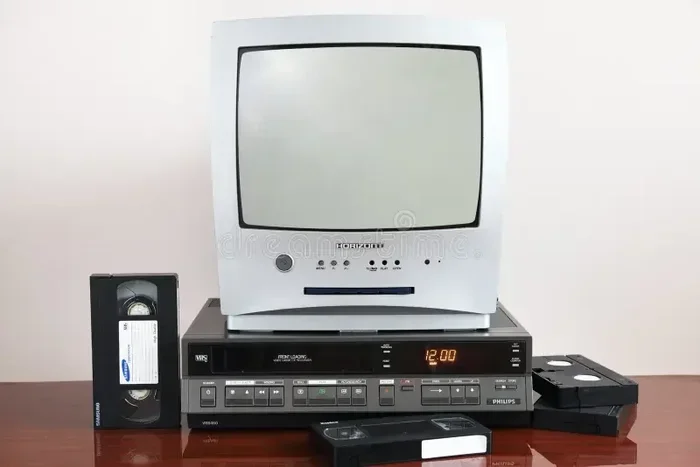
Look at the back of your VCR. Most VCRs have one of two types of outputs. The first is composite AV outputs. These are the red, white, and yellow RCA cables. The second is coaxial output. This is the single round metal plug.
Some newer VCRs also have S-Video outputs. These look like a round plug with many small pins. Check which ports your VCR has before buying any cables.
Step 2: Check Your Roku TV Inputs
Now look at your Roku TV. Most Roku TVs have HDMI ports. Some also have AV inputs on the side or back. The HDMI port is the most common. But your VCR cannot plug directly into HDMI. You need a converter for that.
If your Roku TV has AV inputs, you may be able to connect with RCA cables directly. This is the simplest option. But many modern Roku TVs do not have these inputs anymore.
Step 3: Get the Right Converter
A composite-to-HDMI converter is the most popular solution. This small box takes the red, white, and yellow RCA signals from your VCR and converts them to HDMI. Then you plug the HDMI cable into your Roku TV.
These converters are affordable. You can find them for under 30 dollars online or at electronics stores. Look for a converter that supports 1080p output for the best picture quality.
How to Connect a VCR to a Roku TV with an HDMI Converter
This is the easiest and most reliable method. Here is a step-by-step guide to get it done right.
What You Need for This Method
- Composite-to-HDMI converter box
- RCA cables (red, white, yellow)
- HDMI cable
- Power adapter for the converter
Step-by-Step Connection Process
Follow these steps carefully. Take your time and make sure each connection is secure.
- Plug the RCA cables into the VCR output ports. Match the colors. Red to red. White to white. Yellow to yellow.
- Connect the other end of the RCA cables to the input side of the HDMI converter.
- Plug the HDMI cable into the output side of the converter.
- Connect the other end of the HDMI cable to an HDMI port on your Roku TV.
- Plug the power adapter into the converter box.
- Turn on your Roku TV and set the input to the correct HDMI port.
That is it. You should now see your VCR screen on the TV. Put a tape in and press play. If you see nothing, do not worry. We will cover troubleshooting later in this guide.
Quick Tips for Best Picture Quality
- Use a short HDMI cable to avoid signal loss.
- Make sure the converter supports the right output resolution.
- Clean the VCR heads with a head cleaning tape before watching.
- Use a power strip with surge protection for all your devices.
How to Connect a VCR to a Roku TV Without a Converter
If you do not want to buy a converter, there is another way. This method uses coaxial cables and the TV tuner. It works, but the picture quality is not as good.
Using an RF Modulator or Coaxial Connection
Some VCRs have a coaxial output. This is the same type of cable that connects to a cable box. You can use this to connect to your Roku TV if it has a coaxial input.
However, most Roku TVs do not have coaxial inputs. In that case, you can use an RF modulator. This device changes the VCR signal to a channel that your TV can pick up. You set the modulator to channel 3 or channel 4.
Then you use a coaxial cable from the VCR to the modulator. Another coaxial cable goes from the modulator to the TV antenna input. You tune your Roku TV to channel 3 or 4. The VCR picture should appear on screen.
Pros and Cons of the No-Converter Method
| Pros | Cons |
|---|---|
| No extra equipment needed if you have coaxial cables | Picture quality is lower than HDMI |
| Simple setup with fewer devices | Can be prone to interference and static |
| Works with older VCR models | Requires tuning to the right channel |
| Cost-effective if you already have cables | Audio and video may not sync perfectly |
Common Problems and How to Fix Them
Hooking up a VCR to a Roku TV is not always smooth sailing. Here are the most common issues and how to solve them.
No Picture on the Screen
This is the most common complaint. If you see a black screen, check a few things first. Make sure all cables are firmly plugged in. A loose connection causes this problem more than anything else.
Next, check that your Roku TV is on the right input. Press the home button on your Roku remote. Go to Settings. Then select TV Inputs. Choose the HDMI port where your converter is connected.
Also, make sure the converter box is powered on. Some converters need their own power source. If the power light is off, plug in the adapter.
Poor Picture Quality or Static
If the picture is grainy or full of static, your cables might be old or damaged. Try replacing the RCA cables first. Cheap cables can cause a lot of picture problems.
You should also clean your VCR heads. Over time, dust and oxide buildup can degrade the signal. A head cleaning tape costs just a few dollars and works wonders.
Another cause is signal interference. Keep your VCR away from other electronics. Power strips, routers, and speakers can all cause interference with the analog signal from your VCR.
No Sound or Poor Audio
If you have picture but no sound, check the audio cables. The white and red cables carry the left and right audio channels. Make sure they are in the right ports.
Also check your Roku TV audio settings. Go to Settings. Then select Audio. Make sure the audio output is set to HDMI. If it is set to optical or digital, you will get no sound from the VCR.
VCR Does Not Eject or Play Tapes
Sometimes the problem is not the connection but the VCR itself. Old VCRs can develop mechanical issues. If a tape gets stuck, try pressing the eject button gently a few times.
Never force a stuck tape out. This can damage both the tape and the VCR. If the VCR still does not work, it may need professional servicing. Or it might be time to consider a replacement VCR.
Can You Record from Roku to a VCR?
Yes, you can record from a Roku TV to a VCR. But this is more complicated than just watching tapes. You need to route the signal in the opposite direction.
Here is how it works. You take the HDMI output from your Roku and feed it into a capture device. Then you connect the capture device to the VCR using RCA cables. The VCR records the incoming signal onto a blank tape.
This lets you record streaming content onto VHS tapes. Some people do this for fun. Others do it to create physical backups of their favorite shows. It is a creative way to mix old and new technology.
What You Need for Roku-to-VCR Recording
- HDMI capture card or USB capture device
- RCA cables
- Blank VHS tapes
- A VCR with recording capability
Keep in mind that the quality will not be perfect. You are converting a digital signal to analog. Some loss in quality is expected. But for casual recording and nostalgia projects, it works well.
Best VCR Models for Connecting to Modern TVs
If you do not have a VCR yet, some models work better than others with modern TVs. Here are a few options to consider.
Top Picks for VCRs with Modern Compatibility
- Magnavox VCR: A reliable brand with composite outputs and easy setup.
- Panasonic VCR: Known for good picture quality and durable build.
- Sony SLV-N770: A classic model with solid performance and clear playback.
- Emerson VCR: Budget-friendly and works well with converter boxes.
When buying a used VCR, test it first if possible. Ask the seller about the condition of the heads and belts. A well-maintained VCR will give you much better results than a neglected one.
Expert Insights on Vintage Tech and Modern TVs
Connecting vintage electronics to modern displays is a growing trend. Many people are rediscovering the joy of watching old tapes. The key is using the right adapter to bridge the analog-to-digital gap.
Experts recommend always using a composite-to-HDMI converter over an RF modulator. The picture quality difference is significant. A good converter can make a 20-year-old VHS tape look surprisingly clear on a 4K Roku TV.
It is also important to store your tapes properly. Heat and humidity can damage VHS tapes over time. Keep them in a cool, dry place. Rewind tapes before storing them. And try to watch each tape at least once a year to keep the tape heads clean and the tape lubricated.
Key Takeaways
- You can connect a VCR to a Roku TV: You just need the right cables or a converter box to bridge the gap between old and new tech.
- Composite-to-HDMI converters are the best option: They give you the clearest picture and the easiest setup for watching old tapes on a modern TV.
- RF modulators work as a backup: If you do not have a converter, you can still use coaxial cables and tune to channel 3 or 4.
- Check your VCR and Roku model first: Not all VCRs or Roku TVs have the same ports, so knowing your equipment matters.
- Troubleshooting is simple: Most issues like no picture or poor sound come from loose cables or wrong input settings.
- You can also record from Roku to VCR: With the right setup, you can capture streaming content onto old tapes for fun.
Conclusion
So, can you hook up a VCR to a Roku TV and watch old tapes? Absolutely yes. You have several ways to do it. The best method is using a composite-to-HDMI converter. It is simple, affordable, and gives you great picture quality.
Your old VHS tapes hold memories that nothing else can replace. A family wedding. A childhood birthday. A favorite movie you watched a hundred times. By connecting your VCR to your Roku TV, you bring those memories back to life on a big, beautiful screen.
Do not let those old tapes sit in a box collecting dust. Follow the steps in this guide. Gather your cables. Get a converter if you need one. And enjoy watching your old tapes on your Roku TV today.
The process might feel a little technical at first. But once you make the connection and see that first flicker of your old tape playing on the big screen, it will all be worth it. Happy watching.
Frequently Asked Questions
Can you hook up a VCR to a Roku TV without any extra equipment?
In most cases, you will need at least a composite-to-HDMI converter or an RF modulator. Very few Roku TVs have direct AV inputs. So some kind of adapter is almost always necessary to make the connection work properly.
What kind of cables do I need to connect a VCR to a Roku TV?
You will need RCA cables (red, white, and yellow) for the video and audio signals. You will also need an HDMI cable to connect the converter box to your Roku TV. A composite-to-HDMI converter is the key piece of equipment that bridges the old VCR and the modern TV.
Why is there no picture when I connect my VCR to my Roku TV?
The most common reason is a loose cable connection. Check that all RCA and HDMI cables are firmly plugged in. Also make sure your Roku TV is set to the correct HDMI input. If you are using a converter, ensure it is powered on with its own adapter.
Can I record from my Roku streaming service to a VHS tape?
Yes, you can record from Roku to a VCR. You need an HDMI capture device or capture card to convert the Roku signal. Then you connect that device to your VCR using RCA cables. The VCR will record the incoming signal onto a blank tape.
Does connecting a VCR to a Roku TV affect the TV picture quality?
The VCR signal is analog, so it will never look as sharp as digital streaming. However, a good composite-to-HDMI converter can significantly improve the picture. The result will be much better than using an RF modulator or older connection methods.
Are there any VCR models that work better with Roku TVs?
Most standard VCRs work fine with a converter box. Brands like Magnavox, Panasonic, and Sony are reliable choices. When buying a used VCR, look for one with clean heads and a working eject mechanism for the best results with your Roku TV setup.