Can You Have Wi Fi Through Verizon At Home or Office
Yes, you can have Wi-Fi through Verizon using their home internet plans, 5G Home Internet, or Fios fiber services. Verizon offers flexible options for both home and office setups, giving you reliable wireless connectivity without traditional cable lines. This guide covers everything you need to know about setting up and optimizing your Verizon Wi-Fi experience.
Can you have Wi-Fi through Verizon? The short answer is absolutely yes. Whether you are setting up internet for a cozy apartment or a bustling office, Verizon has options that can bring wireless connectivity right to your doorstep. Over the years, Verizon has built one of the most robust networks in the United States, and they now offer several ways to deliver Wi-Fi directly to your home or workplace.
Many people still wonder about the difference between having a Verizon cellular plan and having Wi-Fi through Verizon. The truth is, these are two different things. A cell phone plan gives your phone mobile data. But Wi-Fi through Verizon means you get a home or office broadband connection that broadcasts a wireless signal throughout your space. This allows all your devices, from laptops to smart TVs, to connect without wires.
In this article, we will walk you through every aspect of getting Wi-Fi through Verizon. We will cover the different types of Verizon internet services, how they work, what plans are available, and how to set everything up. You will also find practical tips to boost your signal and avoid common pitfalls. By the end, you will have a clear picture of whether Verizon Wi-Fi is the right choice for you.
Key Takeaways
- Verizon offers multiple ways to deliver Wi-Fi: including 5G Home Internet, Fios fiber, and LTE-based solutions for both home and office use.
- You need a Verizon internet plan and a compatible router to get Wi-Fi working in your space, whether residential or commercial.
- Setting up Verizon Wi-Fi is straightforward with the Verizon router app and step-by-step installation guides.
- Wi-Fi signal strength depends on your location, plan, and equipment, so choosing the right Verizon service for your area matters.
- Common issues like slow speeds or dropped connections can often be fixed with simple troubleshooting steps.
- Verizon’s 5G Home Internet is a game-changer for areas without traditional broadband infrastructure.
- Expert tips can help you maximize your Verizon Wi-Fi performance at home or in the office.
📑 Table of Contents
- What Is Wi-Fi Through Verizon?
- How Verizon Delivers Wi-Fi to Your Home
- Verizon Home Internet Plans and Options
- Setting Up Wi-Fi Through Verizon at Home or Office
- Comparing Verizon Wi-Fi With Other Internet Services
- Common Problems and How to Fix Them
- Expert Tips for Getting the Best Wi-Fi From Verizon
- Is Wi-Fi Through Verizon Right for You?
What Is Wi-Fi Through Verizon?
When people ask “Can you have Wi-Fi through Verizon,” they usually want to understand what the service actually is. Wi-Fi through Verizon means using Verizon’s network infrastructure to provide a wireless internet connection in your home or office. Instead of relying on cable lines or DSL, Verizon uses cellular towers, fiber optics, or fixed wireless technology to deliver your broadband connection.
The Wi-Fi signal you get in your home comes from a router provided by Verizon or a compatible device you set up yourself. This router connects to Verizon’s network and then broadcasts a wireless signal that your phones, tablets, computers, and smart home devices can use. Think of it as having your own personal internet hotspot, but designed for everyday use across an entire building.
How Verizon Wi-Fi Differs From Mobile Data
It is easy to confuse Verizon Wi-Fi with mobile data. Mobile data is what your phone uses when you are on the go. It connects to nearby cell towers and gives you internet access anywhere. Wi-Fi through Verizon, on the other hand, is a dedicated home or office connection. It is designed to be faster, more stable, and built for heavy use like streaming, gaming, and video calls.
Another key difference is data limits. Many Verizon mobile plans have data caps or throttle speeds after a certain usage level. Verizon home internet plans, especially Fios and 5G Home Internet, often come with unlimited data or much higher thresholds. This makes them better suited for households and offices where multiple people are online all day long.
How Verizon Delivers Wi-Fi to Your Home
Verizon uses several technologies to bring Wi-Fi into your home. The method depends on your location, the plan you choose, and the infrastructure available in your area. Let us break down each method so you understand what to expect.
5G Home Internet
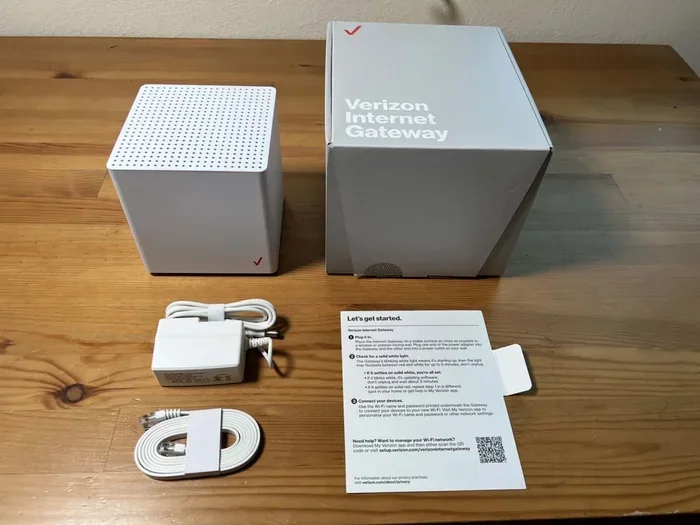
Verizon 5G Home Internet is one of the newest and most exciting options. It uses Verizon’s 5G cellular network to deliver broadband to your home. A small device called a 5G Home Internet router plugs into your power outlet and connects to the nearest 5G tower. This router then creates a Wi-Fi network inside your home.
This option is perfect for areas where traditional cable or fiber internet is not available. If you live in a rural area or a neighborhood without wired infrastructure, 5G Home Internet can be a lifesaver. It offers speeds that rival many cable connections and comes with unlimited data.
Verizon Fios
Verizon Fios is a fiber-optic internet service that delivers blazing-fast speeds through thin glass fibers. Fios is widely regarded as one of the best broadband options in the country. The fiber connection goes directly to your home, and Verizon provides a Wi-Fi router that broadcasts the wireless signal throughout your space.
Fios plans come in various speed tiers, from basic browsing to ultra-fast gigabit speeds. Because fiber is so reliable and fast, it is an excellent choice for homes with many users and devices. If you are a heavy streamer or work from home, Fios Wi-Fi can handle the load with ease.
LTE and Fixed Wireless Options
In some areas, Verizon also offers LTE-based home internet. This works similarly to 5G Home Internet but uses the older LTE network instead. While not as fast as 5G, LTE-based connections still provide solid broadband speeds for everyday use. Fixed wireless is another term used for these types of connections because the signal is transmitted wirelessly from a tower to a fixed receiver at your home.
Verizon Home Internet Plans and Options
When considering Wi-Fi through Verizon, understanding the available plans is essential. Verizon offers several tiers and types of home internet service, each designed for different needs and budgets. Let us look at what is on the table.
5G Home Internet Plans
Verizon’s 5G Home Internet plans are designed to be simple and affordable. They typically include unlimited data, a wireless router, and no annual contracts. Speeds can vary based on your location and network congestion, but most users experience download speeds between 25 Mbps and 1 Gbps.
One of the biggest advantages of 5G Home Internet is the lack of installation fees. The self-install kit arrives in the mail, and you can set it up yourself in minutes. This makes it a great option for renters or anyone who does not want to deal with a technician visit.
Fios Fiber Plans
Fios fiber plans range from basic speeds of 200 Mbps to ultra-fast gigabit plans. These plans often include a Verizon router with built-in Wi-Fi capabilities. Fios also offers TV and phone bundles, which can save you money if you need multiple services.
Fios is available in select markets, primarily in the northeastern United States. If you live in an area with Fios coverage, it is worth seriously considering for your home Wi-Fi needs. The reliability and speed of fiber are hard to beat.
Business and Office Plans
If you are asking about Wi-Fi through Verizon for an office, Verizon has business plans too. These plans offer higher speeds, dedicated customer support, and service level agreements. They also include advanced networking features like static IP addresses and VPN support, which are essential for many businesses.
Verizon business internet can be delivered through Fios, 5G, or dedicated fiber lines. The right choice depends on your office size, number of users, and the type of work you do. Small offices might be fine with 5G Home Internet, while larger operations may need a dedicated fiber connection.
Setting Up Wi-Fi Through Verizon at Home or Office
Setting up Wi-Fi through Verizon is easier than most people think. Whether you choose 5G Home Internet or Fios, the process is designed to be user-friendly. Here is a step-by-step look at what to expect.
What You Need Before You Start
Before setting up your Verizon Wi-Fi, make sure you have the following ready:
- A Verizon internet plan: You need to subscribe to a plan that includes home internet service.
- A Verizon router or compatible device: Verizon provides a router with most plans. You can also use your own router if it is compatible.
- A power outlet: Your router needs to be plugged in near a window or exterior wall for the best signal reception.
- A smartphone or computer: You will use the Verizon app or a web browser to configure your settings.
Step-by-Step Setup Process
Once you have your equipment, follow these steps to get your Wi-Fi up and running:
- Place your router: Put the router in a central location in your home or office. Avoid placing it in closets, behind furniture, or near metal objects that can block the signal.
- Plug in the router: Connect the router to power and wait for the lights to stabilize. This usually takes about two to three minutes.
- Connect to the router: Use the Verizon app on your phone or open a web browser on your computer. Look for the default network name and password, which are printed on a sticker on the router.
- Follow the setup wizard: The Verizon app will guide you through the setup process. You will enter your account details, set your Wi-Fi name and password, and configure any additional settings.
- Test your connection: Once setup is complete, open a browser and visit a website to confirm your Wi-Fi is working. Run a speed test to check your connection quality.
Tips for Optimal Router Placement
Where you place your Verizon router makes a big difference in Wi-Fi performance. Here are some quick tips:
- Place the router on a high shelf, not on the floor.
- Keep it away from microwaves, baby monitors, and other electronic devices that cause interference.
- Position it near the center of your home or office for even coverage.
- If you have a large space, consider using a Verizon Wi-Fi extender or mesh system to boost the signal.
Comparing Verizon Wi-Fi With Other Internet Services
When deciding on Wi-Fi through Verizon, it helps to compare it with other internet service providers and connection types. Here is a quick comparison of Verizon’s main offerings versus common alternatives.
| Feature | Verizon 5G Home | Verizon Fios | Cable Internet | DSL |
|---|---|---|---|---|
| Technology | 5G Cellular | Fiber Optic | Coaxial Cable | Phone Line |
| Typical Speeds | 25 Mbps to 1 Gbps | 200 Mbps to 940 Mbps | 50 Mbps to 1 Gbps | 5 Mbps to 100 Mbps |
| Data Limit | Unlimited | Unlimited | Varies by ISP | Varies by ISP |
| Installation | Self-Install | Professional Install | Professional Install | Professional Install |
| Contract | No Contract | Varies | Usually 1-2 Year | Usually 1-2 Year |
| Availability | Wide Coverage | Select Markets | Widespread | Widespread |
As you can see, Verizon Wi-Fi options offer strong advantages in flexibility and speed. The 5G Home Internet plan is especially attractive because it requires no contract and is easy to set up. Fios fiber is the gold standard for speed and reliability where it is available.
Common Problems and How to Fix Them
Even with a great service like Verizon Wi-Fi, you may run into issues from time to time. Here are the most common problems and how to solve them.
Slow Wi-Fi Speeds
If your Wi-Fi is slower than expected, start by running a speed test using the Verizon app or a website like Speedtest.net. Compare the results to your plan’s advertised speeds. If they do not match, try these steps:
- Restart your router by unplugging it for 30 seconds and plugging it back in.
- Move closer to the router to rule out signal distance as the issue.
- Check if other devices are using heavy bandwidth, like streaming or downloads.
- Update your router’s firmware through the Verizon app.
Wi-Fi Signal Drops
Intermittent signal drops can be frustrating. Common causes include router placement, interference from other devices, or network congestion. Try moving your router to a different location and switching to a less crowded Wi-Fi channel. If the problem persists, contact Verizon support for help.
Router Not Connecting
If your router will not connect to the Verizon network, check the following:
- Make sure the router is powered on and all cables are secure.
- Verify that your Verizon account is active and your bill is paid.
- Check for service outages in your area using the Verizon app or website.
- Reset the router to factory settings and set it up again.
Expert Tips for Getting the Best Wi-Fi From Verizon
Getting the most out of your Verizon Wi-Fi is about more than just plugging in a router. Here are some expert-backed tips to boost your performance.
Upgrade Your Router
While Verizon provides a decent router, upgrading to a newer model can significantly improve your Wi-Fi coverage and speed. Look for routers that support the latest Wi-Fi standards like Wi-Fi 6 or Wi-Fi 6E. These routers handle multiple devices better and offer faster speeds.
Use a Mesh Network System
If you have a large home or office, a single router may not cover every room. A mesh network system uses multiple nodes placed around your space to create a seamless Wi-Fi blanket. Verizon supports mesh systems, and you can also purchase third-party mesh units that work with your Verizon connection.
Secure Your Network
Keeping your Wi-Fi network secure is important for both performance and privacy. Use a strong password, enable WPA3 encryption if available, and change your default network name. These simple steps prevent unauthorized users from slowing down your connection.
Monitor Your Usage
Verizon offers tools to monitor your data usage and connected devices. Use these tools to identify which devices are using the most bandwidth and adjust your habits accordingly. This is especially helpful in office environments where many people share the same connection.
Is Wi-Fi Through Verizon Right for You?
Deciding whether Wi-Fi through Verizon is the right choice depends on your specific needs and circumstances. If you live in an area with strong 5G coverage or Fios availability, Verizon offers excellent options for home and office internet. The plans are flexible, the speeds are competitive, and the setup process is simple.
For renters, the no-contract 5G Home Internet is particularly appealing. For families with heavy internet usage, Fios fiber provides the reliability and speed needed to keep everyone connected. And for businesses, Verizon’s business internet plans offer the features and support required to keep operations running smoothly.
Before making a decision, check Verizon’s coverage map for your address. This will tell you which services are available in your area and help you choose the best option. You can also compare Verizon plans with other providers in your area to ensure you are getting the best deal.
In summary, having Wi-Fi through Verizon is not only possible but also a great option for many households and offices. With multiple technologies, flexible plans, and easy setup, Verizon makes it simple to get wireless internet that fits your lifestyle. Whether you choose 5G Home Internet, Fios fiber, or a business plan, you can count on Verizon to deliver a reliable and fast Wi-Fi experience.
Frequently Asked Questions
Can I use my own router with Verizon Wi-Fi?
Yes, you can use your own router with Verizon internet service. However, make sure your router is compatible with Verizon’s network type, whether it is 5G, Fios fiber, or LTE. Using your own router can sometimes give you better performance and more features than the default Verizon router.
Does Verizon Wi-Fi require a contract?
Verizon 5G Home Internet does not require a contract, which makes it very flexible. However, Fios plans and business internet services may have contract terms depending on the specific plan and promotional offers. Always check the terms before signing up.
How fast is Verizon 5G Home Internet?
Verizon 5G Home Internet speeds can range from 25 Mbps to 1 Gbps depending on your location and network conditions. Most users experience speeds that are comparable to or better than traditional cable internet, making it a strong option for streaming, gaming, and working from home.
Can I get Verizon Wi-Fi in a rural area?
Yes, Verizon 5G Home Internet is designed to work in areas where traditional wired internet is not available. If you live in a rural area with 5G coverage, you can get reliable Wi-Fi through Verizon without needing cable or phone lines.
What is the difference between Verizon Wi-Fi and a mobile hotspot?
A mobile hotspot uses your phone’s cellular data to create a Wi-Fi network for other devices. Verizon Wi-Fi for home or office is a dedicated broadband connection that is designed for continuous, high-volume use. It is faster, more stable, and usually comes with unlimited data, unlike most mobile hotspot plans.
How do I check if Verizon internet is available at my address?
You can check Verizon’s availability by visiting their website and entering your address. The site will show you which services, including 5G Home Internet and Fios, are available at your location. You can also call Verizon customer support for a personalized check.
=== CONCLUSION ===
So, can you have Wi-Fi through Verizon? The answer is a resounding yes. Whether you are at home or in the office, Verizon offers multiple paths to reliable, fast wireless internet. From the cutting-edge 5G Home Internet to the lightning-fast Fios fiber, there is a Verizon solution for nearly every need and budget.
Setting up your Verizon Wi-Fi is simple, and the options for customization are plentiful. You can choose the plan that fits your usage, place your router for the best coverage, and use mesh systems or extenders to reach every corner of your space. And when issues arise, the troubleshooting steps are straightforward and easy to follow.
Take the time to check coverage at your address, compare plans, and pick the option that aligns with your internet needs. With Verizon Wi-Fi, you are getting a trusted brand with a powerful network behind it. Make the switch today and enjoy seamless connectivity at home or in the office.