Can Too Many Devices Slow Down Your Wifi Connection
Yes, too many devices can absolutely slow down your wifi connection. When multiple gadgets compete for the same bandwidth, your network becomes congested, causing slower speeds, buffering, and frustrating lag. Understanding your router’s limits and applying a few smart tweaks can dramatically improve your wireless network performance and keep every device running smoothly.
You are sitting on the couch, trying to binge your favorite show. The buffer wheel spins endlessly. Meanwhile, your partner is on a video call in the next room, and your teenager is gaming online. Something feels off. You wonder, can too many devices slow down wifi? The short answer is yes. But the full story is more interesting than you might think.
Most homes today have more connected devices than ever before. Smart TVs, phones, laptops, tablets, smart speakers, security cameras, and even smart fridges all tap into your wireless network. Each one grabs a slice of your available bandwidth. When too many devices compete at the same time, your internet connection suffers. Pages load slowly. Videos buffer. Calls drop. It is incredibly frustrating.
This article breaks down exactly why this happens, how many devices your router can handle, and what you can do about it. You will learn practical fixes you can try tonight. You will also discover when it is time to upgrade your equipment. Let us dive in.
Key Takeaways
- Device overload is real: Every connected device shares your available bandwidth, and too many can slow down wifi speeds significantly.
- Router capacity matters: Older or budget routers struggle with more than 15-25 devices, while modern models handle 50+.
- Bandwidth-hungry activities hurt the most: Streaming, gaming, and video calls consume far more data than simple browsing.
- Simple fixes work wonders: Changing channels, updating firmware, and using QoS settings can restore speed fast.
- Mesh systems solve coverage issues: A mesh wifi setup distributes devices across multiple nodes, reducing congestion.
- Your internet plan sets the ceiling: No router can deliver speeds your provider doesn’t supply.
- Regular maintenance helps: Restarting your router and monitoring connected devices keeps your network healthy.
📑 Table of Contents
What Happens When Too Many Devices Connect to Your Wifi
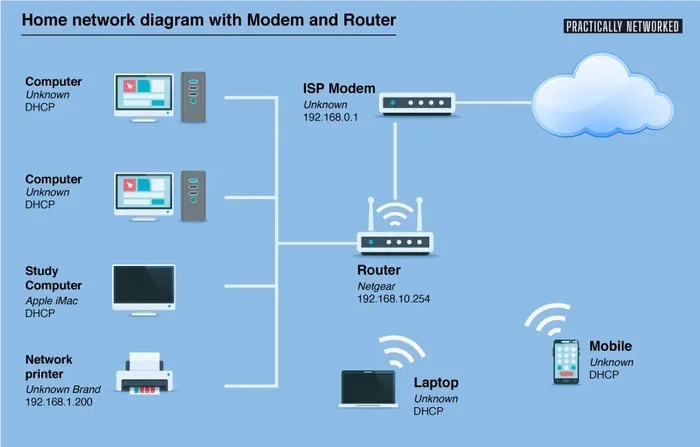
Think of your wifi router like a highway. Each device is a car on that road. When there are only a few cars, traffic flows freely. But when hundreds of cars pile up, everything slows down. This is called network congestion. Your router has a limited amount of data it can send and receive at any given moment.
How Bandwidth Gets Shared
Your internet plan gives you a certain amount of bandwidth. That is like a pipe carrying data to your home. Every device connected to your wireless network shares that pipe. When one device downloads a large file, it takes up a big chunk of the pipe. Add more devices, and the pipe gets split into smaller pieces. Each device gets less data per second.
Here is a simple example. Say your plan gives you 100 Mbps. One device streaming a 4K video might use 25 Mbps. That leaves 75 Mbps for everything else. But add five more devices streaming, browsing, and downloading. Suddenly, each device is fighting for a much smaller share. The result? Noticeably slow wifi speeds.
The Role of Your Router
Not all routers are created equal. A basic router from your internet provider might handle 10 to 15 devices comfortably. A high-end router can manage 30 or more. But here is the catch. Even the best router slows down when too many devices push it hard. The router’s processor and memory have limits. When those limits are reached, your entire network performance drops.
Older routers also lack modern features like dual band or tri band support. These technologies let your router use multiple frequency bands to spread out device traffic. Without them, every device competes on the same channel. That is a recipe for slow speeds.
How Many Devices Can Your Router Handle
This is one of the most common questions people ask. The honest answer is: it depends. Several factors determine how many devices your router can manage before things get sluggish.
Router Type and Quality
Budget routers handle fewer devices. A basic single-band router might start struggling around 10 to 15 devices. A mid-range dual-band router can usually manage 20 to 30. High-end mesh wifi systems can handle 40 or more without breaking a sweat. Here is a quick comparison.
- Basic routers: 10 to 15 devices before noticeable slowdown
- Mid-range routers: 20 to 30 devices with decent performance
- High-end routers: 30 to 50+ devices with stable speeds
- Mesh systems: 40 to 100+ devices depending on the setup
Internet Speed Matters Too
Your router is only half the equation. Your internet plan sets the upper limit. A 25 Mbps plan will struggle with many devices no matter how good your router is. A 300 Mbps plan gives you much more breathing room. Before blaming your router, check your plan speed at speedtest.net. If your speeds are far below what you pay for, the problem might be with your provider, not your router.
Device Activity Levels
Not all devices use the same amount of data. A smart thermostat uses almost nothing. A security camera streaming 24/7 uses a lot. A gaming console downloading updates hogs bandwidth. The type of activity matters just as much as the number of devices. Ten idle smart home devices will barely touch your speed. Ten devices all streaming 4K video will bring your network to its knees.
Signs Your Network Is Overloaded
How do you know if too many devices are causing problems? Your network sends clear warning signs. Learning to spot them early can save you a lot of frustration.
Slow Download and Upload Speeds
This is the most obvious sign. Pages take forever to load. Files download at a crawl. You run a speed test and the results are way below what your plan promises. If this happens consistently, too many connected devices might be the culprit.
Buffering and Lag During Streaming
Netflix keeps stopping to buffer. YouTube videos pixelate mid-playback. Online games lag during crucial moments. These issues often spike during peak usage hours when everyone in the house is online. If you notice this pattern, your network is likely congested.
Devices Losing Connection
Your phone drops from wifi randomly. Your smart speaker disconnects mid-command. A device shows a strong signal but refuses to load anything. These are signs that your router is overwhelmed and cannot manage all the connections properly.
High Latency and Packet Loss
Latency is the delay between sending a request and getting a response. Packet loss happens when data fails to reach its destination. Both cause lag, stuttering, and poor performance. You can check latency using a ping test. High ping numbers during heavy usage mean your network is struggling.
How to Fix Slow Wifi When You Have Many Devices
The good news is that you do not need to buy a new router right away. Several fixes can improve performance quickly and for free.
Restart Your Router Regularly
This sounds too simple, but it works. Restarting your router clears its memory and refreshes connections. Many people never restart their router for months. Try unplugging it for 30 seconds once a week. You will be surprised how much faster your internet connection feels afterward.
Use Quality of Service (QoS) Settings
Most modern routers include a QoS feature. This lets you prioritize certain devices or activities. For example, you can tell your router to give your work laptop top priority. Or you can prioritize video calls over background downloads. QoS ensures the most important tasks get the bandwidth they need, even when your network is busy.
Switch to the 5GHz Band
If your router supports dual band, use the 5GHz frequency for your most demanding devices. The 5GHz band is faster and less crowded than the 2.4GHz band. Smart TVs and gaming consoles benefit greatly from this switch. The tradeoff is shorter range, but for devices in the same room, it is a huge win.
Reduce Unnecessary Connections
Go through your connected devices and remove anything you do not recognize. Old phones, forgotten smart home gadgets, and guest devices all add up. Many routers have a companion app that lets you see every device on your network. Use it. Disconnect devices that are not actively in use.
Update Your Router Firmware
Router manufacturers release updates that fix bugs and improve performance. Outdated firmware can cause slow speeds and connection issues. Check your router settings or companion app for available updates. Keeping your router current is one of the easiest ways to maintain strong wifi performance.
Change Your Wifi Channel
Your neighbors wifi networks can interfere with yours. If multiple networks use the same channel, they clash and slow everyone down. Use a wifi analyzer app to find the least crowded channel. Then log into your router settings and switch to it. This simple change can noticeably reduce interference and boost speeds.
When to Upgrade Your Router or Network Setup
Sometimes fixes are not enough. If your router is more than five years old, it might be time for an upgrade. Modern routers come with better processors, more memory, and advanced features designed for today’s connected homes.
Consider a Mesh Wifi System
A mesh system replaces your single router with multiple nodes placed around your home. Each node acts as a mini router, spreading the load across your space. This means devices connect to the nearest node instead of fighting over one router. Mesh systems also use smart steering to move devices to the best band automatically.
Mesh systems are especially helpful in larger homes. Walls, floors, and distance weaken wifi signals. A mesh setup ensures strong coverage everywhere, which reduces the strain on any single connection.
Look for Wi-Fi 6 and Wi-Fi 7 Routers
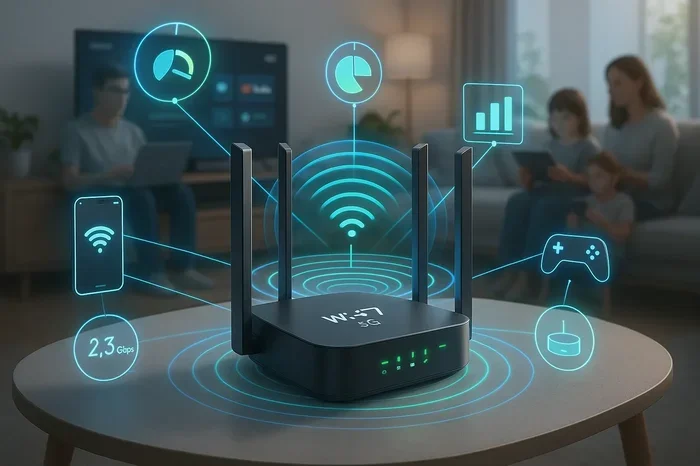
Wi-Fi 6 and Wi-Fi 7 are the latest wireless standards. They handle many devices far more efficiently than older standards. Wi-Fi 6 uses a technology called OFDMA, which slices data into smaller chunks and sends them to multiple devices at once. This dramatically reduces congestion. If you have more than 20 connected devices, a Wi-Fi 6 router is a game changer.
Check Your Internet Plan
Sometimes the problem is not your equipment. It is your internet plan. If your household has many heavy users, you might need faster speeds. Contact your internet provider and ask about higher-tier plans. The extra cost is often worth the improvement in daily performance.
Expert Tips to Keep Your Network Running Smoothly
Beyond the fixes mentioned above, a few habits can keep your wireless network in top shape for the long haul.
Place Your Router in a Central Location
Router placement matters more than most people realize. Keep your router in a central, open area of your home. Avoid hiding it in a closet or behind furniture. Walls and obstacles block wifi signals. A well-placed router reaches every corner of your home more effectively.
Set Up a Guest Network
Guest networks isolate visitors devices from your main network. This prevents guests devices from eating into your bandwidth. It also adds a layer of security. Most modern routers make it easy to set up a guest network through their settings panel.
Schedule Heavy Downloads
If someone in your household downloads large files or updates games, schedule it during off-peak hours. This spreads out the traffic and prevents congestion during the times you need your network most. Many routers let you set bandwidth schedules in their settings.
Use Ethernet for Stationary Devices
Devices that stay in one place benefit from a wired ethernet connection. Smart TVs, desktop computers, and gaming consoles deliver the best performance when plugged in directly. This frees up wireless bandwidth for your mobile devices. Even running one ethernet cable to your main TV can make a big difference.
Monitor Your Network Regularly
Make it a habit to check which devices are connected to your network. Most router apps show a real-time list. If you spot an unknown device, it could be a neighbor piggybacking on your connection. Change your wifi password immediately if you suspect unauthorized access. A secure network performs better and keeps your data safe.
Conclusion
So, can too many devices slow down wifi? Absolutely. Every connected device shares your router’s bandwidth and processing power. When that limit is exceeded, everyone suffers from slower speeds, buffering, and dropped connections. The good news is that you have many tools to fix the problem. From simple restarts and channel changes to QoS settings and mesh upgrades, there is a solution for every budget and every home.
Understanding how your wireless network works puts you in control. You do not have to accept slow speeds as a fact of life. With the right knowledge and a few adjustments, you can keep your internet connection fast and reliable, no matter how many devices you own. Start with the free fixes today. If those are not enough, consider upgrading your router or internet plan. Your future self, streaming without buffering, will thank you.
Frequently Asked Questions
How many devices is too many for a home wifi network?
Most standard routers start to struggle with more than 20 to 25 active devices. However, the real limit depends on your router’s quality and your internet speed. A high-end router with Wi-Fi 6 can handle 50 or more devices without noticeable slowdowns.
Will adding a second router speed up my wifi?
It can help, but only to a point. A second router can distribute the load, but it must be set up correctly. A mesh wifi system is a better long-term solution because it handles traffic more intelligently and provides seamless coverage throughout your home.
Does turning off unused devices help wifi speed?
Yes, it does. Every connected device uses a small amount of bandwidth, even when idle. Disconnecting devices you are not using frees up resources for the devices that matter most. This simple step can improve your speeds immediately.
Why does my wifi slow down at night?
Nighttime slowdowns often happen because more household members are online simultaneously. Streaming, gaming, and downloads all peak in the evening. Network congestion during these hours is the most common cause. Using QoS settings can help prioritize important traffic.
Can my neighbors wifi affect my connection?
Yes, it can. If your neighbor’s wifi network uses the same channel as yours, the signals interfere with each other. This is called channel overlap. Using a wifi analyzer app to find a less crowded channel can reduce this interference and boost your speeds.
Is a mesh wifi system worth the investment?
For homes with many devices or larger square footage, absolutely. Mesh systems eliminate dead zones and distribute the network load across multiple nodes. They also offer easier management through smartphone apps, making it simple to monitor and control your wifi connection from anywhere.