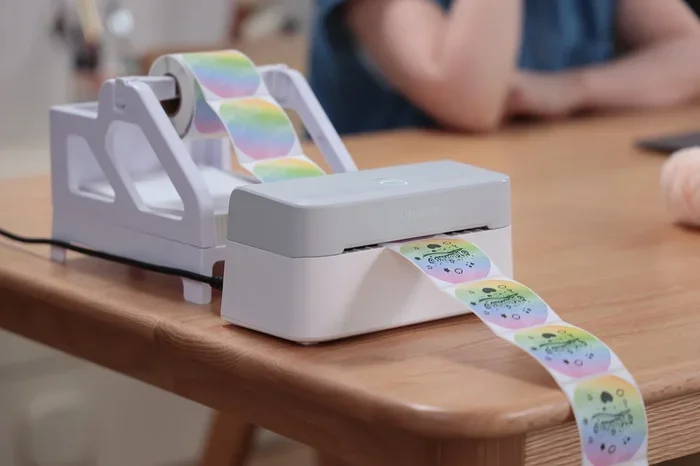
Can You Use Any Labels With Munbyn Thermal Printer
You cannot use just any label with a Munbyn thermal printer. The right Munbyn thermal printer labels depend on your specific model, label size, and material type. Using the wrong labels can cause jams, poor print quality, and wasted money.
Key Takeaways
- Munbyn thermal printers work best with specific label sizes and materials designed for thermal printing.
- Direct thermal labels and thermal transfer labels are not interchangeable — each needs the right printer type.
- Popular Munbyn models like the Munbyn 4X and Munbyn 2X have different label compatibility requirements.
- Label width, adhesive type, and material all matter when choosing labels for your printer.
- Using generic or incompatible labels can lead to smudging, jamming, and poor barcode readability.
- Buying the right label rolls saves time, reduces waste, and keeps your operations running smoothly.
📑 Table of Contents
- Can You Use Any Labels With Munbyn Thermal Printer?
- How Munbyn Thermal Printers Work
- Label Sizes and Dimensions for Munbyn Printers
- Label Materials and Adhesive Types
- Which Labels Work With Popular Munbyn Models
- Common Mistakes People Make With Munbyn Labels
- Where to Buy Compatible Labels for Munbyn Printers
- Quick Tips for Getting the Best Results
- Final Thoughts on Munbyn Label Compatibility
Can You Use Any Labels With Munbyn Thermal Printer?
If you just bought a Munbyn thermal printer, you might be wondering about label compatibility. The short answer is no — you cannot use just any label with your printer. But the good news is that finding the right labels is not as hard as it sounds.
Many people assume that all thermal printers work with all thermal labels. That is a common mistake. Different Munbyn printer models have different requirements. The wrong labels can cause jams, blurry prints, and wasted product labels. This guide breaks it all down so you know exactly what works and what does not.
We will cover label sizes, materials, types, and practical tips. By the end, you will feel confident picking the right label rolls for your Munbyn thermal printer. Let us get into it.
How Munbyn Thermal Printers Work
Direct Thermal vs. Thermal Transfer Printing
Understanding how your printer works is the first step. Munbyn thermal printers use heat to create images and text on labels. But there are two different methods. Knowing the difference helps you pick the right thermal printer paper every time.
Direct thermal printing uses heat-sensitive paper. The printer heats specific areas, and the paper darkens to form text or barcodes. No ink, no toner, no ribbon. It is simple and fast. This method works great for shipping labels, receipts, and short-term product labels.
Thermal transfer printing uses a ribbon coated with ink. The printer heats the ribbon, and the ink transfers onto the label material. This method creates more durable prints. It is ideal for product labels that need to survive moisture, heat, or frequent handling.
Most Munbyn label maker devices are direct thermal printers. This means you need direct thermal labels. Using thermal transfer labels without a ribbon will not work. And using direct thermal labels with a thermal transfer printer wastes the ribbon.
Why Printer Chemistry Matters
Thermal printers are not like regular inkjet or laser printers. They rely on a chemical reaction between the print head and the label surface. The coating on the label paper must be designed to react to heat in a specific way.
When you use the wrong label material, the chemical reaction fails. You get faint prints, smudged text, or no print at all. Over time, the wrong labels can even damage the print head. The print head is a sensitive and expensive part of your shipping label printer. Protecting it starts with using the right labels.
Label Sizes and Dimensions for Munbyn Printers
Common Label Sizes
Not all labels are the same size. Munbyn thermal printer models support specific label widths and lengths. Using a label that is too wide or too narrow causes misalignment and wasted material.
Here are the most common label sizes used with Munbyn printers:
- 2×1 inch labels — great for small product tags and barcode labels
- 3×1 inch labels — popular for inventory labels and warehouse markings
- 4×2 inch labels — ideal for shipping labels and return labels
- 4×3 inch labels — commonly used for product packaging and logistics
- 4×4 inch labels — used for larger shipping and address labels
Always check your printer model’s supported label dimensions before buying. The Munbyn 4X and Munbyn 2X, for example, may accept different label widths. Using the wrong size can lead to label jamming and frustrated printing sessions.
Why Label Width Matters So Much
The label width is the most critical measurement. If the label is even slightly too wide, it will not feed properly through the printer. If it is too narrow, the print may extend past the label edge. Both situations waste labels and slow you down.
Most Munbyn printers handle labels between 2 inches and 4 inches wide. Some models support wider or narrower sizes. Check your user manual or the product page for the exact supported range. This one detail saves you from buying the wrong adhesive labels in bulk.
Label Materials and Adhesive Types
Paper vs. Synthetic Labels
Not all label materials are created equal. The material you choose affects durability, print quality, and application. Here is a simple breakdown of the most common options.
Direct thermal paper labels are the most affordable choice. They work well for indoor use and short-term applications. Think shipping labels that last a few weeks or product tags for retail displays. They are easy to find and budget-friendly.
Synthetic or vinyl labels are more durable. They resist water, heat, and chemicals. These labels are perfect for outdoor use, warehouse environments, or products that face rough handling. If you need durable labels that last for months or even years, synthetic is the way to go.
Glossy vs. matte labels also matter. Glossy labels produce sharper, more vibrant prints. Matte labels reduce glare and are easier to write on by hand. Choose based on your specific use case.
Adhesive Options for Different Surfaces
The adhesive on your label determines where and how it sticks. Not all adhesives work on all surfaces. Here are the main types you will encounter:
- Standard acrylic adhesive — works on most flat surfaces like cardboard and plastic
- Freezer-grade adhesive — designed to stick in cold environments like freezers and cold storage
- High-tack adhesive — grips tightly to rough or textured surfaces
- Removable adhesive — allows clean removal without leaving residue
- Permanent adhesive — creates a strong bond that is not meant to be removed
Pick the adhesive based on where the label will live. A shipping label needs strong adhesion during transit. A price tag might need to be removable. Using the wrong adhesive leads to labels peeling off or leaving sticky residue on your products.
Which Labels Work With Popular Munbyn Models
Munbyn 4X Thermal Printer Labels
The Munbyn 4X is one of the most popular portable thermal printers. It supports a range of label sizes, typically from 2 to 4 inches wide. The 4X uses direct thermal printing, so you need direct thermal labels.
Most users pair the Munbyn 4X with 4×2 inch or 4×3 inch label rolls for shipping and logistics. The printer handles these sizes smoothly. Make sure the label roll diameter fits the printer’s holder. Some aftermarket labels are too thick or too thin and cause feeding issues.
Munbyn 2X and Mini Models
The Munbyn 2X and smaller models are designed for lighter-duty tasks. They usually support narrower label widths. These printers are great for barcode labels, name tags, and small product labels.
For the 2X and mini models, stick to 2×1 inch or 3×1 inch labels. These sizes match the print area and feed mechanism perfectly. Using oversized labels on a compact printer is a recipe for jams and misprints.
Munbyn 8X and Larger Models
The Munbyn 8X and larger models handle bigger label sizes. They are often used in warehouses and fulfillment centers. These printers can manage wider labels and longer continuous prints.
For the 8X, you can use 4×4 inch labels or even wider formats depending on the model. Always verify the maximum label width and roll diameter before purchasing. The manufacturer’s website lists compatible label specifications for each model.
Common Mistakes People Make With Munbyn Labels
Buying the Wrong Label Size
This is the number one mistake. People buy labels based on price or convenience without checking the size requirements. The result is wasted labels, wasted time, and a frustrated user.
Always measure your label or check the printer specs before ordering. A simple measurement saves hours of troubleshooting. Keep a spare roll of the correct size on hand so you never run into a mid-job shortage.
Using Non-Thermal-Sensitive Labels
Some people try to use regular sticker paper or inkjet labels with their thermal printer. This does not work. Regular paper does not have the heat-sensitive coating needed for thermal printing.
The print comes out blank or barely visible. Worse, the heat from the print head can damage non-compatible paper and leave residue inside the printer. Always use labels specifically designed for thermal printing.
Ignoring Label Roll Diameter
Label width is important, but the roll diameter matters too. Some printers cannot accommodate large-diameter rolls. If the roll is too big, it will not fit inside the printer holder.
Check the maximum roll diameter your Munbyn model supports. Standard rolls are usually 4 to 6 inches in diameter. Larger rolls may require a different printer model or an adapter.
Overlooking Print Darkness Settings
Even with the right labels, print quality depends on your printer settings. If the print is too light or too dark, adjust the heat settings in the printer software or app.
Different label materials respond differently to heat. Glossy labels need a different setting than matte labels. Synthetic labels need more heat than paper labels. Take a few minutes to test and calibrate your settings for each label type.
Where to Buy Compatible Labels for Munbyn Printers
Finding the right labels is easier than you think. You have several options for purchasing compatible Munbyn thermal printer labels.
- Munbyn official store — offers branded labels guaranteed to work with their printers
- Amazon and online retailers — carry a wide range of compatible thermal labels from third-party brands
- Specialty label suppliers — offer custom sizes and materials for unique needs
- Office supply stores — carry basic thermal labels in popular sizes
When shopping online, search for “Munbyn compatible labels” or “thermal printer labels 4×2.” Read reviews carefully. Some third-party labels work just as well as branded ones at a fraction of the cost. Others are low quality and cause feeding problems.
Buy in bulk when you find a reliable supplier. Label costs add up over time, and bulk orders save money per roll. Just make sure the bulk labels match your printer model and size requirements.
Quick Tips for Getting the Best Results
- Always test a small batch first before ordering hundreds of labels
- Store label rolls in a cool, dry place to prevent the adhesive from drying out
- Clean the print head regularly with a lint-free cloth and isopropyl alcohol
- Match the label material to the use case — indoor labels for indoor use, outdoor labels for outdoor use
- Keep spare label rolls on hand so you never face a printing delay
- Update your printer firmware for the best compatibility with newer label materials
- Use label design software that supports Munbyn printer dimensions for clean, professional prints
Final Thoughts on Munbyn Label Compatibility
The question “Can I use any labels with Munbyn thermal printer” has a clear answer. No, you cannot use just any label. But with the right knowledge, finding compatible labels is simple and straightforward.
Start by identifying your printer model. Then match the label size, material, and adhesive to your specific needs. Whether you are printing shipping labels, barcode labels, or product labels, the right labels make all the difference.
Invest in quality thermal printer paper and adhesive labels from trusted suppliers. Your Munbyn thermal printer will reward you with clean, sharp, and durable prints every time. Take the time to get it right, and your labeling workflow will run smoothly from day one.
Remember, the cheapest labels are not always the best. A slightly higher price for compatible, high-quality labels saves money in the long run by reducing waste and reprints. Make informed choices, and your Munbyn printer will serve you well for years to come.
Frequently Asked Questions
Can I use regular sticker paper with a Munbyn thermal printer?
No, regular sticker paper will not work with a Munbyn thermal printer. Thermal printers need heat-sensitive coated paper or synthetic labels. Regular paper does not have this coating, so the print will come out blank or very faint.
What size labels does the Munbyn 4X accept?
The Munbyn 4X typically accepts labels between 2 and 4 inches wide. The most popular sizes are 4×2 inches and 4×3 inches. Always check the official Munbyn specifications for your specific model to confirm the exact supported sizes.
Are Munbyn thermal labels reusable?
Most direct thermal labels are not reusable. Once printed, the image is permanent. However, some specialty thermal labels are designed to be erased and reprinted. These are rare and usually more expensive than standard labels.
Can I use third-party labels with my Munbyn printer?
Yes, you can use third-party labels as long as they match the correct size, material, and thermal sensitivity for your Munbyn model. Many users find that third-party labels work just as well as branded ones and cost less.
How do I know if a label is direct thermal or thermal transfer?
Direct thermal labels are coated with a heat-sensitive layer and do not need a ribbon. Thermal transfer labels require a separate ink ribbon. Check the label packaging or product description to confirm which type it is.
How long do thermal labels last before fading?
Direct thermal labels typically last from a few months to a year, depending on storage conditions and exposure to heat or light. Synthetic labels and labels with a protective coating can last much longer, sometimes several years.
=== CONCLUSION ===
Using the right labels with your Munbyn thermal printer is essential for great print quality and smooth operation. You now know that not all labels are compatible, and the right choice depends on your printer model, label size, material, and adhesive type.
Take a moment to review your printer specs. Check the supported label widths, materials, and roll sizes. Then invest in quality Munbyn thermal printer labels that match your needs. Whether you are running a small business, managing inventory, or shipping orders daily, the right labels make your work faster and more professional.
Start with the tips in this guide. Test your labels, adjust your settings, and build a reliable labeling system. Your Munbyn printer is a powerful tool — and with the right labels, it will perform at its best every single time.