Are All HDMI Cords The Same Everything You Need To Know
No, all HDMI cords are not the same. Different HDMI cable types support different resolutions, speeds, and features. Choosing the right HDMI cable can make or break your viewing experience.
You plug in an HDMI cable and expect it to work. Most of the time, it does. But have you ever wondered if all HDMI cords are truly the same? The short answer is no. Not even close. Different cables carry different signals, support different resolutions, and deliver different levels of performance. Understanding this difference can save you money, frustration, and a whole lot of guesswork.
Whether you are setting up a home theater, connecting a gaming console, or hooking up a new TV, the HDMI cable you choose matters. A cheap cable might work fine for basic tasks. But if you want 4K resolution, high refresh rates, or HDR content, you need the right HDMI cable type. This guide breaks down everything you need to know about HDMI cords, their differences, and how to pick the best one for your needs.
The world of HDMI cables can feel confusing. There are versions, speed ratings, certifications, and connectors to consider. But here is the good news. Once you understand the basics, it all makes sense. You will never buy the wrong cable again. Let us dive in and explore what makes each HDMI cord different from the next.
Key Takeaways
- HDMI cables are not one-size-fits-all. Each version supports different bandwidth and features.
- HDMI 2.1 cables are needed for 4K at 120Hz and 8K content.
- Cable speed ratings matter more than price tags in most cases.
- Certification labels like Ultra High Speed help you pick the right cable quickly.
- Longer cables can cause signal loss, so choose the right length for your setup.
- Matching your cable to your device ensures the best picture and sound quality.
- Most people overpay or under-buy HDMI cables without checking their actual needs.
📑 Table of Contents
Understanding HDMI Cable Types and Versions
HDMI technology has evolved a lot over the years. Each new version brought better bandwidth, higher resolutions, and cool new features. Knowing which version you need is the first step to getting the right HDMI cable for your setup.
What Each HDMI Version Brings to the Table
HDMI versions are like milestones. They mark big improvements in what a cable can do. Here is a quick look at the major versions and what they offer.
HDMI 1.4 was a big deal when it came out. It introduced support for 4K resolution at 30Hz. It also brought the ARC feature, which lets audio travel back through the cable to your sound system. For basic 4K viewing, HDMI 1.4 still works fine.
HDMI 2.0 stepped things up significantly. It supports 4K at 60Hz, which makes motion look much smoother. It also added support for wider color ranges and more audio channels. Most modern TVs and streaming devices work great with HDMI 2.0 cables.
HDMI 2.1 is the latest major version. It brings massive bandwidth upgrades. You get support for 4K at 120Hz, 8K at 60Hz, and even higher. It also includes features like Variable Refresh Rate, or VRR, and Auto Low Latency Mode, known as ALLM. These are game-changers for gamers and movie lovers alike.
How HDMI Versions Affect Your Setup
Your devices determine which version you need. A basic cable box might work perfectly with an older HDMI version. But a PlayStation 5 or Xbox Series X demands HDMI 2.1 to unlock their full potential. Using an older cable with a newer device means you miss out on features.
Here is a simple way to think about it. Your HDMI setup is only as strong as its weakest link. If your TV supports 4K at 120Hz but your cable only supports 4K at 30Hz, you will not get the full experience. Always check the specs of both your source device and your display before buying a cable.
HDMI bandwidth is the key factor behind all of this. Higher bandwidth means more data can travel through the cable per second. More data means higher resolution, smoother frame rates, and richer colors. So when comparing HDMI cable versions, bandwidth is the number to watch.
Do All HDMI Cables Support 4K and Beyond
This is one of the most common questions people ask. The answer depends on the cable. Not every HDMI cord can handle 4K, and not every 4K cable can handle 4K at high frame rates.
The Difference Between Standard and High Speed Cables
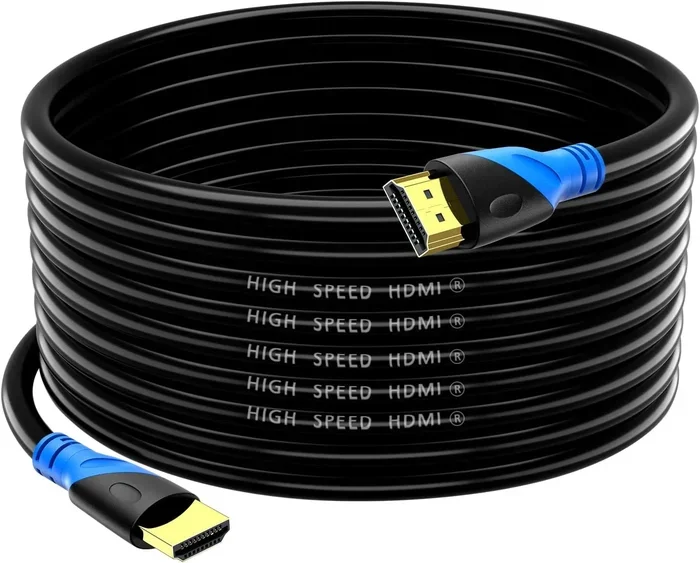
HDMI cables come with speed ratings that tell you what they can handle. Standard HDMI cables work fine for 1080p content. They are great for basic setups, older devices, and simple connections. If you just want to watch regular TV or browse the menu on your cable box, a standard cable does the job.
High Speed HDMI cables support 4K resolution at 30Hz. These are the go-to choice for most people today. They handle streaming 4K content from Netflix or Disney Plus without any problems. They also work well with Blu-ray players and game consoles that output at 4K 30Hz.
Premium High Speed HDMI cables go a step further. They support 4K at 60Hz and often include features like HDR, or High Dynamic Range. HDR makes colors pop and gives you a wider range of brightness levels. If you want the best picture quality on a 4K TV, a Premium High Speed cable is what you want.
Why Cable Speed Matters for 4K Content
Resolution is only part of the picture. Frame rate matters just as much. A 4K movie at 24 frames per second looks great on almost any cable. But a fast-paced video game at 120 frames per second needs a lot more data flowing through the cable every second.
This is where Ultra High Speed HDMI cables come in. They are designed for HDMI 2.1 and can handle 4K at 120Hz, 8K at 60Hz, and even higher resolutions. They also support advanced features like HDR dynamic metadata and eARC, which is enhanced Audio Return Channel. If you have a gaming console or a high-end home theater setup, this is the cable you need.
Using a cable that is too slow for your content can cause problems. You might see screen flickering, color banding, or a drop in resolution. Your device might even refuse to output the highest quality signal. This is why matching your cable speed to your content is so important.
HDMI Cable Certifications and Labels Explained
The HDMI Licensing organization created a certification program to help consumers make informed choices. These labels tell you exactly what a cable can do without you having to dig through technical specs.
What HDMI Certification Really Means
When you see a certified label on a cable, it means the cable has been tested to meet specific standards. The label tells you the cable’s speed rating and the features it supports. There are four main categories of certified HDMI cables right now.
Standard HDMI cables support resolutions up to 1080p. They are fine for basic use but will not handle 4K content. High Speed HDMI cables support 4K at 30Hz. Premium High Speed HDMI cables handle 4K at 60Hz with HDR support. And Ultra High Speed HDMI cables support 4K at 120Hz, 8K, and all the advanced features of HDMI 2.1.
Premium vs Standard Cables: Is the Price Difference Worth It
You might be wondering if you really need to spend more on a premium cable. The honest answer is it depends on your setup. If you have a 4K TV and watch standard streaming content, a High Speed cable works great. You do not need to spend extra.
But if you are a gamer playing on a PS5 or you watch 4K content at high frame rates, a Premium High Speed or Ultra High Speed cable makes a real difference. The price difference between a standard cable and a certified premium cable is usually small. The performance boost is well worth it.
Watch out for cables that claim to be “4K” or “high speed” without proper certification. These unverified claims can be misleading. A certified cable gives you peace of mind that the product actually delivers what it promises. Always look for the official HDMI certification label on the packaging.
Common HDMI Problems and How to Fix Them
Even with the right cable, HDMI connections can sometimes cause issues. Understanding common problems helps you troubleshoot faster and avoid frustration.
Signal Issues and Cable Length
Cable length plays a bigger role than most people realize. A short HDMI cable rarely causes signal problems. But as the cable gets longer, the signal can weaken. This is especially true for high-bandwidth connections like 4K at 120Hz.
As a general rule, keep your HDMI cable length under 6 feet for high-speed connections. If you need a longer run, look for cables with built-in signal boosters or active electronics. These cables use additional hardware to maintain a strong signal over longer distances. They cost a bit more but they solve a very real problem.
Another common issue is loose connections. HDMI cables can wiggle free over time, especially if they are plugged into devices that get moved often. A loose connection causes picture dropouts or no signal at all. Try rearranging your cables so they are not under tension or weight. A simple cable management clip can make a big difference.
When to Replace Your HDMI Cable
HDMI cables do not wear out quickly. But they are not indestructible either. If you notice flickering, intermittent signal loss, or color distortion, your cable might be damaged. Physical bends, kinks, and pinched cables can internal damage that affects performance.
Upgrading your cable is also a good idea when you upgrade your devices. Moving from a 1080p setup to a 4K setup? You will likely need a new cable. Switching from standard HD content to 4K gaming? Same story. Matching your cable to your current equipment ensures you always get the best possible quality.
How to Choose the Right HDMI Cable for Your Needs
Buying an HDMI cable does not have to be confusing. If you know what your devices can do and what you want to watch, the decision becomes simple.
Matching Cables to Your Devices
Start by checking the output capabilities of your source device. Your Blu-ray player, game console, or streaming box will list its maximum resolution and refresh rate. Then check your TV or monitor to see what it supports. Your cable needs to handle the highest output from your source device.
Here is a simple guide to follow:
- Basic 1080p setup: A Standard HDMI cable works fine.
- 4K TV with streaming: A High Speed or Premium High Speed cable is perfect.
- 4K gaming at 60Hz or higher: You need a Premium High Speed or Ultra High Speed cable.
- 4K gaming at 120Hz or 8K content: An Ultra High Speed HDMI 2.1 cable is required.
- Home theater with eARC: Go with an Ultra High Speed cable for the best audio experience.
Do not forget about your connectors. Most devices use standard Type A HDMI ports. But some cameras and laptops use Mini HDMI or Micro HDMI. Make sure you get the right connector type for your devices. Using an adapter is another option if your cable does not match directly.
Quick Tips for Buying HDMI Cables
Here are some practical tips that will help you every time you buy an HDMI cable.
- Check the certification label. It tells you exactly what the cable supports.
- Do not pay extra for gold-plated connectors unless you have a specific reason. The plating helps with corrosion but does not improve signal quality in normal use.
- Buy the shortest cable you need. Shorter cables maintain better signal strength for high-bandwidth content.
- Avoid cables from unknown brands that make wild performance claims without certification.
- Consider your future needs. If you plan to upgrade to a 4K gaming setup, buy an Ultra High Speed cable now.
- Keep spare cables on hand. Having a certified High Speed cable ready can save you from scrambling when a cable fails.
Final Thoughts on HDMI Cables
The truth is that not all HDMI cords are the same. They differ in speed, bandwidth, resolution support, and features. But the good news is that choosing the right one is straightforward once you know what to look for. You do not need to be a tech expert to make the right choice.
Start by understanding your devices and what they can output. Then match that with the right HDMI cable type and certification. You will get a reliable connection, the best picture quality, and a setup that works exactly the way you want it to. The right HDMI cord is a small investment that makes a huge difference in your daily entertainment.
Take a moment to check your current setup. Are you using the right cable for your TV and devices? If you are not sure, now is the perfect time to find out. A quick upgrade can bring your home entertainment to life in ways you might not even expect. HDMI cables might seem simple, but they are the unsung heroes of your entire setup.
With the right knowledge and a little attention to detail, you will never have to worry about your HDMI connection again. Pick the right cable, enjoy the best quality, and sit back to watch your favorite content exactly the way it was meant to be seen.
Frequently Asked Questions
Can I use any HDMI cable for 4K TV?
Not all HDMI cables support 4K. You need at least a High Speed HDMI cable for 4K at 30Hz or a Premium High Speed cable for 4K at 60Hz. Check the certification label on the cable to be sure it supports the resolution and features you need.
What is the difference between HDMI 2.0 and HDMI 2.1 cables?
HDMI 2.0 cables support 4K at 60Hz and basic HDR. HDMI 2.1 cables support 4K at 120Hz, 8K, VRR, and ALLM. The main difference is bandwidth. HDMI 2.1 cables have much higher bandwidth to handle all those advanced features and higher resolutions.
Do expensive HDMI cables perform better than cheap ones?
For most setups, certified cables perform the same regardless of price. The biggest difference is in certifications and build quality. A certified Premium High Speed or Ultra High Speed cable will outperform an uncertified expensive cable every time. Always look for the official certification label.
Does HDMI cable length affect picture quality?
Yes, longer cables can weaken the signal, especially for high-bandwidth content like 4K at 120Hz. For best results, keep high-speed cables under 6 feet. If you need a longer cable, choose one with signal boosting technology to maintain a strong connection.
What does ARC mean on an HDMI port?
ARC stands for Audio Return Channel. It lets your TV send audio back through the HDMI cable to a soundbar or AV receiver. This means you only need one cable for both video and audio. HDMI 2.1 adds an enhanced version called eARC that supports even more audio formats.
How do I know if my HDMI cable is HDMI 2.1?
Look for the Ultra High Speed HDMI certification label on the packaging or cable itself. This label guarantees the cable supports HDMI 2.1 features including 4K at 120Hz, 8K, and VRR. You can also check the product description or spec sheet for the version number.