Can I Plug A Microphone Into A Jbl Speaker And How
Yes, you can plug a microphone into a JBL speaker in many cases, but it depends on your speaker model and the type of mic you use. Some JBL speakers have a dedicated mic input, while others need an adapter or extra gear. In this guide, we show you how to connect a microphone to a JBL speaker, which mics work best, and how to avoid common problems like feedback. Whether you need a karaoke setup or a live performance solution, we have you covered.
Key Takeaways
- Not all JBL speakers support mic input: You need to check your specific model for a mic or audio input port before connecting.
- Wired microphones work best: Dynamic and condenser mics can connect through the right cables and adapters.
- Bluetooth JBL speakers usually lack mic input: Most wireless models do not have a built-in mic input, so you may need extra equipment.
- Feedback is a common issue: Keeping the mic away from the speaker and adjusting volume helps prevent loud screeching sounds.
- An audio mixer gives you more control: Using a mixer between your mic and JBL speaker improves sound quality and gives you better volume management.
- Adapters and cables matter: Having the right 3.5mm, 6.35mm, or XLR adapter makes a smooth connection possible.
- Karaoke and public speaking are great uses: Plugging a mic into a JBL speaker works well for small events, karaoke nights, and casual performances.
📑 Table of Contents
- Can I Plug A Microphone Into A JBL Speaker And How
- What Happens When You Plug a Microphone Into a JBL Speaker
- Types of JBL Speakers and Their Mic Compatibility
- How to Connect a Microphone to a JBL Speaker (Step by Step)
- Best Microphones for JBL Speakers
- Common Problems and How to Fix Them
- Tips for Getting the Best Sound Quality
- Conclusion
Can I Plug A Microphone Into A JBL Speaker And How
If you have ever wanted to use your JBL speaker for singing, speaking, or hosting a small event, you have probably asked yourself this question. The short answer is yes. You can plug a microphone into a JBL speaker in many situations. But the longer answer depends on your speaker model, the type of microphone, and the cables you have on hand.
Connecting a microphone to a JBL speaker is not always plug-and-play. Some JBL models have a built-in mic input. Others need an adapter or a small piece of extra gear. This guide walks you through everything you need to know. You will learn which JBL speakers support mic input, how to make the connection, and how to get great sound without feedback problems.
Whether you want a simple karaoke setup in your living room or a basic PA system for a small outdoor event, this article has practical steps and real advice. Let us get into it.
What Happens When You Plug a Microphone Into a JBL Speaker
Before we jump into the how, let us talk about what actually happens when you connect a mic to a JBL speaker. This helps you understand why some setups work easily and others need a little more effort.
How JBL Speakers Process Audio Input
JBL speakers are designed mainly to play audio. They take an electrical signal and turn it into sound through a driver or speaker cone. When you plug a microphone into a JBL speaker that has an input port, the speaker acts like a simple amplifier. It receives the mic signal and plays it back through its built-in speakers.
Think of it this way. Your JBL speaker becomes both the amplifier and the speaker in one box. That is why some people call this a speaker system with mic support. It is a two-in-one setup that works surprisingly well for small gatherings and casual use.
Why Some JBL Speakers Do Not Accept Mic Input
Not every JBL speaker is built the same way. Many models, especially Bluetooth speakers, are designed strictly for audio playback. They do not have any kind of mic or audio input jack. These speakers focus on wireless convenience, battery life, and portability.
When a speaker lacks an input port, you cannot simply plug a cable in and expect it to work. You will need additional equipment to bridge the gap. More on that later.
Types of JBL Speakers and Their Mic Compatibility
Understanding your specific JBL speaker model is the first and most important step. Not all JBL speakers are created equal when it comes to accepting a microphone signal.
JBL Speakers With Built-In Mic Input
Some JBL speakers are designed with a mic input in mind. These are often found in the portable PA system category. Here are a few popular examples:
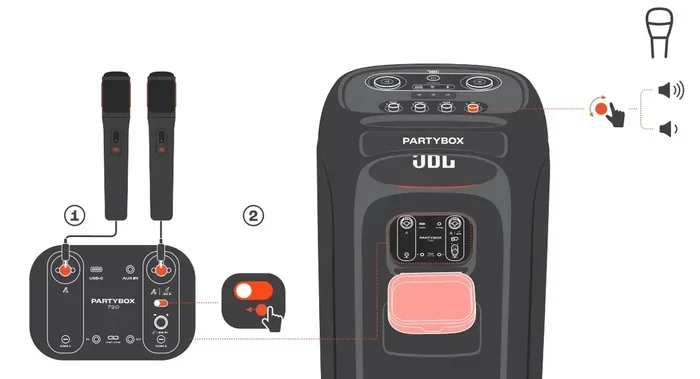
- JBL PartyBox series: These large portable speakers often have an XLR mic input or a 6.35mm jack for connecting microphones and instruments.
- JBL Eon series: These are professional sound reinforcement speakers with dedicated mic inputs built right in.
- JBL Control series: Some models in this line include audio input options that work with standard microphones.
If your speaker has a labeled “Mic,” “Input,” or “Audio In” port, you are in luck. You can likely connect a microphone directly.
JBL Bluetooth Speakers Without Mic Input
Most portable Bluetooth speakers like the JBL Flip, Charge, or Xtreme series do not have a mic input. These speakers are built for music playback. They focus on wireless connectivity, waterproof design, and long battery life.
That does not mean you are out of options. You can still use a microphone with these speakers. You just need a small audio mixer or a special adapter. We will cover that in detail.
JBL Home Speakers and Soundbars
JBL also makes home theater speakers and soundbars. These sometimes include auxiliary inputs but rarely support microphone connections. They are optimized for movie and music playback, not live vocal input. So, connecting a vocal microphone directly is usually not practical with these models.
How to Connect a Microphone to a JBL Speaker (Step by Step)
Now let us walk through the actual process of connecting a microphone to your JBL speaker. The steps vary depending on your equipment, but the general approach is similar across most setups.
Step 1: Check Your Speaker Ports
Start by looking at the back or side of your JBL speaker. Look for any input ports. Common ones include:
- XLR input: This is a round, three-pin connector often used for professional microphones.
- 6.35mm (1/4 inch) jack: This is a larger audio jack, sometimes labeled “Input” or “Instrument.”
- 3.5mm audio jack: This is the smaller headphone-style jack. Some speakers accept this for audio input.
- RCA input: This is a red-and-white pair of connectors sometimes found on older or home audio models.
Take note of what your speaker supports. This determines what kind of mic and cable you need.
Step 2: Choose the Right Microphone and Cable
Once you know your speaker’s input type, pick a microphone that matches. Here is a quick breakdown:
- Dynamic microphones are the most common choice. They work well for vocals and do not need much power. They connect easily with XLR cables.
- Condenser microphones offer great detail but often need phantom power. A basic JBL speaker usually does not provide that, so you may need a separate power source.
- Lavalier or lapel mics can work if you have the right adapter. These are great for presentations and public speaking.
Always match your cable to the input port. If your speaker has an XLR input, use an XLR cable. If it has a 3.5mm input, use a 3.5mm cable or a 6.35mm-to-3.5mm adapter.
Step 3: Plug In and Test
Connect the microphone to the speaker using your chosen cable. Then do a quick test:
- Turn on the speaker and set the volume to a low level.
- Speak into the microphone gently.
- Listen for any sound coming through the speaker.
- Gradually increase the volume until you reach a comfortable level.
If you hear your voice clearly, you are good to go. If not, check your connections and make sure you have the right cables.
Step 4: Use an Audio Mixer if Needed
If your JBL speaker does not have a direct mic input, an audio mixer is your best friend. A small mixer sits between your microphone and your speaker. It takes the mic signal and sends it to the speaker through an audio cable.
Here is how that setup works:
- Plug your microphone into the mixer using an XLR cable.
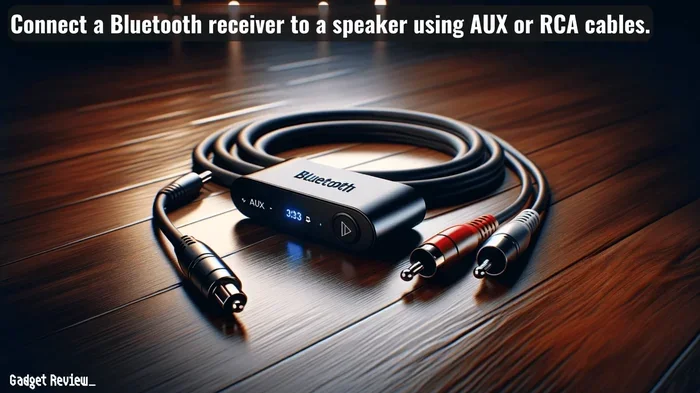
- Connect the mixer’s output to the JBL speaker’s input using a 3.5mm or RCA cable.
- Adjust volume and sound settings on the mixer.
- Play through the JBL speaker with full control over your audio.
This method works with almost any JBL speaker, even Bluetooth models. You just need a small portable mixer, which you can find for under $30 in many cases.
Best Microphones for JBL Speakers
Not all microphones are created equal when it comes to pairing with a JBL speaker. Some give you a cleaner sound. Some are easier to set up. Here are a few options that work well in different situations.
Top Picks for Direct Connection
- Shure SM58: This is the gold standard for live vocals. It connects via XLR and works great with any JBL speaker that has an XLR input.
- Samson Q2U: A budget-friendly dynamic mic that offers solid sound quality. It is great for karaoke and casual speaking events.
- Audio-Technica ATR2100x: This mic offers both USB and XLR output. It is versatile and works well for beginners.
Top Picks for Mixer-Based Setups
When you use an audio mixer, you have more flexibility. Almost any XLR microphone works in this configuration. Some popular choices include:
- Rode PodMic: Built specifically for speech and podcasting. It gives a warm, clear vocal tone.
- Electro-Voice RE20: A professional-grade mic that handles high volume with ease. Perfect for live events.
- Budget option — Pyle PDMIC58: An affordable dynamic mic that gets the job done for small setups.
Common Problems and How to Fix Them
Connecting a microphone to a JBL speaker is usually straightforward, but a few issues can pop up. Here are the most common problems and how to solve them.
Problem 1: No Sound From the Speaker
This is the most common issue. If you hear nothing when you speak into the mic, check these things:
- Make sure the speaker is turned on and not muted.
- Verify that the cable is fully plugged in on both ends.
- Check that you are using the correct cable type for the input port.
- Make sure the speaker is set to the right input source. Some models let you toggle between different inputs.
In many cases, simply reseating the cable or switching the input source solves the problem.
Problem 2: Audio Feedback and Screeching
Audio feedback is that loud, unpleasant screeching sound you hear when the microphone picks up sound from the speaker and amplifies it in a loop. It is painful and can damage your hearing. Here is how to prevent it:
- Keep the microphone far away from the speaker. The farther apart they are, the better.
- Lower the speaker volume before speaking into the mic.
- Point the microphone away from the speaker cone.
- Use a directional microphone that picks up sound from one side only.
- Avoid cupping the mic with your hands, as this changes the pickup pattern.
Following these simple tips eliminates most feedback issues in small setups.
Problem 3: Poor Sound Quality or Low Volume
If your voice sounds muffled or too quiet, consider these fixes:
- Check that your cable is not damaged. A frayed cable can cause signal loss.
- Try a different microphone. Some mics are better suited for certain speaker systems.
- If you are using a mixer, adjust the gain and EQ settings for a clearer signal.
- Make sure the speaker volume is turned up to an appropriate level.
Problem 4: Microphone Picks Up Background Noise
Noisy environments can make it hard to get a clean signal. To reduce background noise:
- Use a dynamic microphone instead of a condenser mic. Dynamic mics reject background sound better.
- Get closer to the microphone. The closer you are, the stronger your signal compared to ambient noise.
- Use a pop filter or windscreen to reduce plosive sounds and wind interference.
- Choose a quieter location whenever possible.
Tips for Getting the Best Sound Quality
Now that you know the basics, here are some expert-level tips to help you get the best possible sound from your microphone and JBL speaker setup.
Position Matters
Where you place your microphone and speaker makes a huge difference in sound quality. Always position the speaker at ear level or higher. Place the microphone at mouth level. Keep them as far apart as practical. This simple change reduces feedback and improves clarity.
Use a Mixer for More Control
Even if your JBL speaker has a direct mic input, adding a small mixer gives you more control. You can adjust bass, treble, and volume independently. This is especially helpful during live performances or events where sound needs to change quickly.
Match Impedance When Possible
Impedance is a technical term that basically means your equipment needs to be compatible on the electrical side. Most dynamic microphones have low impedance, which works well with most speakers. If you are unsure, check the specifications of both your mic and your speaker. Matching impedance reduces signal loss and improves overall sound.
Quick Tips for a Better Setup
- Always test your setup before the actual event. Do a full sound check.
- Bring extra cables and adapters. You never know when something will need replacing.
- Keep spare batteries on hand for wireless microphones.
- Use a mic stand instead of holding the mic by hand. This gives you a more consistent position.
- Label your cables so you can troubleshoot quickly if something goes wrong.
Common Mistakes to Avoid
Even experienced users make a few mistakes when setting up a mic-and-speaker system. Here are the most common ones to watch out for:
- Plugging a mic into an output port: Speakers often have both input and output ports. Plugging into the wrong one will not work and could cause damage.
- Ignoring phantom power needs: Some condenser mics need 48V phantom power. A JBL speaker alone cannot provide this. Use a separate phantom power supply or a mixer that provides it.
- Turning up volume too fast: Always start low and work your way up. This prevents sudden feedback bursts.
- Using damaged cables: A broken cable can cause crackling, intermittent sound, or no sound at all. Inspect your gear regularly.
Conclusion
So, can you plug a microphone into a JBL speaker? The answer is yes, in most cases. It depends on your speaker model, your microphone type, and the right cables and adapters. Some JBL speakers support direct mic input, while others need a small audio mixer to make the connection work.
The key is to know your equipment. Check your speaker’s input ports. Choose a compatible microphone. Use the right cables. And always test your setup before your event. With these steps, you can turn any JBL speaker into a powerful sound system for singing, speaking, or hosting events.
Whether you are setting up a karaoke night, a small live performance, or a public address solution for a gathering, this setup works. Take what you have learned here, apply it, and enjoy better audio at your next event.
Frequently Asked Questions
Can I connect any microphone to any JBL speaker?
No, not every JBL speaker supports microphone input. Many Bluetooth models like the Flip or Charge series do not have mic input ports. You need to check your specific speaker model for an input jack. If your speaker lacks one, you can still use a microphone by connecting it through an audio mixer.
Do I need an audio mixer to connect a mic to a JBL Bluetooth speaker?
Usually, yes. Most JBL Bluetooth speakers do not have a dedicated mic input. A small audio mixer bridges the gap between your microphone and the speaker. You plug the mic into the mixer and then connect the mixer’s output to the speaker. This gives you full control over volume and sound quality.
What type of microphone works best with JBL PartyBox speakers?
The JBL PartyBox series has built-in XLR inputs, so dynamic microphones like the Shure SM58 or Samson Q2U work great. These mics connect directly with an XLR cable. You can also use instruments like electric guitars by plugging them into the 6.35mm input on the PartyBox.
How do I prevent audio feedback when using a mic with a JBL speaker?
Keep the microphone far away from the speaker. Point the mic away from the speaker cone. Start with a low volume and slowly increase it. Use a directional microphone that picks up sound from one side. These simple steps stop the screeching feedback loop before it starts.
Can I use a condenser microphone with a JBL speaker?
You can, but condenser microphones often need phantom power, which most JBL speakers do not provide. You will need a separate phantom power supply or an audio mixer that offers 48V phantom power. Without it, the condenser mic will not work properly.
Is it safe to plug a microphone directly into a JBL speaker’s input jack?
Yes, it is safe as long as you are using the correct input port and the right type of cable. Never plug a mic into an output port, as this can cause damage. Always check that your microphone and speaker are compatible before connecting them. Start at a low volume to protect your equipment.