Can I Hook Up Bluetooth Through Aux and Get It Working
Yes, you can absolutely hook up Bluetooth through aux using a Bluetooth receiver or transmitter. This simple adapter lets you add wireless audio to any device with a 3.5mm jack, from older car stereos to home speakers. You will learn the different types of adapters, step-by-step setup, and tips to get the best audio quality.
Have you ever been stuck with an older stereo, car radio, or speaker that only has an aux input but no Bluetooth? It is frustrating when your phone has wireless capability but your gear does not. The good news is that can I hook up Bluetooth through aux? Yes, you absolutely can. With a small and affordable adapter, you can turn any aux-equipped device into a Bluetooth-compatible one. This guide walks you through everything you need to know.
Whether you want to stream music in your car, connect wirelessly to your home speakers, or just ditch the tangled cables, this article has you covered. We will look at how Bluetooth aux adapters work, which type you need, and how to set them up in minutes. By the end, you will know exactly how to get Bluetooth working through your aux port without any hassle.
Key Takeaways
- A Bluetooth receiver or transmitter makes aux-based Bluetooth possible: These small devices bridge the gap between wireless Bluetooth signals and wired AUX connections.
- It works with almost any device that has an aux port: Older car stereos, home speakers, headphones, and TVs can all gain Bluetooth capability with the right adapter.
- Setup is simple and takes just a few minutes: Plug in the adapter, pair your phone, and you are streaming wireless audio in no time.
- Audio quality depends on the adapter and Bluetooth codec: Choosing a good-quality receiver or transmitter ensures you do not lose sound fidelity.
- Common issues are easy to fix: Interference, pairing problems, and lag can usually be solved with simple troubleshooting steps.
- Bluetooth through aux is a cost-effective upgrade: You do not need to buy a whole new audio system to enjoy wireless streaming.
📑 Table of Contents
- What Does It Mean to Hook Up Bluetooth Through Aux?
- Why Would You Want Bluetooth Through Aux?
- Types of Bluetooth Adapters for Aux Ports
- How to Hook Up Bluetooth Through Aux: Step-by-Step
- Best Bluetooth Adapters for Aux Ports
- Common Problems and How to Fix Them
- Expert Tips for the Best Bluetooth Aux Experience
- Bluetooth Through Aux vs. Other Wireless Options
- Key Takeaways
- Conclusion
What Does It Mean to Hook Up Bluetooth Through Aux?
Let us start with the basics. An aux port, short for auxiliary, is a standard 3.5mm audio jack. It has been around for decades and appears on countless devices. Bluetooth, on the other hand, is a wireless technology that sends audio through the air. These two technologies were not designed to work together at first.
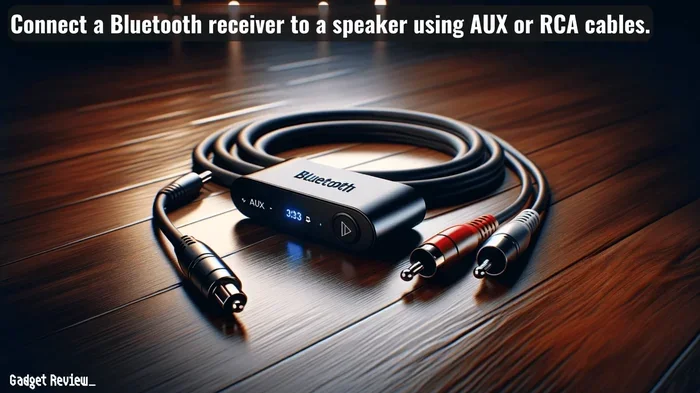
So when people ask, can I hook up Bluetooth through aux, they are really asking how to bridge the wireless-to-wired gap. The answer is a small electronic device called a Bluetooth adapter. This adapter receives the Bluetooth signal from your phone or tablet and converts it into an analog audio signal that travels through the aux cable to your speaker or stereo.
Think of it like a translator. Your phone speaks Bluetooth. Your old speaker speaks aux. The adapter sits in the middle and makes them understand each other. It is a simple concept that solves a very real problem for millions of people who own older audio equipment.
How the Connection Works
The process is straightforward. Your phone connects to the Bluetooth adapter wirelessly. The adapter then sends the audio signal through a short aux cable into your device’s aux port. The audio plays through your speakers just like it would from a wired source. There is no software to install in most cases, and no complicated setup required.
Some adapters also work in reverse. These are called Bluetooth transmitters. They take a wired audio signal and send it out wirelessly to Bluetooth headphones or speakers. We will cover this more later. For now, just know that both receivers and transmitters can solve your Bluetooth-through-aux needs.
Why Would You Want Bluetooth Through Aux?
You might wonder why bother with an adapter at all. Why not just buy a new Bluetooth speaker? There are actually many great reasons to go this route.
Save Money on a New Audio System
A quality Bluetooth speaker can cost anywhere from 30 to 200 dollars or more. If you already have a great pair of speakers or a nice car stereo, why replace them? A Bluetooth receiver costs between 10 and 40 dollars. That is a tiny price to pay for wireless audio on gear you already love.
Keep Your Older Devices Alive
Older cars, in particular, often have excellent sound systems but lack Bluetooth. Instead of buying a whole new stereo, a simple aux Bluetooth adapter brings modern convenience to your vehicle. The same goes for home audio setups, gaming consoles, and older televisions.
Enjoy Wireless Convenience
Once you have Bluetooth through aux, you can stream music, take calls, and use voice assistants without touching cables. It makes your listening experience much more convenient, especially while driving or cooking in the kitchen.
Works with Almost Everything
Almost every audio device made in the last 20 years has an aux port. That means your Bluetooth adapter will work with a wide range of equipment. From old boomboxes to portable radios, the compatibility is excellent.
Types of Bluetooth Adapters for Aux Ports
Not all Bluetooth adapters are the same. Understanding the different types helps you pick the right one for your needs. Here is a breakdown of the main options.
Bluetooth Receiver
A Bluetooth receiver is the most common type. It plugs into your aux port and receives wireless audio from your phone. You then listen through the connected speakers or headphones. These are perfect for car stereos, home speakers, and any device that plays audio but does not have Bluetooth built in.
Most receivers are small enough to plug directly into the aux port. Some come with a short cable that extends the adapter away from the port, which can help with fit and signal strength. Look for a receiver that supports the latest Bluetooth version for the best connection and range.
Bluetooth Transmitter
A Bluetooth transmitter does the opposite. It takes a wired audio signal from your device and sends it out wirelessly to Bluetooth headphones or speakers. This is useful when you want to listen to a TV, computer, or older music player through wireless headphones.
Transmitters plug into the aux port of the source device. They then pair with your Bluetooth headphones or speaker. This is a great option for late-night listening or when you do not want to disturb others.
Bluetooth Adapter with Built-in Cable
Some adapters come with a built-in aux cable attached. These are convenient because you do not need a separate cable. The adapter plugs into the aux port, and the cable connects to your speaker or stereo. These all-in-one designs are compact and easy to use.
FM Bluetooth Transmitter
For cars without an aux port, an FM Bluetooth transmitter is another option. It broadcasts your phone’s audio over an empty FM frequency. Your car radio picks up the signal and plays the music. While not as clean as a direct aux connection, these work well in a pinch and are very affordable.
How to Hook Up Bluetooth Through Aux: Step-by-Step
Setting up a Bluetooth aux adapter is incredibly easy. Follow these steps and you will be streaming in minutes.
Step 1: Choose the Right Adapter
First, decide whether you need a receiver or a transmitter. If your device has an aux port and you want to play audio from your phone, get a receiver. If your device has an aux port and you want to send audio to Bluetooth headphones, get a transmitter.
Check the Bluetooth version. Version 5.0 or newer offers better range and stability. Also look for support for codecs like aptX or AAC if audio quality matters to you.
Step 2: Plug in the Adapter
Insert the adapter into the aux port of your device. If your adapter has a built-in cable, plug the other end into your speaker or stereo. Make sure the connection is firm and secure.
For car use, you might want to place the adapter somewhere it will not slide around. Some receivers come with a sticky pad or clip to keep them in place on your dashboard or console.
Step 3: Power on the Adapter
Most Bluetooth aux adapters need power. Some draw power from the aux port itself. Others use a USB cable connected to a USB port or car charger. Check your adapter’s instructions and make sure it is powered on before moving to the next step.
Step 4: Pair Your Device
Go to your phone’s Bluetooth settings. Turn on Bluetooth and look for the adapter’s name in the list of available devices. Tap on it to pair. Some adapters enter pairing mode automatically when you first power them on. Others require you to hold a button for a few seconds.
Once paired, your phone should show a confirmation. The adapter’s LED light will usually change color or stop blinking to indicate a successful connection.
Step 5: Start Playing Audio
Open your music app, podcast app, or any audio source on your phone. Press play. The audio should now come through your aux-connected speakers or stereo. Adjust the volume on both your phone and your speaker for the best sound.
That is it. You are now streaming wireless audio through an aux connection. It really is that simple.
Best Bluetooth Adapters for Aux Ports
Not all adapters are created equal. Here are some things to look for when shopping for the best one for your needs.
- Bluetooth version: Look for 5.0 or higher for better range and fewer connection drops.
- Codec support: aptX and AAC codecs deliver better audio quality than standard SBC.
- Battery life: If the adapter is wireless, check how long it lasts on a single charge.
- Build quality: A metal body tends to last longer than plastic, especially in hot cars.
- Compatibility: Make sure it works with your specific device and aux port size.
- Price: Good adapters range from 10 to 40 dollars. You do not need to spend more.
Some popular and reliable brands include Mpow, TaoTronics, and Avantree. These brands offer solid performance at reasonable prices. Read user reviews before buying to make sure you get a model that fits your specific use case.
Common Problems and How to Fix Them
Even though setup is easy, you might run into some issues along the way. Here are the most common problems and their solutions.
Bluetooth Will Not Pair
If your phone will not find the adapter, try turning Bluetooth off and on again. Make sure the adapter is in pairing mode. Some adapters need to be reset before they will show up. Check that the adapter is powered on and within range, usually about 30 feet.
Poor Audio Quality
Static or muffled sound can happen for several reasons. Make sure your adapter supports a good Bluetooth codec. Keep your phone close to the adapter to avoid signal interference. If you are in a car, move your phone closer to the adapter. Walls and metal can weaken the Bluetooth signal.
Audio Lag or Latency
A slight delay between the video and audio can be annoying. This is common with Bluetooth connections. Adapters that support aptX Low Latency or aptX HD tend to have less lag. If you are watching videos, look for adapters specifically designed for low latency.
Adapter Keeps Disconnecting
Interference from other Bluetooth devices or Wi-Fi routers can cause dropouts. Move away from other wireless devices and see if that helps. Also check that your adapter’s firmware is up to date. Some manufacturers offer apps that let you update the adapter’s software.
No Sound at All
First, check that the volume is turned up on both your phone and your speaker. Make sure the aux cable is fully inserted. Try a different aux cable if possible. Sometimes the cable itself is the problem, not the adapter.
Expert Tips for the Best Bluetooth Aux Experience
Want to get the most out of your Bluetooth aux setup? Here are some tips from audio enthusiasts and tech experts.
Keep the Adapter Close to Your Source
The closer your phone is to the adapter, the stronger the Bluetooth signal. In a car, place the adapter near the center console or dashboard. At home, keep it on the same table as your phone.
Use a Short Aux Cable
Longer cables can pick up interference and reduce audio quality. A short aux cable, around 3 to 6 feet, keeps the signal clean and strong. It also keeps your setup neat and tidy.
Charge Your Adapter Regularly
If your adapter is battery-powered, do not let it run out completely. Charge it after each use or keep it plugged in when possible. A dead adapter means no Bluetooth audio until it is charged again.
Turn Off Unused Bluetooth Devices
Having too many Bluetooth devices nearby can cause interference. Turn off Bluetooth on devices you are not using. This helps your adapter maintain a stable connection to your phone.
Update Your Adapter Firmware
Some adapters receive firmware updates that improve performance and fix bugs. Check the manufacturer’s website or app for updates. A simple update can solve many connection issues.
Use the Right Audio App
Some music apps handle Bluetooth audio better than others. Apps like Spotify, Apple Music, and YouTube Music generally work well. If you experience issues, try a different app to see if the problem is app-specific.
Bluetooth Through Aux vs. Other Wireless Options
How does Bluetooth through aux compare to other wireless audio solutions? Let us look at a quick comparison.
| Feature | Bluetooth Through Aux | Built-in Bluetooth | FM Transmitter | Aux Cable Only |
|---|---|---|---|---|
| Wireless | Yes | Yes | Yes | No |
| Cost | Low | None (built-in) | Low | Very low |
| Audio Quality | Good to excellent | Good to excellent | Fair | Excellent |
| Works with old devices | Yes | No | Yes | Yes |
| Setup complexity | Very easy | Very easy | Easy | Very easy |
| Portability | High | N/A | High | N/A |
As you can see, Bluetooth through aux is a great middle ground. It gives you wireless convenience without the cost of replacing your entire audio setup. It works with older devices that do not have built-in Bluetooth, which is a huge advantage.
Key Takeaways
- A Bluetooth receiver or transmitter makes aux-based Bluetooth possible: These small devices bridge the gap between wireless Bluetooth signals and wired AUX connections.
- It works with almost any device that has an aux port: Older car stereos, home speakers, headphones, and TVs can all gain Bluetooth capability with the right adapter.
- Setup is simple and takes just a few minutes: Plug in the adapter, pair your phone, and you are streaming wireless audio in no time.
- Audio quality depends on the adapter and Bluetooth codec: Choosing a good-quality receiver or transmitter ensures you do not lose sound fidelity.
- Common issues are easy to fix: Interference, pairing problems, and lag can usually be solved with simple troubleshooting steps.
- Bluetooth through aux is a cost-effective upgrade: You do not need to buy a whole new audio system to enjoy wireless streaming.
Conclusion
The answer to can I hook up Bluetooth through aux is a clear and definite yes. With a Bluetooth receiver or transmitter, you can add wireless audio capability to almost any device with an aux port. The setup takes just a few minutes, the cost is minimal, and the convenience is huge.
Whether you want to stream music in your car, connect wirelessly to your home speakers, or listen to podcasts through Bluetooth headphones, an aux Bluetooth adapter makes it all possible. You do not need to be tech-savvy. The process is simple and straightforward.
Pick the right adapter for your needs, follow the setup steps, and enjoy wireless audio on your favorite older gear. Once you go Bluetooth through aux, you will wonder how you ever lived without it. It is one of those small upgrades that makes a big difference in your daily listening experience.
So go ahead and give it a try. Your aux-equipped devices are ready for a wireless upgrade. All you need is a little adapter and a few minutes of your time.
Frequently Asked Questions
Can I use a Bluetooth aux adapter in any car?
Yes, as long as your car has an aux port, a Bluetooth adapter will work. Most cars made after 2010 have an aux input. Simply plug the adapter in, pair your phone, and start streaming. It works with sedans, SUVs, trucks, and even older vehicles.
Will a Bluetooth aux adapter reduce audio quality?
Not necessarily. High-quality adapters support codecs like aptX and AAC, which deliver excellent sound. Standard adapters use the SBC codec, which is still very good for most listeners. The aux cable and your speaker quality also play a role in the final sound.
How far can my phone be from the Bluetooth aux adapter?
Most Bluetooth adapters have a range of about 30 feet. In a car, this means you can keep your phone in your pocket, purse, or phone mount without losing connection. Walls and metal surfaces can reduce the range slightly.
Can I charge my phone while using a Bluetooth aux adapter?
Yes, most Bluetooth aux adapters have a pass-through USB port. This lets you plug in a USB charging cable alongside the aux connection. Your phone stays charged while you stream music, which is perfect for long road trips.
Is a Bluetooth aux adapter better than an FM transmitter?
In most cases, yes. A Bluetooth aux adapter provides a direct wired connection to your stereo, which means cleaner sound and no static. FM transmitters broadcast over radio waves, which can pick up interference. An aux adapter is the better choice for audio quality.
Can I use a Bluetooth aux adapter with a home stereo system?
Absolutely. Bluetooth aux adapters work with home stereos, bookshelf speakers, soundbars, and even older boomboxes. Just plug the adapter into the aux input, pair your phone, and enjoy wireless music in any room of your house.