Does Netgear AC1900 Have WiFi 6 or Is It Really Outdated
The Netgear AC1900 does not have WiFi 6. It runs on the older 802.11ac standard, which means it is a WiFi 5 router. While it still delivers solid speeds for basic tasks, it cannot match the performance of newer WiFi 6 routers. If you want faster wireless connectivity and better network performance, you may need to consider an upgrade.
Have you been wondering whether the Netgear AC1900 supports WiFi 6? It is a very common question, especially with so many new routers hitting the market. The short answer is no. The Netgear AC1900 does not have WiFi 6. It operates on the older WiFi 5 standard, which is also known as 802.11ac. But does that mean it is completely outdated? Not necessarily.
In this article, we will dive deep into the specs, performance, and real-world use of the Netgear AC1900. We will look at what it can do, where it falls short, and whether you should keep using it or switch to a newer model. By the end, you will have a clear picture of where this router stands in today’s wireless landscape.
The Netgear AC1900 has been a popular choice for home networks for several years now. It offers a dual band setup with speeds up to 1900 Mbps. That sounds impressive on paper. But with WiFi 6 becoming the new standard, many users are left asking whether their current router is holding them back. Let us find out.
Key Takeaways
- No WiFi 6 Support: The Netgear AC1900 uses WiFi 5 (802.11ac) technology, not WiFi 6 (802.11ax).
- Still Functional: Despite being older, it handles everyday browsing, streaming, and light gaming well.
- Speed Limitations: Max speeds top out at 1900 Mbps, which is lower than most WiFi 6 routers.
- Dual Band Capability: It offers both 2.4 GHz and 5 GHz bands for wireless connectivity.
- Upgrade Worth Considering: If you have smart home devices or need better bandwidth, a WiFi 6 router is a smart move.
- Compatibility Matters: The AC1900 works fine with older devices but may bottleneck newer WiFi 6 gadgets.
- Router Specs Matter: Always check the wireless standard before buying a router to match your needs.
📑 Table of Contents
- What Is WiFi 6 and Why Does It Matter?
- Netgear AC1900: Specs and Features
- Real-World Performance of the Netgear AC1900
- Can You Upgrade the Netgear AC1900 to WiFi 6?
- Should You Replace the Netgear AC1900 with a WiFi 6 Router?
- Common Mistakes People Make with Older Routers
- The Bottom Line
- Expert Insights on WiFi Router Longevity
What Is WiFi 6 and Why Does It Matter?
Before we look at the Netgear AC1900 specifically, it helps to understand what WiFi 6 actually is. WiFi 6 is the latest wireless standard, also known as 802.11ax. It was designed to handle more devices at once without slowing down your home network. This is a big deal because most households now have smart home devices competing for bandwidth.
WiFi 6 brings several improvements over WiFi 5. It offers faster wireless connectivity, better efficiency, and lower latency. For gamers and streamers, this means smoother performance. For families, it means fewer buffering issues when multiple devices are online at the same time.
The wireless standard also introduces technologies like OFDMA and MU-MIMO upgrades. These might sound like technical jargon, but they basically mean your router can talk to more devices at the same time instead of one by one. That is a huge upgrade for network performance.
How WiFi 6 Compares to WiFi 5
The Netgear AC1900 uses WiFi 5, which is the 802.11ac standard. WiFi 5 was a great step forward when it came out. It brought faster speeds and better range than its predecessor. But WiFi 6 takes things much further.
Here is a quick comparison to help you understand the difference:
- WiFi 5 (802.11ac): Max speed of around 1900 Mbps on the AC1900. Works well for basic tasks but struggles with many connected devices.
- WiFi 6 (802.11ax): Max speeds can reach 9.6 Gbps. Handles dozens of devices with ease. Uses less power and offers better range.
So when you ask does Netgear AC1900 have WiFi 6, the answer is clearly no. But the real question is whether that matters for your situation.
Netgear AC1900: Specs and Features
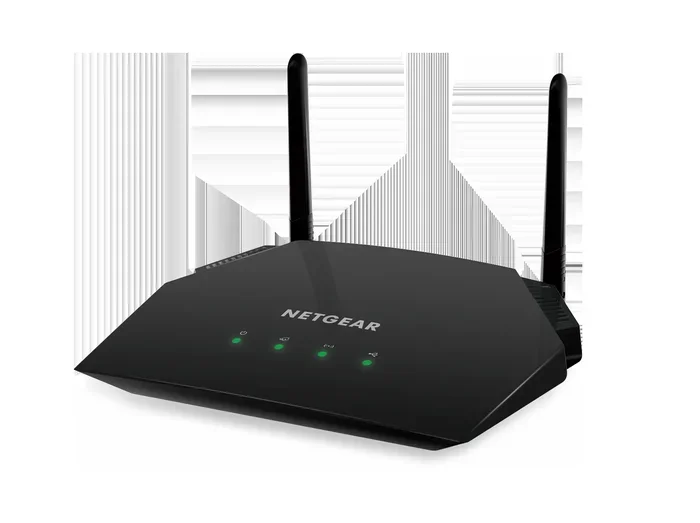
The Netgear AC1900 is a dual-band wireless router. It broadcasts on both the 2.4 GHz and 5 GHz frequency bands. The 2.4 GHz band can reach speeds up to 600 Mbps, while the 5 GHz band delivers up to 1300 Mbps. Combined, that gives you the 1900 Mbps total speed rating.
It also features beamforming technology, which focuses the WiFi signal toward your connected devices instead of spreading it evenly in all directions. This can improve your wireless coverage and help maintain a strong internet speed even at a distance.
The router includes four gigabit ethernet ports, which is great for wired connections. If you have a desktop PC or a gaming console, plugging in with an ethernet cable will always give you the most stable bandwidth and lowest latency.
Does It Support MU-MIMO?
Yes, the Netgear AC1900 supports MU-MIMO, which stands for Multi-User Multiple Input Multiple Output. This technology allows the router to communicate with multiple devices simultaneously. It was a big deal when WiFi 5 first introduced it, and it still works well today.
However, WiFi 6 improves on MU-MIMO by making it work in both directions. With WiFi 5, MU-MIMO mainly helps the router send data to devices. WiFi 6 makes it better for sending and receiving. This is one area where the AC1900 shows its age.
Real-World Performance of the Netgear AC1900
So how does the Netgear AC1900 perform in everyday use? For most households, it still does a decent job. If you mainly browse the web, check email, stream videos on one or two screens, and have a handful of smart home devices, this router can handle it.
But the network performance starts to show its limits when you have many devices connected at once. If your household has more than 15 to 20 devices on the network, you may notice slower speeds and occasional lag. This is where WiFi 6 routers really shine.
For gaming, the AC1900 is adequate but not ideal. Online gaming requires low latency and a stable connection. The wired ethernet ports help here, but if you are gaming wirelessly, you might experience occasional hiccups, especially if other devices are using the network at the same time.
When the AC1900 Still Makes Sense
There are still good reasons to stick with the Netgear AC1900. If you have a small household with few devices, it works perfectly fine. It is also a budget-friendly option. New WiFi 6 routers can be expensive, and not everyone needs the latest and greatest.
If you are renting or living in a small apartment, the wireless coverage of the AC1900 is usually more than enough. It is a solid wireless router for basic needs, and it has proven reliable over the years.
Can You Upgrade the Netgear AC1900 to WiFi 6?
This is a question many people ask, and the answer is no. You cannot simply upgrade the AC1900 to support WiFi 6. The hardware does not support it. The wireless standard is built into the router’s chip and antenna design. There is no firmware update that will change that.
Some people think that connecting a WiFi 6 mesh network device to their existing router might help. And in some cases, it can extend your coverage. But it will not make your AC1900 support WiFi 6. The mesh device will create its own WiFi 6 network, while the AC1900 continues to run on WiFi 5.
For example, if you look into connecting WiFi 6 mesh to a WiFi 5 router, you will see that while it can work, it does not upgrade the older router’s capabilities. The same principle applies to the AC1900.
What About Using It as an Extender?
Another option some people consider is using an older router as an extender. You can set up the AC1900 to repeat the signal from a newer router. While this can help extend your wireless coverage, it will not give you WiFi 6 speeds through the AC1900. The extender will still operate on WiFi 5 standards.
If you are exploring extender options, you might also check whether devices like the Deco series can help. Some users look into using Deco as a WiFi extender to boost their home network without replacing the main router entirely.
Should You Replace the Netgear AC1900 with a WiFi 6 Router?
Whether you should replace your AC1900 depends on your needs. If you have a modern household with many smart devices, streaming services, and gamers, a WiFi 6 router will make a noticeable difference. The bandwidth improvements and better device handling are well worth the investment.
Here are some signs that it is time to upgrade:
- You have more than 15 devices connected to your home network.
- You experience frequent buffering or slow speeds, especially in the evening.
- You own WiFi 6 compatible devices like newer smartphones or laptops.
- Your current router is more than four or five years old.
- You notice dead zones or weak signals in parts of your home.
On the other hand, if you have a small household with basic internet needs, the AC1900 can still serve you well. It is a reliable wireless connectivity solution that has held up over time.
Budget WiFi 6 Routers Worth Considering
If you decide to upgrade, you do not need to spend a fortune. There are several affordable WiFi 6 routers on the market now. Even budget models offer a big step up from the AC1900 in terms of speed, range, and device handling.
When shopping, look for routers that support the 802.11ax standard. Check the number of antennas, the presence of beamforming, and whether the router has gigabit ethernet ports. These features will help you get the most out of your new home network.
Common Mistakes People Make with Older Routers
Many people keep using an older router long after it has stopped being the best fit for their needs. Here are some common mistakes to avoid:
- Ignoring firmware updates: Even older routers benefit from firmware updates. Check Netgear’s support page to see if your AC1900 still receives updates.
- Placing the router in a bad location: Keep it in a central, open area. Walls and metal objects can weaken your signal and reduce wireless coverage.
- Not changing default settings: Always change the default admin password and WiFi name. This improves your network security.
- Assuming more speed equals better performance: A router’s max speed rating does not tell the whole story. Real-world performance depends on many factors, including your internet plan and the number of connected devices.
Quick Tips to Improve Your AC1900 Performance
If you decide to keep using the Netgear AC1900 for now, here are some quick tips to get the best performance out of it:
- Restart your router regularly to clear its memory and refresh connections.
- Place the router on a high shelf in a central location.
- Use the 5 GHz band for devices that need faster speeds, like streaming boxes and gaming consoles.
- Use the 2.4 GHz band for devices that need range, like smart home sensors.
- Keep your router’s firmware up to date for the best security and stability.
These simple steps can help you squeeze more out of your older router and keep your home network running smoothly.
The Bottom Line
The Netgear AC1900 is a WiFi 5 router. It does not support WiFi 6. But that does not automatically make it useless. For basic internet use and smaller households, it still works well. However, if your needs have grown or you are buying new WiFi 6 devices, upgrading to a newer router is a smart move.
Technology moves fast, and the wireless standard keeps evolving. What was cutting-edge five years ago is now considered outdated by today’s standards. The good news is that you do not need to spend a lot to get a WiFi 6 router that will serve you well for years to come.
Take a look at your current setup. Count your connected devices. Think about how you use the internet. Then decide whether the AC1900 still fits your needs or whether it is time to move forward with a WiFi 6 upgrade.
Expert Insights on WiFi Router Longevity
Networking experts generally agree that a wireless router has a lifespan of about four to five years. After that, newer technologies and security standards make older models less effective. The Netgear AC1900 has been around for a while, and while it is not broken, it is approaching or has passed that typical lifespan.
If you are unsure whether to upgrade, consider this: the internet speed you pay for is only as good as the router delivering it to your devices. An older router can become a bottleneck, limiting the performance of even the fastest internet plans. Investing in a newer router specs setup can unlock the full potential of your internet service.
Also, keep in mind that your internet provider may offer a modem-router combo that supports newer standards. It is always worth checking with them before buying a separate router. And if you are setting up a new network from scratch, you might also explore options like connecting Deco mesh WiFi to an existing router for better whole-home coverage.
Frequently Asked Questions
Does the Netgear AC1900 support WiFi 6?
No, the Netgear AC1900 does not support WiFi 6. It uses the older WiFi 5 standard, which is based on the 802.11ac wireless protocol. There is no way to upgrade it to WiFi 6 through a software update.
Is the Netgear AC1900 still worth using in 2024?
It depends on your needs. For basic browsing, streaming, and light use in a small household, it still works fine. But if you have many smart home devices or need faster speeds, a WiFi 6 router would be a better choice.
What is the maximum speed of the Netgear AC1900?
The Netgear AC1900 has a combined max speed of 1900 Mbps. This includes 600 Mbps on the 2.4 GHz band and 1300 Mbps on the 5 GHz band. While decent, this is lower than what WiFi 6 routers offer.
Can I connect a WiFi 6 device to the Netgear AC1900?
Yes, you can connect WiFi 6 devices to the AC1900, but they will only run at WiFi 5 speeds. The device will automatically fall back to the older standard when connected to this router, limiting its full potential.
How do I know if my router supports WiFi 6?
Check the router’s model number and specs on the manufacturer’s website. Look for the 802.11ax standard or the WiFi 6 label. If it says 802.11ac or WiFi 5, it does not support WiFi 6.
Should I buy a WiFi 6 router if I have the AC1900?
If you have many connected devices, experience slow speeds, or own WiFi 6 compatible gadgets, upgrading is a good idea. A WiFi 6 router will improve your overall network performance and future-proof your home network.
=== CONCLUSION ===
The Netgear AC1900 is a solid router that served many households well over the years. But the answer to does Netgear AC1900 have WiFi 6 is a clear no. It runs on WiFi 5, and while that is not a dealbreaker for everyone, it does show its age in today’s connected world.
If you are happy with your current setup and have basic internet needs, there is no rush to replace it. But if you want better speed, more device capacity, and future-proof wireless connectivity, a WiFi 6 upgrade is worth considering. The technology has come a long way, and the benefits are real.
Take the time to evaluate your home network needs. Check your device count, your internet speed, and your usage habits. Then make the choice that is right for you. Whether you stick with the AC1900 or move on to something newer, the most important thing is that your home network works well for you and your family.