Does Google Wifi Need A Internet Provider Explained
Does Google Wifi need an internet provider? Yes, it absolutely does. Google Wifi is a mesh wifi system that extends your existing internet connection but cannot create one on its own. You still need an active internet service provider and a modem to get online.
So you just got your hands on a Google Wifi system, and you are ready to enjoy seamless wireless connectivity throughout your home. But there is one question that keeps nagging at you: does Google Wifi need a internet provider? The short answer is yes. Google Wifi is a mesh wifi system that spreads your existing internet signal around your home. It does not replace your internet service provider or create a connection on its own. You still need an active broadband plan and a modem to get things running.
In this guide, we will break down everything you need to know about how Google Wifi works with internet providers. We will cover setup, common mistakes, and practical tips to get the most out of your mesh network. Whether you are a tech beginner or someone who just wants to understand your network better, this article has you covered.
Key Takeaways
- Google Wifi requires an internet provider: It cannot generate its own internet connection without an ISP and modem.
- Google Wifi is a mesh router system: It replaces your traditional router but works alongside your existing internet setup.
- Setting up Google Wifi is simple: You connect it to your modem through the Google Home app and follow a few easy steps.
- You can extend wifi coverage with Google Wifi points: This helps eliminate dead zones in larger homes.
- No internet provider means no internet: Even the best mesh system will not work without a broadband connection.
- Google Wifi supports most ISPs: It works with cable, fiber, DSL, and satellite internet providers.
📑 Table of Contents
- What Is Google Wifi And How Does It Work
- Do You Need An Internet Provider For Google Wifi
- How Google Wifi Connects To Your Internet Service
- Can You Use Google Wifi Without Any Internet Provider
- Setting Up Google Wifi With Your Existing Provider
- Common Mistakes People Make With Google Wifi Setup
- Expert Insights On Google Wifi And Internet Providers
- Key Takeaways
- Conclusion
What Is Google Wifi And How Does It Work
Google Wifi is a mesh networking system designed to provide strong and reliable wireless connectivity across your entire home. Unlike a single traditional router, Google Wifi uses multiple points (also called nodes) that work together to create one unified network. Each point talks to the others, creating a mesh network that blankets your home with wifi coverage.
The system was created by Google to solve a common problem: weak wifi signals in certain areas of a home. A single router often struggles to reach every room, especially in larger houses or homes with thick walls. Google Wifi points act as extenders that pass the signal from one unit to the next. This means you can move from room to room without losing your connection.
How Mesh Networking Differs From A Traditional Router
A traditional router sends wifi signals from one central point. If you are far away from that router, your signal gets weaker. Walls, furniture, and even appliances can block or weaken the signal. A mesh system like Google Wifi solves this problem by using multiple points that communicate with each other. Each point is like a mini router that shares the load and keeps your connection strong.
Here is a quick comparison:
- Traditional Router: One device, one signal source, weaker coverage in far rooms.
- Mesh System (Google Wifi): Multiple devices working together, stronger and more even coverage throughout the home.
Both options connect to your modem, which is the device that brings the internet into your home from your internet service provider. Without that modem and ISP connection, neither a traditional router nor a mesh system can provide internet access.
Do You Need An Internet Provider For Google Wifi
The answer is a firm yes. Google Wifi is not an internet provider. It is a router and mesh system. It needs an active internet connection to function. Think of it this way: Google Wifi is like a garden hose, and your internet provider is the water source. Without water, the hose is just a piece of rubber. Without an ISP, Google Wifi is just a fancy piece of equipment that cannot do anything.
You must have a working broadband connection from a company like Comcast, AT&T, Verizon, Spectrum, or any other internet service provider. That company delivers the internet to your home through a modem. Google Wifi then connects to that modem and distributes the signal wirelessly to all your devices.
If you are wondering whether you can skip the ISP and just use Google Wifi, the answer is no. There is no workaround for this. Even if you want to be your own internet provider, you would still need some form of internet infrastructure. Google Wifi does not have a built-in modem or cellular connection that can create its own internet source.
How Google Wifi Connects To Your Internet Service
Setting up Google Wifi with your existing internet provider is a straightforward process. Here is how it works step by step.
Step 1: Connect Your Modem To Google Wifi
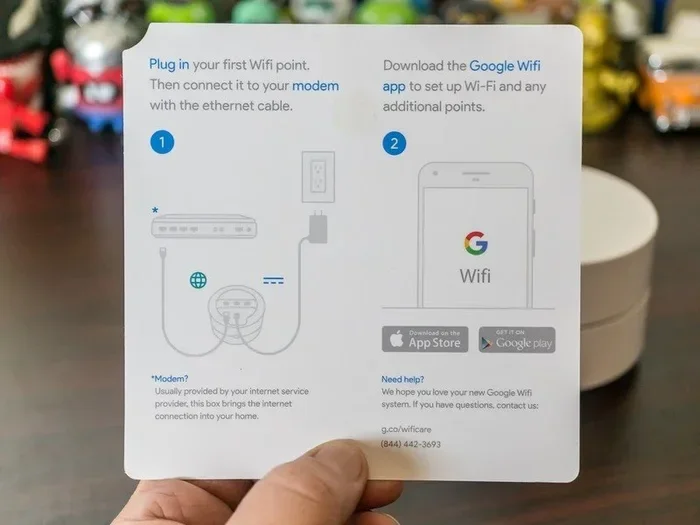
First, you need to connect your modem to the Google Wifi primary point. Use an ethernet cable to go from the modem’s ethernet port to the WAN port on your Google Wifi unit. This creates the bridge between your ISP’s internet signal and your mesh network.
Step 2: Download The Google Home App
Next, download the Google Home app on your smartphone or tablet. This app is your control center for managing Google Wifi. It walks you through the entire setup process, from naming your network to setting your password.
Step 3: Add Google Wifi Points
Once the primary point is set up, you can add more Google Wifi points around your home. The app makes this easy. Just place the additional points in rooms where you need better coverage. They will automatically connect to the primary point and form a seamless mesh network.
Step 4: Test Your Connection
After everything is set up, run a speed test through the Google Home app. This tells you how fast your connection is at different points in your home. If the speed is good everywhere, you are all set. If not, try moving a Google Wifi point closer to the center of your home.
For those who want to extend their network even further, you might consider extending your wifi to your shed or garage. Google Wifi points can be placed in outbuildings to ensure you have coverage everywhere on your property.
Can You Use Google Wifi Without Any Internet Provider
This is a common question, and the answer is important to understand clearly. You cannot use Google Wifi to access the internet without an internet provider. Google Wifi does not create internet. It only distributes the internet that comes from your ISP.
However, there is one small exception. If you have a mobile hotspot or a cellular data connection, you can connect Google Wifi to it through a compatible device. But this is not a practical long-term solution. It would be slow, expensive, and unreliable compared to a proper broadband plan.
Some people wonder if they can use Google Wifi with a satellite internet connection. The answer is yes. Google Wifi works with satellite internet just like it works with cable or fiber. As long as you have a modem that outputs an ethernet connection, Google Wifi can work with it. Similarly, if you are exploring options for getting internet without traditional phone lines, you can look into alternatives like getting internet in your home without a phone line, which opens up several modern broadband options.
Setting Up Google Wifi With Your Existing Provider
Most internet providers work perfectly with Google Wifi. Here are some tips to make sure your setup goes smoothly.
Check Your Modem Compatibility
Not all modems are created equal. Before you buy Google Wifi, check that your modem has an ethernet output port. Most modern modems do, but older ones might only have a coaxial connection. In that case, you may need a coaxial-to-ethernet adapter or a modem-router combo unit.
Choose The Right Google Wifi Plan
Google Wifi comes in different configurations. You can buy a single point for small apartments or a three-pack for larger homes. Think about your home size and the number of devices you need to connect. A three-pack is usually enough for most homes up to 2,000 square feet.
Optimize Your Network Settings
Once Google Wifi is set up, spend some time in the Google Home app to optimize your settings. You can set up guest networks, prioritize devices for streaming or gaming, and update your firmware regularly. Keeping your wireless router firmware updated ensures you get the best performance and security.
Use The Google Home App For Ongoing Management
The Google Home app is not just for setup. It is a powerful tool for managing your network every day. You can see which devices are connected, run speed tests, set up parental controls, and even pause internet access for specific devices. It gives you full control over your home network.
Common Mistakes People Make With Google Wifi Setup
Setting up Google Wifi is easy, but people still make avoidable mistakes. Here are the most common ones and how to fix them.
Placing The Primary Point Too Far From The Modem
The primary Google Wifi point should be as close to your modem as possible. This ensures the strongest signal from the start. If you place it too far away, you lose signal strength right out of the gate.
Ignoring Firmware Updates
Google regularly releases firmware updates that improve performance and fix bugs. Ignoring these updates can leave your network slower or more vulnerable. Always keep your system updated through the Google Home app.
Overloading One Point With Too Many Devices
Google Wifi points share the load across the entire mesh network. But if you place too many heavy-use devices near one point, that point can become overwhelmed. Spread your devices evenly across the network for the best performance.
Not Using Ethernet Backhaul When Possible
If you have ethernet cables running through your walls, use them to connect Google Wifi points. This is called ethernet backhaul, and it provides the fastest and most stable connection between points. Without it, the points use wireless backhaul, which is still good but not as fast.
Expert Insights On Google Wifi And Internet Providers
Networking experts agree that Google Wifi is one of the best mesh systems on the market for home users. It is simple to set up, reliable, and works well with most internet providers. However, experts also stress that the quality of your internet experience depends heavily on your ISP and your broadband plan.
Even the best mesh system cannot make your internet faster than what your provider delivers. If you have a slow internet plan, Google Wifi will distribute that slow speed evenly across your home. If you want faster speeds, you need to upgrade your internet plan with your provider.
One thing experts recommend is using a Wi-Fi 6 mesh router if your provider supports it. Wi-Fi 6 offers faster speeds, better battery life for connected devices, and improved performance in homes with many devices. You can check if your current setup supports Wi-Fi 6 or if you need to upgrade your router.
For users who are exploring different networking options, it is also worth understanding how mesh systems compare to traditional setups. A good mesh system like Google Wifi can replace your old router entirely and give you much better coverage. The key is pairing it with a reliable internet provider and a compatible modem.
Key Takeaways
- Google Wifi requires an internet provider: It cannot create its own internet connection. You must have an active ISP and modem.
- Google Wifi is a mesh router system: It distributes your existing internet signal using multiple points for better coverage.
- Setup is simple through the Google Home app: Connect to your modem, follow the app instructions, and add points as needed.
- No ISP means no internet: Even the best mesh system is useless without a broadband connection from a provider.
- Google Wifi works with most ISPs: Cable, fiber, DSL, and satellite providers all work with Google Wifi as long as you have a compatible modem.
- Avoid common setup mistakes: Place your primary point close to the modem, keep firmware updated, and use ethernet backhaul when possible.
- Your internet speed depends on your provider: Google Wifi spreads your speed evenly, so a faster plan means better performance everywhere.
Conclusion
So, does Google Wifi need an internet provider? The answer is clear: yes, absolutely. Google Wifi is a fantastic mesh networking system that brings strong and reliable wifi to every corner of your home. But it is not a magic box that creates internet out of thin air. It needs an active connection from your internet service provider to work.
The good news is that setting up Google Wifi with your ISP is easy and straightforward. Once you have your modem connected and the Google Home app configured, you can be online in minutes. Adding more points around your home gives you seamless coverage, whether you are in the living room, the bedroom, or even the backyard.
Remember that your Google Wifi system is only as good as the internet plan behind it. Choose a reliable provider, pick a plan that matches your usage needs, and keep your system updated. With the right setup, Google Wifi delivers an excellent internet experience for streaming, gaming, working from home, and everything in between.
If you are still deciding on your internet setup or exploring options, take the time to compare providers and plans in your area. A strong internet connection paired with Google Wifi is the winning combination for a fast, reliable, and coverage-rich home network.
Frequently Asked Questions
Can Google Wifi work without a modem?
No, Google Wifi cannot work without a modem. The modem is what connects your home to your internet service provider. Google Wifi connects to the modem and then distributes the internet signal wirelessly throughout your home. Without a modem, there is no internet source for Google Wifi to share.
Do I need a separate router if I have Google Wifi?
No, Google Wifi replaces your traditional router. It is a mesh system that includes a primary router point and additional satellite points. Once set up, you do not need any other router. Google Wifi handles all the routing and wireless distribution for your home network.
Can I use Google Wifi with any internet provider?
Yes, Google Wifi works with most internet providers. It is compatible with cable, fiber, DSL, and satellite internet services. The only requirement is that your modem has an ethernet port and provides a stable broadband connection. If you are unsure, check your modem specifications or contact your provider.
How many Google Wifi points do I need for my home?
This depends on the size of your home and the number of devices you have. A single point works well for small apartments up to 1,000 square feet. A three-pack is ideal for homes between 1,000 and 2,000 square feet. For larger homes, you can add more points as needed. You can also consider extending your wifi to a shed or other outbuilding with an additional point.
Can I use Google Wifi as a mobile hotspot replacement?
Not directly. Google Wifi does not have a built-in cellular modem. It needs a wired broadband connection from a modem. However, you could theoretically connect a cellular hotspot device to your Google Wifi primary point, though this would be slow and impractical for regular use.
What happens if my internet provider goes down?
If your internet provider experiences an outage, Google Wifi will not have internet access. All connected devices will show as offline. Google Wifi will continue to create a local network, but you will not be able to browse the internet, stream content, or access online services until your ISP restores the connection.