Does MIMO Increase Range and Boost Your Wireless Signal
Does MIMO increase range? Yes, MIMO technology can extend your wireless coverage by using multiple antennas to send and receive data more efficiently. It improves signal strength, reduces dead zones, and boosts overall network performance. Understanding how MIMO works helps you get the most out of your router and devices.
Have you ever walked to the back of your house and noticed your Wi-Fi signal drops to nothing? You are not alone. Many people struggle with weak wireless connections in certain rooms. And when that happens, one question keeps popping up: does MIMO increase range?
The short answer is yes. MIMO technology can genuinely improve how far your wireless signal travels. But the full story is more interesting than a simple yes or no. MIMO stands for Multiple Input Multiple Output. It uses multiple antennas to send and receive data at the same time. This approach changes how your wireless network behaves, especially when it comes to coverage and range.
In this article, we will break down everything you need to know. We will explain what MIMO is, how it affects range, and whether upgrading to a MIMO router makes sense for your home. By the end, you will have a clear picture of what MIMO can and cannot do for your wireless signal.
Key Takeaways
- MIMO uses multiple antennas: This technology sends and receives more data simultaneously, which can improve range and signal quality.
- MIMO can increase wireless range: By using spatial streams and beamforming, MIMO extends coverage farther than single-antenna setups.
- MU-MIMO and SU-MIMO differ: MU-MIMO serves multiple devices at once, while SU-MIMO focuses on one device at a time.
- Wi-Fi 6 uses advanced MIMO: The latest wireless standard supports more spatial streams for better range and speed.
- Your devices matter too: For MIMO to boost range, both your router and wireless adapter must support it.
- Placement and environment count: Even with MIMO, physical obstacles and router placement affect how far your signal reaches.
📑 Table of Contents
- What Is MIMO and How Does It Work?
- Does MIMO Increase Range? The Truth Behind the Technology
- MIMO vs. Traditional Wireless: Range Comparison
- How MIMO Boosts Your Wireless Signal
- MU-MIMO vs. SU-MIMO: Which One Helps with Range?
- Tips to Maximize MIMO Range in Your Home
- Common Mistakes That Limit MIMO Range
- Expert Insights on MIMO and Range
- Key Takeaways
- Conclusion
What Is MIMO and How Does It Work?
Understanding the Basics of MIMO Technology
MIMO stands for Multiple Input Multiple Output. It is a wireless technology that uses multiple antennas on both the transmitter and receiver sides. Traditional Wi-Fi setups use a single antenna to send and receive data. MIMO changes this by using two, four, or even eight antennas working together.
Think of it like a highway. A single antenna is a one-lane road. Only one car can pass at a time. MIMO adds more lanes. Now, multiple cars can travel at the same time. This means more data moves faster and more efficiently. The result? Better performance and, yes, better range in many cases.
MIMO works by splitting data into smaller pieces called spatial streams. Each antenna sends its own stream. The receiver then puts all the pieces back together. This process happens so fast that you never notice it. But it makes a big difference in how your wireless network performs.
How Many Antennas Matter
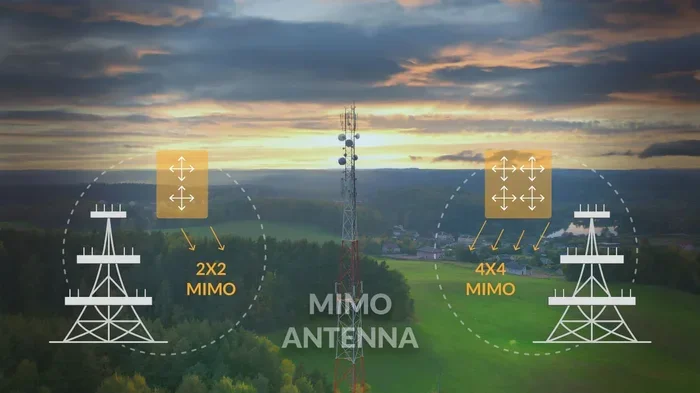
The number of antennas on a MIMO device determines its capabilities. You will often see terms like 2×2 MIMO, 4×4 MIMO, and even 8×8 MIMO. The first number tells you how many antennas are used for sending. The second number tells you how many are used for receiving.
Here is a simple breakdown:
- 2×2 MIMO: Two antennas for sending and two for receiving. Good for most homes.
- 4×4 MIMO: Four antennas in each direction. Great for larger homes and more devices.
- 8×8 MIMO: Eight antennas each way. Found in high-end routers and enterprise equipment.
More antennas generally mean better range and faster speeds. But your devices also need to support MIMO to get the full benefit. If your phone only has a single antenna, it cannot take advantage of 4×4 MIMO.
Does MIMO Increase Range? The Truth Behind the Technology
The Direct Answer
Does MIMO increase range? Yes, it can. MIMO improves range in several ways. First, multiple antennas create a stronger combined signal. Second, MIMO uses a technique called beamforming. Beamforming focuses the wireless signal toward your device instead of spreading it everywhere. This targeted approach helps the signal travel farther and penetrate obstacles better.
But here is the catch. MIMO does not magically make your signal reach through thick concrete walls. It works within the limits of physics. What MIMO does is maximize the range you already have. It makes your existing signal stronger and more reliable at the edges of your coverage area.
How Beamforming Boosts Range
Beamforming is one of the most important features of MIMO. Without beamforming, a router sends signals in all directions equally. Think of it like a light bulb. The light goes everywhere, but it gets weaker the farther you move from it.
Beamforming works like a flashlight. It focuses the signal directly toward your device. This means the signal stays stronger at greater distances. For wireless range, this is a game changer. You get better coverage in rooms that are far from the router.
Modern MIMO routers use advanced algorithms to track where your devices are. They then adjust the beamforming pattern in real time. This ensures every device gets the strongest possible signal. The result is a noticeable improvement in signal coverage throughout your home.
Spatial Streams and Their Role in Range
Each spatial stream in a MIMO setup adds to the overall range and capacity. A 2×2 MIMO setup has two spatial streams. A 4×4 MIMO setup has four. More streams mean the router can communicate with your devices more efficiently.
When a signal has to travel a long distance, it can weaken. MIMO helps by using multiple streams to maintain a connection. Even if one stream weakens, the others can keep the data flowing. This redundancy extends the effective range of your network.
For example, imagine you are in a room at the far end of your house. A single-antenna router might lose the connection entirely. A 4×4 MIMO router can keep multiple streams active. At least one stream will likely maintain a strong enough connection for smooth browsing and streaming.
MIMO vs. Traditional Wireless: Range Comparison
Single-Antenna vs. MIMO Setup
To really understand the impact of MIMO on range, it helps to compare it to a traditional single-antenna setup. A single-antenna router sends one signal stream. If that stream weakens or gets interrupted, your connection suffers. This is the main reason you get wireless dead zones in your home.
A MIMO router sends multiple streams at once. Even if one stream weakens due to distance or obstacles, the others compensate. This means fewer dead zones and a more consistent signal throughout your space.
Here is a quick comparison of what you can expect:
Range Comparison Table
A standard single-antenna router might deliver reliable range up to about 100 feet indoors. A 2×2 MIMO router can extend that to around 130 feet. A 4×4 MIMO router can push reliable coverage even further, sometimes reaching 160 feet or more in open spaces.
Keep in mind that these numbers vary based on your environment. Walls, furniture, and other obstacles reduce range. But the pattern holds. MIMO setups consistently outperform single-antenna setups when it comes to wireless range and signal reliability.
Real-World Range Improvements
In real-world tests, MIMO technology shows clear advantages. Users with 4×4 MIMO routers report fewer buffer drops in far rooms. They also experience fewer disconnections when moving around the house.
One key factor is the signal-to-noise ratio. MIMO improves this ratio by using multiple antennas to separate the signal from background noise. A better signal-to-noise ratio means the router can communicate with your device from farther away. This directly translates to more range.
How MIMO Boosts Your Wireless Signal
Faster Speeds at Greater Distances
MIMO does not just increase range. It also improves the quality of your wireless signal at those distances. With multiple antennas working together, MIMO delivers higher data rates even when you are far from the router.
This is especially important for activities like video streaming and video calls. A weak signal at the edge of your range might give you a choppy video call with a single-antenna router. A MIMO router keeps the signal strong enough for a smooth, high-quality experience.
The secret lies in how MIMO handles wireless bandwidth. By using multiple streams, MIMO makes better use of the available spectrum. This means you get more speed and more reliable connections at the same time.
Reduced Interference and Better Stability
Wireless networks face interference from many sources. Neighboring Wi-Fi networks, microwaves, baby monitors, and Bluetooth devices all compete for the same airspace. This interference weakens your signal and reduces range.
MIMO handles interference better than single-antenna setups. Multiple antennas can switch to less congested streams automatically. This adaptive behavior keeps your connection stable even in crowded wireless environments. The result is a more reliable signal that reaches farther.
MIMO and Wi-Fi 6: A Perfect Match
Wi-Fi 6, also known as 802.11ax, takes MIMO to the next level. It supports up to 8×8 MIMO in theory. It also introduces a feature called OFDMA, which works alongside MIMO to improve efficiency.
Wi-Fi 6 routers with MIMO can serve many devices simultaneously without sacrificing range. This is huge for busy households with multiple smartphones, tablets, and smart home devices. The network performance stays strong even when every device is connected.
If you are buying a new router, look for Wi-Fi 6 with MIMO support. It is the best way to future-proof your wireless network and maximize your range.
MU-MIMO vs. SU-MIMO: Which One Helps with Range?
What Is SU-MIMO?
SU-MIMO stands for Single-User MIMO. It is the older form of MIMO. With SU-MIMO, the router communicates with one device at a time. It sends data to that device using multiple antennas, then moves on to the next device.
SU-MIMO still improves range compared to a single-antenna setup. But it has limitations. When multiple devices are connected, they take turns. This can slow things down, especially in busy households. The range benefit is still there, but the overall experience may suffer when many devices are online.
What Is MU-MIMO?
MU-MIMO stands for Multi-User MIMO. It is the newer and better approach. With MU-MIMO, the router can communicate with multiple devices at the same time. Each device gets its own dedicated stream from the router’s antennas.
This has a direct impact on range. When the router is not juggling devices one by one, it can focus its energy on maintaining strong connections. MU-MIMO ensures that every device, even those at the edge of your signal coverage, gets a strong and stable connection.
Which One Should You Choose?
For range and overall performance, MU-MIMO is the clear winner. Most modern routers support MU-MIMO, especially those running Wi-Fi 5 or Wi-Fi 6. If you have an older router with only SU-MIMO, upgrading can make a noticeable difference in how far your signal reaches.
Tips to Maximize MIMO Range in Your Home
Place Your Router in a Central Location
Even the best MIMO router cannot overcome poor placement. Put your router in a central, elevated spot in your home. Avoid hiding it behind furniture or inside closets. The more open the space around the router, the better your MIMO signal can spread.
Keep Your Router Firmware Updated
Router manufacturers regularly release firmware updates. These updates often include improvements to MIMO performance and beamforming algorithms. Keeping your router up to date ensures you are getting the best range possible from your MIMO setup.
Use Compatible Devices
MIMO only works when both your router and your device support it. Check the specifications of your phone, laptop, and tablet. Make sure they support the same MIMO standard as your router. A 4×4 MIMO router paired with a 2×2 MIMO laptop will still work. But you will not get the full range benefit.
Reduce Interference from Other Devices
Keep your router away from devices that cause interference. Microwaves, cordless phones, and baby monitors can all weaken your Wi-Fi signal. Moving these devices away from your router helps your MIMO setup maintain a strong and reliable range.
Consider a Mesh System with MIMO
If your home is very large, a single MIMO router may not be enough. Consider a mesh Wi-Fi system that uses MIMO technology in every node. Mesh systems extend your coverage by placing additional access points around your home. Each node uses MIMO to maintain strong connections with the others and with your devices.
Common Mistakes That Limit MIMO Range
Assuming MIMO Fixes Everything
MIMO is powerful, but it is not magic. It cannot overcome physical barriers like thick concrete walls or long distances without help. Setting unrealistic expectations can lead to disappointment. Understand what MIMO can and cannot do.
Ignoring Device Compatibility
As mentioned earlier, both your router and your device need to support MIMO. If your older laptop only has a single antenna, it will not benefit from a 4×4 MIMO router. Always check device specs before assuming you will get the full range boost.
Overlooking Channel Congestion
Even with MIMO, a crowded wireless channel can reduce your effective range. Use a Wi-Fi analyzer app to find the least congested channel for your router. Switching to a cleaner channel can significantly improve your MIMO performance.
Expert Insights on MIMO and Range
Networking professionals agree that MIMO is one of the most impactful technologies for improving wireless range. According to industry experts, MIMO has been the single biggest driver of better Wi-Fi performance over the past decade. From Wi-Fi 4 to Wi-Fi 6 and now Wi-Fi 7, MIMO continues to evolve and deliver better results.
Experts also emphasize that MIMO works best when combined with good network practices. Proper router placement, firmware updates, and device compatibility all play a role. MIMO is a tool, and like any tool, it works best when used correctly.
One expert tip from network engineers is to always enable beamforming if your router has the option. Some older routers disable beamforming by default. Turning it on can immediately improve your MIMO range and signal quality.
Key Takeaways
- MIMO uses multiple antennas: This technology sends and receives more data simultaneously, which can improve range and signal quality.
- MIMO can increase wireless range: By using spatial streams and beamforming, MIMO extends coverage farther than single-antenna setups.
- MU-MIMO and SU-MIMO differ: MU-MIMO serves multiple devices at once, while SU-MIMO focuses on one device at a time.
- Wi-Fi 6 uses advanced MIMO: The latest wireless standard supports more spatial streams for better range and speed.
- Your devices matter too: For MIMO to boost range, both your router and wireless adapter must support it.
- Placement and environment count: Even with MIMO, physical obstacles and router placement affect how far your signal reaches.
Conclusion
Does MIMO increase range? The evidence is clear. Yes, MIMO technology genuinely increases wireless range and improves signal quality. By using multiple antennas, spatial streams, and beamforming, MIMO pushes your Wi-Fi signal farther than traditional single-antenna setups. It reduces dead zones, improves stability, and delivers better performance at the edges of your coverage area.
However, MIMO is not a standalone fix. It works best when combined with proper router placement, updated firmware, compatible devices, and smart network management. Think of MIMO as a powerful engine that needs the right vehicle to perform at its best.
If you are dealing with weak Wi-Fi in certain parts of your home, upgrading to a MIMO router is one of the best steps you can take. Whether you choose a 2×2 MIMO setup or invest in a high-end 4×4 or 8×8 MIMO router, you will notice a real improvement in your wireless range. Pair that with a good mesh system if needed, and you can cover even large homes with strong, reliable Wi-Fi.
Take action today. Check your current router’s MIMO capabilities. Upgrade if needed. And enjoy a stronger, farther-reaching wireless signal throughout your home.
Frequently Asked Questions
Does MIMO work with older Wi-Fi standards?
Yes, MIMO was introduced with Wi-Fi 4 (802.11n). It has been a part of Wi-Fi standards ever since. However, newer standards like Wi-Fi 5 and Wi-Fi 6 support more spatial streams and advanced MIMO features. If your router and devices support at least Wi-Fi 4, you can benefit from MIMO technology.
Can MIMO improve range outdoors?
MIMO can improve range outdoors, but the effect depends on the environment. In open outdoor spaces, MIMO’s beamforming can significantly extend coverage. However, outdoor obstacles like trees, buildings, and weather conditions can still limit range. Outdoor-rated access points with MIMO are the best choice for exterior coverage.
Do all MIMO routers support beamforming?
Most modern MIMO routers support beamforming. It is especially common in Wi-Fi 5 and Wi-Fi 6 routers. However, some older or budget MIMO routers may not include it. Check your router’s specifications to confirm. Enabling beamforming in your router settings can make a noticeable difference in range.
How many devices can benefit from MIMO at once?
This depends on the type of MIMO. SU-MIMO routers serve one device at a time, so each device benefits sequentially. MU-MIMO routers can serve multiple devices simultaneously. Wi-Fi 6 MU-MIMO routers can support up to eight devices at once, making them ideal for busy households.
Does MIMO increase range on mesh networks?
Yes, MIMO works with mesh networks to extend range even further. Each mesh node uses MIMO to communicate with the main router and with your devices. This creates a strong, seamless connection throughout your home. Mesh systems with MIMO are especially effective for larger properties.
Is MIMO the same as Wi-Fi boosting?
MIMO is not the same as a Wi-Fi booster or range extender. MIMO is a fundamental wireless technology built into modern routers. It improves range naturally through multiple antennas and smart signal processing. Range extenders repeat the existing signal, while MIMO makes the original signal stronger and more efficient.