Do Coaxial To HDMI Converters Work Or Waste Your Money
Coaxial to HDMI converters bridge the gap between older coaxial cables and modern HD displays. They convert analog signals to digital output, making them essential for connecting legacy devices to today’s TVs. Yes, they work — but quality depends on the converter you choose. This guide covers everything you need to know before buying.
This is a comprehensive guide about Do Coaxial To Hdmi Converters Work.
Key Takeaways
- Coaxial to HDMI converters do work: They transform analog RF signals into digital HDMI output for modern displays.
- Not all converters are equal: Cheap models often produce poor image quality and audio sync issues.
- Match your converter to your setup: RF to HDMI, composite to HDMI, and RCA to HDMI are different types for different needs.
- Signal degradation is real: Long coaxial runs or low-quality cables can hurt the output even with a good converter.
- Check HDTV compatibility first: Make sure your TV supports the input resolution the converter provides.
- Read reviews before buying: Real user feedback helps you avoid wasting money on underperforming units.
[FEATURED_IMAGE_PLACEHOLDER]
Have you ever stared at your old cable box or vintage VCR and wondered how to connect it to a modern flat-screen TV? The gap between legacy coaxial connections and today’s HDMI ports feels impossible sometimes. But here is the good news — coaxial to HDMI converters exist, and they actually do the job.
The real question is whether they deliver quality or just drain your wallet. This guide breaks down everything you need to know about coaxial to HDMI conversion, from how these devices work to which ones are worth your hard-earned money.
Whether you are setting up an older surveillance system, connecting a legacy cable outlet, or repurposing vintage equipment, understanding analog to digital signal conversion is essential. Let us dive in and find out if a converter is the right move for your setup.
What Is a Coaxial to HDMI Converter?
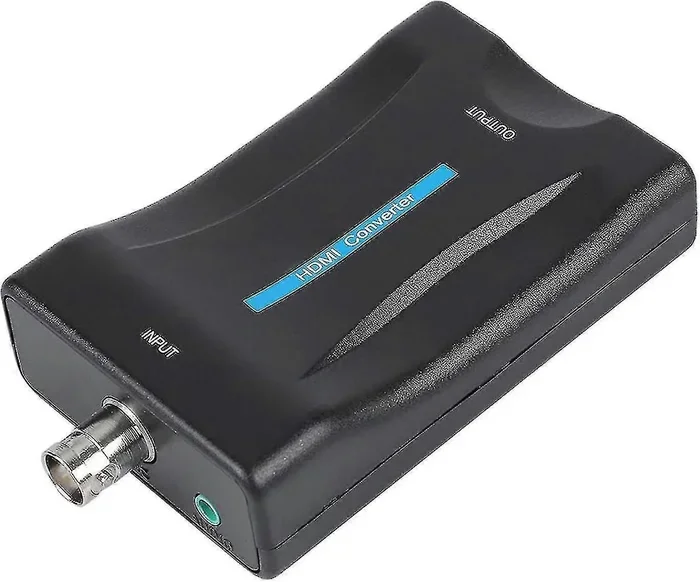
A coaxial to HDMI converter is a small device that takes an analog signal from a coaxial cable and converts it into a digital HDMI signal. Think of it as a translator between two different languages — your old equipment speaks coaxial, and your modern TV speaks HDMI.
These converter boxes come in several forms. Some handle RF to HDMI conversion, which is common for antenna or cable TV inputs. Others convert composite or RCA signals to HDMI for older gaming consoles or VCRs. The type you need depends entirely on your source device.
How Does the Conversion Process Work?
Inside the converter, a chip reads the analog signal coming through the coaxial cable. It then digitizes that signal and reformats it into a digital HDMI output. This process is called signal conversion, and it happens in real time.
The quality of the internal chip matters a lot here. Better chips produce sharper images and cleaner audio. Cheaper models often struggle with video signal format handling, leading to fuzzy pictures or laggy sound.
Do Coaxial to HDMI Converters Actually Work?
The short answer is yes. Coaxial to HDMI converters work for most standard setups. They successfully turn older analog signals into something your modern TV can display. But the word “work” comes with some important caveats.
When Do They Work Best?
Converters shine in specific scenarios. Here are the situations where they perform well:
- Connecting a cable TV outlet to a modern HDTV: If your wall has a coaxial jack and your TV only has HDMI inputs, a converter solves this perfectly.
- Using old security cameras with coaxial output: Many legacy surveillance systems use coaxial cables. A converter lets you view the feed on a modern monitor.
- Hooking up vintage game consoles or VCRs: Retro gaming fans often need signal conversion to enjoy classic games on big screens today.
- Setting up a secondary TV in a cabin or garage: For basic viewing needs, a budget converter does the job just fine.
When Do They Struggle?
Converters face challenges in certain situations too. Here is what to watch out for:
- Very low-quality source signals: If the original coaxial signal is weak or degraded, no converter can magically fix it.
- High-resolution expectations: Most converters max out at 720p or 1080p. Do not expect 4K output from an analog source.
- Long cable runs: Running a long coaxial cable before the converter can introduce signal loss and noise.
Types of Coaxial to HDMI Converters Available
Not all converters are the same. Understanding the different types helps you pick the right one for your needs.
RF to HDMI Converters
These handle radio frequency signals from cable TV or antenna connections. They are the most common type and work well for basic TV viewing. Many people use them to connect a cable TV to HDMI setup without a cable box.
Some RF converters also handle audio extraction. They can separate the audio track from the coaxial signal and output it through HDMI. This is handy for setups where your source device only has coaxial output.
Composite to HDMI Converters
These take the classic yellow, red, and white RCA cables and convert them to HDMI. They are popular for retro gaming and older DVD players. The image quality is decent but not as sharp as a true digital source.
If you are trying to get an old console or camcorder working with a modern display, a composite converter is your best bet. Look for models that support upscaling to improve the output quality.
Component to HDMI Converters
Component cables offer better quality than composite. Component to HDMI converters take those three separate video cables and merge them into a single HDMI output. These are ideal for devices that still use component connections.
Key Features to Look For When Buying
Not every converter on the market is worth buying. Here are the features that separate a good unit from a bad one.
Resolution Support
Check what resolutions the converter supports. Most decent models handle 720p or 1080p. If you want the best picture quality, look for a unit that supports at least 1080p full HD output.
Some budget models only push 480p, which looks blurry on a large screen. Always check the specifications before purchasing. The difference between a 480p and 1080p converter is night and day.
Audio Compatibility
A good converter handles both video and audio through the single HDMI cable. Avoid models that require separate audio cables unless your setup specifically demands it. Audio and video converter units that pass sound through HDMI save you from extra wiring.
Build Quality and Brand Reputation
Cheap no-name converters often overheat or produce unreliable signals. Stick with reputable brands that have solid customer reviews. A converter cable from a trusted manufacturer will last longer and perform better.
HDTV Compatibility
Make sure the converter works with your specific TV model. Most modern flat screens accept standard HDMI input, but some smart TVs have quirks. Check for compatibility notes on the product page or in the manual.
Common Mistakes People Make with Coaxial to HDMI Converters
Avoid these pitfalls to get the best results from your converter setup.
Buying the Cheapest Option
It is tempting to grab the cheapest converter online, but this often backfires. Ultra-budget units tend to have poor digital conversion chips that produce subpar image quality. Spending a little more upfront saves you from disappointment later.
Ignoring Cable Quality
Even the best converter cannot compensate for a bad coaxial cable. Use quality, well-shielded coaxial cables to minimize signal interference. A poor coaxial cable connection introduces static and picture artifacts.
Wrong Signal Type Assumption
Not all coaxial signals are the same. Some carry RF signals, while others carry composite or component signals. Make sure you buy the right converter type for your specific signal. Using an RF converter for a composite input will not work properly.
Skipping the Firmware Update
Some smart converters receive firmware updates that improve performance. Check the manufacturer’s website for updates after purchase. This simple step can fix audio sync issues and improve picture quality.
Expert Tips for Best Results
Want to get the most out of your coaxial to HDMI setup? Follow these practical tips.
First, keep your coaxial cable run as short as possible. Shorter runs mean stronger signals reaching the converter. If you must run a long cable, use a high-quality, heavy-gauge coaxial cable with good shielding.
Second, power your converter using the included adapter rather than relying on USB power from your TV. Dedicated power ensures stable performance and reduces the risk of signal dropouts.
Third, test your setup with a known good source before installing permanently. This helps you confirm the converter works properly with your specific equipment. If you are dealing with older cable infrastructure, you might also want to explore alternatives to traditional cable setups that could simplify your connection needs.
Fourth, update your converter firmware if available. Manufacturers often release updates that fix bugs and improve display device compatibility. Check the brand website or product manual for instructions.
Fifth, consider the placement of your converter. Keep it in a well-ventilated area and away from heat sources. Overheating can cause intermittent signal issues and shorten the lifespan of the unit.
Finally, if you are running multiple devices through one display, make sure your TV has enough HDMI ports. A simple HDMI switch can expand your options without adding complexity to your setup.
Coaxial to HDMI Converters vs. Modern Streaming
With so many people cutting the cord, you might wonder if a converter is even necessary anymore. The answer depends on your situation.
If you still receive cable TV through a coaxial wall outlet, a converter is a practical solution. It lets you watch your existing channels on a modern TV without a bulky cable box. Many people find this setup simpler and more affordable than maintaining a full cable subscription.
However, if you are considering ditching cable entirely, streaming services offer a more modern alternative. Services like Netflix, Hulu, and YouTube work directly through smart TVs and streaming sticks. No converter needed.
For those who want to keep their antenna-based local channels, a converter paired with an antenna can work well. This gives you free over-the-air TV in high definition. Just make sure your converter supports the resolution your antenna broadcasts.
If you are exploring options beyond traditional cable, you might want to look into alternatives to satellite and cable TV providers that offer more flexible viewing solutions for modern households.
Do You Really Need a Coaxial to HDMI Converter?
This depends on your specific situation. If you have a modern TV and an older device that only outputs coaxial, then yes — you need one. The converter bridges the gap and makes everything work together.
But if your devices already have HDMI outputs, skip the converter. You do not need it. The whole point is to connect older equipment to newer displays. If both ends of your setup already use HDMI, there is nothing to convert.
For security camera setups, a converter is often essential. Many older surveillance systems use coaxial connections that do not match modern monitors. A reliable converter lets you view your security footage clearly on a large HD display.
If you are setting up a secondary TV in a vacation home or workshop, a basic converter works great for casual viewing. The investment is small, and the convenience is real.
For parents who need to monitor baby cameras or other connected devices around the house, the type of connection matters. If your monitoring setup uses coaxial cables, a converter can help you view the feed on a modern screen. Just make sure your home network and device connections are properly configured for the best experience.
Final Verdict: Are Coaxial to HDMI Converters Worth It?
So, do coaxial to HDMI converters work or waste your money? The honest answer is — they work, and they are worth it when you need them.
The key is choosing the right converter for your setup. A quality unit from a reputable brand delivers reliable performance and solid picture quality. A cheap, no-name model might leave you frustrated with poor image and audio issues.
Set realistic expectations too. A converter cannot create a 4K picture from an analog source. What it can do is take a standard definition or high definition analog signal and make it viewable on a modern TV. For most everyday uses, that is more than enough.
If you have an older device, a legacy cable connection, or a coaxial wall outlet that you want to use with your new flat-screen TV, a converter is a smart investment. Just buy wisely, check the specs, and enjoy the upgrade.
Take the time to compare a few options, read real user reviews, and match the converter to your specific needs. A little research goes a long way in avoiding buyer’s remorse and getting the best picture quality from your setup.
Frequently Asked Questions
Can I use a coaxial to HDMI converter with any TV?
Most modern TVs with HDMI inputs work perfectly with coaxial to HDMI converters. Check that your TV has at least one HDMI port. Nearly all flat-screen TVs made in the last 15 years include HDMI inputs. If your TV is older and lacks HDMI, you may need a different type of adapter or connection solution.
Do coaxial to HDMI converters support audio?
Yes, most quality converters pass both video and audio through the HDMI cable. This means you only need one cable going from the converter to your TV. Some very cheap models may have audio sync issues, so reading reviews before buying is always a smart move.
What resolution can I expect from a coaxial to HDMI converter?
Most converters support up to 720p or 1080p output. The actual resolution depends on your source signal and the converter’s internal upscaling capability. Do not expect true 4K output from an analog coaxial source, as the input signal simply does not carry that level of detail.
Will a converter improve my picture quality?
A converter can make a blurry analog signal viewable on a modern HDTV, but it cannot create detail that does not exist in the original source. Think of it as making the best of what you have. The upscaling process can sharpen the image to some degree, but the starting quality of your coaxial signal matters most.
Can I connect multiple devices to one converter?
Most converters are designed for one input at a time. If you want to switch between multiple coaxial sources, look for a model with multiple inputs or pair your converter with an HDMI switch. This setup lets you toggle between devices without unplugging cables constantly.
Are wireless coaxial to HDMI converters worth it?
Wireless converters offer more flexibility in placement since you do not need a cable between the source and the display. However, they can introduce latency and signal interference. For most home setups, a wired converter provides more reliable and consistent performance. Save wireless options for situations where running cables is truly impractical.
Frequently Asked Questions
What is Do Coaxial To Hdmi Converters Work?
Do Coaxial To Hdmi Converters Work is an important topic with many practical applications.