Can Micro USB Be Converted To USB C With Simple Adapters
Yes, you can convert Micro USB to USB C using a simple adapter or cable. This easy upgrade lets you use your older Micro USB devices with modern USB C ports. We will walk you through every adapter type, compatibility check, and buying tip you need.
Key Takeaways
- Simple Adapters Work: A Micro USB to USB C adapter lets you connect older devices to new USB C ports without any hassle.
- Multiple Options Available: You can choose from adapter dongles, cables, and hubs depending on your needs.
- Check Compatibility First: Not all adapters support data transfer and fast charging at the same time.
- USB OTG Matters: USB On-The-Go support is essential if you want to use adapters for more than just charging.
- Quality Counts: Cheap adapters may cause slow charging or data loss. Always buy from trusted brands.
- Future-Proof Your Gear: Converting to USB C extends the life of your older devices and saves you money.
📑 Table of Contents
- Can You Convert Micro USB to USB C? Yes, Here Is How
- Understanding Micro USB and USB C Connectors
- Types of Adapters That Convert Micro USB to USB C
- How to Choose the Right Micro USB to USB C Adapter
- Step-by-Step Guide to Using Your Adapter
- Common Mistakes People Make When Using Adapters
- Quick Tips for Getting the Most From Your Adapter
- Expert Insights: The Future of USB Connectors
- Final Thoughts: Should You Convert Micro USB to USB C?
Can You Convert Micro USB to USB C? Yes, Here Is How
If you have ever held an older device with a Micro USB port and looked at a shiny new phone with a USB C port, you have felt the frustration. The world of connectors keeps changing, and it can feel like your old gear is left behind. The good news is that Micro USB can be converted to USB C with a simple adapter. You do not need to throw away your favorite devices just because the port type has changed.
USB C has become the standard for most modern gadgets. Laptops, tablets, and phones now use the small, reversible USB C connector. But millions of devices still use the older Micro USB standard. This creates a real problem for people who want to keep using their older gear. The solution is simpler than you think. A basic adapter or cable can bridge the gap between these two connector types.
In this guide, we will answer every question you have about converting Micro USB to USB C. We will cover the different types of adapters, how to pick the right one, and common mistakes to avoid. Whether you want to charge your device, transfer data, or use it with a new laptop, we have you covered. Let us dive in and make your old devices work with new technology.
Understanding Micro USB and USB C Connectors
Before you buy any adapter, it helps to understand what makes these two connector types different. Knowing the basics will save you money and prevent buying the wrong product.
What Is Micro USB?
Micro USB is a small connector that was the standard for mobile devices for many years. You have likely seen it on older phones, Bluetooth speakers, and portable chargers. The Micro USB connector comes in two main types: Micro USB Type A and Micro USB Type B. The Type B version is the one you see most often on phones and tablets.
The Micro USB connector has a flat, rectangular shape. It only fits in one direction, which can be annoying. It also supports older versions of USB, including USB 2.0. While it does the job for charging and basic data transfer, it is slower and less versatile than USB C.
What Is USB C?
USB Type C is the newer, more advanced connector. It is small and oval-shaped, and it is reversible, meaning you can plug it in either way. USB C supports faster data transfer speeds and higher power delivery. This means you can charge your device quicker and move files faster.
USB C also supports USB 3.0 and USB 3.1 standards, which offer much better performance than older USB versions. Many laptops now use USB C as their main charging and data port. The connector is also used for video output, which means you can connect your laptop to a monitor using just a USB C cable.
Key Differences Between Micro USB and USB C
Here are the main differences you should know about:
- Shape: Micro USB is rectangular. USB C is small and oval with rounded edges.
- Reversibility: Micro USB only works one way. USB C can be plugged in either direction.
- Speed: Micro USB maxes out at USB 2.0 speeds. USB C supports USB 3.0 and faster.
- Power Delivery: USB C supports higher wattage, meaning faster charging.
- Versatility: USB C handles data, video, and power all through one port.
These differences are exactly why people want to convert their Micro USB devices to work with USB C ports. The adapter fills the gap and makes everything work together.
Types of Adapters That Convert Micro USB to USB C
Not all adapters are the same. There are several types available, and each one serves a different purpose. Let us look at the most common options you will find on the market.
Micro USB to USB C Adapter Dongle
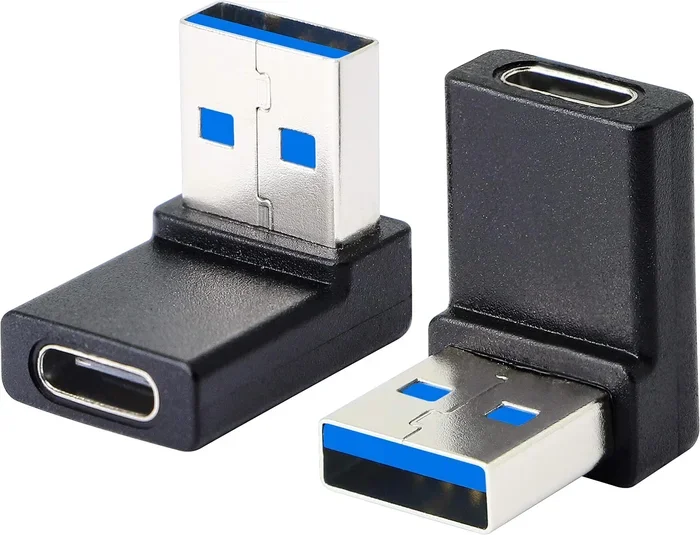
This is the most popular and affordable option. It is a small, pocket-sized adapter that plugs into a USB C port. You then connect your Micro USB cable into the other end of the adapter. It is simple, compact, and perfect for travel. These dongles usually support both charging and basic data transfer.
A Micro USB adapter like this is great if you just need to charge your old device from a new laptop or power bank with a USB C port. They are widely available and cost just a few dollars.
USB C to Micro USB Cable
This is a full cable with a USB C connector on one end and a Micro USB connector on the other. You do not need a separate adapter. Just plug the USB C end into your new device and the Micro USB end into your old device. These cables are convenient because you do not need an extra dongle.
A USB C to Micro USB cable is ideal if you need a permanent solution. Keep one at your desk, one in your bag, and one by your bed. They make charging older devices from new power sources much easier.
USB C Hub with Micro USB Port
If you need more than just a simple connection, a USB C hub is a great choice. These hubs plug into a USB C port and add multiple ports, including a Micro USB port. You can charge your device, transfer data, and sometimes even connect to a display all at the same time.
A USB C hub is perfect for people who use their laptop as a workstation. You get extra ports without carrying multiple adapters. Look for hubs that support USB 3.0 or higher for the best data transfer speeds.
USB C Adapter Converter with Power Delivery
For users who need fast charging, a converter with power delivery support is the way to go. These adapters support USB Power Delivery, which means they can send more power to your device. This is especially useful for tablets and larger devices that need higher wattage to charge quickly.
When looking for an adapter converter, make sure it supports the power requirements of your device. Check the wattage rating and compare it to what your device needs. A mismatch can lead to slow charging or no charging at all.
How to Choose the Right Micro USB to USB C Adapter
With so many options available, picking the right adapter can feel overwhelming. Here are the key factors to consider before you buy.
Check Your Device Compatibility
Not every adapter works with every device. Some adapters only support charging, while others support data transfer too. Before you buy, check what your device needs. If you just want to charge your phone, any basic adapter will work. If you need to transfer files, you need an adapter that supports data transfer.
Also, check if your device supports USB OTG, which stands for USB On-The-Go. USB OTG allows your device to act as a host, meaning it can read from external drives and accessories. Not all phones and tablets support USB OTG, so this is an important check.
Consider Data Transfer Speed
If you plan to move files between devices, speed matters. Older adapters that only support USB 2.0 will be slow. Look for adapters that support USB 3.0 or higher for the best performance. A good USB C adapter will clearly state its data transfer speed on the packaging or product listing.
Think About Build Quality
Cheap adapters might seem like a good deal, but they can cause problems. Poorly made adapters can overheat, fail to charge properly, or damage your device’s port. Always buy from reputable brands and read customer reviews before purchasing.
You can find great adapters at most electronics stores or online retailers. Just like you would compare options before picking alternatives to Dish Network and DirectTV, take time to compare adapter options and read reviews to find the best fit for your needs.
Pricing and Value
Most Micro USB to USB C adapters cost between five and twenty dollars. You do not need to spend a lot to get a reliable adapter. However, spending a little more on a quality product will save you from frustration and potential damage to your devices.
Step-by-Step Guide to Using Your Adapter
Using a Micro USB to USB C adapter is very simple. Follow these steps for a smooth setup every time.
- Choose the right adapter type. Decide whether you need a dongle, cable, or hub based on your use case.
- Plug the adapter into the USB C port. Make sure it fits snugly and feels secure.
- Connect your Micro USB cable to the adapter. The Micro USB end goes into your older device.
- Check for a connection. Your device should recognize the adapter. If it does not, try unplugging and plugging it back in.
- Test charging and data transfer. Plug the adapter into a power source and check if your device charges. Then try transferring a file to confirm data transfer works.
That is it. The process takes less than a minute once you have the right adapter. No technical skills are needed.
Common Mistakes People Make When Using Adapters
Even though adapters are simple, people still make mistakes. Here are the most common ones and how to avoid them.
Buying the Wrong Adapter Type
The biggest mistake is buying an adapter that does not match your needs. Some adapters only support charging, not data transfer. Others only support USB 2.0 speeds. Always check the product description carefully before you buy.
Ignoring Power Delivery Requirements
If your device needs fast charging, a basic adapter may not provide enough power. This is especially true for tablets and larger devices. Always check the wattage and make sure your adapter supports it.
Using Low-Quality Cables
The adapter is only as good as the cable you pair it with. A cheap or damaged cable can cause slow charging, data errors, or even safety hazards. Always use good quality cables with your adapters.
Forcing the Connector
If an adapter or cable does not fit easily, do not force it. This can damage the port on your device. Check the orientation and try again gently. USB C is reversible, but Micro USB only fits one way.
Quick Tips for Getting the Most From Your Adapter
Here are some practical tips to help you get the best experience from your Micro USB to USB C adapter:
- Keep your adapter portable. Store it in a small pouch or your laptop bag so you always have it handy.
- Label your cables. If you have multiple adapters and cables, label them so you know which one supports data and which one only charges.
- Clean your ports regularly. Dust and lint can build up in USB ports and cause connection issues. Use a soft brush or compressed air to keep them clean.
- Update your device firmware. Sometimes, connection issues are caused by outdated software. Check for updates regularly.
- Buy from trusted sellers. Stick to well-known brands and reputable retailers to avoid counterfeit products.
Expert Insights: The Future of USB Connectors
The tech world is always moving forward. USB C is now the dominant connector type for most devices. Apple, Google, Samsung, and many other major brands have all adopted USB C as their standard port. This shift means that older connectors like Micro USB are becoming less common.
The European Union has even passed regulations requiring USB C as the standard charging port for most electronics. This means more devices will move to USB C in the coming years. But that does not mean your older Micro USB devices are useless. With the right adapter, they can still work perfectly with modern technology.
Adapters also help reduce electronic waste. Instead of throwing away perfectly good devices just because the port type changed, you can keep using them with a simple adapter. This is better for your wallet and better for the environment.
Final Thoughts: Should You Convert Micro USB to USB C?
The answer is a clear yes. Converting your Micro USB devices to work with USB C ports is easy, affordable, and practical. A simple Micro USB adapter or cable can breathe new life into your older gadgets. You get the convenience of modern USB C ports without spending money on new devices.
Whether you need a basic charging adapter or a full USB C hub with multiple ports, there is an option for every budget and every need. Just remember to check compatibility, buy quality products, and follow the tips in this guide.
Can Micro USB be converted to USB C? Absolutely. With the right adapter, your older devices will work seamlessly with the latest technology. Do not let outdated connectors hold you back. Make the switch today and enjoy the benefits of USB C with all your favorite devices.
Frequently Asked Questions
Do I Need a Special Adapter to Convert Micro USB to USB C?
No, you do not need anything special. A standard Micro USB to USB C adapter or cable works perfectly for most devices. These adapters are widely available and affordable. Just make sure the adapter supports both charging and data transfer if you need both features.
Will Converting Micro USB to USB C Slow Down My Charging Speed?
It depends on the adapter you choose. A basic adapter may only support USB 2.0 speeds, which can limit charging speed. If you want fast charging, look for an adapter that supports USB Power Delivery and higher wattage ratings. Quality adapters will not slow down your charging at all.
Can I Use a Micro USB to USB C Adapter for Data Transfer?
Yes, most adapters support data transfer. However, the speed depends on the adapter’s specifications. Look for adapters that support USB 3.0 or higher for the best data transfer speeds. Always check the product description to confirm data transfer support before buying.
Are All Micro USB to USB C Adapters the Same?
No, they are not all the same. Some adapters only support charging, while others support both charging and data transfer. Some support fast charging and USB OTG, while others are basic. Always check what features the adapter offers and match them to your needs.
Is USB OTG Necessary for Using a Micro USB to USB C Adapter?
USB OTG is not always necessary, but it is helpful. USB OTG allows your device to act as a host, which means you can connect external devices like flash drives or keyboards using your adapter. If you only need to charge your device, USB OTG is not required. But if you want to do more than just charge, look for an adapter that supports USB OTG.
How Long Do Micro USB to USB C Adapters Last?
A good quality adapter can last for several years with normal use. The lifespan depends on the build quality and how often you use it. Cheap adapters may wear out quickly, while well-made adapters from trusted brands tend to last much longer. Store your adapter in a safe place when not in use to extend its life.
=== CONCLUSION ===
Converting Micro USB to USB C is one of the easiest and most affordable upgrades you can make for your older devices. With a simple adapter, you can charge faster, transfer data more efficiently, and keep using your favorite gadgets with modern USB C ports. The options are plentiful, from basic dongles to full USB C hubs, so there is something for everyone.
Remember to check compatibility, choose quality products, and avoid the common mistakes we covered in this guide. A small investment in a good adapter can save you a lot of money and hassle in the long run. Your older devices still have plenty of life left in them, and USB C adapters help them keep up with modern technology.
Start exploring your options today. Whether you need a simple charging cable or a feature-rich USB C hub, the right adapter will make your old devices work like new again.