Do Charging Cables Draw Power When Not In Use At All
Do charging cables draw power when not in use? The short answer is yes, but only a tiny amount. When you leave a cable plugged into the wall without a device attached, it still pulls a small amount of electricity known as phantom power or vampire power. While the standby power consumption is minimal, it can add up over months and years, affecting your electricity bill slightly. Understanding how much power your power adapter uses when idle helps you make smarter energy saving choices at home.
Have you ever looked at a charger plugged into your wall and wondered if it was secretly eating electricity? You are not alone. Many people assume that a charging cable only uses power when a phone or tablet is attached. But the reality is a bit more interesting. The truth about standby power consumption might surprise you, and it could change the way you think about your charging habits forever.
In this article, we will explore everything you need to know about do charging cables draw power when not in use. We will look at the science behind it, the actual numbers, and what you can do to save energy and money. Whether you are curious about phantom power, want to reduce your electricity bill, or simply care about energy saving, this guide has you covered.
By the end, you will understand exactly how much power your idle power adapter uses, why it matters, and the simple steps you can take to stop wasting electricity. Let us dive in.
Key Takeaways
- Charging cables do draw a small amount of power even when not connected to a device, often called phantom or vampire power.
- The standby power draw is extremely low, usually between 0.1 and 0.5 watts per cable, but it accumulates over time.
- Unplugging cables when not in use is the simplest way to eliminate unnecessary electricity waste.
- Using a smart plug can help you monitor and cut power to idle cables automatically.
- Cable quality and adapter type affect how much idle power draw occurs, so choosing reliable brands matters.
- Leaving cables plugged in overnight is generally safe for your devices but contributes slightly to energy waste.
- Small habits like unplugging chargers can lead to noticeable savings on your electricity bill over a year.
📑 Table of Contents
- What Happens When a Charging Cable Is Plugged In but Not Connected?
- How Much Power Does an Idle Charging Cable Actually Use?
- Does Leaving Cables Plugged In Overnight Waste Energy?
- Quick Tips to Reduce Phantom Power from Charging Cables
- Common Mistakes People Make With Charging Cables
- Expert Insights: What Energy Experts Say About Idle Cable Power
- Key Takeaways
- Conclusion
What Happens When a Charging Cable Is Plugged In but Not Connected?
When you plug a USB cable into a wall outlet or a power strip but leave the other end loose, something still happens. Your wall charger stays in a ready state. It waits for a device to connect. During this waiting period, it draws a small amount of electricity. This is often called phantom power or vampire power.
But how much power are we talking about? The answer is less than you might think. Most modern power adapters draw between 0.1 and 0.5 watts when nothing is plugged in. That is a tiny amount. To put it in perspective, a single light bulb uses about 6 to 10 watts. So one idle cable is not going to break the bank.
However, here is where it gets interesting. Most households have multiple chargers. You might have a phone charger, a tablet charger, a laptop adapter, and cables for other devices. If all of them stay plugged in 24 hours a day, the idle power draw adds up. Over a year, those small draws can cost you a few extra dollars on your electricity bill. It is not huge, but it is completely unnecessary.
Why Do Cables Draw Power Even When Idle?
The reason comes down to how power adapters work. Even when no device is connected, the adapter still maintains a small electrical circuit. This circuit keeps the adapter ready to deliver power the moment you plug in your phone. Think of it like a light switch that stays slightly warm even when the light is off. The adapter is always on standby, which means it always uses a little bit of electricity.
Older chargers tend to draw more idle power than newer ones. This is because older charging technology was less efficient. Modern chargers, especially those with smart chips, are designed to minimize standby power consumption. They can detect when no device is connected and reduce their power draw to almost nothing.
How Much Power Does an Idle Charging Cable Actually Use?
Let us get into the numbers. If you want to know exactly how much electrical consumption an idle cable causes, you need to look at wattage. A typical phone charger uses about 5 to 10 watts when actively charging a device. But when nothing is connected, it drops to around 0.1 to 0.5 watts.
Here is a simple way to think about it. If your cable draws 0.3 watts and stays plugged in all day, every day, for a full year, it uses about 2.6 kilowatt-hours. That might sound technical, but here is what it means in real money. At the average US electricity rate, that costs roughly 30 to 40 cents per year for one cable. One cable. Not bad, right?
But most people have more than one. A family with five idle chargers plugged in all the time could be spending two dollars or more per year on standby power. And that is just cables. Add in other devices like game consoles, smart TVs, and desktop computers, and the vampire power in your home grows significantly.
| Device | Idle Power Draw (Watts) | Annual Energy Use (kWh) | Estimated Annual Cost |
|---|---|---|---|
| Phone Charger (Idle) | 0.1 – 0.5 | 0.9 – 4.4 | $0.10 – $0.50 |
| Tablet Charger (Idle) | 0.2 – 0.5 | 1.8 – 4.4 | $0.20 – $0.50 |
| Laptop Adapter (Idle) | 0.5 – 1.5 | 4.4 – 13.1 | $0.50 – $1.50 |
| USB Hub (Idle) | 0.3 – 1.0 | 2.6 – 8.8 | $0.30 – $1.00 |
| Smart Speaker Charger (Idle) | 0.1 – 0.3 | 0.9 – 2.6 | $0.10 – $0.30 |
As you can see, the numbers are small for individual devices. But when you multiply them across a whole household, the energy waste becomes more meaningful. This is why many people are now paying attention to their charging habits and looking for ways to reduce phantom power in their homes.
Does Leaving Cables Plugged In Overnight Waste Energy?
A lot of people charge their phones overnight. They plug the cable in before bed and unplug it in the morning. But what about the charger itself? Does leaving a wall charger in the socket all night draw power even after the phone is fully charged?
The answer is yes, but only a tiny bit. Once your device reaches 100 percent, the power adapter stops delivering significant current. However, it still sits in the wall drawing that small standby amount. If you leave it plugged in for eight hours every night, that adds up over weeks and months.
Here is an important point. Leaving a cable plugged in overnight is not dangerous. Modern charging cables and power adapters are designed with safety features. They will not overheat, catch fire, or damage your outlet. The risk is extremely low. The real concern is the slow, steady electrical consumption that happens silently in the background.
Is It Safe to Leave Cables Plugged In All the Time?
From a safety standpoint, yes. Quality charging cables and certified power adapters are built to handle being left plugged in. They have internal circuits that prevent overheating and power surges. However, cheap or uncertified cables can be a different story. Low-quality USB cables may not have proper safety protections. They can degrade over time and become a fire hazard, even when not in active use.
This is why cable quality matters so much. Always choose cables and adapters from reputable brands. Look for certifications like USB-IF or UL listing. These ensure your equipment meets safety standards and operates efficiently, even when sitting idle in your outlet.
Quick Tips to Reduce Phantom Power from Charging Cables
Want to cut down on vampire power without changing your entire lifestyle? Here are some simple and practical tips you can start today.
- Unplug cables when not in use. This is the most effective method. It takes two seconds and eliminates standby power completely.
- Use a smart plug. A smart plug lets you turn off power to multiple chargers with one tap. Some even let you schedule when outlets are active.
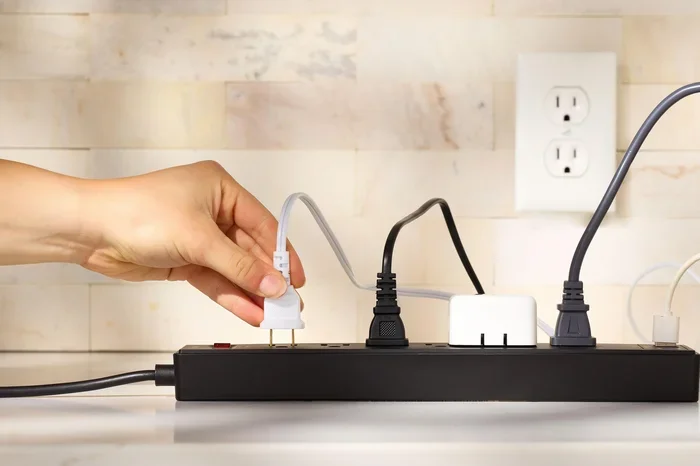
- Invest in a quality power strip with an on/off switch. Plug all your chargers into one strip and flip it off at night. This is an easy energy saving habit.
- Choose chargers with low standby power. Look for adapters that are ENERGY STAR certified or labeled as low standby consumption.
- Unplug cables from the wall, not just the device. Pulling the cable from your phone does not stop the power adapter from drawing electricity if it stays in the outlet.
- Charge your devices during the day. This way, you can unplug the cable right after charging is done instead of leaving it in overnight.
These tips are small, but they add up. Over time, they can make a real difference in your electricity bill and your home’s overall energy efficiency.
Common Mistakes People Make With Charging Cables
There are some habits that quietly increase your electrical consumption without you even realizing it. Let us look at the most common mistakes.
Mistake 1: Leaving Cables Plugged In Indefinitely
This is the biggest offender. Many people plug in a cable once and leave it there for weeks or months. Whether the other end is connected to a device or not, the power adapter continues to draw standby power. Over time, this waste multiplies, especially in homes with many devices.
Mistake 2: Using Cheap or Uncertified Cables
Cheap cables are not just inefficient. They can also be unsafe. Low-quality charging cables may have poor insulation, weak connectors, and inadequate safety features. They waste more energy as heat and can pose a genuine risk. Always invest in cable quality over price.
Mistake 3: Ignoring the Power Adapter
People often focus on the cable itself and forget about the power adapter. The adapter is the part that plugs into the wall, and it is the component that draws idle power. If you want to reduce standby power consumption, pay attention to the adapter, not just the cable.
Mistake 4: Charging Devices to 100 Percent Every Night
While this does not directly relate to phantom power, it is a related charging habit that wastes energy. Keeping your device plugged in after it reaches full charge means the adapter continues to supply a small trickle of power. This is unnecessary and slightly increases your energy waste.
Expert Insights: What Energy Experts Say About Idle Cable Power
Energy experts and sustainability advocates have long highlighted the issue of phantom power in homes. According to the US Department of Energy, standby power can account for 5 to 10 percent of a household’s total electricity use. While charging cables are only a small part of that, they are one of the easiest leaks to plug.
Experts recommend a simple approach. Unplug what you are not using. It sounds basic, but it works. If unplugging every cable feels tedious, a smart plug or a switched power strip is a great alternative. These tools let you cut power to multiple devices at once, making energy saving effortless.
Some experts also point out that the future of charging technology is moving toward even lower standby power. Newer USB standards, like USB-C with power delivery, are designed to be more efficient. As cable efficiency improves, the idle power draw of modern chargers will continue to decrease.
However, until every home is using the latest technology, the best thing you can do is be mindful. Awareness is the first step toward change. Once you understand that your cables draw power even when not in use, you can take small, meaningful actions to reduce waste.
Key Takeaways
- Charging cables do draw a small amount of power when plugged into the wall but not connected to a device. This is known as phantom power or vampire power.
- The idle power draw is very low, usually between 0.1 and 0.5 watts per cable, but it adds up across multiple devices and over time.
- Unplugging cables when not in use is the single most effective way to eliminate standby power waste.
- Using a smart plug or switched power strip makes it easy to cut power to idle chargers without changing your routine.
- Cable quality and adapter type influence how much idle power draw occurs, so choose certified, reputable brands.
- Leaving cables plugged in overnight is safe with modern equipment but contributes slightly to unnecessary energy waste.
- Small daily habits like unplugging chargers after use can lead to meaningful savings on your electricity bill over the course of a year.
Conclusion
So, do charging cables draw power when not in use? The answer is a clear yes, but the amount is very small. Each individual cable pulls only a tiny fraction of a watt when idle. However, when you consider how many chargers most households have, the standby power consumption becomes more noticeable. Over weeks, months, and years, this phantom power quietly adds to your electricity bill and your home’s overall energy waste.
The good news is that fixing this problem is simple. You do not need expensive equipment or a complete lifestyle overhaul. Just unplugging cables when you are done charging, using a smart plug, or switching to a power strip with an on-off switch can make a real difference. These small actions add up to meaningful energy saving over time.
Remember, every bit of electrical consumption you reduce helps both your wallet and the environment. Being mindful of your charging habits is one of the easiest and most overlooked ways to live a more energy efficient lifestyle. Start today. Unplug that idle cable. Your future self and your electricity bill will thank you.
Do charging cables draw power when not in use? Yes, they do. But now that you know the truth, you have the power to do something about it. Take control of your home’s energy usage and make every watt count.
Frequently Asked Questions
Do all charging cables draw power when not in use?
Yes, most charging cables draw a small amount of standby power when plugged into a wall outlet, even if no device is connected. The amount depends on the type and quality of the power adapter. Modern certified adapters draw less idle power than older or uncertified ones.
How much electricity does an idle charging cable use per year?
An idle cable typically uses between 0.9 and 4.4 kilowatt-hours per year, depending on the adapter. At average electricity rates, this costs roughly 10 to 50 cents per cable annually. The cost is low for one cable but grows with multiple idle chargers.
Is it safe to leave a charging cable plugged in all the time?
Yes, it is generally safe with modern, certified charging cables and power adapters. They are designed with safety features that prevent overheating and electrical issues. However, always use quality cables and avoid cheap, uncertified products for safety.
Can a smart plug help reduce phantom power from cables?
Absolutely. A smart plug lets you completely cut power to your chargers when they are not in use. You can turn them off remotely or set schedules. This is one of the easiest ways to stop vampire power and save on your electricity bill.
Does unplugging cables really save money?
Yes, it does. While the savings per cable are small, they add up over time, especially in households with many idle chargers. Combined with other energy saving habits, unplugging cables can contribute to a noticeable reduction in your monthly electricity bill.
What is the difference between phantom power and vampire power?
Phantom power and vampire power are two terms for the same thing. They both refer to the electricity that devices and power adapters draw when they are plugged in but not actively in use. This standby power consumption happens silently and is one of the most common forms of energy waste in homes.