Does Eero Require A Subscription Everything You Need To Know
Does Eero Require A Subscription? The short answer is no — Eero works without a subscription. However, Eero Plus offers advanced features like Eero security, parental controls, and enhanced network insights. This guide covers every Eero plan, pricing detail, and whether the Eero subscription is worth the cost for your home network setup.
Eero has become one of the most popular mesh Wi-Fi systems on the market. People love how easy it is to set up and how well it covers homes with strong signals. But one question keeps coming up: does Eero require a subscription? The answer might surprise you. You can use Eero fully without paying a dime each month. Yet there is also an optional plan called Eero Plus that adds some powerful extras. In this article, we will walk through everything you need to know about Eero pricing, plans, and whether the Eero subscription is right for your home.
Whether you are setting up a new home network or thinking about upgrading your current one, understanding Eero’s subscription options matters. You want to know what you are getting and what you are paying for. This guide breaks it all down in simple terms. No jargon. No confusing fine print. Just clear, honest information to help you make the best decision for your home.
Key Takeaways
- Eero works without a subscription: You get full mesh Wi-Fi functionality at no monthly cost.
- Eero Plus costs around $9.99/month: It adds advanced security, parental controls, and network insights.
- The base Eero plan includes solid features: You still get easy setup, guest networks, and device prioritization.
- Eero subscription is optional: Most users find the free plan sufficient for everyday use.
- Compare before you commit: Other mesh systems like Google Nest and Linksys offer different pricing models.
- Your internet provider may charge separately: Eero does not replace your internet bill.
📑 Table of Contents
- What Is Eero and How Does It Work
- Does Eero Require A Subscription
- Eero Plus Subscription: What It Includes
- Is Eero Plus Worth The Cost
- How To Set Up Eero Without A Subscription
- Eero Subscription vs Other Mesh Systems
- Common Mistakes People Make With Eero Subscriptions
- Expert Insights on Eero Pricing
- Key Takeaways
- Frequently Asked Questions
- Final Thoughts
What Is Eero and How Does It Work
Eero is a mesh Wi-Fi system designed to give your whole home strong, reliable internet. Instead of one router that might struggle to reach every room, Eero uses multiple units (called nodes or beacons) that work together. These units talk to each other and spread Wi-Fi coverage evenly throughout your space.
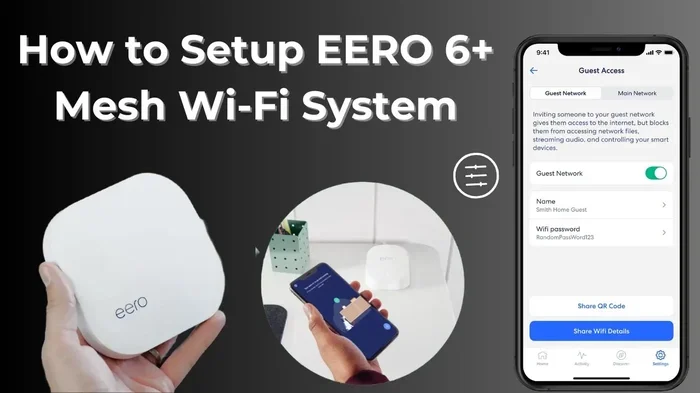
Setting up Eero is incredibly simple. You plug in the main unit, connect it to your modem, and use the Eero app on your phone. The app walks you through everything step by step. Within minutes, you have a working mesh network. You can add more Eero units anywhere you need better coverage. Each unit is small and blends into your home decor.
Eero works with most internet service providers. You do not need any special equipment from your ISP. Just connect the Eero gateway to your modem, and you are good to go. If you have ever struggled with can I get internet in my home without a phone line, Eero works independently of phone lines. It uses your existing internet connection from cable, fiber, or DSL providers.
How Mesh Wi-Fi Differs From Traditional Routers
Traditional routers send Wi-Fi signals from one point. Walls, floors, and furniture can weaken those signals. Dead zones are common in larger homes. Mesh systems like Eero solve this problem by using multiple units that create one seamless network. Your phone and laptop automatically connect to the strongest unit as you move around the house.
This is a big difference from using Wi-Fi extenders, which often create separate network names and cause connection drops. With Eero, you have one network name and one password. The handoff between units is smooth and fast. You can stream videos, video call, and game without interruptions.
Does Eero Require A Subscription
Here is the most important part. Does Eero require a subscription? No, it does not. Eero’s basic functionality is completely free. You pay for the Eero hardware upfront, and that is it. You get full access to mesh Wi-Fi, the Eero app, network management tools, and all the core features without any monthly fee.
This is a major advantage over some other mesh systems that lock basic features behind a paywall. With Eero, you can set up guest networks, prioritize devices, run speed tests, and manage connected devices all for free. The Eero app gives you a clean dashboard where you can see everything happening on your network.
So why does Eero even offer a subscription? Because the optional plan adds layers of protection and convenience that some users want. Think of it like a car. The base model drives great. But you can pay extra for heated seats and a premium sound system. Eero Plus is that premium add-on.
What You Get With the Free Eero Plan
The free Eero plan includes a lot of value. Here is what you get without paying anything extra:
- Full mesh Wi-Fi coverage across all connected Eero units
- Easy setup and management through the Eero mobile app
- Guest network creation so visitors can use your Wi-Fi without accessing your main network
- Device prioritization to give bandwidth to the devices that need it most
- Network diagnostics and basic speed testing tools
- Automatic software updates to keep your system running smoothly
For most households, this free plan is more than enough. If you just want reliable Wi-Fi throughout your home, you do not need to spend anything extra each month.
Eero Plus Subscription: What It Includes
Eero Plus is the optional subscription plan from Eero. It costs around $9.99 per month or $99.99 per year. The price may vary slightly depending on promotions and the number of Eero units you own. Let us look at what you actually get for that money.
Eero Security
The standout feature of Eero Plus is Eero security. This is a network-wide security system that protects every device connected to your Eero network. It includes automatic threat detection, malicious website blocking, and real-time alerts if something suspicious is detected. Eero security works at the network level, which means it protects devices that do not have their own antivirus software, like smart home gadgets and IoT devices.
Parental Controls
Eero Plus gives you advanced parental controls. You can set screen time limits for individual devices, pause the internet for specific devices, and filter content based on age groups. These controls go beyond what the free plan offers. You get detailed activity reports that show which websites and services each device uses. This is especially helpful for families who want to manage their children’s internet habits.
Advanced Network Insights
Eero Plus provides deeper insights into your network activity. You can see which devices are using the most bandwidth, identify connected devices more easily, and get detailed usage reports. This is useful for people who work from home or have many smart devices competing for bandwidth.
Priority Support
Subscribers also get priority customer support. If you run into any issues with your Eero system, you get faster access to Eero’s support team. This is a nice perk, though most users rarely need support for their mesh systems.
| Feature | Free Plan | Eero Plus |
|---|---|---|
| Mesh Wi-Fi Coverage | Yes | Yes |
| App-Based Management | Yes | Yes |
| Guest Networks | Yes | Yes |
| Device Prioritization | Yes | Yes |
| Network Security | No | Yes |
| Parental Controls | Basic | Advanced |
| Network Insights | Basic | Advanced |
| Priority Support | No | Yes |
| Monthly Cost | $0 | $9.99 |
| Annual Cost | $0 | $99.99 |
Is Eero Plus Worth The Cost
This is the question most people ask. Is the Eero subscription worth paying for? The honest answer depends on your needs and how you use your home network.
If you have a family with kids, Eero Plus can be a great value. The advanced parental controls alone justify the cost for many parents. Being able to set screen time limits, pause internet access during homework time, and filter inappropriate content gives you peace of mind. These tools are easy to manage from your phone, which makes daily parenting a little simpler.
On the other hand, if you are a single person or a couple with basic internet needs, the free plan is probably all you need. You get solid mesh Wi-Fi coverage, easy management, and all the essentials without paying a monthly fee. Why pay for something you do not need?
Another factor to consider is your overall home network security. With more smart home devices entering our homes — cameras, smart locks, thermostats — having network-level protection becomes more valuable. Eero security scans all traffic passing through your network and blocks known threats before they reach your devices. This is a proactive approach that many people appreciate.
Quick tip: Before you decide, try the free plan for a few weeks. See how it works for your household. Then decide if you want to upgrade to Eero Plus. There is no risk in starting with the free version.
How To Set Up Eero Without A Subscription
Setting up Eero without a subscription is straightforward. Here is what you need to do:
- Unbox your Eero system. Each Eero unit is compact and ready to plug in right out of the box.
- Connect the main Eero unit to your modem using the included ethernet cable.
- Download the Eero app on your iPhone or Android device.
- Follow the on-screen instructions to set up your network name and password.
- Place additional Eero units in rooms where you need better coverage. The app will guide you on optimal placement.
- Connect your devices to the new Eero network and enjoy seamless Wi-Fi.
That is it. No subscription required. No credit card needed. Just a working mesh network that covers your home with strong Wi-Fi signals.
If you also use a computer on this network, keep in mind that connecting to a Wi-Fi card for your computer works seamlessly with Eero. Most modern laptops and desktops have built-in Wi-Fi that connects to any standard router or mesh system, including Eero. You do not need any special adapters or subscriptions for this to work.
Eero Subscription vs Other Mesh Systems
How does Eero’s subscription model compare to other popular mesh systems? Let us take a quick look.
Google Nest Wi-Fi does not require a subscription either. It offers similar free features and has a built-in Google Assistant speaker on the router unit. However, Google does not offer a separate paid security or parental control plan for its mesh system.
Linksys Velop also works without a subscription. However, Linksys offers an optional Linksys Shield service for $4.99 per month that provides parental controls and security features. This is similar to Eero Plus in concept but at a lower price point.
Netgear Orbi does not require a subscription for its core features. Netgear offers optional security add-ons through its Armor service, which costs extra and provides comprehensive antivirus protection across all connected devices.
Each system has its strengths. Eero stands out for its simplicity and user-friendly app. The optional Eero Plus subscription is fairly priced compared to competitors. The key takeaway is that you are never forced to pay a subscription to get a working mesh Wi-Fi system from Eero.
Common Mistakes People Make With Eero Subscriptions
Here are some common mistakes to avoid when thinking about Eero and subscriptions:
- Assuming you need Eero Plus for basic Wi-Fi. You do not. The free plan handles everything most households need.
- Forgetting that Eero does not replace your internet bill. You still pay your internet service provider each month. Eero is just your router and mesh system.
- Not trying the free plan first. Jumping straight into Eero Plus without testing the free version can lead to unnecessary spending.
- Overlooking the annual payment option. Paying $99.99 per year saves you about $20 compared to the monthly rate of $9.99.
- Ignoring hardware costs. Eero units are an upfront investment. Make sure you budget for the hardware before worrying about subscriptions.
Expert Insights on Eero Pricing
Networking experts generally agree that Eero offers one of the best values in the mesh Wi-Fi market. The fact that the core system works without any subscription sets it apart from competitors who lock essential features behind paywalls. The optional Eero Plus plan is a reasonable add-on for users who want enhanced security and parental controls.
Experts also point out that Eero’s simplicity is its biggest selling point. The setup process takes minutes, the app is intuitive, and the system just works. For people who are not tech-savvy, this ease of use is invaluable. You do not need a subscription to access this simplicity.
If you are currently exploring networking options, you might also wonder about broader home setup questions. For instance, if you are setting up a home office, you might ask can a docking station ruin a laptop — the answer is generally no, but it is worth understanding how peripherals interact with your network setup.
Key Takeaways
- Eero does not require a subscription. The basic plan is completely free and includes full mesh Wi-Fi functionality.
- Eero Plus costs $9.99/month or $99.99/year and adds security, advanced parental controls, and priority support.
- The free plan is enough for most users. You get guest networks, device prioritization, and easy app management.
- Eero Plus shines for families. Advanced parental controls and network security make it a strong value for households with children.
- Compare with competitors. Linksys Shield and Netgear Armor offer similar paid add-ons at different price points.
- Start with the free plan. Test Eero for a few weeks before deciding if you want to upgrade to Eero Plus.
- Your internet bill is separate. Eero does not replace or reduce your monthly internet service cost.
Frequently Asked Questions
Is Eero completely free to use?
Yes, Eero’s basic functionality is completely free. You pay for the Eero hardware upfront, and there are no monthly fees for the core mesh Wi-Fi features. You get full access to the Eero app, network management, guest networks, and device prioritization at no extra cost.
What happens if I cancel my Eero Plus subscription?
If you cancel Eero Plus, you simply lose access to the premium features like advanced security, detailed parental controls, and priority support. Your Eero system continues to work perfectly with all the free features. Nothing breaks or stops working when you cancel the subscription.
Can I use Eero without an internet service provider?
No, Eero needs an active internet connection to provide Wi-Fi. You still need an internet service provider. Eero is your router and mesh system, not your internet source. You connect Eero to your modem, which connects to your ISP’s network.
Does Eero Plus protect all devices on my network?
Yes, Eero Plus security features protect every device connected to your Eero network. This includes phones, laptops, smart TVs, smart home devices, and anything else that connects to your Wi-Fi. The security works at the network level, so you do not need to install anything on individual devices.
Can I switch between Eero plans at any time?
Yes, you can switch between Eero plans anytime through the Eero app. You can upgrade to Eero Plus or cancel and return to the free plan. There are no long-term contracts or cancellation fees. It is completely flexible.
How many Eero units do I need for my home?
It depends on the size of your home. A single Eero unit works well for small apartments or condos. For larger homes, you may need two or three units to ensure full coverage. Eero’s app helps you place units in optimal locations for the best signal strength throughout your home.
Final Thoughts
So, does Eero require a subscription? The clear answer is no. Eero gives you everything you need for a great mesh Wi-Fi experience without asking for a monthly fee. The free plan is generous, easy to use, and covers all the essentials that most households need. You get reliable coverage, simple management, and solid performance straight out of the box.
The optional Eero Plus subscription is a nice bonus for those who want extra security and parental controls. At around $10 per month, it is reasonably priced and adds genuine value for families and security-conscious users. But it is entirely your choice. You are never locked into anything.
Eero stands out in the mesh Wi-Fi market because of its simplicity, affordability, and no-subscription-required approach. Whether you are setting up a new home network or replacing an old router, Eero is a strong choice. Start with the free plan, see how it works for your home, and decide from there. You have nothing to lose and a lot of reliable Wi-Fi to gain.