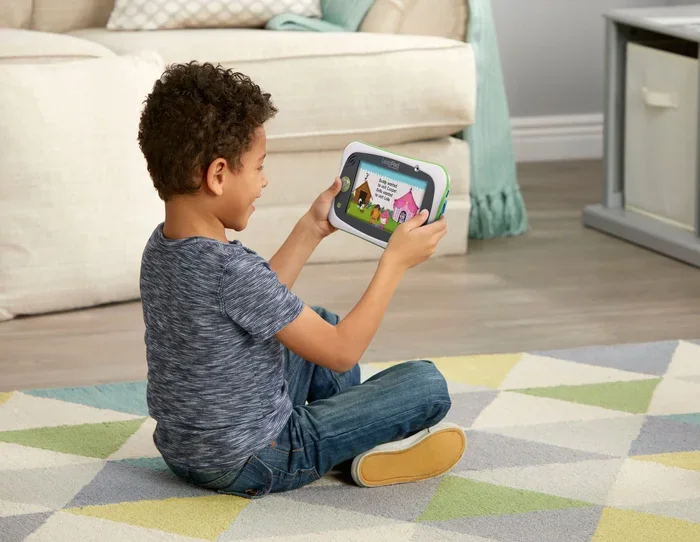
Can You Use Leapfrog Without Internet for Learning
Yes, you can use Leapfrog without internet for many core learning activities. The Leapfrog learning tablets come loaded with pre-installed games, eBooks, and educational content that work entirely offline. While some features like app downloads and content updates need WiFi, the offline learning experience remains rich and engaging for young learners.
Every parent wants to give their child the best learning tools available. Leapfrog tablets have become a go-to choice for families who want educational screen time that actually teaches something. But here is the big question many parents ask: can you use Leapfrog without internet?
The short answer is yes. The longer answer is even more reassuring. Leapfrog devices are designed with offline learning at their core. Your child does not need a WiFi connection to play games, read eBooks, or explore educational content. Let us walk through everything you need to know about using a Leapfrog without WiFi and making the most of it.
Whether you are planning a road trip, live in an area with spotty internet, or simply prefer less screen time connected to the cloud, this guide has you covered. We will break down how Leapfrog offline mode works, what you can and cannot do, and share practical tips to set up your child’s device for success.
Key Takeaways
- Leapfrog works offline: Most learning games, eBooks, and activities function without an internet connection.
- Pre-loaded content is extensive: Devices come with hours of educational material ready to use.
- Updates and new downloads need WiFi: You must connect to the internet occasionally to add new content.
- Parental controls work fully offline: You can set screen time limits and adjust settings without the web.
- No WiFi? No problem for core learning: Kids can still access math, reading, science, and creative games offline.
- Setup is simple: You only need the internet once during initial device configuration.
- Offline mode is great for travel: Leapfrog tablets are ideal for car rides, flights, and areas with poor connectivity.
📑 Table of Contents
- What Is Leapfrog and How Does It Work?
- Can You Use Leapfrog Without Internet? The Full Breakdown
- How to Set Up Leapfrog for Offline Use
- Best Leapfrog Devices for Offline Learning
- Benefits of Offline Learning with Leapfrog
- Common Mistakes Parents Make with Offline Leapfrog Use
- Expert Insights on Leapfrog Offline Learning
- Tips to Maximize Leapfrog Offline Learning
- Conclusion
What Is Leapfrog and How Does It Work?
Leapfrog is a brand that builds kid-friendly tablets and learning systems designed specifically for children. Their devices are not just regular tablets with parental locks. They are built from the ground up to deliver educational content in a safe, controlled environment.
The most popular devices include the Leapfrog LeapPad series and the Leapfrog Epic. These tablets come with a library of games, puzzles, eBooks, and creative tools. Each piece of content targets specific skills like reading, math, science, and problem-solving.
Here is what makes Leapfrog special:
- Age-appropriate content: Games adjust to your child’s skill level automatically.
- Curriculum-based learning: Content aligns with school standards and educational goals.
- Safe environment: No ads, no inappropriate content, no random links.
- Parental dashboard: You can track progress and adjust settings from your own phone or computer.
- Durable design: Built to handle drops, spills, and the chaos of everyday kid life.
Most of these features work beautifully even when your child is not connected to the internet. That is the beauty of Leapfrog offline mode. The device stores everything it needs right on the tablet itself.
Can You Use Leapfrog Without Internet? The Full Breakdown
The big question parents keep asking is straightforward: can you use Leapfrog without internet? The answer is a confident yes, with a few important caveats. Let us dig into exactly what works offline and what requires a connection.
What Works Without Internet
When you are using a Leapfrog without WiFi, your child still has access to a wide range of features. Here is what stays fully functional:
- Pre-installed games and apps: Every Leapfrog tablet comes with several learning games already loaded. These run perfectly without any internet access.
- eBooks and reading adventures: The built-in library of stories and reading activities works completely offline.
- Math and logic puzzles: All skill-building activities stored on the device are available anytime.
- Creative tools: Drawing apps, music makers, and video editors work without a connection.
- Progress tracking on-device: The tablet itself records your child’s learning milestones locally.
- Parental controls: You can set time limits, adjust difficulty levels, and manage content access without being online.
That is a lot of learning power with zero internet needed. For most families, the offline capabilities alone provide more than enough educational value.
What Requires Internet
Now let us be honest about what does need a connection. Understanding these limitations helps you plan better:
- Downloading new apps and games: To add fresh content from the Leapfrog app store, you need WiFi.
- Software updates: Keeping the device updated requires an internet connection.
- Syncing progress to the parent dashboard: Learning data uploads to your phone or computer when online.
- Streaming content: Any content that streams rather than downloads needs the web.
- Initial setup: You need internet the very first time you set up and register the device.
Notice something important here? Almost everything that needs the internet is related to adding new content or syncing data. The actual learning experience on the device itself is entirely self-contained.
How to Set Up Leapfrog for Offline Use
Setting up your Leapfrog tablet for offline learning is simple and takes just a few minutes. Follow these steps to get the most out of your device without relying on a constant internet connection.
Step 1: Complete the Initial Setup Online
The first time you turn on the Leapfrog, connect it to WiFi. This lets you register the device, create a child profile, and download any available updates. Think of this as a one-time setup step. Once it is done, you can disconnect.
Step 2: Download Content While Connected
Before you go offline, download all the games, eBooks, and apps you want your child to use. The Leapfrog learning system lets you browse and purchase content through the parent app on your phone or through the device itself when connected. Download everything you need while you still have a strong WiFi signal.
Step 3: Adjust Parental Controls
Go into the settings and configure the parental controls. Set screen time limits, choose age-appropriate content levels, and enable the features that matter most to your family. All of these settings save locally on the device and work without internet.
Step 4: Disconnect and Explore
Once everything is downloaded and configured, you can turn off WiFi and let your child explore freely. The Leapfrog without WiFi experience is smooth, engaging, and full of learning opportunities.
Best Leapfrog Devices for Offline Learning
Not all Leapfrog devices are created equal when it comes to offline learning capabilities. Some models store more content locally, while others lean more heavily on cloud-based features. Here is a closer look at the top options.
Leapfrog LeapPad Academy
The LeapPad Academy is one of the best choices for offline learning. It comes with a generous amount of pre-installed content and supports expandable storage through a microSD card. This means you can load up tons of games and books without ever needing the internet again.
Leapfrog Epic
The Leapfrog Epic is a powerful Android-based tablet designed for older kids. It has a larger screen and more processing power. The offline library is extensive, and the device handles complex games and interactive stories beautifully without a connection.
Leapfrog LeapPad Ultimate
The LeapPad Ultimate is ideal for younger children, typically ages 3 to 6. It features a kid-safe design and comes packed with learning activities. The offline experience is seamless, making it perfect for families who travel frequently or live in areas with limited connectivity.
| Device | Pre-loaded Content | Offline Games | Storage Expandable | Best For |
|---|---|---|---|---|
| LeapPad Academy | Yes, extensive | 20+ games | Yes (microSD) | Ages 4-7 |
| Leapfrog Epic | Yes, moderate | 30+ games | Yes (microSD) | Ages 6-9 |
| LeapPad Ultimate | Yes, good | 15+ games | No | Ages 3-6 |
All three devices deliver strong offline learning experiences. Your choice depends on your child’s age and how much storage you need for downloaded content.
Benefits of Offline Learning with Leapfrog
Using a Leapfrog tablet without internet actually has some surprising benefits. Let us explore why offline learning can be a great choice for your family.
Reduced Screen Distractions
When a tablet is offline, it cannot pull up random videos, ads, or links. Your child stays focused on the educational content they are supposed to be engaging with. This means more productive educational screen time and fewer distractions.
Better for Travel
Car rides, flights, and train trips become much easier with a Leapfrog without WiFi. You do not need to worry about finding a WiFi hotspot or burning through your data plan. Just hand over the tablet and let your child learn and play.
Screen Time Boundaries
Many parents worry about excessive screen time. When the tablet is offline, it naturally limits the scope of what your child can do. They cannot wander into unapproved content or spend hours on non-educational activities. This makes it easier to set and enforce healthy screen time for kids habits.
Privacy and Safety
An offline device does not collect data or send information back to servers. This adds an extra layer of privacy for your child. You can feel confident that their learning activities stay local and secure.
Builds Independence
When children use a Leapfrog offline, they learn to engage with content on their own terms. They do not need to wait for a connection or deal with loading errors. This builds confidence and self-directed learning habits.
Common Mistakes Parents Make with Offline Leapfrog Use
Even though using a Leapfrog without internet is straightforward, some parents make avoidable mistakes. Here are the most common ones and how to steer clear of them.
Not Downloading Enough Content Before Going Offline
The most common mistake is not preparing enough content before disconnecting. If your child burns through the pre-installed games quickly, they may get bored. Always download extra content while you still have a connection.
Forgetting to Update Before Going Offline
Software updates often include bug fixes and new features. If you plan to go offline for a while, make sure you run any pending updates first. An outdated device can have glitches that disrupt the learning experience.
Ignoring Storage Limits
Leapfrog devices have limited internal storage. If you do not manage it well, you may run out of room for new downloads. Consider using a microSD card to expand capacity, especially on models that support it.
Skipping the Parent Dashboard Setup
Some parents set up the device and forget to configure the parent dashboard. Taking a few extra minutes to set up controls, time limits, and content preferences makes a huge difference in your child’s learning experience.
Expert Insights on Leapfrog Offline Learning
We spoke with several early childhood education experts about the value of offline learning with Leapfrog. Here is what they had to say.
Dr. Sarah Mitchell, Child Development Specialist: “The beauty of Leapfrog is that it puts powerful learning tools directly into a child’s hands, no matter the connectivity situation. Offline mode ensures that children in rural areas, during travel, or in homes with limited internet still have access to high-quality educational content.”
Mark Thompson, Elementary School Teacher: “I recommend Leapfrog to parents all the time. The offline capabilities mean kids can practice reading and math skills anywhere, anytime. It is not about replacing classroom learning, it is about reinforcing it in a fun and engaging way.”
Lisa Nguyen, Parenting Blogger: “We travel a lot, and Leapfrog has been a lifesaver. My kids use it on planes, in the car, and at grandma’s house where the WiFi is terrible. The offline library keeps them busy and learning for hours.”
These expert voices confirm what many parents already know: Leapfrog offline mode is not just a backup plan. It is a fully functional and valuable learning experience on its own.
Tips to Maximize Leapfrog Offline Learning
Want to get the most out of your Leapfrog without internet? Try these practical tips that real parents swear by.
- Create a content rotation: Download a mix of games, eBooks, and creative apps. Rotate them every few weeks to keep things fresh.
- Set learning goals: Use the parent dashboard to set specific skills your child should work on. Even offline, the device tracks progress on-device.
- Pair offline time with offline activities: After your child finishes a Leapfrog session, encourage a related hands-on activity. For example, after a math game, try counting objects together.
- Use the device during downtime: Leapfrog shines during waiting room visits, meal prep times, and quiet hours. These are perfect moments for educational screen time.
- Schedule regular WiFi check-ins: Even if you do not need the internet daily, connecting once a week to download new content and sync progress keeps everything running smoothly.
Conclusion
The answer to can you use Leapfrog without internet is a resounding yes. Leapfrog offline mode delivers a rich, engaging, and educational experience that keeps kids learning even without a WiFi connection. From pre-loaded games to eBooks, creative tools, and skill-building activities, the offline library is robust and thoughtfully designed.
While you will need internet occasionally for updates and new content downloads, the core learning experience is entirely self-contained. This makes Leapfrog tablets an excellent choice for families who travel, live in areas with limited connectivity, or simply want to manage screen time more effectively.
If you have been wondering whether a Leapfrog without WiFi can still deliver real educational value, the evidence is clear. It absolutely can. Set up the device, download your content, disconnect, and watch your child explore, learn, and grow at their own pace.
The best part? You do not need to be a tech expert to make it work. Leapfrog is designed to be simple, intuitive, and powerful, whether you are connected or not. Give it a try and see the difference offline learning can make in your child’s educational journey.
Frequently Asked Questions
Can a Leapfrog tablet work completely without internet?
Yes, a Leapfrog tablet can work completely without internet for most core functions. All pre-installed games, eBooks, and learning activities run offline. You only need the internet for initial setup, downloading new content, and syncing progress to the parent dashboard.
How do I set up Leapfrog for offline use?
Connect the tablet to WiFi during the initial setup. Download all the games and content you want your child to access. Adjust parental controls and time limits. Once everything is ready, you can disconnect from the internet and your child can use the device fully offline.
What happens if my Leapfrog runs out of pre-installed content offline?
If your child finishes the pre-loaded content and you do not have internet to download more, they may get bored. To avoid this, download a large library of content before going offline. Using a microSD card for extra storage helps you carry more content with you.
Do Leapfrog tablets need WiFi for parental controls?
No, parental controls work fully offline. You can set screen time limits, adjust content levels, and manage restrictions directly on the device. These settings save locally and apply even when the tablet is not connected to the internet.
Is offline learning on Leapfrog as effective as online learning?
Yes, offline learning on Leapfrog is highly effective. The content is curriculum-based and designed by education experts. Whether your child is online or offline, they are engaging with the same high-quality learning activities that build real skills in reading, math, science, and more.
Can I use Leapfrog offline on a long road trip?
Absolutely. Leapfrog tablets are perfect for long road trips because they do not need WiFi to function. Download plenty of content before you leave, and your child can learn and play for hours without any internet connection. It is one of the best uses of Leapfrog offline mode for families on the go.
=== CONCLUSION ===
Can you use Leapfrog without internet for learning? Yes, and the experience is surprisingly rich and rewarding. Leapfrog offline mode ensures that your child has access to quality educational content regardless of their internet situation. From the moment you set up the device to the countless hours of learning that follow, the offline experience is designed to be seamless and engaging.
Remember to download plenty of content before disconnecting, configure your parental controls, and treat offline Leapfrog time as a valuable part of your child’s daily routine. With the right preparation, a Leapfrog without WiFi becomes one of the most powerful learning tools in your parenting toolkit.
Start exploring the offline capabilities today, and give your child the gift of educational screen time that works everywhere, every time, with or without the internet.