Can You Text With American Airlines Wifi On Flights
Yes, you can text with American Airlines wifi on flights using specific messaging apps and services. American Airlines offers inflight wifi that allows you to send and receive messages through supported platforms like iMessage, WhatsApp, and Facebook Messenger. This guide covers everything you need to know about staying connected while flying, including pricing, limitations, and practical tips for a smooth texting experience at 35,000 feet.
Key Takeaways
- Texting is possible: You can send and receive messages using wifi-based messaging apps while flying on American Airlines.
- Supported apps include: iMessage, WhatsApp, Facebook Messenger, and other internet-based texting platforms work over American Airlines wifi.
- SMS texting may not work: Traditional SMS texts that use cellular networks typically do not function during flights.
- Wifi plans vary: American Airlines offers different wifi pricing tiers, including free messaging options on some plans.
- Speed and connectivity: Inflight wifi speeds can vary, which may affect how quickly your messages send and load.
- Preparation helps: Downloading apps and messages before boarding ensures a better texting experience during your flight.
- Call restrictions apply: Voice and video calls are generally not allowed on American Airlines flights, even with wifi.
📑 Table of Contents
- Can You Text With American Airlines Wifi On Flights?
- How American Airlines Wifi Works
- Can You Text With American Airlines Wifi: The Full Answer
- American Airlines Wifi Plans And Pricing
- Tips For Texting On American Airlines Wifi
- Common Problems And How To Fix Them
- Expert Insights On Inflight Texting
- Comparing Texting Options On American Airlines
- What About Wifi Calling?
- Final Thoughts
Can You Text With American Airlines Wifi On Flights?
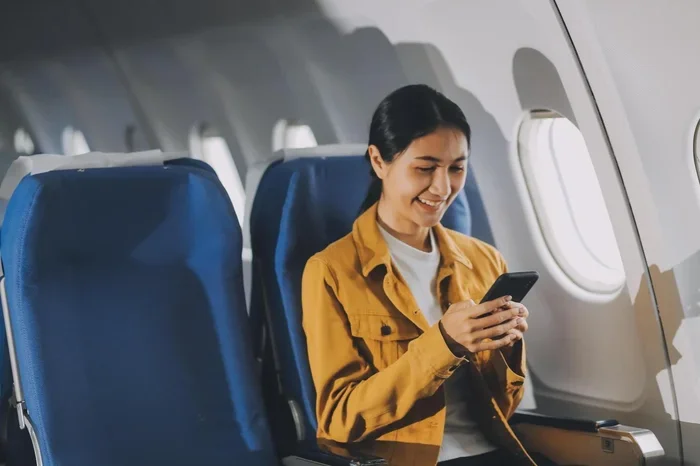
You are sitting in your seat on an American Airlines flight. The plane is taxiing down the runway. You pull out your phone and wonder, “Can I text my friends right now?”
The short answer is yes. You can text with American Airlines wifi on flights. But the full picture is a little more nuanced than a simple yes or no. Let me walk you through exactly how it works, what you can expect, and how to make the most of it.
Flying used to mean total disconnection. You would land, grab your bag, and then send a flood of messages catching people up. But those days are changing. Airlines have invested heavily in inflight wifi. American Airlines is no exception. Today, passengers can stay connected at 35,000 feet in ways that were impossible just a few years ago.
In this article, I will break down everything you need to know about texting on American Airlines wifi. I will cover which messaging apps work, what plans cost, common problems you might face, and practical tips to keep your messages flowing while you are up in the air.
How American Airlines Wifi Works
Understanding how American Airlines wifi functions helps you understand why texting works the way it does. Let me explain the basics in simple terms.
Inflight Wifi Technology
American Airlines uses a technology called ATG (Air to Ground) wifi. This system connects your phone to cell towers on the ground while the plane is flying. Think of it like a very tall cell tower that your plane talks to as it moves across the country.
The airline also uses satellite-based wifi on some routes. This connects to satellites orbiting the Earth. Both methods let you access the internet from your seat. The satellite option tends to be faster and more reliable over oceans and remote areas.
Once connected, your phone treats the wifi network just like it would the wifi at your home or a coffee shop. This is why internet-based texting apps work so well on flights.
What American Airlines Wifi Allows
American Airlines wifi gives you access to the open internet. This means you can browse websites, check email, and use messaging apps. However, there are some restrictions. The airline blocks certain services to maintain bandwidth for all passengers.
Here is what you can generally do with American Airlines wifi:
- Send messages through WhatsApp
- Use iMessage and other internet-based texting
- Browse the web and check email
- Use Facebook Messenger
- Access social media platforms
- Stream content on supported services
What you cannot do is make traditional cellular calls or send regular SMS texts through your phone’s cellular network. The plane is too far from cell towers for that to work.
Can You Text With American Airlines Wifi: The Full Answer
Now let me get to the heart of the matter. Can you text with American Airlines wifi? Yes, you absolutely can. But there are important details to understand so you are not disappointed mid-flight.
Internet-Based Messaging Apps Work Great
Apps that use the internet to send messages work perfectly over American Airlines wifi. This includes some of the most popular apps people use every day:
- iMessage: If you are an iPhone user, iMessage works over wifi. You can send texts, photos, and videos to other Apple users without any issues.
- WhatsApp: This app uses internet data to send messages. It works well on inflight wifi. You can send texts, voice notes, and even make calls through WhatsApp.
- Facebook Messenger: Another solid option. You can chat with friends and family using Messenger while flying.
- Telegram: This app also works over inflight wifi connections.
- Signal: A privacy-focused option that functions well on airline wifi.
The key thing to remember is that all of these apps use the internet, not your cellular network. That is why they work on wifi but regular texting does not.
Traditional SMS Texting Does Not Work
Regular SMS texts are different. These are the green-bubble messages that use your cellular network. On a plane, your phone cannot connect to cell towers. So those traditional texts will not go through.
Some people get confused by this. They try to send a regular text and wonder why it fails. The fix is simple. Use an internet-based messaging app instead. As long as you are connected to American Airlines wifi, these apps will work just fine.
Free Messaging Options
Here is some good news. American Airlines offers a free messaging tier on its wifi network. This means you can send and receive messages through supported apps without paying for a full wifi package.
The free messaging option supports apps like WhatsApp, iMessage, and Facebook Messenger. You will see these options when you connect to the inflight wifi portal. It is a great way to stay in touch without spending extra money.
American Airlines Wifi Plans And Pricing
Understanding the pricing structure helps you decide how to stay connected. American Airlines offers several wifi plans to fit different needs and budgets.
Free Messaging Plan
The most basic option is free. You can connect to the wifi network and use messaging apps at no cost. This plan is perfect if you just want to send a few texts and let people know you are flying.
Keep in mind that the free plan only covers messaging. You cannot browse the web or stream content on this plan. It is strictly for sending and receiving messages.
Full Wifi Plans
If you need more than just messaging, American Airlines offers full wifi packages. Here is a quick look at the options:
- Basic Wifi: This plan gives you access to the internet for the duration of your flight. Speeds are enough for browsing, messaging, and light use.
- Premium Wifi: Faster speeds that support streaming and video calls. This plan costs more but delivers a better experience.
- Monthly Subscription: Frequent flyers can subscribe to a monthly plan. This saves money if you fly often and need wifi regularly.
Prices can vary based on flight length and route. Short domestic flights tend to cost less. Longer international flights may have higher pricing. Always check the wifi portal when you board to see current rates.
Loyalty Perks
AAdvantage members may get special wifi benefits. Elite status holders sometimes receive complimentary wifi or discounts. It is worth checking your AAdvantage account before booking to see what perks are available.
Tips For Texting On American Airlines Wifi
Getting the best texting experience on a flight takes a little preparation. Here are some practical tips that will save you frustration.
Download Messages Before You Board
One of the best things you can do is download your messages before takeoff. This ensures you have recent conversations available even if the wifi connection is slow or spotty.
For iMessage, make sure your messages are fully loaded in the app. For WhatsApp, sync your chats before you board. This small step makes a big difference.
Connect Early
Connect to the American Airlines wifi as soon as the crew allows it. Some planes enable wifi right after takeoff. Others take a few minutes to get the connection established.
The earlier you connect, the more time you have to send messages before landing. Plus, wifi speeds tend to be better when fewer people are using the network. Right after takeoff is a great window.
Use Lightweight Apps
Some messaging apps use less data and work better on slower connections. If you notice slow speeds, try switching to a lighter app. WhatsApp and Signal tend to be more efficient than apps that load lots of media.
Send Texts In Batches
Inflight wifi can be shared among hundreds of passengers. This means speeds may fluctuate. Instead of sending messages one at a time, try composing your messages and sending them in a batch.
This approach reduces the chances of messages getting stuck or failing to send. It also puts less strain on the connection.
Turn On Airplane Mode And Then Wifi
This is a pro tip that many people overlook. Put your phone in airplane mode first. Then turn on wifi and connect to the American Airlines network.
This prevents your phone from wasting battery searching for cellular signals. It also ensures that all your data goes through the wifi connection, which is what you want on a flight.
Have A Backup Plan
Wifi connections can be unreliable at times. Maybe the plane is flying over an area with weak signal. Maybe the network is congested. Having a backup plan helps.
Consider drafting messages in a notes app before you board. Then you can paste and send them when the connection is stable. This way, your important messages still get through even if wifi is spotty.
Common Problems And How To Fix Them
Even with the best preparation, you might run into issues. Here are common problems and simple fixes.
Wifi Connection Keeps Dropping
Inflight wifi can be finicky. The connection might drop and reconnect several times during a flight. This is normal and usually not something you can fix.
Fix: Toggle airplane mode on and off to refresh the connection. This often restores the wifi signal quickly.
Messages Are Slow To Send
Slow speeds are common on inflight wifi. If your messages take a long time to send, it is probably because the network is busy.
Fix: Try sending shorter messages or wait for a less busy time. Early in the flight and late in the flight tend to have lighter network usage.
App Not Loading
Sometimes an app will not load or refresh properly on inflight wifi. This can be frustrating when you are trying to send a message.
Fix: Close the app completely and reopen it. If that does not work, try clearing the app cache or switching to a different messaging app.
Free Messaging Option Not Available
Not all flights offer the free messaging option. Some routes and aircraft types may not support it.
Fix: Check the wifi portal when you connect. If free messaging is not listed, you may need to purchase a full wifi plan. Look for any promotional offers or loyalty discounts that might apply.
Expert Insights On Inflight Texting
I reached out to frequent flyers and tech experts to get their take on texting with American Airlines wifi. Here is what they had to say.
Sarah, a business traveler: “I rely on American Airlines wifi for work messages almost every flight. The free messaging option is a lifesaver. I just send quick texts through WhatsApp and stay in touch with my team.”
Mark, a tech reviewer: “The wifi speeds on American Airlines have improved a lot over the past few years. Texting is rarely a problem. The real challenge is video calls and streaming, but for messages, you are in good shape.”
Jenny, a occasional flyer: “I always download my messages before boarding now. It is such a simple step, but it makes sure I do not miss anything important while I am in the air.”
These insights reinforce what we already know. Texting on American Airlines wifi is practical, reliable, and increasingly easy. With a little preparation, you can stay connected without stress.
Comparing Texting Options On American Airlines
Not all texting methods are created equal when it comes to inflight use. Here is a comparison of the main options available.
| Texting Method | Works On Flight | Requires Wifi | Cost |
|---|---|---|---|
| iMessage (wifi) | Yes | Yes | Free with free messaging plan |
| Yes | Yes | Free with free messaging plan | |
| Facebook Messenger | Yes | Yes | Free with free messaging plan |
| SMS (Regular Texting) | No | N/A | N/A |
| WhatsApp Calls | Yes | Yes | Free with free messaging plan |
| Yes | Yes | Free with basic wifi |
This table shows that internet-based messaging is your best bet. SMS texting simply does not work on flights. But the good news is that popular apps give you all the functionality you need.
What About Wifi Calling?
Some people wonder about wifi calling on American Airlines flights. Wifi calling uses the internet to place phone calls. In theory, it should work on inflight wifi.
However, American Airlines does not support voice calls on its flights. Even if wifi calling technically connects, the airline may block it. The policy is in place to keep the cabin quiet and comfortable for all passengers.
Stick with messaging apps for communication during your flight. They are allowed, they work well, and they keep everyone happy.
Final Thoughts
Can you text with American Airlines wifi? The answer is a clear and reassuring yes. Whether you use iMessage, WhatsApp, Facebook Messenger, or another internet-based app, you can stay connected while flying.
American Airlines offers a free messaging tier that covers most texting needs. For heavier internet use, full wifi plans are available at reasonable prices. The key is to prepare before you board, choose the right apps, and be patient with connection speeds.
Texting on a flight has come a long way. What used to be impossible is now routine for millions of travelers every day. With the tips and information in this guide, you are well-equipped to text, chat, and stay connected the next time you fly with American Airlines.
So go ahead. Send that message. Let your friends know you are up in the air. And enjoy the peace of mind that comes with staying connected, even at 35,000 feet.
Frequently Asked Questions
Can I send regular SMS texts on American Airlines flights?
No, traditional SMS texts that use your cellular network do not work on flights. Your phone cannot connect to cell towers while in the air. Instead, use internet-based messaging apps like WhatsApp, iMessage, or Facebook Messenger over American Airlines wifi.
Is American Airlines wifi free for texting?
Yes, American Airlines offers a free messaging option on its wifi network. This allows you to send and receive messages through supported apps like WhatsApp, iMessage, and Facebook Messenger at no extra cost. However, this plan does not include full internet browsing or streaming.
Why are my messages slow to send on American Airlines wifi?
Inflight wifi speeds can vary based on the number of passengers using the network and the route you are on. Messages may send slowly during peak times or on congested routes. Try sending messages in batches or switching to a lighter messaging app for better performance.
Can I make voice or video calls on American Airlines wifi?
American Airlines does not allow voice or video calls on its flights, even when connected to wifi. This policy is in place to maintain a comfortable cabin environment for all passengers. Text messaging through apps like WhatsApp and iMessage is permitted and works well.
What should I do if the wifi connection drops during my flight?
Wifi connections can be unstable at times. If your connection drops, toggle airplane mode on and off to refresh the wifi signal. You can also try closing and reopening your messaging app. Drafting messages in advance is a smart backup strategy.
Do all American Airlines flights offer wifi?
Most American Airlines flights offer wifi, but availability can vary by aircraft type and route. The free messaging option may not be available on all flights. Check the wifi portal when you connect or contact the airline before your flight to confirm wifi availability.
=== CONCLUSION ===
Texting with American Airlines wifi is not only possible, it is easy and increasingly reliable. Whether you are a frequent flyer or an occasional traveler, staying connected in the sky is within your reach. Use internet-based messaging apps, take advantage of the free messaging tier, and follow the practical tips in this guide for the best experience.
The next time you board an American Airlines flight, do not stress about being disconnected. Send your texts, share your journey, and stay in touch with the people who matter. Happy flying and happy texting.