Can You Have Too Many Wi Fi Pods and Why It Matters
Yes, you can have too many WiFi pods, and it can actually hurt your network instead of helping it. Adding extra mesh pods beyond what your home needs can cause signal interference, slow down your internet speed, and create unnecessary network congestion. Understanding the right number of pods for your space is the key to a fast, reliable WiFi connection throughout your home.
Have you ever walked through your house and noticed the WiFi signal drops the moment you step into the kitchen or the bedroom down the hall? It is frustrating, right? That is exactly the problem WiFi pods were designed to solve. These small mesh devices work together with your router to spread a strong wireless signal everywhere in your home.
But here is the thing most people do not think about. Can you actually have too many WiFi pods? It sounds like a good problem to have, but it is a real issue that can slow down your network, cause interference, and make your internet feel worse than before. If you have been adding pod after pod hoping for better coverage, this article is for you.
In this guide, we will walk through everything you need to know about mesh WiFi pods, how many you really need, and why more is not always better. Whether you live in a small apartment or a large multi-story home, you will find practical advice to get the most out of your home network.
Key Takeaways
- Too many pods create interference: Adding more mesh nodes than needed can cause signal overlap and reduce overall performance.
- Diminishing returns are real: Each additional pod beyond your home’s needs delivers less benefit and can slow things down.
- Placement matters more than quantity: A well-placed pod works better than three poorly positioned ones.
- Watch for warning signs: Slow speeds, frequent disconnects, and blinking lights often mean you have too many pods.
- Match pods to your home size: A general rule is one pod per 1,000 square feet, but your layout and walls matter too.
- Network management gets harder: More pods mean more devices to manage, update, and troubleshoot.
- Start small and expand: Begin with the minimum number of pods and add more only if you need better coverage.
📑 Table of Contents
What Are WiFi Pods and How Do They Work?
WiFi pods are small wireless devices that work as part of a mesh WiFi system. Unlike traditional WiFi extenders, mesh pods communicate with each other and your main router to create one unified wireless network across your entire home. Each pod acts as a node that receives and rebroadcasts the WiFi signal to areas that need better wireless coverage.
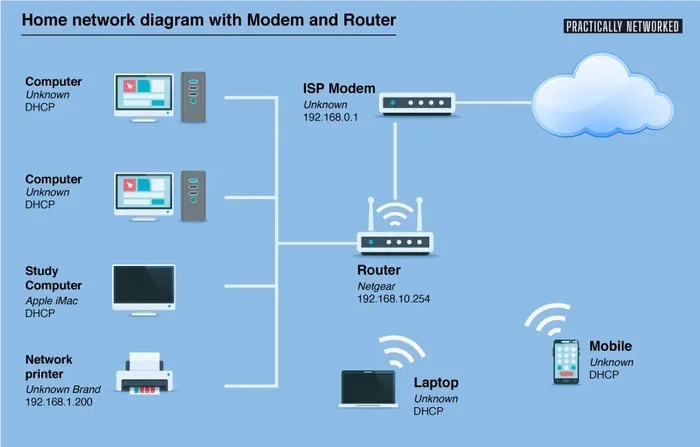
When you set up a mesh system, the main router connects directly to your modem. Then you place the pods around your home in strategic locations. These pods talk to each other wirelessly, forming a mesh network that blankets your living space with a strong, consistent signal.
How Mesh Nodes Create Seamless Coverage
Each mesh network node works like a relay station. It takes the WiFi signal from the router or another pod and passes it along. This means your phone, laptop, and smart home devices all stay connected to the same network name, even as you move from room to room. You do not have to manually switch between networks like you would with an old-school extender.
The beauty of this setup is that your devices automatically connect to the pod with the strongest signal strength at any given moment. This is called seamless roaming, and it is one of the biggest advantages of a mesh WiFi system over a single router or traditional range extender.
Why People Turn to Pods for Home WiFi
Many homes today have thick walls, multiple floors, and lots of electronic devices that cause WiFi interference. A single wireless router simply cannot push a strong signal through all of that. WiFi dead zones are areas where the signal is too weak or completely missing. Pods fill in those gaps and give every room reliable internet connectivity.
People who work from home, stream movies in 4K, or have smart home setups with dozens of connected devices especially benefit from a well-planned pod arrangement. The wireless bandwidth gets shared efficiently, and everyone in the household can stay online without frustrating lag or buffering.
Can You Have Too Many WiFi Pods?
The short answer is yes. You absolutely can have too many WiFi pods in your home. While each pod is designed to improve your WiFi range and network coverage, adding more pods than your space needs can create a range of problems. It is like trying to fill a glass that is already full, water just spills over.
The Science Behind Signal Overlap
When you place multiple mesh pods close together, their wireless signals start to overlap. This signal overlap causes the pods to compete with each other for the same airspace. Instead of improving your connection, they end up creating wireless interference that slows everything down.
Think of it like people trying to talk in a crowded room. If everyone speaks at the same time, nobody understands anything. The same thing happens with your mesh WiFi nodes when they are too close together. The WiFi throughput drops, and your devices struggle to maintain a stable connection.
Diminishing Returns on WiFi Coverage
Every pod you add gives you less benefit than the one before it. The first pod you place in a weak area makes a huge difference. The second pod in the same area barely helps at all. This is what experts call diminishing returns. After a certain point, adding more pods does nothing useful and can actually make your wireless performance worse.
This is why it is so important to plan your setup carefully. Before you buy or place another pod, check whether your current setup already covers the areas you need. Often, simply moving an existing pod to a better location gives you the same result as adding a brand new one.
How Many Devices Can Your Network Handle?
Every pod on your network adds more devices to manage, but it also shares the same internet bandwidth. If you have too many pods and too many connected devices, your network bandwidth gets stretched thin. Smart TVs, phones, tablets, gaming consoles, and smart home gadgets all compete for a slice of the pie.
A good rule of thumb is to make sure your total number of connected devices does not exceed what your internet plan and router can handle. Adding pods does not increase your internet speed from your provider. It only helps distribute the speed you already have more evenly around your home.
Signs That You Have Added Too Many Pods
How do you know if you have gone overboard with your mesh WiFi pods? There are several clear signs that your network is suffering from too many devices. Watch out for these red flags.
Slow Internet Speeds Across the Board
If your internet used to be fast and now everything feels sluggish, extra pods might be the culprit. When too many mesh nodes are active on the same wireless channel, they create congestion. Your WiFi speed drops because the pods are constantly talking to each other instead of focusing on delivering data to your devices.
Run a speed test from different rooms in your home. If the results are slower than what your internet plan promises, too many pods could be causing the bottleneck.
Frequent Disconnects and Dropped Connections
A stable WiFi connection should stay strong as you move around your home. If you find yourself constantly reconnecting or experiencing drops, your network might be overloaded. Each pod adds another point of potential failure. More pods mean more chances for connection drops and intermittent outages.
Pay attention to whether the disconnects happen more after you added new pods. If they do, that is a strong clue you have too many nodes competing for space on your network.
LED Lights Blinking Rapidly on Your Pods
Most mesh pods have indicator lights that show their status. If you notice the lights on your pods are blinking rapidly or flashing in unusual patterns, it often means the pod is struggling to communicate with the other nodes. This is a classic sign of signal interference caused by overcrowding your network with too many devices.
Your Router or Pods Overheating
Every pod generates heat when it operates. When you stack too many pods in a small area, the heat builds up. Overheating can cause your pods to throttle performance, shut down unexpectedly, or even stop working altogether. Make sure your pods have good airflow and are not crammed into tight spaces.
How Many WiFi Pods Do You Actually Need?
Figuring out the right number of pods for your home does not have to be guesswork. A few simple factors can help you determine the ideal setup for your space and needs.
General Rule: One Pod Per 1,000 Square Feet
A good starting point is to use one mesh WiFi pod for every 1,000 square feet of living space. This assumes a single-story home with standard drywall construction and no major obstructions. For multi-story homes, you should add at least one extra pod per floor to ensure the signal travels properly between levels.
However, this is just a baseline. Your actual needs depend on several other factors that can change the equation significantly.
Factors That Change Your Pod Requirements
Several things affect how many pods you really need:
- Home layout and floor plan: Open floor plans allow signals to travel farther. Homes with many walls, hallways, and separate rooms need more pods to push the signal through obstacles.
- Wall materials: Brick, concrete, and metal studs block WiFi signals much more than drywall or wood frames. If your home has thick or dense building materials, plan for extra pods.
- Number of connected devices: A household with 10 connected devices needs different coverage than one with 50 smart devices all streaming, gaming, or working at the same time.
- Usage habits: If your family watches a lot of 4K video, plays online games, or works from home with video calls, you need stronger and more consistent coverage.
- Router placement: A centrally located router with a clear line of sight reduces the number of pods you need. A router tucked in a basement corner increases the need for more pods.
Start Small and Expand Only If Needed
The best approach is to start with the minimum number of pods and add more only if you notice weak spots. Most mesh systems come with a router and one or two pods in the box. Set those up first, test the coverage, and then decide if you need additional units.
This method saves you money and prevents the problem of overcrowding your network. You can always buy another pod later if a specific room still has poor WiFi coverage.
The Downsides of Having Too Many WiFi Pods
While it might seem like more pods equal better coverage, the reality is that too many devices on your mesh network can cause a long list of problems. Let us look at the biggest downsides.
Increased Network Congestion
Every pod on your network takes up a share of the available wireless bandwidth. When you have too many pods, they spend more time communicating with each other and less time serving your actual devices. This network congestion leads to slower speeds and higher latency, especially during peak usage hours when everyone is online at once.
More Devices to Manage and Update
Each pod is essentially a small computer that needs firmware updates, security patches, and occasional restarts. More pods mean more maintenance. You need to check for updates, monitor performance, and troubleshoot issues across a larger number of devices. For most homeowners, this added complexity is simply not worth it.
Higher Power Consumption
Even though each individual pod uses relatively little electricity, having many of them running 24/7 adds up. Over time, this increases your electricity bill and also generates more heat in your home. It is not a huge cost, but it is an unnecessary expense when you can get the same results with fewer, well-placed pods.
Wasted Money and Resources
Buying extra pods you do not need is simply a waste of money. Most mesh systems are sold in packs, and it is tempting to add all of them to your setup. But if your home only needs three pods and you install five, you have spent extra on hardware that is just sitting there causing interference. Save your money and invest in better-quality pods instead of more of them.
How to Optimize Your Pod Setup for Best Results
Now that you understand the risks of having too many pods, let us talk about how to get the best performance from your setup. A few smart adjustments can make a huge difference in your home WiFi network.
Strategic Pod Placement Tips
Placement is the single most important factor in getting great performance from your mesh system. Follow these tips for the best results:
- Place pods halfway between your router and the weak spot: Do not put a pod at the far end of the house. Put it somewhere in between where it can still get a strong signal from the router or another pod.
- Keep pods in open, elevated spaces: Avoid hiding pods behind furniture, inside cabinets, or in closets. Elevating them on shelves improves signal spread.
- Stay away from thick walls and metal objects: These block wireless signals and reduce the effectiveness of each pod.
- Keep pods at least 15 to 20 feet apart: This reduces signal overlap and prevents the pods from interfering with each other.
- Test coverage before adding more pods: Walk around your home with your phone and check the signal strength in each room before deciding you need another unit.
Use the Manufacturer App to Monitor Performance
Most mesh WiFi systems come with a companion app that lets you see signal strength, connected devices, and pod health. Use this app to identify weak spots and check whether your current setup is working properly. The app can also help you find the best locations for each pod based on real-time signal strength data.
Update Firmware Regularly
Keeping your pods and router updated ensures you have the latest performance improvements and security fixes. Manufacturers regularly release firmware updates that optimize mesh network performance and fix bugs. Check for updates at least once a month to keep everything running smoothly.
Consider a WiFi Analyzer Tool
A WiFi analyzer app can show you which wireless channels are crowded in your neighborhood and help you choose the least congested one for your mesh system. This simple step can dramatically improve your WiFi performance and reduce interference from neighboring networks.
Quick Tips for Better Pod Performance
- Restart your pods once a month to clear memory and refresh connections.
- Keep your main router in a central location in your home.
- Avoid placing pods near microwaves, cordless phones, or baby monitors, which cause WiFi interference.
- Use ethernet backhaul if your pods support it for the fastest possible connections.
- Limit the number of pods to what your home actually needs.
Common Mistakes People Make with WiFi Pods
Even well-meaning homeowners can make mistakes when setting up their mesh WiFi system. Here are the most common ones to avoid.
Buying the Biggest Pack and Using All of Them
Just because a pack of five pods is available does not mean you need all five. Buying in bulk and using every single unit is one of the fastest ways to create signal interference and slow down your network. Only use the number of pods your home actually requires.
Placing Pods Too Close Together
It is tempting to put two pods right next to each other in a weak area, but this creates the exact same signal overlap problems we talked about. Give each pod enough space to broadcast its signal without bumping into another pod’s range.
Ignoring the Main Router’s Position
No matter how many pods you have, a poorly placed main router will limit your entire network. Always start by positioning your router in the most central location possible before adding any pods.
Not Checking Your Internet Speed First
Sometimes the problem is not your pods at all. Before adding more hardware, run a speed test directly connected to your modem. If your base internet speed is slow, no number of pods will fix that. You may need to upgrade your internet plan instead.
Forgetting About Wired Backhaul Options
If your mesh system supports ethernet backhaul, use it. Connecting pods with a cable instead of relying on wireless backhaul gives you the fastest possible speeds and takes the pressure off your wireless network. This is one of the best-kept secrets for getting the most out of your mesh WiFi setup.
Conclusion
WiFi pods are a fantastic solution for eliminating dead zones and bringing strong internet to every corner of your home. But more is definitely not always better. Adding too many pods can cause signal interference, network congestion, and slower speeds that defeat the entire purpose of having a mesh system in the first place.
The key is to find the right balance for your home. Start with the minimum number of pods, place them strategically, and only add more if you truly need better coverage. Monitor your network performance, keep your firmware updated, and use the tips in this guide to get the most out of your setup.
Remember that a well-planned mesh WiFi network with three or four properly placed pods will always outperform a cluttered setup with seven or eight overcrowded units. Take the time to plan your setup, and you will enjoy fast, reliable WiFi coverage throughout your home for years to come.
FAQs
Can adding too many WiFi pods slow down my internet speed?
Yes, absolutely. When you add more pods than your home needs, they start competing for the same wireless airspace. This signal overlap creates interference and reduces the WiFi throughput available to your devices, which makes your internet feel slower.
How many WiFi pods do I need for a 2,000 square foot home?
For a 2,000 square foot single-story home, two to three pods are usually enough. This includes the router and one or two additional mesh nodes. If your home has thick walls or multiple floors, you may need a third or fourth pod for complete coverage.
Do WiFi pods work better than traditional WiFi extenders?
Yes, mesh WiFi pods are generally much better than traditional extenders. Pods create a single unified network with seamless roaming, while extenders often create separate network names and can cut your speed in half. Pods also communicate with each other more efficiently than standard extenders.
Can I use pods from different brands in the same network?
No, mesh pods are designed to work together within the same ecosystem. Mixing brands or models will likely cause compatibility issues, connection drops, and poor performance. Stick with one brand and one system for the best results.
Should I turn off extra pods I am not using?
Yes, if you have pods that are not actively improving your coverage, turn them off or unplug them. Unused pods still consume power and can cause minor interference on your wireless network. Keeping only the pods you need ensures optimal performance.
How far apart should WiFi pods be placed?
Place your mesh pods approximately 15 to 25 feet apart, depending on your home’s layout and wall construction. Keeping them too close causes signal overlap, while placing them too far apart can result in weak connections between nodes. Aim for each pod to have a strong signal from the router or the pod before it.