Can You Use Hdmi Cable For Ps2 Yes Here Is How It Works
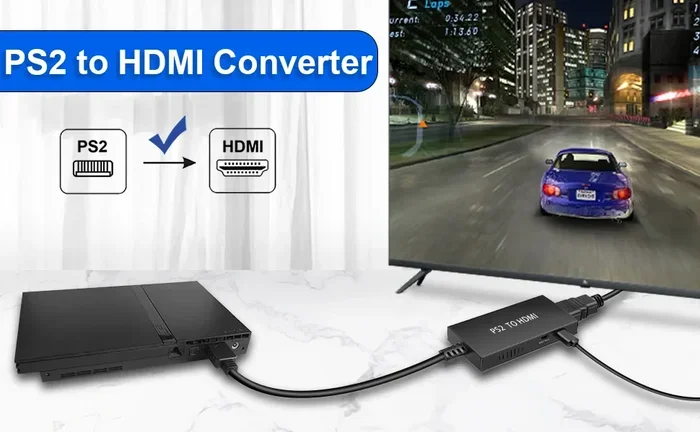
Yes, you can use an HDMI cable with your PS2, but you need the right adapter or converter. The original PlayStation 2 does not have a built-in HDMI port, so a PS2 to HDMI converter is essential for modern displays. Whether you own the fat or slim model, this guide covers everything you need to know about upgrading your PS2 video output for sharper, cleaner visuals on today’s TVs.
Key Takeaways
- You need a converter: The PS2 does not have a native HDMI port, so a dedicated PS2 to HDMI adapter or converter is required.
- Both fat and slim models work: Every PlayStation 2 model can be connected to an HDMI display with the right cable or adapter.
- Video quality improves significantly: Using an HDMI connection gives you a much cleaner image compared to traditional composite or component cables.
- Audio comes through HDMI too: You get both video and audio from a single cable, simplifying your setup.
- Upscaling makes a big difference: Many HDMI converters upscale the PS2 signal, making old games look better on modern TVs.
- Price varies widely: Budget converters start around $10, while higher-end options offer better image processing and fewer latency issues.
📑 Table of Contents
- Can You Use Hdmi Cable For Ps2 Yes Here Is How It Works
- Why Would You Want Hdmi on a Ps2
- Understanding Ps2 Models and Their Connections
- How to Connect Hdmi to Your Ps2 Step by Step
- Types of Hdmi Adapters and Converters for Ps2
- Comparing Connection Options for Ps2
- Common Problems and How to Fix Them
- Can You Use Hdmi Cable For Ps2 Online Gaming
- Tips for Getting the Best Hdmi Experience on Ps2
- Is It Worth Upgrading Ps2 to Hdmi
- Frequently Asked Questions
- Final Thoughts
Can You Use Hdmi Cable For Ps2 Yes Here Is How It Works
If you have been searching for a way to connect your PlayStation 2 to a modern TV, you are not alone. Many gamers want to know can you use HDMI cable for PS2 without buying a whole new console. The short answer is yes. But the full answer involves a little more detail. You need the right adapter, the right setup, and a clear understanding of what to expect.
The PlayStation 2 launched in 2000 and used AV cables that were standard at the time. Those cables worked fine on old CRT TVs. But today’s flat-screen TVs do not always have the same inputs. That is where HDMI adapters for PS2 come in. They bridge the gap between your old console and your new display. Let us walk through everything you need to know.
Why Would You Want Hdmi on a Ps2
You might wonder why anyone would bother with an HDMI connection for a console that is over two decades old. The reasons are actually pretty compelling. Modern TVs handle older signals differently than old CRT sets did. Here is why making the switch matters.
Better Image Quality
When you plug a PS2 into a modern TV using the original composite cable, the image often looks blurry or washed out. This happens because older cables carry lower-resolution signals. An HDMI connection sends a much cleaner digital signal. Games look sharper, text is easier to read, and colors pop more naturally.
Simpler Setup
Old PS2 setups required multiple cables. You had a video cable, an audio cable, and sometimes even extra wires for surround sound. With HDMI, everything runs through one cable. You plug it in, and you are done. This is a huge win for anyone who wants a clean gaming desk or entertainment center.
Modern TV Compatibility
Many newer TVs no longer include RCA or composite inputs. If your TV only has HDMI ports, you simply cannot use the original PS2 cables without an adapter. A PS2 HDMI converter solves this problem completely.
Understanding Ps2 Models and Their Connections
Not all PlayStation 2 consoles are the same. Sony released several versions over the years, and each one handles video output a little differently. Knowing your model helps you choose the right HDMI solution.
The Fat Model (Original Ps2)
The original PlayStation 2, often called the fat model, was the first version released. It has a built-in expansion bay and uses standard AV multi-out ports. This model supports composite, S-Video, component, and even VGA cables with the right adapter. For HDMI, you will need an external converter box that plugs into the AV multi-out port.
The Slim Model (Ps2 Slim)
The PS2 Slim came out in 2004 and was much smaller and lighter. It also uses the AV multi-out port, but the design is more compact. The good news is that HDMI converters work just as well with the slim model. Some gamers prefer the slim because it takes up less space and runs cooler.
The Super Slim Model
The final version of the PS2, the Super Slim, came out in 2007. It uses a proprietary disc loader and has a slightly different port layout. But it still supports the same AV multi-out connections. HDMI adapters work with this model too, though you may need to check compatibility with your specific converter.
How to Connect Hdmi to Your Ps2 Step by Step
Setting up an HDMI connection for your PS2 is straightforward once you have the right gear. Follow these steps and you will be gaming in no time.
What You Will Need
- A PlayStation 2 console (any model)
- A PS2 to HDMI converter or adapter
- An HDMI cable
- Your original PS2 AV cable (usually included with the console)
- A modern TV or monitor with an HDMI input
Step-by-Step Setup
- Turn off your PS2 and unplug it from the power outlet.
- Connect your AV cable to the PS2 AV multi-out port. This is the multi-colored cable that came with your console.
- Plug the other end of the AV cable into the input side of your HDMI converter box.
- Connect an HDMI cable from the output side of the converter to your TV or monitor.
- Plug in the power for the HDMI converter if it requires external power.
- Turn on your TV and switch to the correct HDMI input channel.
- Power on your PS2 and you should see the image on your screen.
That is it. The whole process takes about five minutes. Some converters also let you adjust settings like scanlines, resolution, and aspect ratio right from a small menu on the device.
Types of Hdmi Adapters and Converters for Ps2
Not all HDMI adapters are created equal. There are several types available, and each one offers different features and price points. Here is a quick look at what is out there.
Basic HDMI Converters
These are the most affordable options. They take the PS2 AV signal and convert it to HDMI. They do not add any fancy processing. You get a clean digital signal, but the resolution stays the same as the original output. These work great for casual gamers who just want to play their favorite titles on a modern TV.
Upscaling HDMI Converters
These adapters do more than just convert the signal. They upscale the PS2 output to higher resolutions like 480p or even 720p. This makes games look noticeably better on larger TVs. If you care about image quality, an upscaling converter is worth the extra cost.
USB HDMI Capture Cards
Some gamers use USB capture cards as a workaround. These devices capture the PS2 video signal and send it over USB to a computer or directly to a TV. This is not the most common method, but it works in a pinch. It is also useful if you want to stream or record your PS2 gameplay.
Comparing Connection Options for Ps2
There are several ways to connect a PS2 to a TV. Here is how the main options stack up against each other.
| Connection Type | Image Quality | Ease of Use | Cost |
|---|---|---|---|
| Composite AV Cable | Standard definition, blurry on modern TVs | Very easy, plug and play | Included with console |
| Component Cable | Better than composite, supports 480p | Easy, requires 3 cables | $10-$20 |
| VGA Cable (with adapter) | Good quality, sharp text | Moderate setup | $15-$30 |
| HDMI Converter | Best quality, clean digital signal | Simple, one HDMI cable | $15-$60 |
As you can see from the comparison, HDMI adapters for PS2 offer the best overall experience. They combine good image quality with simple setup. The only downside is the cost of the converter, but most options are very affordable.
Common Problems and How to Fix Them
Even with the right setup, you might run into some issues when connecting your PS2 via HDMI. Here are the most common problems and how to solve them.
No Signal on the TV
If your TV shows no signal, check that the HDMI cable is firmly connected at both ends. Make sure your TV is on the correct HDMI input. Also verify that the converter box is powered on. Some converters need their own power supply to work correctly.
Image Looks Too Dark or Too Bright
Some HDMI converters allow you to adjust brightness and contrast settings. Check your converter’s menu if it has one. You can also try adjusting your TV’s picture settings. Sometimes a simple brightness tweak makes a big difference.
Audio and Video Are Out of Sync
This is rare but can happen with cheaper converters. If you notice audio lagging behind video, try a different HDMI cable or a higher-quality converter. Using a shorter HDMI cable can also help reduce sync issues.
PS2 Does Not Recognize the Converter
Make sure your converter is compatible with your PS2 model. Some converters work better with the fat model than the slim, or vice versa. Check the product specifications before purchasing.
Can You Use Hdmi Cable For Ps2 Online Gaming
One question that comes up often is whether using HDMI affects online gaming on the PS2. The PlayStation 2 had a network adapter that allowed online play for certain games. The HDMI connection does not interfere with online functionality at all. Your internet connection is handled separately through the network adapter or a USB network adapter.
However, you should know that the PS2’s online capabilities are very limited by today’s standards. Most servers for PS2 games are no longer active. If you want to play online, you may need third-party servers or fan-run communities. The HDMI connection itself does not impact this at all. It only affects your video and audio output.
When it comes to overall connectivity, many gamers also wonder about wireless options. While the PS2 was designed for wired ethernet connections, modern setups sometimes involve wireless routers and network bridges. Some players also explore broader connectivity topics like 5G towers for Wi-Fi to understand how modern wireless infrastructure can support retro gaming setups in different environments. This can be especially relevant if you are setting up a retro gaming station in a location where traditional wired internet is not convenient.
Tips for Getting the Best Hdmi Experience on Ps2
Want to get the most out of your PS2 HDMI setup? Here are some practical tips that make a real difference.
- Use a short HDMI cable. Shorter cables reduce signal loss and help prevent sync issues.
- Choose a converter with upscaling. This makes a noticeable difference on screens 32 inches or larger.
- Adjust your TV’s picture mode. Set your TV to a game mode for the lowest input lag and best responsiveness.
- Clean your PS2 disc and connector. Dust on the AV multi-out port can cause intermittent signal problems.
- Keep your converter ventilated. Some converters generate heat. Make sure they are not buried under other electronics.
- Test with multiple games. Some PS2 games look better than others on HDMI. Experiment to find which titles benefit the most.
Is It Worth Upgrading Ps2 to Hdmi
The honest answer is yes, for most people. If you still have a working PlayStation 2 and a modern TV, an HDMI converter is a small investment that pays off quickly. The improvement in image quality is immediate and noticeable. You will wonder how you ever played with composite cables.
The cost of a basic HDMI converter ranges from $10 to $30. Even the higher-end upscaling options rarely exceed $60. Compared to the cost of buying a new console or replacing your entire gaming setup, this is a very affordable upgrade. It also helps extend the life of your PS2, which is always a good thing for collectors and fans of classic games.
For retro gaming enthusiasts, HDMI output is almost essential. Modern displays simply do not handle older analog signals well. An HDMI converter ensures your PlayStation 2 games look their best on any modern TV or monitor.
Frequently Asked Questions
Do I Need a Special HDMI Cable for Ps2
No, you do not need a special HDMI cable. Any standard HDMI cable will work. The important part is the converter or adapter that connects to your PS2. The HDMI cable itself is just a standard cable that carries the converted signal to your TV.
Will Hdmi Improve Ps2 Game Performance
HDMI will improve the visual quality of your PS2 games, but it will not change the actual performance or frame rate. The games run at the same speed they always did. You just get a cleaner, sharper image on your screen. This makes a big difference in how the games look and feel.
Can I Use Hdmi on All Ps2 Models
Yes, all PS2 models can use HDMI with the right converter. This includes the original fat model, the slim model, and the super slim model. Each model uses the same AV multi-out port, so the setup process is the same across all versions.
Does Hdmi Output Add Input Lag on Ps2
Some HDMI converters can add a small amount of input lag. This is more common with budget converters that do not have good processing chips. Higher-end converters and upscaling adapters tend to have very little lag. If you are sensitive to input delay, look for converters specifically designed for retro gaming.
Can I Get Hdmi Output Directly From Ps2 Without a Converter
No, the PlayStation 2 does not have a built-in HDMI port. You must use a converter or adapter to get HDMI output. There is no way around this unless you modify the console internally, which is not recommended for most users.
Are There Any Wireless Hdmi Options for Ps2
Yes, wireless HDMI transmitters exist that can send the PS2 signal to your TV without a cable. However, these add extra cost and can introduce latency. For the best experience, a wired HDMI connection is still the most reliable and affordable option.
Final Thoughts
Using an HDMI cable with your PlayStation 2 is absolutely possible and highly recommended. The PS2 to HDMI converter market has made it easier than ever to bring your old console into the modern era. Whether you are a casual gamer looking for better image quality or a retro enthusiast who wants the best possible display, an HDMI setup delivers real results.
The process is simple, the cost is low, and the improvement in your gaming experience is significant. You get cleaner visuals, simpler cable management, and full compatibility with today’s TVs. Can you use HDMI cable for PS2? Absolutely yes. And now you know exactly how to do it.
Grab the right adapter, follow the steps in this guide, and enjoy your PlayStation 2 games the way they were always meant to look. Happy gaming.