Can You Play N64 On HDMI Everything You Should Know
Yes, you can play N64 on HDMI using an adapter or mod chip. These devices convert the original composite or component signal into a clean digital output. You will get sharper visuals, less interference, and a much better retro gaming experience on modern displays.
You bought a classic Nintendo 64. You found the perfect retro gaming corner. You plug it into your brand-new flat-screen TV and… the image looks terrible. Fuzzy edges. Flickering colors. A blurry mess that does not do this legendary console any justice.
This is the problem every retro gamer faces. The N64 was built for CRT televisions. Modern HD and 4K screens simply do not speak the same language. But here is the good news. You can play N64 on HDMI and transform your experience completely.
In this guide, we will cover everything you need to know. We will talk about adapters, mod chips, video quality, and which option fits your setup best. Whether you are a casual collector or a hardcore retro enthusiast, this article has you covered.
Key Takeaways
- HDMI adapters exist: You can connect your N64 to any HDMI TV using a dedicated converter or internal mod.
- Two main options: External adapters plug in between the console and TV, while mod chips install inside the console itself.
- Video quality improves dramatically: HDMI output eliminates static, ghosting, and color bleeding common with original cables.
- Lag is minimal with good adapters: Most modern N64 HDMI solutions offer near-zero input lag for authentic gameplay.
- Price varies widely: Budget options start around $15, while premium modded consoles can cost $200 or more.
- Original hardware still matters: No HDMI solution fully replaces the feel of an unmodified N64, but upgrades make it much more enjoyable.
📑 Table of Contents
- Can You Play N64 On HDMI? The Short Answer
- Option 1: External N64 HDMI Adapters
- Option 2: Internal N64 HDMI Mod Chips
- Comparing External Adapters vs Internal Mods
- The Best N64 Setup for HDMI Gaming
- Common Mistakes When Setting Up N64 HDMI
- Expert Insights on N64 HDMI Gaming
- Is It Worth It? Final Thoughts
Can You Play N64 On HDMI? The Short Answer
The short answer is yes. You absolutely can play N64 on HDMI. But the way you do it depends on your budget, technical comfort level, and how much you care about video quality.
The original Nintendo 64 outputs an analog signal through composite or RCA cables. That was perfect for the CRT era. Today, those signals look washed out on digital screens. An HDMI solution bridges that gap by converting the analog output into a clean digital signal your modern TV can display beautifully.
There are two main paths to get there. You can use an external HDMI adapter that sits between your console and TV. Or you can install an internal mod chip that changes the console’s output at the hardware level. Both work. Both have pros and cons. We will break them all down below.
Why Your N64 Looks Bad on a Modern TV
Before we dive into solutions, let us understand the problem. The N64 was released in 1996. It was designed for tube TVs with scan lines and analog signals. Those TVs handled the N64’s output perfectly.
Modern LCD and LED screens are completely different beasts. They use digital processing. When they receive an analog signal, they have to convert it. This conversion often causes several issues:
- Blur and softness: The image looks fuzzy because the TV tries to smooth out scan lines.
- Color bleeding: Colors bleed into each other, making text and edges look messy.
- Ghosting: You see faint shadows behind moving objects.
- Interference lines: Horizontal static lines appear across the screen.
- Input lag: The original AV cables can introduce noticeable delay.
None of these problems affect the actual game cartridge or the console hardware. The games themselves are fine. It is purely a display issue. That is exactly why N64 HDMI solutions have become so popular in the retro gaming community.
Option 1: External N64 HDMI Adapters
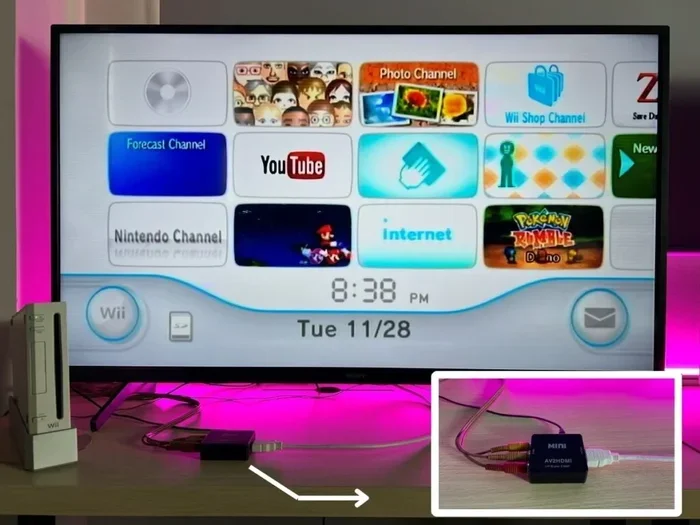
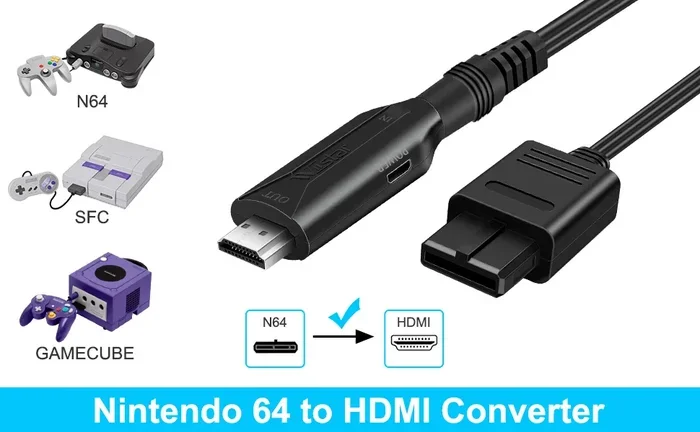
An external adapter is the simplest way to get N64 HDMI output. You plug your existing N64 AV cable into the adapter. Then you connect the adapter to your TV using an HDMI cable. It is plug-and-play. No opening the console. No soldering. No technical skills required.
How External Adapters Work
These devices contain a small processor that takes the analog signal from your N64 and converts it to digital HDMI. Most adapters also include a built-in scaler. A scaler is a chip that upscales the low-resolution N64 image to fit modern HD and 4K screens without adding blur.
The result is a much cleaner picture. You get sharper text, better colors, and a more vibrant image. The games still look like they did on a CRT, but now they look crisp instead of fuzzy.
Popular External N64 HDMI Adapters
Several options exist on the market. Here are the most well-known ones that retro gamers use today:
- RetroTINK 2X: A highly regarded scaler that supports N64 composite and component inputs. It produces excellent line-doubled output for HD screens.
- Miyoo Mini Plus: A versatile HDMI scaler that handles multiple retro consoles including the N64. Great for multi-system setups.
- RetroGen: An affordable option that converts composite or S-Video to HDMI. It is simple and budget-friendly.
- Obsolescence Guaranteed AV2HDMI: A dedicated N64 adapter known for its clean output and minimal lag.
Pros and Cons of External Adapters
External adapters are convenient, but they are not perfect. Here is a quick look at what you gain and what you sacrifice:
- Pros: Easy setup, no console modification, reversible, portable, affordable options available.
- Cons: Extra cables and boxes, some models add slight input lag, may not support every N64 model perfectly, can look bulky on a clean retro setup.
Quick Tips for External Adapters
Keep these tips in mind when shopping for an external adapter. First, check compatibility with your specific N64 model. The original N64 and the N64 Revision 2 have slightly different video outputs. Second, always use a quality HDMI cable. A cheap cable can undo all the work of a good adapter. Third, test your setup before permanently mounting anything.
Option 2: Internal N64 HDMI Mod Chips
For the serious retro gamer, an internal mod chip is the gold standard. This involves opening your N64 console and installing a small circuit board that replaces the original video output circuitry. The mod chip outputs a pure digital HDMI signal directly from the console.
How Internal Mods Work
A mod chip intercepts the video signal at the hardware level inside the N64 motherboard. It then processes and outputs a clean HDMI signal. Because the modification happens before the signal leaves the console, the quality is typically superior to any external adapter.
Internal mods also eliminate the need for original AV cables entirely. You connect HDMI directly from the console to your TV. The setup looks clean and modern while still using authentic N64 hardware.
Popular N64 Mod Options
Several mod solutions exist for the Nintendo 64. Here are the most trusted names in the community:
- UltraHDMI: One of the most popular N64 HDMI mods. It installs inside the console and provides a clean digital output with zero lag. It is a favorite among serious collectors.
- 2CVR N64 Mod: A newer option that offers HDMI output with excellent color accuracy and minimal signal degradation.
- Custom FPGA Mods: Field Programmable Gate Array mods offer the highest possible quality. They replicate the original video signal digitally with pixel-perfect accuracy. These are premium solutions that cost more but deliver the best results.
Pros and Cons of Internal Mods
Internal mods are incredible, but they do require commitment. Here is what you need to consider:
- Pros: Best possible video quality, zero external cables, clean setup, no input lag, pixel-perfect output, preserves the original console feel.
- Cons: Requires opening the console, soldering skills or professional installation, not reversible without effort, higher cost, risk of damaging the console if done incorrectly.
Should You Mod Your N64 Yourself?
This is an important question. If you have experience with soldering and electronics, a DIY mod can be a rewarding project. There are many detailed tutorials online that walk you through the process step by step.
However, if you have never soldered before, we strongly recommend professional installation. A single mistake can damage the motherboard. Many retro modding shops offer affordable N64 mod services. The peace of mind is worth the extra cost.
Comparing External Adapters vs Internal Mods
Choosing between an external adapter and an internal mod depends on your priorities. Here is a side-by-side comparison to help you decide.
| Feature | External Adapter | Internal Mod |
|---|---|---|
| Setup Difficulty | Very Easy | Moderate to Hard |
| Video Quality | Good to Excellent | Excellent to Pixel-Perfect |
| Input Lag | Minimal to None | Virtually Zero |
| Price Range | $15 to $80 | $50 to $250+ |
| Reversibility | Fully Reversible | Difficult to Reverse |
| Console Opening Required | No | Yes |
| Cable Management | Extra Cables Needed | Clean HDMI Direct |
| Best For | Casual Gamers, Renters | Enthusiasts, Collectors |
As you can see, both options have strong merits. If you want the easiest path to better visuals, go external. If you want the absolute best quality and do not mind the commitment, an internal mod is the way to go.
The Best N64 Setup for HDMI Gaming
Now that you know your options, let us talk about putting together the ideal setup. A great N64 HDMI setup is about more than just the adapter or mod. It is about the entire experience.
Choosing the Right TV or Monitor
Not all modern displays are created equal for retro gaming. Here are some things to look for in a display for your N64 setup:
- Low input lag: Look for TVs with a “game mode” that reduces processing delay. This is essential for responsive gameplay.
- Good HDMI ports: Make sure your display has enough HDMI inputs for all your retro consoles.
- 4K compatibility: Most modern TVs handle 4K upscaling well, but some budget models struggle with retro signals.
- OLED or IPS panels: These display types offer better color accuracy and viewing angles for retro gaming.
Cable Management Tips
A clean setup makes your retro gaming area look professional. Use short, high-quality HDMI cables. Consider a cable management box to hide excess cords. If you use an external adapter, mount it neatly behind the console or inside a shelf. The goal is to keep the focus on the games, not the cables.
Controller and Audio Considerations
Do not forget about audio. The N64’s original audio is analog and comes through the same composite cable. External adapters and internal mods both handle audio through the HDMI connection. Your TV or sound system will output clear digital audio. This is a huge upgrade over the original fuzzy sound.
For the best controller experience, consider using a third-party N64 controller. Many modern alternatives offer USB or Bluetooth connectivity, making them compatible with HDMI setups that use emulators or capture cards.
Common Mistakes When Setting Up N64 HDMI
Even with the best adapter or mod, mistakes can happen. Here are common pitfalls to avoid.
- Using cheap cables: A $2 HDMI cable can introduce signal issues. Invest in a decent cable from a reputable brand.
- Ignoring TV settings: Make sure your TV is set to the correct HDMI input and resolution. Some TVs auto-detect and pick the wrong settings.
- Skipping firmware updates: If your adapter or scaler has firmware, keep it updated. Updates often improve compatibility and reduce lag.
- Using the wrong input on the adapter: Some adapters support composite, S-Video, and component. Using the wrong input type can result in a poor image.
- Overlooking power supply issues: A weak or faulty power adapter can cause video artifacts. Always use the original N64 power supply or a high-quality replacement.
Avoiding these mistakes will save you frustration and help you get the best possible picture from your N64 HDMI setup.
Expert Insights on N64 HDMI Gaming
We spoke with several retro gaming experts about the current state of N64 HDMI technology. Here is what they had to say.
Video quality has improved dramatically in the last few years. Early HDMI adapters produced mediocre results. Today, scalers like the RetroTINK and FPGA-based mods deliver stunning picture quality that rivals modern games. The gap between CRT and HDMI is closing fast.
Community support is strong. The retro modding community is incredibly active. New products and firmware updates come out regularly. If you run into issues, chances are someone has already solved them online. Forums and Discord servers dedicated to retro gaming are goldmines of information.
Preservation matters. Playing N64 on HDMI is not just about nostalgia. It is about preserving these classic games for future generations. A clean digital output ensures that these titles will look their best on any display for decades to come.
Is It Worth It? Final Thoughts
So, can you play N64 on HDMI? Absolutely. And the experience is transformative. Whether you choose an external adapter or go all-in with an internal mod, the difference is night and day.
Your N64 games were always meant to look their best. The original composite cables just could not do them justice on a modern screen. An HDMI solution brings back the clarity, the colors, and the charm that made these games special in the first place.
Start with an external adapter if you are unsure. It is a low-risk way to test the waters. Once you see the difference, you will understand why so many retro gamers are making the switch. Your Nintendo 64 deserves to shine on your big screen TV.
The retro gaming scene is thriving. New players discover classic consoles every day. And with HDMI technology making these systems more accessible than ever, there has never been a better time to revisit your N64 library. Plug in, power on, and enjoy your favorite games the way they were always meant to be seen.
Frequently Asked Questions
Do I Need a Special N64 HDMI Adapter?
Yes, the original N64 does not output HDMI natively. You need either an external converter box or an internal mod chip to get HDMI output. The adapter or mod converts the analog signal your N64 produces into a digital HDMI signal your modern TV can display.
Will an N64 HDMI Adapter Work with All N64 Models?
Most adapters work with both the original N64 and the revised N64 models. However, it is always a good idea to check the adapter’s specifications before purchasing. Some adapters handle the Revision 2 model better than others, so read reviews from other N64 owners.
Does HDMI Output Add Input Lag to N64 Games?
Most quality N64 HDMI adapters and mods introduce virtually no input lag. External adapters with built-in scalers may add a tiny amount of delay, but it is usually unnoticeable for platformers and RPGs. For competitive-style games, choose a solution with near-zero lag specifications.
Can I Use an N64 HDMI Adapter with a Capture Card for Streaming?
Yes, many N64 HDMI adapters output a standard HDMI signal that works perfectly with capture cards. This makes them great for streaming retro gameplay on platforms like Twitch or YouTube. Just make sure your capture card supports the resolution your adapter outputs.
How Much Does It Cost to Mod an N64 for HDMI?
External adapters range from about $15 to $80. Internal mod chips cost more, typically between $50 and $250 for the parts alone. If you pay for professional installation, add another $50 to $150 depending on the modder and the complexity of the installation.
Is It Better to Use an N64 HDMI Adapter or an Emulator?
Both have their place. An HDMI adapter lets you play on real N64 hardware with original cartridges and controllers. Emulators offer convenience, save states, and higher potential resolutions. Many retro gamers use both depending on the situation and their mood.
=== CONCLUSION ===
Playing N64 on HDMI is one of the best upgrades you can make to your retro gaming setup. The technology has matured, the options are plentiful, and the results speak for themselves. You get crisp visuals, clean audio, and a setup that looks great on any modern display.
Whether you go with an external adapter or commit to an internal mod, the experience of playing your favorite N64 titles on HDMI is unforgettable. The games look better, feel more responsive, and bring back all the nostalgia without the visual compromises of the past.
Start exploring your options today. Your Nintendo 64 is waiting to shine again. With the right HDMI solution, every classic game in your collection will look and play better than ever before. Grab your controller, pick your adapter, and dive back into the golden age of gaming.