Can I Print Whatever I Want On A 3D Printer Right Now
Can I Print Whatever I Want On A 3D Printer? The short answer is almost yes, but there are real limits you need to know about. Legal restrictions, printer capabilities, and material choices all play a role in what you can create. This guide breaks down every factor so you can start printing with confidence.
So you just bought a 3D printer and you are staring at it, wondering what is possible. Maybe you have a wild idea for a custom phone case, a replacement gear, or even a full chess set. The question on your mind is simple: Can I Print Whatever I Want On A 3D Printer Right Now? The honest answer is both exciting and a little more complicated than you might expect. You can print a huge variety of objects, but there are real boundaries around legal rules, printer hardware, and material science. This guide walks you through everything you need to know before you hit that print button.
3D printing has exploded in popularity over the last few years. Prices have dropped, quality has improved, and the community is more helpful than ever. Whether you are a hobbyist, a maker, or someone just curious about the technology, understanding the limits and possibilities is essential. Let us dive into what you can actually create, what holds you back, and how to get the best results from your machine.
Key Takeaways
- You can print almost anything: As long as it is legal and fits your printer’s build volume and material limits.
- Legal rules matter: Copyright, patent, and local laws can restrict what you are allowed to print.
- Material choice is key: PLA, ABS, PETG, and resin each have different strengths and weaknesses.
- Printer bed size limits your objects: Larger items need larger printers or multi-part printing.
- Common mistakes cause print failures: Bed adhesion, support structures, and slicer settings trip up most beginners.
- Free design files are everywhere: Sites like Thingiverse and Printables offer thousands of ready-to-print models.
- Practice makes perfect: Your first prints will not be flawless, and that is completely normal.
📑 Table of Contents
What Can You Actually Print on a 3D Printer?
The world of 3D printing is incredibly diverse. You can create functional parts, decorative items, prototypes, toys, tools, and much more. But not every idea translates smoothly to a physical object. Your printer has real limits in terms of size, detail, and material strength.
Understanding Build Volume
Every 3D printer has a maximum build volume. This is the physical space inside the print chamber where your object takes shape. Think of it like a box. If your design is bigger than that box, it will not fit. Most entry-level printers have a build volume around 220 x 220 x 250 mm. That is enough for small household items, phone stands, and figurines. Larger printers can handle bigger projects, but they cost more.
If you need something bigger than your build volume, you can split the model into smaller pieces. Print each part separately and then glue or bolt them together. This is a common practice in the 3D printing community. Many people print large props, costume pieces, and furniture this way.
Resolution and Detail Limits
Print quality depends on layer height and nozzle size. A lower layer height means finer detail but slower print times. Most printers can achieve layer heights between 0.1 mm and 0.3 mm. For general use, 0.2 mm is a sweet spot. It balances speed and detail nicely.
If you want ultra-fine detail, you need a smaller nozzle and lower layer heights. This works great for miniatures and figurines. But for functional parts like gears or mounts, higher layer heights are perfectly fine and save you time.
Types of 3D Printers and Their Capabilities
Not all 3D printers are the same. The two most common types are FDM printers and resin printers. Each has its own strengths and weaknesses.
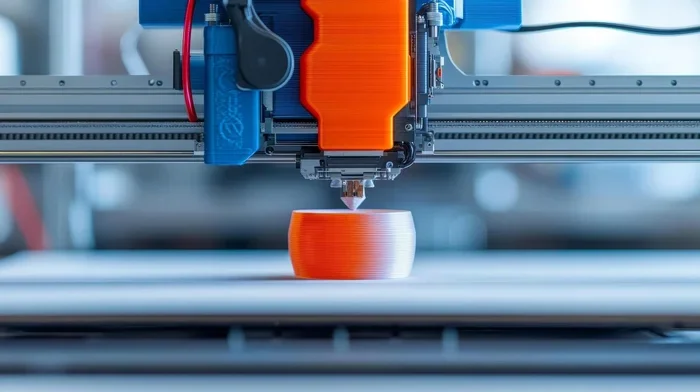
FDM printers melt plastic filament and lay it down layer by layer. They are affordable, easy to use, and great for beginners. Common filaments include PLA, ABS, PETG, and TPU. Each material behaves differently and suits different projects.
Resin printers use UV light to cure liquid resin into solid layers. They produce incredibly smooth surfaces and fine details. They are perfect for jewelry, dental models, and miniatures. But resin is messier, more expensive, and requires more post-processing care.
| Feature | FDM Printer | Resin Printer |
|---|---|---|
| Price Range | $150 – $500 | $150 – $400 |
| Build Volume | Medium to Large | Small to Medium |
| Surface Finish | Layer lines visible | Very smooth |
| Material Types | PLA, ABS, PETG, TPU | Standard, Tough, Flexible resins |
| Ease of Use | Easy | Moderate |
| Best For | Functional parts, prototypes | Detail-heavy models, miniatures |
The Legal Side of 3D Printing
This is where things get serious. 3D printing laws exist, and they matter. Just because you can print something does not always mean you should or that it is legal. Understanding the legal landscape protects you from trouble down the road.
Copyright and Intellectual Property
Copyright infringement is a real risk in the 3D printing world. If you download a file for a branded character or a patented design, you could be violating intellectual property laws. Companies actively monitor for unauthorized reproductions of their products.
For example, printing a Disney figurine and selling it is illegal. Printing one for personal use sits in a gray area, but it still carries risk. The safest approach is to create your own original designs or use files from creators who explicitly allow reproduction.
Patent Issues
Patents protect functional inventions. If a design is still under patent protection, printing it even for personal use can technically be infringement. This is especially relevant for mechanical parts and replacement components. Before printing a functional part, check if the design is patented.
Local Laws and Regulations
Some countries have specific 3D printing regulations. Certain nations restrict the printing of weapons or dangerous items. Even in places with loose laws, using 3D printer filament that produces toxic fumes in enclosed spaces may violate safety codes. Always research your local rules before printing anything questionable.
What Is Generally Legal to Print?
Most personal, non-commercial prints are perfectly fine. Replacement parts for household items, custom phone cases, decorative art, and original designs are all widely accepted. The key rule is simple: do not print things that infringe on someone else’s intellectual property or violate local laws.
Material Limitations and What You Can Use
The material you choose determines what your 3D printer can produce. Different 3D printer filament types have different properties. Understanding these differences helps you pick the right material for every project.
PLA Filament
PLA is the most popular 3D printing filament for beginners. It is easy to print, biodegradable, and comes in hundreds of colors. PLA print settings are forgiving, with a low printing temperature around 200°C. It works great for decorative items, prototypes, and simple functional parts.
The downside is that PLA is not very heat-resistant. It softens around 60°C, so it is not ideal for parts that will be exposed to high temperatures or heavy stress.
ABS Filament
ABS is stronger and more heat-resistant than PLA. It is the go-to material for functional parts, automotive components, and items that need durability. However, ABS warps easily during printing and requires a heated bed. It also emits fumes, so you need good ventilation or an enclosed printer.
PETG Filament
PETG strikes a great balance between PLA and ABS. It is strong, relatively easy to print, and more heat-resistant than PLA. PETG 3D printing is excellent for mechanical parts, containers, and outdoor items. It resists moisture better than ABS and produces fewer fumes.
TPU and Flexible Filaments
TPU is a flexible, rubber-like material. It is perfect for phone cases, gaskets, seals, and wearable items. Printing with TPU requires a direct-drive extruder and slower print speeds. But the results are worth it for projects that need bend and stretch.
Resin Materials
Resin printers use liquid photopolymer that hardens under UV light. Standard resin offers great detail but is brittle. Tough resin adds strength for functional parts. Flexible resin allows for some bend. Each resin type has its own curing and handling requirements.
Common Mistakes That Stop Your Prints
Even experienced 3D printing enthusiasts run into problems. Knowing the most common pitfalls saves you time, filament, and frustration.
Poor Bed Adhesion
If your print does not stick to the bed, it will fail. This is the number one complaint among beginners. The fix is usually simple. Make sure your bed is level and clean. Use a glue stick or blue painter’s tape for better adhesion. Adjust the first layer height and temperature settings in your slicer software.
Wrong Print Settings
Every material needs different print settings. Using PLA settings for ABS will cause warping and delamination. Always check the recommended temperature, speed, and cooling settings for your specific filament. Most filament manufacturers provide a profile that you can load directly into your slicer.
Ignoring Support Structures
Overhanging features need support structures to print correctly. Without supports, gaps, strings, and collapsed layers ruin your print. Most slicer software adds supports automatically, but you should review them before slicing. Place supports only where needed to save material and post-processing time.
Skipping Model Preparation
Not all STL files are print-ready. A model might have holes, inverted normals, or thin walls that cause printing errors. Use tools like Meshmixer or the built-in slicer repair functions to fix issues before sending the file to your printer.
Not Calibrating Your Printer
A poorly calibrated 3D printer produces inconsistent results. Take the time to level your bed, calibrate your extruder steps, and tension your belts. These small steps make a huge difference in print quality and reliability.
How to Get Started with 3D Printing
Getting started with 3D printing is easier than you think. You do not need to be an engineer or a designer. With the right tools and a bit of patience, anyone can create amazing objects.
Step 1: Choose Your Printer
Start with an entry-level FDM printer. Brands like Creality, Bambu Lab, and Prusa offer reliable machines at affordable prices. Look for a printer with a decent build volume, good reviews, and an active support community. A heated bed is a must-have feature for printing with multiple materials.
Step 2: Set Up Your Workspace
Place your printer on a stable, level surface away from drafts. Good ventilation is important, especially if you print with ABS or nylon. Keep your workspace clean and organized. A clutter-free area reduces the risk of accidents and makes troubleshooting easier.
Step 3: Download or Create 3D Models
You need a digital file to print. STL files are the most common format. Free model libraries like Thingiverse, Printables, and MyMiniFactory have thousands of designs. You can also create your own using 3D design software like Tinkercad, Fusion 360, or Blender. Tinkercad is perfect for absolute beginners because it runs in your browser and uses simple drag-and-drop controls.
Step 4: Slice Your Model
Slicing is the process of converting a 3D model into instructions your printer can follow. Slicer software like Cura, PrusaSlicer, or OrcaSlicer handles this job. You set your layer height, print speed, temperature, and support options. The slicer generates a G-code file that tells the printer exactly what to do.
Step 5: Print and Post-Process
Hit print and watch the magic happen. Most prints take a few hours, while larger objects can take days. Once the print is complete, remove it from the bed, remove any support structures, and sand or paint as desired. Post-processing is where your print goes from raw to polished.
Quick Tips for Better Prints
- Always clean your build plate before every print.
- Use a brim or raft for better bed adhesion on large flat prints.
- Keep your filament dry. Moisture causes poor print quality and popping sounds.
- Start with the manufacturer-recommended settings before making adjustments.
- Print a calibration cube first to verify your printer is dialed in.
- Join online communities for troubleshooting tips and inspiration.
- Be patient. Your tenth print will be better than your first.
Expert Insights on Pushing Your 3D Printer Limits
Experienced makers know that 3D printer limitations are not walls, they are challenges to solve. The community is full of creative workarounds that open up new possibilities.
Multi-Material Printing
Dual-extruder printers let you print with two materials at once. This is useful for objects that need a rigid body and flexible joints, or parts with different colors. Some advanced printers support filament swapping mid-print, letting you add color changes without stopping.
Scaling and Modifying Existing Models
You can scale any 3D model file up or down to fit your printer’s build volume. Slicer software makes this easy. Just import the file, resize it, and slice. This trick lets you print large objects on small printers by adjusting the scale factor.
Upgrading Your Printer Over Time
Most entry-level printers are upgrade-friendly. You can add a better extruder, an enclosure for temperature control, or an auto bed leveling sensor. Each upgrade improves your print quality and expands what you can create. Many experienced users say their printer is never truly finished, it just keeps evolving.
Designing for 3D Printing
Good 3D design for printing is different from traditional manufacturing. Walls need to be thick enough to hold together. Sharp corners create weak points, so rounding edges helps. Overhangs need support or chamfers. Learning these design rules transforms your ideas into successful prints every time.
The Role of the 3D Printing Community
The 3D printing community is one of the most valuable resources available. Forums, Reddit groups, Discord servers, and YouTube channels are packed with free advice, tutorials, and encouragement. When you hit a wall, someone in the community has likely already solved the same problem. Do not be afraid to ask questions and share your own discoveries.
Key Takeaways
- You can print almost anything: As long as it is legal and fits your printer’s build volume and material limits.
- Legal rules matter: Copyright, patent, and local laws can restrict what you are allowed to print.
- Material choice is key: PLA, ABS, PETG, and resin each have different strengths and weaknesses.
- Printer bed size limits your objects: Larger items need larger printers or multi-part printing.
- Common mistakes cause print failures: Bed adhesion, support structures, and slicer settings trip up most beginners.
- Free design files are everywhere: Sites like Thingiverse and Printables offer thousands of ready-to-print models.
- Practice makes perfect: Your first prints will not be flawless, and that is completely normal.
Conclusion
The answer to Can I Print Whatever I Want On A 3D Printer is a resounding yes, with a few important caveats. Legal restrictions, printer capabilities, and material properties all set boundaries, but within those boundaries, the creative possibilities are nearly endless. Whether you want to print practical household items, artistic creations, or functional mechanical parts, a 3D printer gives you the power to bring your ideas to life.
Start simple. Pick an easy project, choose the right filament, and follow proven print settings. Learn from each print, even the failed ones. Every mistake teaches you something valuable. As your skills grow, so will the complexity and quality of what you can create. The world of 3D printing is waiting for you. All you need to do is hit print.
Do not wait for the perfect printer or the perfect design. Start where you are, use what you have, and let your creativity lead the way. The best 3D printer is the one you are using right now.
Frequently Asked Questions
Is it illegal to print anything on a 3D printer?
No, printing most items for personal use is legal. However, printing copyrighted, patented, or regulated items can get you into legal trouble. Always respect intellectual property laws and check your local regulations before printing anything questionable.
What is the easiest thing to print on a 3D printer for beginners?
Simple shapes like phone stands, keychains, and calibration cubes are perfect for beginners. They require minimal setup, use little material, and help you learn basic 3D printer operation without wasting filament or time.
Can I sell things I print on a 3D printer?
Yes, you can sell 3D-printed items as long as you do not infringe on copyrights or patents. If you use someone else’s design, make sure you have permission or that the file is licensed for commercial use. Original designs are always safe to sell.
Why do my prints keep failing?
Most print failures come from bed adhesion issues, wrong print settings, or unleveled beds. Start by cleaning your build plate, checking your first layer calibration, and using the recommended temperature for your filament. Small adjustments make a big difference.
Do I need a powerful computer to use a 3D printer?
Not really. Most slicer software runs fine on basic computers. The slicing process happens on your machine, but it does not require a high-end GPU or lots of RAM. Even an older laptop can handle 3D printing workflows without any problems.
What file format do I need to print something?
The most common format is STL, which stands for stereolithography. Some slicers also support 3MF and OBJ formats. You can download STL files from free libraries or create your own using 3D design software like Tinkercad or Fusion 360.