Do Wi Fi Extenders Go Out And The Best Ways To Fix Them
Do Wi-Fi extenders go out? Yes, they can, and it happens more often than most people think. Wi-Fi extenders are helpful devices, but they face issues like signal drops, firmware glitches, and network coverage problems. The good news is that most of these issues are easy to fix with simple steps. In this guide, you will learn exactly why your wireless range extender fails, how to troubleshoot it, and the best fixes to get your home network running strong again.
Do Wi-Fi extenders go out? The short answer is yes. Just like any other tech gadget, Wi-Fi extenders have a lifespan, and they can stop working for many reasons. Maybe your wireless signal booster suddenly lost power, or perhaps the network coverage in your home has gotten worse over time. Whatever the reason, this guide will walk you through everything you need to know. You will learn why extenders fail, how to fix them, and when it is time to buy a new one.
If you have ever walked into a room and lost your Wi-Fi connection, you know how frustrating that can be. A wireless range extender is supposed to fix that problem, but sometimes it becomes part of the issue. The good news is that most connection drops and signal strength problems can be solved without calling a technician. Let us dive into the details and get your home network back on track.
Key Takeaways
- Wi-Fi extenders can and do go out: They are not permanent devices and face signal loss, overheating, and firmware issues over time.
- Placement matters a lot: Where you put your repeater device directly affects signal strength and network coverage.
- Firmware updates fix most problems: Keeping your extender updated prevents connection drops and boosts Wi-Fi performance.
- Mesh networks are a modern alternative: They offer better wireless range and fewer internet dead zones than traditional extenders.
- Know when to replace: If your extender is old or damaged, replacing it is smarter than endless troubleshooting.
- Simple fixes work first: Restart, reposition, and update before spending money on a new device.
📑 Table of Contents
- Do Wi-Fi Extenders Go Out? Understanding the Basics
- Why Do Wi-Fi Extenders Stop Working? A Deep Dive
- The Best Ways to Fix a Wi-Fi Extender
- Quick Tips to Keep Your Wi-Fi Extender Running Strong
- Common Mistakes That Cause Wi-Fi Extenders to Fail
- When to Replace Your Wi-Fi Extender Instead of Fixing It
- How to Choose the Right Wi-Fi Extender for Your Needs
- Conclusion
Do Wi-Fi Extenders Go Out? Understanding the Basics
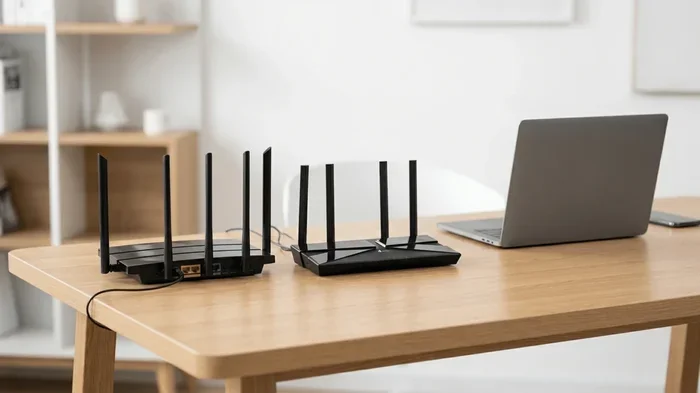
A Wi-Fi extender works by receiving your router’s signal and rebroadcasting it to areas with poor network coverage. Think of it as a helper that reaches into internet dead zones and brings the signal to places your router cannot reach on its own. But here is the thing, Wi-Fi extenders are not magic. They have limits, and they can go out for several reasons.
The most common reason an extender stops working is signal interference. Other electronic devices, walls, and even neighboring wireless networks can weaken the signal your extender receives. When the signal it gets is already weak, it cannot boost it properly. This leads to slow speeds, connection drops, and a frustrating online experience.
How Wi-Fi Extenders Work in Your Home
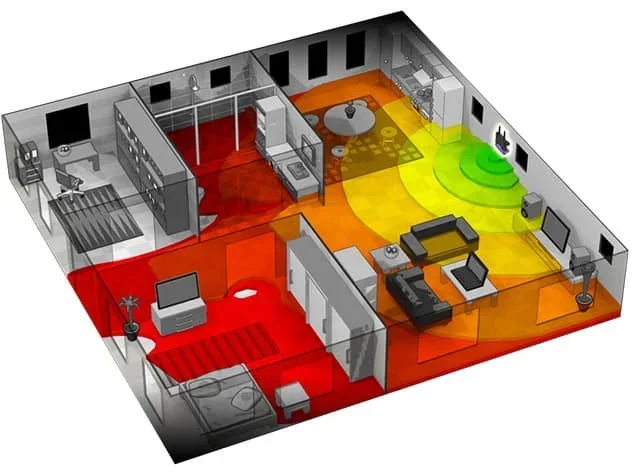
Your router sends out a Wi-Fi signal that travels through the air. When that signal hits a thick wall or a far corner, it gets weaker. A repeater device picks up that weakened signal, amplifies it, and sends it further. This process helps extend your Wi-Fi coverage area to rooms, basements, and backyards that would otherwise have no connection.
However, the extender must be placed in a spot where it can still receive a decent signal from the router. If you place it too far away, it will repeat a weak signal, and you will get poor bandwidth speed in the extended area. This is why router placement and extender positioning are so important.
Common Reasons Why Wi-Fi Extenders Go Out
Several factors can cause your wireless range extender to stop working or perform poorly:
- Overheating: Extenders generate heat, especially when running for long hours. Poor ventilation can cause them to overheat and shut down.
- Firmware issues: Outdated firmware can lead to compatibility problems and connection drops.
- Signal interference: Microwaves, baby monitors, and neighboring Wi-Fi networks on the same channel congestion can disrupt the signal.
- Power supply problems: A loose power outlet or faulty adapter can cut power to your extender unexpectedly.
- Hardware failure: Like all electronics, extenders have a lifespan and components can wear out over time.
- Software conflicts: Sometimes your network adapter or device settings conflict with the extender’s operation.
Expert Insight: Most Wi-Fi extenders last between 3 and 5 years with normal use. If yours is older than that, it may be time to consider a replacement, even if it still turns on.
Why Do Wi-Fi Extenders Stop Working? A Deep Dive
Understanding why your Wi-Fi extender goes out helps you prevent it from happening again. Let us look at the main culprits behind extender failures and signal loss.
Signal Interference and Channel Congestion
Wi-Fi interference is one of the biggest enemies of your wireless range extender. Your home is full of devices that emit signals on similar frequencies. Bluetooth devices, cordless phones, baby monitors, and even microwave ovens can disrupt your Wi-Fi signal. When many wireless networks in your neighborhood use the same channel, you get channel congestion, which slows everything down.
The good news is that you can reduce interference. Switching to the 5 GHz band instead of the 2.4 GHz band often helps. The 5 GHz band has more channels and less congestion, which means better bandwidth speed for your connected devices.
Overheating and Hardware Wear
Wi-Fi extenders are small devices that work hard 24/7. They generate heat, and if they do not have enough airflow, they can overheat. An overheating extender may slow down, drop connections, or shut off completely. Placing your extender in a closed cabinet or on top of other electronics makes this problem worse.
Over time, the internal components of an extender wear out too. Capacitors degrade, antennas weaken, and the network adapter becomes less efficient. This is a natural part of the device lifecycle, and it is one reason why Wi-Fi performance declines with age.
Firmware and Software Problems
Firmware is the software that runs inside your extender. Just like your phone or computer, your extender needs updates to fix bugs, improve Wi-Fi performance, and patch security holes. When you skip firmware updates, your extender may start experiencing connection drops or fail to connect to new devices.
Some extenders also have trouble with software conflicts. If you recently changed your router settings or added new devices to your home network, the extender might need to be reconfigured. A simple reset often fixes these issues.
The Best Ways to Fix a Wi-Fi Extender
Now that you know why Wi-Fi extenders go out, let us fix them. These solutions work for most common problems and do not require any technical expertise.
Fix 1: Restart Your Extender
The simplest fix is often the best one. Unplug your wireless range extender from the power outlet, wait 30 seconds, and plug it back in. This clears the temporary memory and resets the connection. Many connection drops are caused by minor software glitches that a simple restart fixes.
Here is how to do it properly:
- Unplug the extender from the power outlet.
- Wait at least 30 seconds.
- Plug it back in and wait for the lights to stabilize.
- Check if your Wi-Fi signal is restored.
Fix 2: Reposition Your Extender
Router placement and extender positioning are critical for good network coverage. Your extender should be placed halfway between your router and the area with weak signal. If it is too far from the router, it will repeat a weak signal. If it is too close, it will not extend the coverage far enough.
Quick Tips for the best extender placement:
- Keep the extender in an open area, not inside a closet or behind furniture.
- Avoid placing it near microwaves, baby monitors, or other electronic devices.
- Place it on a higher shelf or mount it on a wall for better signal strength.
- Keep it away from metal objects and thick concrete walls.
Fix 3: Update the Firmware
Outdated firmware is a leading cause of Wi-Fi performance issues. Most modern extenders have a mobile app or web interface that lets you check for updates. Updating your firmware can fix bugs, improve bandwidth speed, and add new features.
To update your extender’s firmware:
- Open the extender’s app or web dashboard.
- Look for a “Firmware Update” or “System Update” section.
- Download and install any available updates.
- Restart the extender after the update is complete.
Fix 4: Change the Wi-Fi Channel
Channel congestion happens when too many wireless networks in your area use the same channel. This causes interference and slows down your Wi-Fi connection. Changing your extender’s channel can reduce interference and improve signal strength.
You can change the channel through your extender’s settings. Try channels 1, 6, or 11 for the 2.4 GHz band, as these are the least likely to overlap with neighboring networks. For the 5 GHz band, the automatic channel selection feature usually works well.
Fix 5: Reset the Extender to Factory Settings
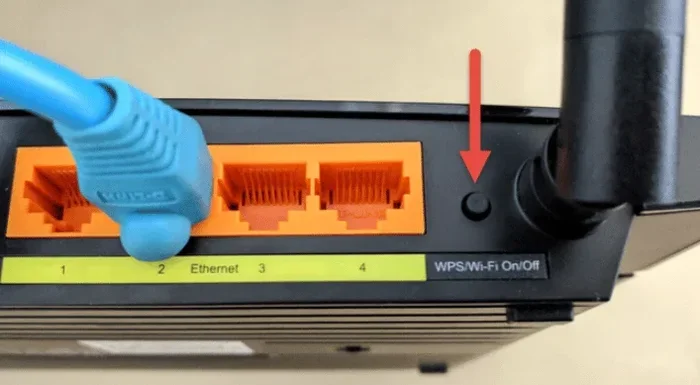
If none of the above fixes work, a factory reset can solve deep-rooted software issues. This wipes all settings and starts fresh. Use a paperclip or pin to press the reset button on the back of the extender for 10 seconds. After the reset, you will need to reconfigure the extender using your router’s network name and password.
Quick Tips to Keep Your Wi-Fi Extender Running Strong
Prevention is always better than cure. Here are some simple habits that keep your wireless range extender healthy and your home network running smoothly:
- Restart your extender monthly: This clears temporary files and refreshes the connection.
- Keep firmware updated: Check for updates every few months or enable automatic updates if available.
- Monitor signal strength: Use a Wi-Fi signal strength app to find the best spot for your extender.
- Keep it cool: Make sure the extender has good airflow and is not covered by other objects.
- Run an internet speed test: regularly to check if your bandwidth speed is where it should be.
- Reboot your router too: A healthy router means a healthier extender and better network coverage.
Common Mistakes That Cause Wi-Fi Extenders to Fail
Many people make mistakes that shorten the life of their Wi-Fi extender or cause it to go out more often than it should. Avoid these common pitfalls:
- Placing the extender too far from the router: This causes the extender to repeat a weak signal, resulting in poor Wi-Fi performance.
- Ignoring firmware updates: Outdated software leads to bugs, security risks, and connection drops.
- Overloading the extender: Connecting too many devices to a single extender can overwhelm it and slow down bandwidth speed.
- Using an old extender with a new router: Older extenders may not support newer Wi-Fi standards, limiting your network coverage.
- Ignoring overheating: Blocking the extender’s vents with fabric or other objects can cause it to overheat and fail.
Common Mistake: Many people place their wireless range extender in the room with the worst signal, thinking this will fix the problem. In reality, the extender needs a decent signal from the router first. Place it where it can still “see” the router clearly.
When to Replace Your Wi-Fi Extender Instead of Fixing It
Sometimes the best fix is a new wireless range extender. If you have tried all the troubleshooting steps and your extender still goes out frequently, it may be time to replace it. Here are signs that replacement is the right choice:
- Your extender is more than 5 years old.
- The signal strength has noticeably declined even after troubleshooting.
- The extender frequently overheats or shuts off.
- It does not support dual-band or Wi-Fi 6 standards.
- Firmware updates are no longer available from the manufacturer.
- You have added many new smart home devices that overwhelm the extender.
Extender vs. Mesh Network: Which Is Better?
If you are considering replacing your old repeater device, you might want to look at mesh networks instead. A mesh network uses multiple nodes placed around your home to create seamless Wi-Fi coverage. Unlike traditional extenders, mesh systems do not create separate network names, so your devices switch automatically between nodes as you move around the house.
| Feature | Wi-Fi Extender | Mesh Network |
|---|---|---|
| Price Range | $20 – $80 | $100 – $400 |
| Setup Difficulty | Easy | Easy to Moderate |
| Seamless Roaming | No | Yes |
| Coverage Area | Limited | Large |
| Signal Consistency | Moderate | Excellent |
| Best For | Small to medium homes | Large homes with many devices |
Mesh networks are more expensive but offer much better Wi-Fi performance and network coverage. They are especially useful for larger homes or households with many connected devices. If you find yourself constantly dealing with internet dead zones and connection drops, a mesh system might be the best long-term solution.
How to Choose the Right Wi-Fi Extender for Your Needs
If you decide to buy a new wireless range extender, choosing the right one makes a big difference. Here is what to look for:
- Dual-band or tri-band support: Dual-band extenders work on both 2.4 GHz and 5 GHz frequencies. Tri-band extenders add a second 5 GHz band for better bandwidth speed.
- Wi-Fi standard: Look for Wi-Fi 6 (802.11ax) support for the fastest speeds and best performance with modern devices.
- Range: Check the extender’s coverage area and make sure it matches the size of your home.
- Ease of setup: Many extenders now come with simple mobile apps that make setup quick and painless.
- Ethernet port: An extender with a wired Ethernet port lets you connect devices like smart TVs and gaming consoles for a stable internet connection.
Expert Insight: When shopping for a Wi-Fi signal booster, do not just look at the price. Check the Wi-Fi standard, the number of bands, and user reviews. A slightly more expensive extender with better Wi-Fi performance will save you from buying another one in a year.
Conclusion
Do Wi-Fi extenders go out? Yes, they do, but most problems are fixable with simple steps. Whether your wireless range extender is suffering from signal interference, outdated firmware, or poor placement, the fixes in this guide should help you get back online quickly. Regular maintenance like restarting your extender, updating firmware, and checking signal strength can extend its life and keep your home network running smoothly.
If your extender is old, damaged, or simply not keeping up with your Wi-Fi needs, do not hesitate to replace it. And if you are tired of connection drops and internet dead zones, consider upgrading to a mesh network for seamless Wi-Fi coverage throughout your home. The key is to act quickly when you notice problems, because the sooner you fix them, the less frustration you will deal with.
Take action today. Check your extender’s placement, update its firmware, and run an internet speed test. Your home network will thank you, and you will enjoy a stronger, more reliable Wi-Fi connection in every room of your house.
Frequently Asked Questions
Can a Wi-Fi extender go bad over time?
Yes, Wi-Fi extenders can go bad over time. Electronics wear out, firmware becomes outdated, and components degrade with age. Most extenders last 3 to 5 years before you notice a significant decline in Wi-Fi performance and network coverage.
Why does my Wi-Fi extender keep disconnecting?
Frequent disconnections are usually caused by signal interference, channel congestion, or outdated firmware. Try repositioning your extender, switching to a less crowded channel, or updating the firmware to fix this issue.
Is it better to use a mesh network instead of a Wi-Fi extender?
For most homes, a mesh network offers better Wi-Fi performance and seamless coverage than a traditional extender. Mesh systems automatically switch your devices between nodes, reducing connection drops and improving signal strength throughout your home.
How can I test my Wi-Fi extender’s signal strength?
You can use a free Wi-Fi signal strength app on your phone to measure the signal in different areas of your home. Walk around and check the readings to find the best spot for your repeater device and identify internet dead zones.
Does placing a Wi-Fi extender in a closet work?
No, placing your wireless range extender in a closet or behind furniture blocks the signal and reduces network coverage. Always place your extender in an open area where it can receive a strong signal from your router and broadcast it effectively.
How often should I restart my Wi-Fi extender?
Restarting your Wi-Fi extender once a month is a good practice. This clears temporary files, refreshes the connection, and helps prevent minor software issues that can cause connection drops and slow bandwidth speed.