Can I Use Any Usb C Adapter Everything You Need To Know
Not every USB C adapter works with every device. The answer to “can I use any USB C adapter” depends on your device model, the adapter standard, and what you want to connect. This guide walks you through everything from USB C power delivery to Thunderbolt 3 compatibility so you can make the right choice without the guesswork.
Key Takeaways
- USB C adapters are not universal: Different adapters support different speeds, power levels, and video formats.
- Check your device first: Your laptop or phone must support the standard the adapter uses before it will work properly.
- Thunderbolt 3 and USB C are not the same: Thunderbolt 3 uses the USB C shape but offers much faster speeds and more features.
- Cheap adapters can damage your gear: Always buy from trusted brands and look for safety certifications.
- USB C power delivery matters: The right adapter can charge your device faster and power multiple accessories at once.
- Match the adapter to your need: Pick USB C to HDMI, USB C to USB A, or a full USB C hub based on what you connect most often.
📑 Table of Contents
What Is a USB C Adapter and Why Does It Matter
A USB C adapter is a small device that lets you connect one type of port or cable to another. It bridges the gap between your device and the accessory you want to use. Think of it as a translator between two different connection types.
The USB C connector has become the go-to standard for laptops, phones, and tablets. Its reversible connector design means you never have to flip it around three times to plug it in. That alone has made it a favorite among users.
But here is the catch. Just because a device has a USB C port does not mean every adapter will work with it. The port shape is only one piece of the puzzle. What matters most is what the port and adapter actually support underneath the hood.
Understanding this difference can save you money, time, and a lot of frustration. It also keeps your devices safe from power surges or data transfer failures.
So when you ask yourself, can I use any USB C adapter, the short answer is no. But the longer answer is what this guide is all about. Let us dig in.
Types of USB C Adapters Available
The market for USB C accessories has exploded in recent years. You can find an adapter for almost any connection need. Here are the most common types you will come across.
USB C to USB A Adapters
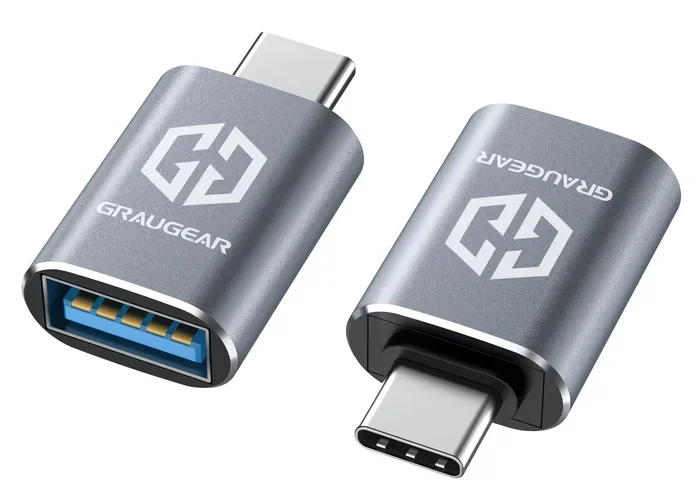
This is the most basic adapter type. It lets you plug older USB A devices into a newer USB C port. Many people use these for USB flash drives, keyboards, and mice that still have the classic rectangular connector.
These adapters are cheap and widely available. They usually work fine for basic data transfer. But they do not carry video signals or high-power charging.
USB C to HDMI Adapters
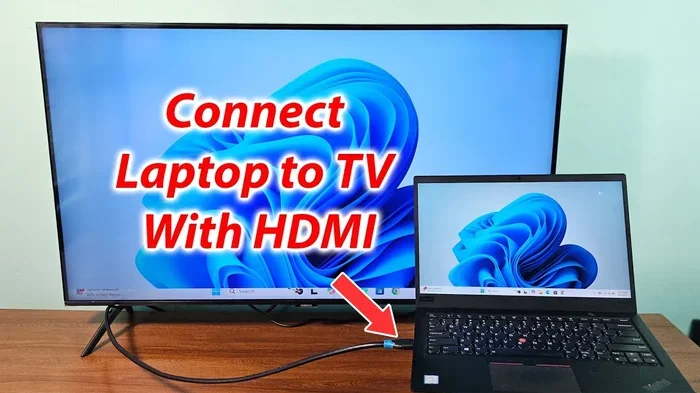
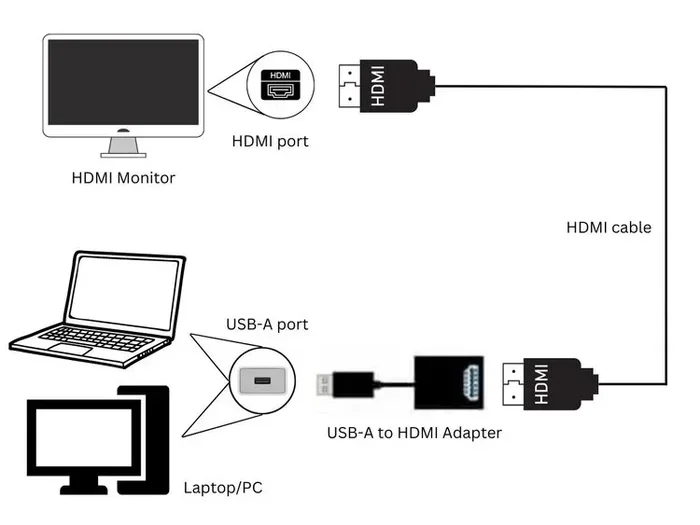
A USB C to HDMI adapter lets you mirror or extend your screen to a TV or external monitor. This is a lifesaver for presentations, gaming, or simply working on a bigger display.
Not all USB C to HDMI adapters are created equal. Some support 4K resolution. Others only handle 1080p. Always check the specs before you buy if you need a specific video output.
USB C Docking Stations
A USB C docking station is like a power hub for your workspace. It bundles multiple ports into one adapter. You can get Ethernet, HDMI, USB A ports, and SD card slots all in a single unit.
These are ideal for desk setups where you connect and disconnect your laptop daily. They turn a thin laptop into a full workstation in seconds.
USB C Power Delivery Adapters
USB C power delivery adapters handle charging. They can send anywhere from 18 watts to over 100 watts through the USB C cable. This is what powers most modern laptops and tablets.
A good USB C charger can replace multiple power bricks. It simplifies your bag and keeps your devices charged faster.
USB C Dongles and Splitters
A USB C dongle is a tiny adapter that adds one or two ports. A splitter does something similar but divides a connection. These are great for travel because they are small and lightweight.
Just remember that smaller does not always mean less capable. Some dongles punch well above their weight in terms of features.
Can You Use Any USB C Adapter
This is the big question. And the honest answer is it depends. The USB C shape is universal, but the technology inside the adapter is not. Let us break down why.
Compatibility Factors to Consider
Several things determine whether a USB C adapter will work with your device. Here are the key factors to check first.
- Your device USB C standard: Does your laptop support USB 3.2, USB 4, or Thunderbolt 3? The adapter must match or exceed this standard.
- Power delivery needs: If you want to charge while using the adapter, make sure it supports USB C power delivery at the wattage your device needs.
- Video output support: Not all adapters can carry a video signal. Check if the adapter supports DisplayPort Alt Mode or HDMI output.
- Data transfer speed: If you are moving large files, you need an adapter that supports the right data speed. USB 3.0 is slower than USB 3.2 or Thunderbolt.
- Operating system compatibility: Some adapters work better with Windows, macOS, or ChromeOS. Check for driver support if needed.
USB C Standards Explained Simply
The USB C connector looks the same across all devices. But the protocol inside can vary a lot. Here is a quick breakdown of the main standards you will encounter.
USB 3.2 Gen 1 offers data speeds up to 5 Gbps. It is fine for everyday tasks like file transfers and charging. USB 3.2 Gen 2 doubles that to 10 Gbps. It handles 4K video output with ease.
Thunderbolt 3 uses the USB C shape but goes much further. It supports data speeds up to 40 Gbps, video output, and up to 100 watts of power delivery. Thunderbolt 4 builds on this with even stricter performance requirements.
USB4 is the newest standard and it is based on Thunderbolt 3 architecture. It offers 40 Gbps speeds and is becoming more common in newer laptops.
When you ask can I use any USB C adapter, your device standard is the first thing to check. A Thunderbolt 3 adapter will work with a Thunderbolt 4 laptop. But a basic USB 3.0 adapter will not unlock the full speed of a Thunderbolt port.
USB C to Ethernet Adapters
A USB C to Ethernet adapter is a handy tool for stable internet connections. It is especially useful for laptops that dropped the Ethernet port to stay thin and light.
Most USB C to Ethernet adapters support Gigabit speeds. Some even handle 2.5 Gbps. They are affordable and plug in with zero hassle. Just make sure your adapter supports the speed your internet plan requires.
USB C Video Output Options
Getting video from your laptop to a screen is one of the most common reasons people buy a USB C adapter. The options include USB C to HDMI, USB C to DisplayPort, and USB C to VGA.
HDMI is the most popular choice for TVs and monitors. DisplayPort offers higher refresh rates for gaming. VGA is older and lower quality but still works for basic projectors.
Always check if your device supports video output over USB C before buying an adapter. Some devices only charge through the port and cannot send a video signal.
How to Choose the Right USB C Adapter for Your Needs
Now that you know the types and standards, let us talk about how to pick the right one. The best adapter is the one that matches your actual use case.
Check Your Device Requirements
Start by looking at your device manual or the manufacturer website. Find out what USB C standards your port supports. This tells you the maximum speed, power, and video capability you can get.
If you own a MacBook Pro with Thunderbolt 4, you want a Thunderbolt 4 adapter to get the full benefits. If you have a basic Chromebook with USB 3.2, a standard USB C adapter will work perfectly fine.
Quality and Safety Considerations
Not all adapters are built the same. Cheap, no-name adapters can overheat, deliver inconsistent power, or fail after a few weeks. This is not just an inconvenience. It can also damage your device.
Look for adapters from reputable brands. Check for safety certifications like USB-IF certification or CE marking. These tell you the adapter has been tested for safety and performance.
A good USB C charger or adapter might cost a bit more upfront. But it protects your gear and lasts much longer than a bargain-bin option.
Match the Adapter to Your Daily Use
Think about what you connect most often. Do you need to plug in an external monitor every day? Go with a USB C hub that has HDMI and USB A ports. Do you mostly charge and transfer files? A simple USB C to USB A adapter is all you need.
Travelers should look for compact dongles. Desk workers benefit most from full USB C docking stations. Match the tool to your lifestyle and you will get the most value out of it.
Common USB C Adapter Problems and How to Fix Them
Even with the right adapter, you might run into issues from time to time. Here are the most common problems and how to solve them.
Adapter not recognized by the device: Try unplugging and plugging it back in. If that does not work, check for driver updates on your computer. Some adapters need software to work properly.
No video output: Make sure the adapter supports video output. Not every USB C adapter can carry a display signal. Also check your display settings to ensure the external monitor is enabled.
Slow data transfer speeds: This usually means the adapter or cable is limited to an older USB standard. Upgrade to a USB 3.2 or Thunderbolt adapter for much faster speeds.
Device not charging through the adapter: Some adapters do not pass through power. Look for adapters that specifically support USB C power delivery and pass-through charging.
Overheating adapter: Unplug it immediately. Overheating is a sign of poor quality or incompatible power delivery. Replace it with a certified adapter from a trusted brand.
Quick Tips and Best Practices for USB C Adapters
Follow these simple tips to get the best experience from your USB C adapters.
- Always check compatibility before buying. Match the adapter standard to your device capability.
- Buy certified adapters. Look for USB-IF certification or equivalent safety marks.
- Avoid daisy-chaining cheap adapters. Connecting multiple adapters together can cause power and data issues.
- Keep your adapters in a dedicated pouch. This prevents damage and keeps them organized.
- Update your device firmware regularly. Updates often improve USB C port compatibility and performance.
- Read reviews before purchasing. Real user experiences help you spot problems before they happen to you.
- Invest in one good adapter instead of many cheap ones. Quality matters more than quantity when it comes to USB C accessories.
The bottom line is that USB C adapters are incredibly useful. They unlock the full potential of your devices by adding ports, video output, and fast charging. But they are not one-size-fits-all. Taking a few minutes to understand your needs and your device capabilities goes a long way.
So the next time you wonder, can I use any USB C adapter, you will know the answer. It depends on your device, the adapter standard, and what you want to connect. Armed with that knowledge, you can shop with confidence and avoid common pitfalls.
The right USB C adapter makes your life easier. It simplifies your setup, reduces cable clutter, and keeps your devices connected no matter where you are. Take the time to choose wisely, and your adapter will serve you well for years to come.
Frequently Asked Questions
Can I Use Any USB C Adapter With My Laptop?
Not necessarily. Your laptop must support the same USB C standard as the adapter. Check if your laptop supports Thunderbolt 3, USB 3.2, or USB4. A basic adapter will work for charging and simple data transfer, but advanced features like 4K video or fast data speeds require a matching adapter standard.
Do All USB C Adapters Support Fast Charging?
No. Only adapters that support USB C power delivery can charge your device quickly. Some adapters are designed only for data transfer and cannot pass through power. Always check the wattage and power delivery specs before buying if charging speed matters to you.
Is a USB C Hub the Same as a USB C Adapter?
Not exactly. A USB C adapter usually adds one or two ports. A USB C hub offers multiple ports in one device. Both serve similar purposes, but a hub is better if you need several connections at once. Think of a hub as a multi-port adapter.
Can I Use a Thunderbolt 3 Adapter With a USB C Port?
Yes, but with limitations. A Thunderbolt 3 adapter will work in a USB C port. However, you will not get Thunderbolt speeds unless your device also supports Thunderbolt. The adapter will fall back to standard USB C speeds for data and video.
Why Does My USB C Adapter Keep Disconnecting?
This can happen for a few reasons. The adapter might be loose in the port. The cable could be damaged. Or the adapter might not be compatible with your device. Try a different cable first. If the problem continues, the adapter may be faulty or incompatible.
Are Expensive USB C Adapters Worth It?
Often yes. Expensive adapters from trusted brands tend to be more reliable, safer, and faster. They use better components and undergo more rigorous testing. A cheap adapter might save you a few dollars now but could cost you more in the long run if it damages your device or fails quickly.
=== CONCLUSION ===
The question can I use any USB C adapter comes up a lot. And the answer is more nuanced than a simple yes or no. USB C has become a universal shape, but the technology inside each adapter varies widely. Your device, your needs, and the adapter standard all play a role in finding the right fit.
Take the time to understand your device capabilities. Check for USB C power delivery support, video output standards, and data transfer speeds. Choose certified adapters from trusted brands. And always match the adapter to what you actually need to connect.
A good USB C adapter is a small investment that pays off big. It keeps your devices connected, your data moving, and your workflow smooth. Use the tips in this guide to make smart choices, and you will never have to worry about compatibility again.