Can You Convert Old Stereo To Bluetooth With These Tips
Can You Convert Old Stereo To Bluetooth with a simple wireless adapter? Absolutely. This guide shows you how to add Bluetooth to any vintage stereo, pick the right Bluetooth receiver, and enjoy wireless streaming without buying a new system. You’ll learn step-by-step setup, sound quality tips, and common mistakes to avoid.
You probably have that dusty old stereo in the corner of the room. It still sounds great, but it lacks wireless connectivity. You want to stream music from your phone without fumbling with cables. The good news is that you can add Bluetooth to almost any vintage system. This guide will show you exactly how to convert old stereo to Bluetooth with simple, affordable tools.
Many people think they need to buy a brand-new Bluetooth speaker or replace their entire stereo system. That is not true. A small Bluetooth adapter can bring wireless music to your retro setup in minutes. Whether you own a classic wooden console or a sleek shelf system, you can make it Bluetooth-enabled. Let’s walk through the process together.
By the end of this article, you will know which Bluetooth receiver to choose, how to connect it, and how to keep your audio quality high. You will also learn a few quick tips that even tech-savvy friends might miss. So grab a cup of coffee, and let’s give your old stereo a modern upgrade.
Key Takeaways
- Use a Bluetooth receiver adapter: This small device plugs into your stereo’s aux or RCA input and pairs with any phone or tablet.
- Check your stereo’s inputs first: Look for a 3.5mm jack, RCA ports, or a USB slot to know which adapter fits best.
- Choose an adapter with aptX or AAC codec: These deliver near-lossless sound and reduce audio delay for a better listening experience.
- Follow a simple 4-step setup: Plug in the adapter, pair your phone, adjust the volume, and enjoy wireless music.
- Avoid common mistakes: Don’t place the adapter too far from the stereo, and always keep the adapter charged or powered.
- Boost sound quality: Use a high-quality cable, keep the adapter away from Wi-Fi routers, and update firmware when possible.
- It’s worth the effort: Converting an old stereo to Bluetooth gives it new life, saves money, and adds modern convenience.
📑 Table of Contents
- Can You Convert Old Stereo To Bluetooth? Yes, With the Right Adapter
- Know Your Stereo’s Inputs Before You Buy
- Choose the Best Bluetooth Adapter for Your Stereo
- Step-by-Step Guide to Convert Old Stereo to Bluetooth
- Maximize Sound Quality and Reduce Latency
- Common Mistakes to Avoid When Converting Your Stereo
- Final Thoughts on Adding Bluetooth to Your Old Stereo
Can You Convert Old Stereo To Bluetooth? Yes, With the Right Adapter
The short answer is yes. You can convert old stereo to Bluetooth using a wireless receiver or transmitter. A Bluetooth receiver plugs into your stereo’s input and accepts audio from your phone. A Bluetooth transmitter does the opposite—it sends audio from a stereo to wireless headphones. For most people, a receiver is what you need. It turns your non-Bluetooth stereo into a wireless speaker system.
The process is simple because the adapter handles all the Bluetooth pairing work. You just plug it in, pair your device, and play music. No soldering, no complicated software. Most adapters cost between $15 and $60. That is much cheaper than a whole new stereo system. Let’s look at the options you have.
What Kind of Bluetooth Adapter Do You Need?
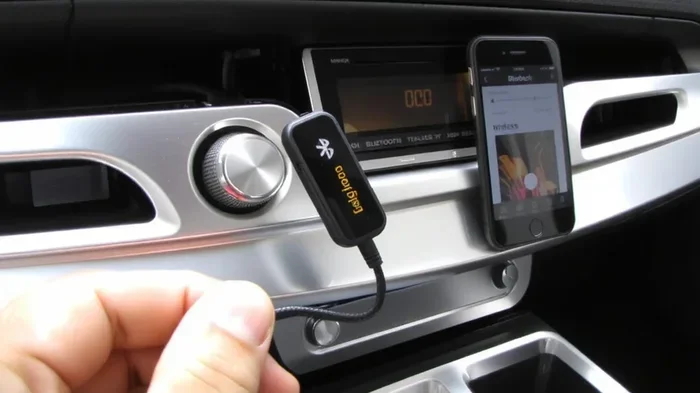
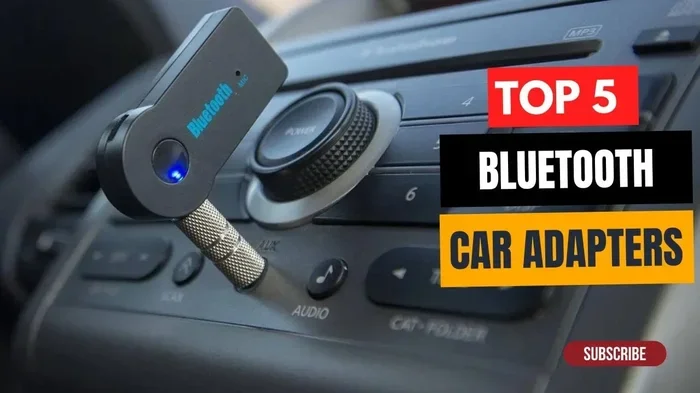
There are two main types of Bluetooth adapters for old stereos. The first is a 3.5mm aux receiver. It plugs into a standard headphone jack or aux input. The second is an RCA Bluetooth receiver. It connects to the red and white audio ports on the back of your stereo. Some adapters even work with USB inputs or optical ports. You just need to match the adapter to your stereo’s available inputs.
Many modern adapters also support Bluetooth codecs like aptX or AAC. These codecs improve sound quality by compressing and decompressing audio more efficiently. If you care about music fidelity, look for an adapter that mentions aptX Low Latency. This reduces the delay between video and audio, which is great for watching movies.
Know Your Stereo’s Inputs Before You Buy
Before you buy any Bluetooth receiver, take a look at the back of your vintage stereo. You need to know what kind of input it has. This step saves you from buying the wrong adapter. Most retro stereos have at least one of the following inputs.
Common Input Types on Old Stereos
- 3.5mm Aux Input: This is the most common and easiest to use. It looks like a small round headphone jack. Almost every Bluetooth aux receiver works with this.
- RCA Inputs (Red and White): These are the round red and white ports. They are standard on older home audio systems. You will need an RCA Bluetooth receiver or an adapter cable.
- USB Port: Some newer vintage stereos have a USB slot. You can use a USB Bluetooth adapter if your stereo supports USB audio.
- Optical or Coaxial Digital: High-end vintage receivers may have these. You can use a digital Bluetooth transmitter, but it costs more.
If your stereo only has a tape input or a phono input, you can still add Bluetooth. You will need a 3.5mm to RCA cable or a tape deck emulator. The adapter will connect to that cable. So no input is a dead end. You just need the right cable combination.
Choose the Best Bluetooth Adapter for Your Stereo
Not all Bluetooth adapters are the same. Some focus on range, while others focus on sound quality. Here is a quick comparison of popular options to help you decide.
| Adapter | Input Type | Bluetooth Version | Codec Support | Price Range | Best For |
|---|---|---|---|---|---|
| Mpow HC6 | 3.5mm Aux | 5.0 | aptX, AAC | $20–$30 | Budget-friendly aux connection |
| Avantree Oasis Plus | Optical, RCA, 3.5mm | 5.0 | aptX HD, aptX Low Latency | $80–$100 | High-quality audio and low latency |
| 1Mii B06 | 3.5mm Aux | 5.1 | aptX, aptX HD, AAC | $25–$35 | Long range up to 100 feet |
| TaoTronics TT-BA07 | RCA, 3.5mm | 5.0 | aptX, AAC | $25–$40 | Stereos with RCA inputs |
| Creative BT-W4 | 3.5mm Aux | 5.2 | aptX Adaptive | $50–$70 | Modern features and multipoint |
When picking an adapter, think about how far you want to walk around your house. Bluetooth range usually reaches 30 feet. Some adapters claim 100 feet, but walls and furniture reduce that. If you plan to listen in the backyard, choose a model with a strong signal. Also, check if the adapter needs a USB power cable or batteries. A battery-powered adapter gives you freedom, but you must recharge it.
Quick Tips for Choosing the Right Adapter
- Match the adapter input to your stereo’s input. If you have RCA, buy an RCA receiver.
- Pick an adapter with at least Bluetooth 5.0 for a stable connection.
- If sound quality matters most, choose one with aptX or aptX HD support.
- Read reviews to check for pairing issues or audio dropout problems.
- Consider a model with a built-in DAC for cleaner audio output.
Step-by-Step Guide to Convert Old Stereo to Bluetooth
Now that you have the right Bluetooth receiver, let’s set it up. The whole process takes less than 10 minutes. Follow these simple steps and you will be streaming music in no time.
Step 1: Plug the Adapter into Your Stereo
Connect the Bluetooth adapter to the correct input on your old stereo. If you are using a 3.5mm aux receiver, plug the 3.5mm cable into the aux port. If you have an RCA receiver, connect the red and white cables to the matching RCA ports. Make sure the connections are snug. A loose cable causes static and dropouts.
Step 2: Power the Adapter
Most Bluetooth receivers need power. Many use a USB cable that plugs into a wall adapter or a USB port on the stereo. If your stereo does not have a USB port, use a standard phone charger. Battery-powered adapters just need a full charge before you start. The adapter will usually show a light when it is ready.
Step 3: Pair Your Phone or Tablet
Go to the Bluetooth settings on your phone. Turn on Bluetooth and search for new devices. The name of your Bluetooth receiver will appear on the list. Tap on it to pair. You may need to enter a PIN, which is often 0000 or 1234. Once paired, the adapter will connect automatically in the future.
Step 4: Play Music and Adjust Volume
Open your favorite music app and play a song. The audio will now come through your vintage stereo. Use the volume buttons on your phone or the stereo’s volume knob. It is best to keep the phone volume at about 70% and control the rest with the stereo. This prevents distortion and protects your speakers.
Step 5: Test the Range
Walk around your room with your phone to test the wireless range. If the music cuts out, move closer to the stereo or the adapter. Walls and metal objects weaken the signal. If you need more range, consider a Bluetooth range extender or a better antenna on the adapter.
Maximize Sound Quality and Reduce Latency
One concern people have is whether Bluetooth audio sounds as good as a wired connection. The answer is yes, with the right setup. A good Bluetooth adapter can deliver rich, clear sound that fills the room. Here are a few tips to get the best audio quality from your converted stereo.
Use High-Quality Cables
The cable between your adapter and stereo matters. A cheap cable can introduce noise and weaken the signal. Use a shielded 3.5mm cable or a quality set of RCA cables. Gold-plated connectors reduce corrosion and improve conductivity. A $10 cable can make a big difference in sound clarity.
Keep the Adapter Away from Interference
Wi-Fi routers, microwaves, and cordless phones can interfere with Bluetooth signals. Place your adapter at least a few feet away from these devices. If you notice crackling or dropouts, move the adapter to a different spot. A clear line of sight between your phone and the adapter also helps.
Update Firmware and Drivers
Some Bluetooth receivers have updatable firmware. Check the manufacturer’s website or app for updates. Firmware updates can fix bugs, improve connection stability, and enhance codec support. This is a quick step that many people skip, but it can solve sound issues.
Understand Bluetooth Codecs
Bluetooth codecs are like languages that audio uses to travel wirelessly. The most common ones are SBC, aptX, AAC, and LDAC. SBC is the basic one that all devices support. aptX and AAC offer better sound with less compression. If your phone and adapter both support aptX, you will notice a richer soundstage. Look for adapters that list the codecs they support in the product description.
Reduce Audio Latency for Videos
Latency is the delay between seeing an action on screen and hearing the sound. A cheap adapter might have a delay of 200 milliseconds, which is very noticeable. To reduce this, use an adapter with aptX Low Latency or aptX Adaptive. These codecs cut the delay to under 40 milliseconds. You can watch movies and YouTube videos without the lips moving out of sync.
Common Mistakes to Avoid When Converting Your Stereo
Even with a simple setup, people make mistakes that hurt their experience. Here are a few common mistakes to watch out for.
- Buying the wrong adapter type: If your stereo has RCA inputs, do not buy a 3.5mm-only adapter. You will need an RCA receiver or an adapter cable.
- Ignoring power requirements: Some adapters need a USB power source. If you plug it into a phone charger that does not provide enough power, the adapter may keep disconnecting.
- Placing the adapter in a hidden spot: Sticking the adapter behind a heavy stereo cabinet blocks the signal. Keep it in the open for the best Bluetooth range.
- Overlooking battery maintenance: Battery-powered adapters will die in the middle of a song if you forget to charge them. Get into the habit of charging them after each use.
- Not resetting the adapter: If pairing fails, do a factory reset on the adapter. This clears old pairings and fixes most connection issues.
Expert Insight: Is It Worth Converting an Old Stereo?
Many audio experts agree that converting an old stereo to Bluetooth is a smart move. Vintage stereos often have better speakers and amplifiers than cheap modern Bluetooth speakers. By adding a Bluetooth module, you get the best of both worlds. You keep the warm, rich sound of your retro stereo and enjoy the convenience of wireless streaming. It is a cost-effective audio upgrade that extends the life of your favorite equipment.
One thing to keep in mind is that Bluetooth will never sound exactly like a perfect wired connection. There is a tiny amount of compression. However, with a modern adapter and a good codec, the difference is very small for most listeners. If you are an audiophile with a $5,000 stereo system, you might notice a slight loss in detail. But for the vast majority of people, the upgrade is totally worth it.
Final Thoughts on Adding Bluetooth to Your Old Stereo
Can You Convert Old Stereo To Bluetooth with ease? Yes, you can. The process is simple, affordable, and reversible. You do not need to drill holes or change any wiring. A Bluetooth adapter sits neatly behind your stereo and connects in seconds. This small change brings your entire music library into your living room without the clutter of cables.
Whether you want to stream music from Spotify, listen to podcasts, or play videos from your tablet, a converted stereo handles it all. You can even use it as a wireless speaker for parties. The range lets you control the music from across the room. Your friends will not believe that this great sound comes from a vintage system.
Take a few minutes to check your stereo’s inputs, pick the right adapter, and follow the setup steps. You will be amazed at how much life your old stereo gets back. It is one of the best home audio upgrades you can make. So go ahead, give your stereo a wireless upgrade, and enjoy your music the modern way.
Frequently Asked Questions
What is the easiest way to add Bluetooth to an old stereo?
The easiest way is to use a Bluetooth receiver that plugs into your stereo’s aux or RCA input. These small adapters cost under $30 and require no technical skills. Just plug it in, pair your phone, and start streaming.
Will converting my stereo to Bluetooth reduce sound quality?
Not significantly if you use a good Bluetooth adapter with aptX or AAC support. Modern codecs compress audio very efficiently. Most listeners cannot tell the difference between a wired and a high-quality Bluetooth connection. Only the most sensitive audiophiles might notice a slight difference.
Can I use a Bluetooth transmitter instead of a receiver?
A Bluetooth transmitter sends audio out from a stereo to wireless headphones. A receiver brings audio into the stereo from a phone. For streaming music to your stereo, you need a receiver. Transmitters are for making wired headphones wireless.
How far can I walk away from my stereo with a Bluetooth adapter?
Most Bluetooth receivers have a range of 30 to 50 feet in open space. Walls, furniture, and metal objects reduce this distance. If you stay within the same room, you will not experience dropouts. For larger homes, choose an adapter with a strong signal or a range extender.
Do I need to keep my phone near the stereo while playing music?
Yes, your phone needs to be within Bluetooth range of the adapter. However, once paired, the connection stays stable as long as you do not walk too far away. Some adapters support multipoint, letting you connect two devices at once.
Can I convert a stereo that only has a tape deck input?
Yes, you can. You will need a 3.5mm to RCA cable or a tape deck emulator. Plug the cable into the tape input and the other end into your Bluetooth receiver. This trick works with many older vintage stereos that lack modern inputs.