Can You Add Bluetooth To A Factory Radio And How To
Yes, you can add Bluetooth to a factory radio using several simple and affordable methods. Whether you have an older car or a newer model, Bluetooth adapters, FM transmitters, and aftermarket receivers make wireless streaming possible. This guide covers every method, from plug-and-play options to full stereo replacements. You will learn the pros and cons of each approach, along with step-by-step installation tips and common mistakes to avoid. By the end, you will know exactly which Bluetooth solution fits your car and budget.
You love your car. The engine runs smooth. The seats are comfortable. But that old factory radio just does not play music from your phone. You want to stream your favorite playlists. You want to take calls without holding your device. You want wireless audio without spending a fortune.
The good news is that you can add Bluetooth to a factory radio. There are several ways to do it. Some methods cost under twenty dollars. Others give you a full audio upgrade. This article walks you through every option. You will learn what works best for your car, your budget, and your needs.
Whether you drive a sedan, truck, or SUV, adding Bluetooth to your factory radio is easier than you think. No tech skills are required. No expensive mechanic visits are needed. Let us dive into the world of car audio upgrades and get your radio connected.
Key Takeaways
- Multiple Options Exist: You can add Bluetooth to a factory radio using adapters, FM transmitters, or a full stereo replacement.
- FM Transmitters Are Easiest: They require no wiring and work with almost any factory radio.
- Bluetooth Adapters Offer Better Quality: A dedicated adapter provides cleaner audio and hands-free calling.
- Aftermarket Stereos Give Full Control: Replacing the factory unit gives you the best sound and features.
- Installation Is Simple: Most methods take under 30 minutes and need basic tools.
- Avoid Common Mistakes: Skipping proper pairing and ignoring signal interference can cause problems.
- Your Car Audio Upgrades Matter: Adding Bluetooth improves safety and convenience while driving.
📑 Table of Contents
- What Is Bluetooth and Why Do People Want It in Their Factory Radio?
- Can You Add Bluetooth to a Factory Radio?
- Methods to Add Bluetooth to a Factory Radio
- Step-by-Step Guide to Adding Bluetooth to a Factory Radio
- Comparison: FM Transmitter vs. Bluetooth Adapter vs. Aftermarket Stereo
- Common Mistakes to Avoid When Adding Bluetooth
- Expert Tips for the Best Bluetooth Experience in Your Car
- Conclusion
What Is Bluetooth and Why Do People Want It in Their Factory Radio?
Bluetooth is a wireless technology that lets devices talk to each other over short distances. Your phone uses it to connect to earbuds, speakers, and car stereos. When you pair your phone with a Bluetooth-enabled car stereo, music flows through your car speakers without any cables.
Factory radios were built before Bluetooth became standard. Many older cars have CD players or simple AM/FM tuners. They lack smart connectivity features. This can feel frustrating in a world where everyone streams music from their phone.
Here is why people want Bluetooth in their factory radio:
- Hands-Free Calling: You stay safe and keep your hands on the wheel.
- Wireless Music Streaming: Play Spotify, Apple Music, or any app without cables.
- No More CDs or USBs: Everything lives on your phone now.
- Easy Switching: Jump between calls and music with a tap.
- Better Sound Quality: Modern Bluetooth versions deliver clear, crisp audio.
Adding wireless connectivity to your factory radio transforms your daily commute. It makes every drive more enjoyable and safer.
Can You Add Bluetooth to a Factory Radio?
The short answer is yes. You absolutely can add Bluetooth to a factory radio. There is no single way to do it. Different methods work for different setups. Let us look at the three main options.
Option 1: FM Bluetooth Transmitter. This is a small device that plugs into your car’s cigarette lighter or 12V port. It sends music from your phone to your radio using an FM frequency. It is cheap, easy to use, and works with almost any factory radio.
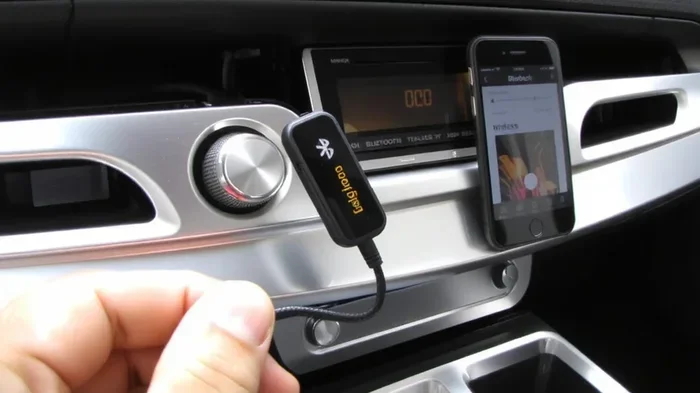
Option 2: Bluetooth Car Adapter. This device connects to your radio’s auxiliary input or CD changer port. It receives Bluetooth signals and sends them directly to your factory stereo. The sound quality is much better than an FM transmitter.
Option 3: Aftermarket Stereo Replacement. You remove the factory radio and install a new Bluetooth-ready car stereo. This gives you the best sound and the most features. It costs more but offers the full car audio upgrade experience.
Each option has its place. Your choice depends on your budget, your car model, and how much effort you want to put in.
Which Method Is Right for You?
If you want a quick fix, go with an FM Bluetooth transmitter. If you want better sound without replacing the whole radio, choose a Bluetooth car adapter. If you want a complete transformation, invest in an aftermarket stereo. All three methods let you add Bluetooth to your factory radio successfully.
Methods to Add Bluetooth to a Factory Radio
Now let us explore each method in detail. We will cover how they work, what you need, and what to expect.
Method 1: FM Bluetooth Transmitter
An FM Bluetooth transmitter is the most popular budget option. It plugs right into your car’s power outlet. The device pairs with your phone via Bluetooth. Then it broadcasts the audio signal to your factory radio on an FM frequency.
Here is how it works:
- Plug the transmitter into your 12V power port.
- Turn your factory radio to an empty FM frequency.
- Pair your phone with the transmitter.
- Play music on your phone.
- Enjoy wireless audio through your car speakers.
Pros of FM Transmitters:
- Very affordable, usually under 30 dollars.
- No wiring or technical skills needed.
- Works with any factory radio that has an FM tuner.
- Portable, so you can use it in any car.
- Some models include USB charging ports.
Cons of FM Transmitters:
- Audio quality can suffer from signal interference.
- FM frequencies may overlap with local radio stations.
- Range is limited compared to wired connections.
- Not all models support hands-free calling well.
Quick Tip: Choose a frequency with no local radio stations for the clearest sound. Most transmitters let you scan for the best frequency automatically.
Method 2: Bluetooth Car Adapter (AUX or CD Changer)
A Bluetooth car adapter connects directly to your factory radio. It uses the auxiliary input port or the CD changer port to send audio. This method gives you much better sound quality than an FM transmitter.
Here is what you need to know:
- Check if your factory radio has an auxiliary input. Many newer cars do.
- If your car has a CD changer port, some adapters plug into that instead.
- The adapter receives Bluetooth signals and sends them as audio to your radio.
- You control playback from your phone, not the radio.
Pros of Bluetooth Adapters:
- Better audio quality than FM transmitters.
- No signal interference or static noise.
- Supports hands-free calling in most models.
- Stays hidden behind your radio for a clean look.
Cons of Bluetooth Adapters:
- Requires your factory radio to have an AUX or CD port.
- Slightly more expensive than FM transmitters.
- Installation takes a few extra minutes.
Expert Insight: Brands like Axxess and Scosche make reliable Bluetooth adapters that work with most factory radios. Check compatibility before buying.
Method 3: Aftermarket Stereo Replacement
Replacing your factory radio with an aftermarket Bluetooth stereo is the most thorough option. You get a brand new unit with built-in Bluetooth, touchscreen, navigation, and more.
What you need for a stereo replacement:
- A compatible aftermarket stereo (single DIN or double DIN).
- A wiring harness adapter for your car model.
- A dash kit for a clean fit.
- Basic hand tools like screwdrivers and panel removal tools.
Pros of Aftermarket Stereos:
- Best sound quality and the most features.
- Built-in Bluetooth with the latest version.
- Touchscreen control and smartphone integration.
- Supports Apple CarPlay and Android Auto.
- Adds resale value to your vehicle.
Cons of Aftermarket Stereos:
- Higher cost, typically 100 to 300 dollars.
- Requires removing the factory radio.
- May need professional installation for complex setups.
- Loses factory features like steering wheel controls (unless you add a bypass module).
Quick Tip: If your car has steering wheel audio controls, buy a steering wheel control adapter. It keeps your factory controls working with the new stereo.
Step-by-Step Guide to Adding Bluetooth to a Factory Radio
Let us walk through the installation process for each method. You will see how simple it really is.
Installing an FM Bluetooth Transmitter
Follow these steps for a fast and easy setup:
- Find your car’s 12V power port. It is usually near the center console or dashboard.
- Plug the FM transmitter into the port.
- Turn on your car radio and set it to an empty FM frequency. Try 88.1 or 107.9.
- Set the transmitter to the same frequency.
- On your phone, go to Bluetooth settings and turn it on.
- Find the transmitter name in the list of available devices.
- Tap to pair. Enter the PIN if prompted (usually 0000 or 1234).
- Play music on your phone. You should hear it through your car speakers.
That is it. Your factory radio now has Bluetooth. The whole process takes less than five minutes.
Installing a Bluetooth Car Adapter
Here is how to set up a Bluetooth adapter with your factory radio:
- Locate the auxiliary input port on your factory radio. It is usually a 3.5mm jack on the face or behind the radio.
- Connect the Bluetooth adapter cable to the auxiliary input.
- Plug the adapter’s power cable into the 12V port.
- Turn on your factory radio and set it to AUX mode.
- On your phone, go to Bluetooth settings.
- Find and pair with the adapter.
- Play music. The sound comes through your car speakers with clean, wired-quality audio.
Common Mistake: Some people forget to switch the factory radio to AUX mode. Make sure you do this before pairing, or you will not hear any sound.
Installing an Aftermarket Stereo
Replacing a factory radio takes a bit more effort. Here is the process:
- Disconnect the negative battery terminal for safety.
- Remove the factory radio faceplate using panel removal tools.
- Unscrew the factory radio from the dash.
- Disconnect the wiring harness from the back of the factory radio.
- Connect the wiring harness adapter to the new aftermarket stereo.
- Connect the antenna adapter if needed.
- Slide the new stereo into the dash.
- Secure it with the provided screws.
- Reconnect the battery terminal.
- Turn on the stereo and follow the on-screen setup.
- Pair your phone with the new stereo’s Bluetooth.
This process takes about 30 to 60 minutes. If you are not comfortable with wiring, ask a friend or visit a local auto audio shop. Most shops will install a stereo for a reasonable fee.
Comparison: FM Transmitter vs. Bluetooth Adapter vs. Aftermarket Stereo
Not sure which method to choose? Here is a side-by-side comparison.
| Feature | FM Transmitter | Bluetooth Adapter | Aftermarket Stereo |
|---|---|---|---|
| Cost | 15 to 30 dollars | 20 to 50 dollars | 100 to 300 dollars |
| Sound Quality | Good | Very Good | Excellent |
| Installation Difficulty | Very Easy | Easy | Moderate to Hard |
| Hands-Free Calling | Basic | Good | Excellent |
| Requires Wiring | No | No | Yes |
| Works With Any Radio | Yes | Needs AUX/CD Port | N/A (Replaces Radio) |
| Extra Features | None | None | Touchscreen, Navigation, CarPlay |
Bottom Line: If you want the simplest solution, choose an FM transmitter. If you want better sound without replacing the radio, go with a Bluetooth adapter. If you want a full car audio upgrade, replace the factory stereo.
Common Mistakes to Avoid When Adding Bluetooth
Adding Bluetooth to your factory radio is straightforward, but a few mistakes can cause frustration. Here are the ones to watch out for.
Buying an Incompatible Adapter
Not every Bluetooth adapter works with every factory radio. Some cars use proprietary connectors. Before you buy, check your radio model and find a compatible adapter. Reading the product description carefully saves you time and money.
Ignoring Signal Interference
FM transmitters can pick up interference from nearby radio stations. This causes static and buzzing in your audio. Always scan for the clearest frequency before you pair your phone. If you drive through areas with strong FM signals, the interference may get worse.
Skipping the Pairing Process
Many people try to play music before the devices are fully paired. Make sure both devices show a connected status. If pairing fails, turn off Bluetooth on both devices, wait a few seconds, and try again.
Forgetting to Update Firmware
Some Bluetooth adapters and transmitters have firmware updates. These updates improve connection stability and audio quality. Check the manufacturer’s website or app for updates after installation.
Overlooking Power Supply Issues
If your FM transmitter or adapter keeps disconnecting, the power supply may be the problem. Try a different 12V port or use a high-quality USB cable. A weak power connection causes dropouts and poor performance.
Expert Tips for the Best Bluetooth Experience in Your Car
You have added Bluetooth to your factory radio. Now let us make sure you get the best experience possible.
Keep Your Devices Close
Bluetooth works best within 30 feet. Keep your phone in a mount or console holder close to the radio. This ensures a strong, stable connection with no dropouts.
Use High-Quality Audio Files
Bluetooth streaming works best with high-quality audio files. If you use lossless formats like FLAC, the sound is noticeably better than compressed MP3s. Your car speakers will thank you.
Charge Your Phone While Streaming
Bluetooth streaming drains your phone battery faster than normal use. Use a USB charging cable or a USB car charger to keep your phone powered during long drives.
Restart Devices if You Have Connection Issues
If your Bluetooth connection drops or sounds choppy, restart both devices. Turn off Bluetooth, wait 10 seconds, and turn it back on. This fixes most minor connection issues.
Clean Your Auxiliary Ports
If you use a Bluetooth adapter, dust and debris can build up in the auxiliary port. Use a compressed air can or a soft brush to keep the port clean. A clean connection means better audio quality.
Conclusion
Adding Bluetooth to a factory radio is one of the best car audio upgrades you can make. It brings wireless streaming, hands-free calling, and modern convenience to any vehicle. Whether you choose an FM transmitter, a Bluetooth adapter, or a full aftermarket stereo replacement, the process is simple and rewarding.
Start with an FM transmitter if you want a quick and affordable solution. Choose a Bluetooth adapter for better sound without replacing your radio. Go all-in with an aftermarket stereo for the ultimate car audio experience.
No matter which method you pick, the result is the same. Your factory radio becomes smarter. Your drives become more enjoyable. Your phone connects seamlessly to your car speakers. You can add Bluetooth to a factory radio, and now you know exactly how to do it.
Grab the right adapter or stereo, follow the steps in this guide, and enjoy wireless audio on every drive. Your car audio setup has just leveled up.
Frequently Asked Questions
Can you add Bluetooth to any factory radio?
Yes, you can add Bluetooth to almost any factory radio. FM transmitters work with any radio that has an FM tuner. Bluetooth adapters work with radios that have an auxiliary input or CD changer port. Even the oldest factory radios can get Bluetooth with the right adapter.
How much does it cost to add Bluetooth to a factory radio?
The cost depends on the method. FM Bluetooth transmitters cost 15 to 30 dollars. Bluetooth car adapters cost 20 to 50 dollars. Aftermarket stereo replacements cost 100 to 300 dollars. All three options are affordable and easy to install.
Does adding Bluetooth to a factory radio affect sound quality?
It depends on the method. FM transmitters offer good sound but may have slight static. Bluetooth adapters provide very good sound with no interference. Aftermarket stereos deliver the best sound quality with built-in Bluetooth technology.
Can I make hands-free calls with a Bluetooth factory radio adapter?
Yes, most Bluetooth adapters and transmitters support hands-free calling. You can answer calls through your car speakers and microphone. The audio quality for calls is usually clear and reliable.
Is it hard to install a Bluetooth adapter in a factory radio?
No, it is not hard at all. Most Bluetooth adapters plug in and pair in under 10 minutes. FM transmitters are the easiest of all. Aftermarket stereo replacements take more time but still do not require professional skills for most car models.
Will adding Bluetooth void my car warranty?
Adding a Bluetooth adapter or transmitter usually does not void your warranty. However, if the installation damages your factory radio or wiring, it could cause issues. Always follow the manufacturer’s instructions and use quality products to stay safe.