How Do I Connect My Bluetooth Vanity Mirror Step by Step
Connecting your Bluetooth vanity mirror is easier than you think. This guide walks you through the entire setup process, from powering on your mirror to pairing it with your phone or tablet. You will also learn common fixes, pro tips, and how to get the best wireless performance every time.
Have you just bought a Bluetooth vanity mirror and are not sure how to get it working? You are not alone. These smart mirrors are trending hard right now, and for good reason. They combine the function of a regular mirror with wireless connectivity, built-in lighting, and even Bluetooth speaker capabilities. Whether you want to listen to your morning playlist or take a hands-free call while getting ready, a wireless vanity mirror makes it all possible.
Setting up a Bluetooth mirror might feel intimidating if you are not tech-savvy. But here is the truth: it is really not that hard. Most Bluetooth vanity mirrors follow the same basic pairing process. Once you understand the steps, you will be able to connect your mirror to any compatible device in minutes. This guide gives you a complete step-by-step walkthrough so you can start enjoying your smart mirror right away.
We will cover everything from the initial setup to solving common connection problems. You will also find practical tips to get the most out of your Bluetooth connectivity experience. Let us dive in and get your mirror connected.
Key Takeaways
- Bluetooth vanity mirrors offer hands-free convenience: You can stream music, take calls, and enjoy ambient lighting without any messy wires.
- Pairing is quick and simple: Most mirrors use a standard Bluetooth connection process that takes less than two minutes.
- Troubleshooting is straightforward: Common issues like signal drops or pairing failures have easy fixes you can do at home.
- Placement matters for performance: Keeping your mirror within range of your device ensures a stable connection.
- Maintenance keeps things running smoothly: Regular updates and proper care extend the life of your Bluetooth mirror setup.
📑 Table of Contents
- What Is a Bluetooth Vanity Mirror?
- How to Connect Your Bluetooth Vanity Mirror Step by Step
- Common Bluetooth Vanity Mirror Problems and Fixes
- Tips for Getting the Best Bluetooth Mirror Performance
- Bluetooth Vanity Mirror vs. Wired Mirror: Which Is Better?
- Can I Use My Bluetooth Vanity Mirror with Multiple Devices?
- How to Disconnect and Unpair Your Bluetooth Vanity Mirror
- Expert Tips for Extending Your Bluetooth Mirror’s Range
- Final Thoughts on Connecting Your Bluetooth Vanity Mirror
What Is a Bluetooth Vanity Mirror?
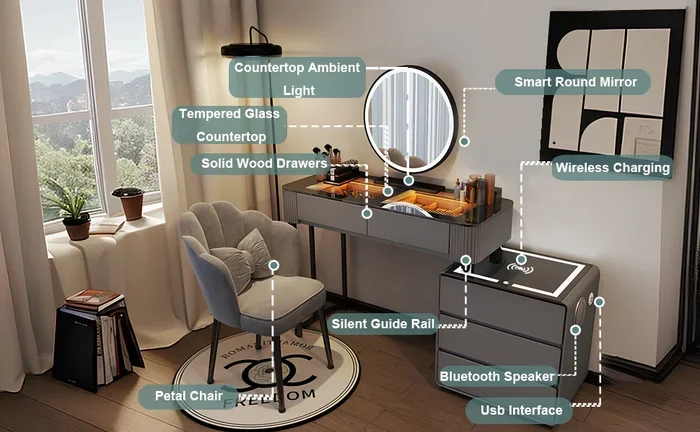
A Bluetooth vanity mirror is a smart mirror that uses Bluetooth technology to connect wirelessly to your phone, tablet, or other devices. Unlike a regular mirror, this type of mirror can do much more than just reflect your face. Many models come with built-in LED lights, touch controls, and even Bluetooth speakers built right in.
The Bluetooth technology inside these mirrors allows you to stream audio directly from your phone. You can listen to podcasts, music, or take calls while you get ready. Some mirrors also let you control the lighting settings through a companion app. This kind of wireless connectivity turns a simple bathroom or dressing room mirror into a smart device.
How Does Bluetooth Connectivity Work in a Vanity Mirror?
Inside your Bluetooth vanity mirror, there is a small Bluetooth chip and antenna. When you turn on the mirror, this chip broadcasts a Bluetooth signal. Your phone or tablet detects this signal and lets you pair the two devices together. Once paired, audio flows wirelessly between the devices within a certain Bluetooth range.
Most mirrors use Bluetooth version 4.0 or higher, which gives you a reliable range of about 30 feet. This means you can leave your phone on the counter and still stream audio from the mirror. The connection is wireless and does not require any cables between your devices.
How to Connect Your Bluetooth Vanity Mirror Step by Step
Now that you understand what a Bluetooth vanity mirror is, let us walk through the actual connection process. Follow these steps carefully and you will have your mirror paired in no time.
Step 1: Power On Your Bluetooth Vanity Mirror
Before you can pair anything, you need to turn on your mirror. Most Bluetooth mirrors have a power button on the side or back. Some models turn on automatically when you plug them in. Once the mirror is on, look for a light indicator that shows it is ready for pairing.
Many mirrors will flash a blue or white LED light when they are in pairing mode. If your mirror does not flash, check the manual. Some models have a dedicated Bluetooth button you need to press to enter pairing mode.
Step 2: Turn on Bluetooth on Your Device
Next, go to your phone or tablet and turn on Bluetooth. You can usually find this in your quick settings panel by swiping down from the top of your screen. On an iPhone, go to Settings and tap Bluetooth. On an Android, the process is similar but may vary slightly depending on your brand.
Make sure your Bluetooth is switched on and your device is set to be visible. This allows your phone to detect nearby Bluetooth devices including your vanity mirror.
Step 3: Find Your Mirror on the Device List
Once Bluetooth is on, open your device’s Bluetooth settings and look for available devices. Your mirror should appear in the list of available Bluetooth devices. It might show up as the brand name or simply as “Bluetooth Mirror.”
Tap on the name of your mirror to start the pairing process. You may see a pairing request pop up on your screen. Accept it, and the two devices will connect. This Bluetooth device pairing process usually takes only a few seconds.
Step 4: Test the Connection
After pairing, play some audio on your phone to test the connection. You should hear the sound come through the mirror’s built-in speakers. If the audio plays clearly, congratulations. Your Bluetooth vanity mirror is now connected and ready to use.
If you do not hear any sound, do not worry. This is a common issue and it is usually easy to fix. We will cover troubleshooting in the next section.
Step 5: Save the Connection for Future Use
Most devices remember paired Bluetooth devices automatically. This means your mirror will reconnect to your phone whenever both devices have Bluetooth turned on and are within range. You do not need to repeat the pairing process every time.
If you want to connect a different device to your mirror, simply put the mirror back into pairing mode and repeat the steps above. Your mirror can usually remember multiple paired devices at once.
Common Bluetooth Vanity Mirror Problems and Fixes
Even though connecting a Bluetooth vanity mirror is pretty straightforward, you might run into some hiccups along the way. Here are the most common problems and how to solve them.
Problem 1: The Mirror Does Not Show Up on My Device
This is the number one issue people face when setting up a Bluetooth mirror. If your mirror does not appear in the list of available devices, try these fixes:
- Make sure the mirror is in pairing mode. Some mirrors need you to hold down the Bluetooth button for three to five seconds before they become visible.
- Turn Bluetooth off and back on. This simple reset often fixes detection problems on both your phone and the mirror.
- Move closer to the mirror. Bluetooth range can be affected by walls and other obstacles. Standing within a few feet of the mirror helps your phone find it faster.
- Restart both devices. A quick restart of your phone and the mirror can clear up temporary software glitches.
Problem 2: Audio Keeps Cutting Out
If your audio drops in and out while using your wireless vanity mirror, the Bluetooth signal might be weak. Here are some things to try:
- Move your phone closer to the mirror. The closer your phone is, the stronger the signal will be.
- Remove obstructions. Thick walls and large objects can weaken the Bluetooth connection. Try to keep your phone in the same room as the mirror.
- Check for interference. Other wireless devices like microwaves or baby monitors can interfere with Bluetooth connectivity. Move these devices away if possible.
Problem 3: The Mirror Will Not Pair
If your mirror refuses to pair with your device, try resetting the Bluetooth connection on both devices. On most phones, you can go to Bluetooth settings, find the mirror in the list of previously paired devices, and choose “Forget This Device.” Then try pairing again from scratch.
If the problem continues, check if your mirror needs a firmware update. Some smart mirrors have companion apps that let you update the software. Keeping your mirror updated ensures the best Bluetooth performance.
Tips for Getting the Best Bluetooth Mirror Performance
Want your Bluetooth vanity mirror to work flawlessly every time? Follow these simple tips to get the best performance out of your setup.
Keep Your Devices Close Together
Bluetooth range is typically around 30 feet, but real-world performance can be shorter. Keep your phone within the same room as your mirror for the strongest and most stable wireless connection. If you are using the mirror in a large bathroom, try to keep your phone on the counter right next to the mirror.
Update Your Mirror’s Firmware Regularly
Just like your phone, your Bluetooth vanity mirror benefits from software updates. These updates often include fixes for Bluetooth connectivity issues and improvements to overall performance. Check the manufacturer’s app or website for updates every few months.
Avoid Interference from Other Devices
Many household devices use the same wireless frequency as Bluetooth. Wi-Fi routers, microwaves, and cordless phones can all cause interference. If you notice connection problems, try turning off or moving these devices and see if the Bluetooth signal improves.
Charge Your Mirror Regularly
If your mirror is battery-powered, keep it charged. A low battery can cause weak Bluetooth performance and unexpected disconnections. Most mirrors work best when they are fully charged or plugged in during use.
Use the Right Audio Source
Not all audio apps work equally well with Bluetooth devices. Streaming apps like Spotify, Apple Music, and YouTube usually work perfectly. If you are having trouble with audio, try a different app to see if the problem is with the app itself rather than the Bluetooth connection.
Bluetooth Vanity Mirror vs. Wired Mirror: Which Is Better?
When shopping for a vanity mirror, you will likely come across both Bluetooth and wired options. Each type has its own advantages. Here is a quick comparison to help you decide.
| Feature | Bluetooth Vanity Mirror | Wired Mirror |
|---|---|---|
| Connectivity | Wireless Bluetooth connection | Requires cables or wired connection |
| Installation | Easy, no wiring needed | May require electrical wiring |
| Portability | Highly portable and cordless | Less portable due to wires |
| Audio Quality | Good, depends on built-in speakers | Can be better with external speakers |
| Smart Features | Usually includes smart features | Limited or no smart features |
| Setup Complexity | Simple pairing process | May require professional installation |
Overall, a Bluetooth vanity mirror offers more flexibility and convenience. You do not need to worry about cables or outlet placement. The wireless connectivity gives you freedom to place the mirror anywhere in your home. If you value simplicity and smart features, a Bluetooth mirror is the way to go.
On the other hand, if you need consistent audio quality and do not mind a few wires, a wired mirror can work well too. Some people prefer the reliability of a wired connection over Bluetooth technology. It really comes down to your personal needs and preferences.
Can I Use My Bluetooth Vanity Mirror with Multiple Devices?
Yes, most Bluetooth vanity mirrors can connect to multiple devices. The process is similar to pairing with your first device. Simply put the mirror back into pairing mode and connect the new device through its Bluetooth settings.
However, keep in mind that most mirrors can only stream audio from one device at a time. If your phone is connected and you want to connect your tablet, you will need to disconnect the phone first. This is a standard limitation of Bluetooth device pairing and not specific to vanity mirrors.
Some higher-end mirrors support multipoint Bluetooth, which allows them to stay connected to two devices at once. If this feature is important to you, look for a mirror that specifically advertises multipoint Bluetooth connectivity before you buy.
How to Disconnect and Unpair Your Bluetooth Vanity Mirror
There may come a time when you want to disconnect your mirror from a device. Maybe you are selling the mirror or you just want to pair it with a new phone. Here is how to do it.
On your phone, go to Bluetooth settings and find your mirror in the list of paired devices. Tap on the settings icon next to the mirror name and choose “Forget This Device” or “Unpair.” This removes the connection from your phone’s memory.
On the mirror side, some models have a reset button. You may need to hold down the Bluetooth button for 10 seconds to clear all saved pairings. Check your mirror’s manual for specific instructions on how to factory reset the Bluetooth connection.
Once you have unpaired the mirror, you can pair it with a new device by following the steps in Section 2 above. The process is quick and easy, even if you have done it before.
Expert Tips for Extending Your Bluetooth Mirror’s Range
If you want to use your Bluetooth vanity mirror from farther away, there are a few things you can try. While standard Bluetooth range is about 30 feet, you can sometimes extend this with a few simple tricks.
- Place the mirror in an open area. Walls and obstacles weaken the Bluetooth signal. The more open the space, the better the range.
- Use a Bluetooth range extender. These small devices boost the Bluetooth signal and can extend your range significantly.
- Keep your phone’s battery charged. Low battery can reduce the strength of your phone’s Bluetooth signal.
- Avoid using the mirror near Wi-Fi routers. Wi-Fi and Bluetooth both use the 2.4 GHz frequency, which can cause interference.
If you are looking for ways to boost your overall wireless connectivity at home, you might also want to check out our guide on how to extend your Wi-Fi range with a wired connection. Stronger Wi-Fi helps all your smart devices work better, including your Bluetooth mirror.
Final Thoughts on Connecting Your Bluetooth Vanity Mirror
Connecting your Bluetooth vanity mirror does not have to be complicated. With the right steps and a little patience, you can have your mirror paired and working in under five minutes. Remember to keep your devices close, minimize interference, and update your firmware regularly for the best Bluetooth experience.
Once your mirror is connected, you will wonder how you ever lived without it. The wireless convenience of streaming music, taking calls, and controlling your mirror’s lighting from your phone is truly a game changer. It is one of those small upgrades that makes your daily routine feel more modern and enjoyable.
If you run into any issues, refer back to the troubleshooting section. Most problems have simple solutions that you can do right at home. And if you are exploring other smart home devices, you might enjoy reading our article on making your TV Bluetooth capable for more ways to bring wireless connectivity into your home.
Now that you know how to connect your Bluetooth vanity mirror step by step, go ahead and set it up. You will be glad you did. Happy connecting!
Frequently Asked Questions
Can I connect my Bluetooth vanity mirror to any phone?
Yes, most Bluetooth vanity mirrors work with any smartphone that supports Bluetooth. Whether you use an iPhone or an Android device, the pairing process is the same. Just make sure your phone’s Bluetooth is turned on and your mirror is in pairing mode.
Why does my Bluetooth vanity mirror keep disconnecting?
Frequent disconnections are usually caused by distance or interference. Keep your phone within 30 feet of the mirror and away from other wireless devices. Also check that your mirror’s firmware is up to date, as updates often fix Bluetooth connectivity issues.
Can I use my Bluetooth vanity mirror without a phone?
Most Bluetooth vanity mirrors need a paired device to stream audio. However, some models have built-in storage or FM radio features that work without a phone. Check your mirror’s features to see if it can function independently.
How far can my phone be from the Bluetooth vanity mirror?
The standard Bluetooth range is about 30 feet. However, walls and other obstacles can reduce this distance. For the best wireless connection, keep your phone in the same room as the mirror.
Can I connect multiple phones to one Bluetooth vanity mirror?
Yes, most mirrors can store multiple paired devices. You can switch between phones by putting the mirror back into pairing mode and connecting the new device. Just remember that only one device can stream audio at a time.
Is connecting a Bluetooth vanity mirror safe?
Absolutely. Bluetooth technology is safe and widely used in millions of devices every day. The signal strength is low and does not pose any health risks. Your Bluetooth mirror connection is also secure and does not share personal data unless you allow it.