Does A 4k Projector Screen Make A Noticeable Difference
A 4K projector screen can make a huge difference for your home theater. It delivers sharper details, better contrast, and richer colors compared to a standard screen. If you watch a lot of 4K content, upgrading is definitely worth it.
You just bought a 4K projector. The picture looks amazing on the wall. But then you wonder: does a 4K projector screen really make a difference? It is a fair question. Many people assume that the projector does all the work. The truth is, the screen you use plays a big role in how the final image looks. A 4K projector screen can unlock details that a plain wall or a basic screen simply cannot show. In this guide, we will break down exactly when and why a 4K projector screen makes a noticeable difference. You will learn about sharpness, contrast, color, and when the upgrade is truly worth it.
Whether you are building a home theater or upgrading a bedroom setup, this article will help you decide. We will compare 4K screens to standard screens. We will look at DIY options like using blackout curtains as a projector screen or painting a wall black. By the end, you will know exactly what to expect from a 4K projector screen and whether it fits your setup.
Key Takeaways
- Sharper Details: A 4K projector screen reveals fine textures and tiny text that a 1080p screen hides.
- Better Contrast and Color: Proper screen material boosts blacks and makes colors pop on a 4K projector.
- Not Always Necessary: If you watch mostly 1080p content or have lots of ambient light, a 4K screen may not be a game-changer.
- DIY Options Work: You can use blackout curtains, a plain sheet, or paint a wall black to create a budget-friendly 4K-friendly surface.
- Room Setup Matters: The biggest gains come when you pair a 4K projector with the right screen size, gain, and lighting control.
- Worth the Investment for Enthusiasts: If you care about pixel-perfect image quality and plan to watch 4K movies and games, a dedicated 4K projector screen elevates the experience.
📑 Table of Contents
- What Is a 4K Projector Screen?
- How a 4K Screen Improves Picture Quality
- 4K Screen vs. Regular Screen: What’s the Difference?
- When Does a 4K Screen Make the Most Difference?
- Can You Use Any Screen for 4K?
- Is a 4K Projector Screen Worth the Investment?
- Quick Tips for Getting the Most from a 4K Projector Screen
- Common Mistakes to Avoid
- Final Thoughts
What Is a 4K Projector Screen?
A 4K projector screen is a display surface designed to show 4K resolution content at its best. 4K means the image has about 8.3 million pixels. That is four times more detail than a standard 1080p image. To see all those pixels, your screen needs to be smooth and evenly textured. A basic wall or a low-quality screen can scatter light and blur those tiny details. A proper 4K projector screen uses a tightly woven material that preserves pixel structure. It also often has a special coating that boosts brightness and contrast.
Not all screens are labeled “4K.” Many are just general-purpose screens. The key is to find a screen that can handle the pixel density of a 4K signal without losing sharpness. Some screens have a fine matte white surface. Others use a gray material to improve contrast in rooms with some light. The goal is to present the 4K image as the creator intended.
How a 4K Screen Improves Picture Quality
A 4K projector screen does not add pixels to your projector. The projector creates the pixels. But the screen determines how those pixels reach your eyes. A good screen keeps each pixel distinct and evenly lit. A poor screen can blend pixels together, making the image look soft. Here is how a 4K projector screen improves the picture.
Sharpness and Detail
With 4K resolution, you can see individual eyelashes, fabric textures, and distant background details. A standard screen might blur those fine lines. A 4K projector screen has a smooth, uniform surface that preserves edge sharpness. When you watch a nature documentary or a sports game, the difference is clear. Small text on screen, like scores or subtitles, becomes perfectly legible. This is especially noticeable on larger screens above 100 inches.
Color Accuracy and Contrast
A 4K projector screen often comes with a coating that reflects light more efficiently. This means colors look more vibrant and accurate. The blacks appear deeper because the screen material absorbs stray light instead of bouncing it around the room. If you watch a dark scene in a movie, a good 4K projector screen keeps shadows rich and detailed. You can see objects hidden in the dark without the image turning gray and washed out.
4K Screen vs. Regular Screen: What’s the Difference?
Understanding the difference between a 4K projector screen and a regular screen helps you make a smart choice. A regular screen is designed to work with any resolution. It can display 1080p or 4K, but it may not optimize the 4K experience. A 4K projector screen is specifically engineered for high pixel density. Here is a quick comparison.
| Feature | Regular Projector Screen | 4K Projector Screen |
|---|---|---|
| Surface Texture | Slightly textured or standard matte | Ultra-fine, uniform matte |
| Sharpness at 4K | Good, may soften fine details | Excellent, preserves pixel edges |
| Contrast in Ambient Light | Average, can look washed out | Better with gray or high-gain coatings |
| Color Brightness | Standard reflection | Enhanced reflection for vivid colors |
| Price Range | Budget-friendly | Mid to premium |
The table shows that a 4K projector screen offers clear advantages for sharpness and contrast. However, if you mostly watch 1080p content, the difference may be less obvious. A regular screen still works well for everyday use.
When Does a 4K Screen Make the Most Difference?
A 4K projector screen shines in specific situations. Knowing when it matters most helps you decide if the upgrade is right for you.
Room Lighting and Ambient Conditions
In a completely dark room, any screen looks good. But in a room with some light, a 4K projector screen makes a big difference. A gray or high-gain screen fights ambient light and keeps the image punchy. If you have windows or lamps in the room, a regular white screen may look faded. A 4K projector screen with the right gain maintains contrast and color even when the lights are on low.
Screen Size and Viewing Distance
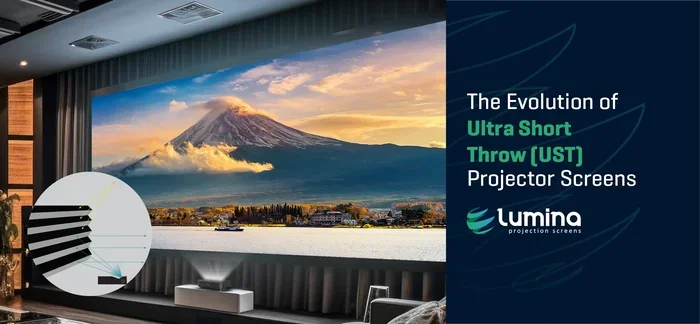
The bigger the screen, the more you notice the detail of a 4K image. On a small screen under 80 inches, a 4K projector screen and a regular screen look similar. But on a 120-inch screen, the difference is huge. You can sit closer and still see a crisp image. This is perfect for home theaters where you want an immersive feel. The 4K projector screen ensures that every corner of the large image stays sharp.
Can You Use Any Screen for 4K?
You do not need a fancy store-bought screen to enjoy 4K. Many people create a great 4K projector screen with simple DIY methods. The key is a smooth, light-colored, and evenly reflective surface. Here are a few popular alternatives.
DIY and Alternative Screen Options
If you are on a budget, you can start with what you have. A white bedsheet hung tightly can work as a basic 4K projector screen. For a better look, some people use blackout curtains as a projector screen. The thick fabric blocks light and provides a dark background that boosts contrast. Just make sure the curtain is stretched flat and wrinkle-free. Another option is to paint a wall with special projector screen paint. You can also paint the screen area black around the projection zone to reduce light spill and improve perceived contrast.
For a more permanent setup, you can make your own projector screen using a PVC pipe frame and a projector-friendly fabric. These DIY screens can rival expensive commercial options when done right. The main goal is to avoid wrinkles and shadows. Any 4K projector screen alternative should be flat, clean, and light-colored in the center.
Is a 4K Projector Screen Worth the Investment?
This is the most common question. The answer depends on how you use your projector. If you watch a lot of 4K movies, stream 4K content, or play 4K video games, a dedicated 4K projector screen is a worthwhile upgrade. The improved sharpness, color, and contrast make the experience much more engaging. You will notice details in landscapes, faces, and fast-moving action that a regular screen hides.
On the other hand, if you mostly watch regular TV, YouTube, or older movies in 1080p, a 4K projector screen will still look good but may not feel like a huge leap. The upgrade is most impactful when the content matches the screen’s capability. If you plan to watch 4K content regularly, investing in a proper 4K projector screen pays off over time. It also future-proofs your setup for newer 4K projectors and sources.
Before buying, consider your room lighting, screen size, and budget. A mid-range 4K projector screen often strikes the best balance between performance and cost. You do not need the most expensive option to see a clear improvement. Focus on a smooth surface, appropriate gain, and a size that fits your viewing distance.
Quick Tips for Getting the Most from a 4K Projector Screen
- Choose the Right Gain: A gain between 1.0 and 1.3 works well for most rooms. Higher gain screens brighten the image but narrow the viewing angle.
- Keep the Screen Flat: Any wrinkles or sag will distort the 4K image. Use a tensioned screen or a tight DIY frame.
- Control Ambient Light: Darken the room with curtains or blinds. A 4K projector screen performs best in low light.
- Match the Screen Size to Your Projector: Check the throw ratio of your projector to ensure a focused 4K image on your screen.
- Clean Gently: Dust the screen with a soft microfiber cloth. Avoid harsh chemicals that can damage the coating.
Common Mistakes to Avoid
Many people make simple mistakes that reduce the benefit of a 4K projector screen. One common error is using a wrinkled sheet or a curved wall. This scatters light and softens the 4K detail. Another mistake is placing the screen in a bright area with direct sunlight. Even the best 4K projector screen will look washed out in bright light. Avoid using a glossy white paint that creates hot spots. Stick to matte or specialized projector screen paint for an even reflection.
Do not ignore the projector settings either. Make sure your projector is set to output 4K resolution. A 4K projector screen cannot improve a 1080p signal. Finally, do not stretch a fabric too tight in one direction. Uneven tension creates an uneven image. Take your time to set up a flat, stable surface.
Final Thoughts
A 4K projector screen does make a noticeable difference, especially if you value image quality. The sharper details, better contrast, and richer colors turn a good movie night into a cinematic experience. You do not need to spend a fortune. DIY options like using blackout curtains or painting a wall black can give you a great 4K projector screen surface for very little money. The key is a smooth, clean, and properly sized surface that matches your projector’s 4K output.
If you watch a lot of 4K content and want the best possible picture, a dedicated 4K projector screen is a smart investment. It unlocks the full potential of your 4K projector and makes every frame look its best. Start with the tips in this guide, test a DIY option, and upgrade when you are ready. You will be glad you did.
Frequently Asked Questions
Does a 4K projector screen really make a difference compared to a wall?
Yes, a 4K projector screen makes a clear difference compared to a plain wall. A wall often has texture, paint imperfections, and uneven light reflection. A proper screen provides a smooth, uniform surface that preserves the sharpness and detail of a 4K image. You will notice crisper text, finer textures, and better contrast on a dedicated screen.
Can I use a white bedsheet as a 4K projector screen?
You can use a white bedsheet as a temporary 4K projector screen, but the results are not ideal. Sheets often have wrinkles, weave texture, and slight color tinting that soften the 4K detail. If you stretch it tightly and iron out the wrinkles, it works in a pinch. For the best 4K experience, a purpose-made screen or a smooth DIY surface is better.
Is a 4K projector screen worth it for gaming?
Absolutely. A 4K projector screen enhances gaming by delivering sharper textures, smoother motion, and deeper blacks. Fast-paced games benefit from the improved contrast and color accuracy. If you play 4K games on a projector, a dedicated screen makes the visuals feel more immersive and responsive.
What screen size is best for a 4K projector?
For 4K, a screen size between 100 and 120 inches is often ideal. At this size, you can see the full detail of 4K resolution without pixel visibility. The exact size depends on your room and viewing distance. A 4K projector screen in this range balances immersion and sharpness perfectly for most home theaters.
Do I need a special projector setting for a 4K screen?
Yes, you should set your projector to output 4K resolution and turn on any sharpness or clarity settings it offers. A 4K projector screen works best when the source signal matches the screen’s capability. Also, ensure the projector is focused properly. A blurry projector will negate the benefits of any high-quality screen.
Can I paint my wall to act as a 4K projector screen?
You can paint a wall with specialized projector screen paint to create a DIY 4K projector screen. Use a matte white or gray paint designed for projection. Avoid glossy paints that cause hot spots. For even better results, paint the surrounding wall black to boost contrast. This simple trick makes a 4K projector screen out of any flat wall surface.