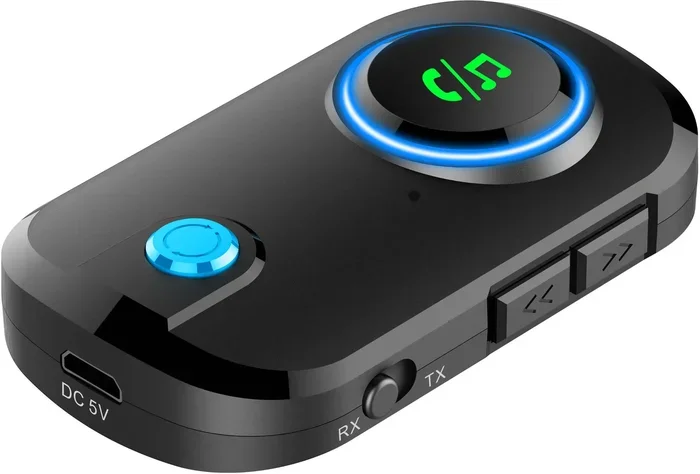
Do Bluetooth Transmitters Work On TVs Here Is The Truth
Do Bluetooth transmitters work on TVs? Yes, they absolutely do. A Bluetooth transmitter lets you send audio from your TV to wireless headphones or speakers without any messy cables. Whether you have a smart TV or an older model, a Bluetooth TV adapter can transform your viewing experience and give you wireless audio in minutes.
Do Bluetooth Transmitters Work On TVs Here Is The Truth
So you want to ditch the cables and listen to your TV through wireless headphones or speakers. The question is simple: do Bluetooth transmitters work on TVs? The short answer is yes. But like most tech questions, the full answer has some important details you should know before you buy.
A Bluetooth transmitter is a small device that takes audio from your TV and sends it wirelessly to your headphones, speakers, or soundbar. It is one of the easiest ways to add wireless audio to any TV. Whether you are a late-night movie watcher who does not want to wake up the family or someone with hearing difficulties who needs personal audio, a Bluetooth transmitter can be a game changer.
In this guide, we will cover everything you need to know. We will look at how they work, which types to buy, setup steps, common problems, and whether they are worth your money. By the end, you will know exactly what to expect and how to get the best results.
Key Takeaways
- Bluetooth transmitters work on most TVs: They connect through 3.5mm jacks, optical ports, or RCA outputs.
- Setup is simple: Most devices pair in under five minutes with no technical skills needed.
- Latency can be an issue: Cheap transmitters may cause audio delay, but aptX low-latency models fix this.
- Range matters: Most Bluetooth transmitters work within 30 feet, so keep your headphones nearby.
- Not all TVs are compatible: Older TVs may need an adapter, while newer smart TVs often have built-in Bluetooth.
- Price varies widely: Budget options work fine for casual viewing, but audiophiles should invest in premium models.
📑 Table of Contents
- What Is A Bluetooth Transmitter And How Does It Work?
- Do Bluetooth Transmitters Actually Work On TVs?
- Types Of Bluetooth Transmitters For TVs
- How To Set Up A Bluetooth Transmitter With Your TV
- Common Problems And How To Fix Them
- Bluetooth Transmitter vs Other Wireless Audio Options
- Should You Buy A Bluetooth Transmitter For Your TV?
- Final Thoughts
What Is A Bluetooth Transmitter And How Does It Work?
A Bluetooth transmitter is a compact gadget that bridges the gap between your TV’s audio output and your wireless device. Think of it as a translator. Your TV speaks one language (a wired audio signal), and your Bluetooth headphones speak another (wireless). The transmitter converts the TV’s audio into a Bluetooth signal and sends it to your device.
Most transmitters connect to your TV using one of three methods. The first is a 3.5mm audio jack, which is the most common. The second is an optical audio output, found on many modern TVs. The third is RCA connectors, which you will see on older TVs. Some transmitters support multiple connection types, which gives you more flexibility.
Once connected, the transmitter pairs with your Bluetooth headphones or speaker. After pairing, any audio from your TV flows wirelessly to your device. That is really all there is to it. The process is straightforward and does not require any technical expertise.
How Bluetooth Audio Streaming Works
When you press play on your TV, the audio signal travels from the TV to the transmitter. The transmitter encodes the signal into a Bluetooth format and broadcasts it. Your headphones or speaker receives the signal and decodes it back into sound. This all happens in real time.
The quality of this wireless audio depends on the Bluetooth version and codec your transmitter supports. Newer versions like Bluetooth 5.0 offer better range and stability. Codecs like aptX and aptX Low Latency deliver higher quality sound with less delay. If you care about audio quality, look for a transmitter that supports these codecs.
Some people wonder whether Can I Make My TV Have Bluetooth is the same as using a transmitter. The answer is no. A transmitter adds wireless capability to a TV that does not have it built in. If your TV already has Bluetooth, you may not need a separate transmitter at all.
Do Bluetooth Transmitters Actually Work On TVs?
Yes, they really do work. Thousands of people use Bluetooth transmitters with their TVs every single day. They are one of the most popular ways to add wireless audio to a television. But “they work” does not mean they work perfectly for everyone in every situation. There are some things you need to understand.
The biggest factor is your TV’s audio output options. If your TV has a 3.5mm headphone jack or an optical port, a transmitter will work great. If your TV has neither, you may need an additional adapter. This is common with very old or very thin modern TVs that have limited ports.
Another factor is Bluetooth compatibility. Most modern Bluetooth transmitters work with virtually any Bluetooth-enabled headphones or speakers. However, older Bluetooth versions may have connection issues or lower audio quality. Always check the transmitter’s Bluetooth version before buying.
Will A Bluetooth Transmitter Work With Any TV?
In most cases, yes. Here is a quick breakdown of TV types and compatibility:
- Smart TVs from 2018 or newer: Usually have a 3.5mm jack or optical output. Bluetooth transmitters work perfectly.
- Older CRT or flat-screen TVs: May only have RCA outputs. You need a transmitter with RCA compatibility.
- Very thin modern TVs: Some lack a 3.5mm jack entirely. Check your TV’s specs or look for an optical output.
- TVs with built-in Bluetooth: You may not need a transmitter. You can pair headphones directly to the TV.
If you are unsure about your TV’s capabilities, you might want to explore options like Can I Use Bluetooth Headphones With Roku if you use a streaming device, since Roku and similar platforms often have their own wireless audio options built in.
Types Of Bluetooth Transmitters For TVs
Not all transmitters are the same. They come in different shapes, sizes, and price ranges. Choosing the right one depends on your TV, your needs, and your budget.
Basic Bluetooth Transmitters
These are the most affordable options. They usually cost between $10 and $25. Basic transmitters connect via a 3.5mm jack and support standard Bluetooth. They work well for casual viewing and are a great entry point.
The downside is that basic models often lack advanced features. They may have higher latency, which means the audio and video can fall out of sync. They also tend to have shorter battery life and shorter Bluetooth range.
Premium Bluetooth Transmitters
Premium transmitters cost between $40 and $100. They support advanced Bluetooth codecs like aptX and aptX Low Latency. This means better audio quality and less delay between video and sound. Many premium models also offer dual pairing, which lets two people listen to the same TV on different headphones.
If you watch a lot of movies or play games, a premium transmitter is worth the investment. The low latency feature is especially important for gaming and fast-paced content where audio sync matters.
Bluetooth Transmitters With Built-In Receivers
Some transmitters also act as receivers. This means they can both send and receive Bluetooth signals. These dual-function devices are versatile and can save you money if you need both capabilities. You can use them to stream audio from your TV to headphones, or to play music from your phone through your TV speakers.
For those using assistive listening devices, you might also be interested in whether Can I Use Bluetooth On My Hearing Aid works with TV transmitters. The answer is yes, in most cases, as long as the hearing aid supports Bluetooth connectivity.
How To Set Up A Bluetooth Transmitter With Your TV
Setting up a Bluetooth transmitter is easier than most people think. You do not need to be tech-savvy. Follow these steps and you will be listening wirelessly in no time.
Step 1: Check Your TV’s Audio Output
Look at the back or side of your TV. Find the audio output port. It could be a 3.5mm headphone jack, an optical port, or RCA outputs. Note which type your TV has, because this determines which transmitter you need.
Step 2: Connect The Transmitter To Your TV
Plug the transmitter into the matching port on your TV. If your transmitter came with multiple cables, use the one that matches your TV’s output. Make sure the connection is secure.
Step 3: Power On The Transmitter
Most transmitters plug into a USB port on your TV for power. If your TV does not have a free USB port, many transmitters come with a USB wall adapter. Plug it in and turn the transmitter on.
Step 4: Put Your Headphones Or Speaker Into Pairing Mode
Turn on your Bluetooth headphones or speaker and activate pairing mode. Refer to the device’s manual if you are not sure how to do this. Usually, you hold down a button until a light flashes.
Step 5: Pair The Devices
On the transmitter, press the pairing button. The LED light will usually start flashing, indicating it is searching for devices. Your headphones or speaker should appear on the transmitter’s display or beep to confirm pairing.
Step 6: Test The Audio
Play something on your TV and listen through your headphones or speaker. Check for any audio delay or sync issues. If everything sounds good, you are all set.
Some users find that pairing Bluetooth headphones to an LG TV works a bit differently depending on the TV brand. LG TVs, for example, often have built-in Bluetooth support that simplifies the process. But for TVs without native Bluetooth, a transmitter is the best solution.
Quick Tips For A Smooth Setup
- Keep your transmitter and headphones within 30 feet of each other for the best connection.
- Remove any obstacles between the transmitter and your Bluetooth device.
- Charge your transmitter fully before first use for the best battery performance.
- If pairing fails, restart both devices and try again.
- Update your transmitter’s firmware if the manufacturer provides updates.
Common Problems And How To Fix Them
Bluetooth transmitters work well, but they are not perfect. Here are the most common issues people face and how to solve them.
Audio And Video Are Out Of Sync
This is the number one complaint about Bluetooth transmitters. The delay happens because Bluetooth takes a tiny bit of time to transmit audio. On cheap transmitters, this delay is noticeable.
The fix is to buy a transmitter with aptX Low Latency support. This codec reduces the delay to near imperceptible levels. If you already have a transmitter and experience sync issues, check if a firmware update is available. Some transmitters improve latency through software updates.
The Transmitter Will Not Pair With My Device
This usually happens for one of three reasons. First, your headphones may not be in pairing mode. Second, the transmitter may already be connected to another device. Third, the Bluetooth versions may be incompatible.
To fix this, make sure your headphones are in pairing mode and not connected to another device. Restart both the transmitter and your headphones. If the problem persists, check the Bluetooth version compatibility on both devices.
The Audio Quality Is Poor
Poor audio quality is often caused by a weak connection or a low-quality transmitter. Make sure you are within range and that there are no thick walls or electronic interference between the transmitter and your headphones.
If the quality is still bad, your transmitter may not support a high-quality codec. Upgrading to a transmitter with aptX or AAC support can dramatically improve sound quality.
The Transmitter Keeps Disconnecting
Interference from other wireless devices can cause dropouts. Wi-Fi routers, microwaves, and other Bluetooth devices can all interfere with the signal. Move your router away from the TV and transmitter if possible.
Also, check the battery level of your transmitter. A low battery can cause unstable connections. Keep it charged for the best performance.
Bluetooth Transmitter vs Other Wireless Audio Options
Bluetooth transmitters are not the only way to get wireless audio from your TV. Here is how they compare to other options.
| Feature | Bluetooth Transmitter | Wi-Fi Streaming | TV Built-In Bluetooth |
|---|---|---|---|
| Works On Older TVs | Yes | No | No |
| Setup Difficulty | Easy | Moderate | Very Easy |
| Audio Quality | Good to Excellent | Excellent | Good to Excellent |
| Latency | Low (with aptX) | Low | Low |
| Cost | $10 to $100 | Requires smart TV | Free |
| Range | 30 feet | Whole home | 30 feet |
Wi-Fi streaming is great if you have a smart TV that supports it. It offers better range and often higher audio quality. But it requires a smart TV and a strong Wi-Fi connection. Bluetooth transmitters work with almost any TV, making them more versatile.
If your TV already has built-in Bluetooth, you can skip the transmitter entirely. You just pair your headphones directly to the TV. However, many TVs have limited Bluetooth features and may not support all codecs or dual pairing.
Some people also ask about using Alexa as a Bluetooth speaker for their TV. While Alexa devices can receive Bluetooth audio, they are not transmitters. They work as receivers, not senders. So they are a different solution for a different need.
For those who stream content on devices like Roku, you may want to check Can I Use Bluetooth Headphones With Roku to see if your streaming device offers native Bluetooth support before buying a separate transmitter.
Should You Buy A Bluetooth Transmitter For Your TV?
After all of this, the real question is whether a Bluetooth transmitter is worth it for you. The answer depends on your situation and what you want from your TV watching experience.
You should buy a Bluetooth transmitter if any of these sound like you:
- You watch TV late at night and do not want to disturb others.
- You have hearing difficulties and need personal audio at a comfortable volume.
- Your TV does not have built-in Bluetooth and you want wireless freedom.
- You want to listen to your TV through wireless speakers or headphones in another room.
- You share your TV with someone who has different audio preferences.
On the other hand, you might not need a transmitter if your TV already has Bluetooth, or if you are happy with wired headphones or speakers. Also, if you only watch TV occasionally, the cost of a transmitter might not be worth it.
One thing to keep in mind: Bluetooth technology works without Wi-Fi, and the same is true for TV transmitters. You do not need an internet connection for a Bluetooth transmitter to work. It creates a direct wireless connection between your TV and your audio device. This is a huge advantage because it means your audio streaming is private and does not depend on your internet speed.
Final Thoughts
So do Bluetooth transmitters work on TVs? The truth is they really do. They are simple, affordable, and effective. Whether you want to watch movies in silence with wireless headphones or stream audio to a speaker across the room, a Bluetooth transmitter gets the job done.
The key is choosing the right transmitter for your needs. Check your TV’s audio output, pick a transmitter with the right connection type, and look for features like aptX Low Latency if audio sync matters to you. With the right setup, you will enjoy wireless TV audio in minutes.
Do not let the fear of complicated setup stop you. Most transmitters pair in under five minutes and work flawlessly once connected. This is one of the easiest and most affordable upgrades you can make to your TV setup.
If you are still unsure, start with a budget-friendly transmitter. You can always upgrade later if you need more features. The important thing is to take the leap and experience the freedom of wireless TV audio. Once you go wireless, you will not want to go back to cables.
Frequently Asked Questions
Do Bluetooth transmitters work on all TVs?
They work on most TVs that have an audio output port like a 3.5mm jack, optical port, or RCA output. If your TV has none of these, you may need an additional adapter. TVs with built-in Bluetooth do not need a separate transmitter.
Can I use any Bluetooth headphones with a TV transmitter?
Yes, most Bluetooth headphones will work with a TV transmitter. Just make sure both devices support compatible Bluetooth versions. For the best audio quality, look for headphones that support codecs like aptX or AAC.
Is there a delay when using a Bluetooth transmitter with a TV?
Some delay is normal with Bluetooth technology. Cheap transmitters may have noticeable lag. Transmitters with aptX Low Latency support reduce the delay significantly, making it nearly imperceptible for most users.
How far can I move away from my TV with a Bluetooth transmitter?
Most Bluetooth transmitters have a range of about 30 feet. Walls and other obstacles can reduce this range. For the best experience, stay within the recommended range and keep your transmitter and headphones in the same room.
Do I need Wi-Fi to use a Bluetooth transmitter on my TV?
No. Bluetooth transmitters create a direct wireless connection between your TV and your audio device. They do not need an internet connection or Wi-Fi to work. This makes them reliable and private for wireless audio streaming.
Can two people listen to the same TV using a Bluetooth transmitter?
Yes, but only if your transmitter supports dual pairing. Premium Bluetooth transmitters allow you to pair two sets of headphones or speakers at the same time. This is great for couples or families who want to share the audio without disturbing others.