Do Bluetooth Speakers Work Without Wi Fi You Need To Know
Do Bluetooth speakers work without Wi-Fi? Yes, they absolutely do. Bluetooth speakers use their own wireless protocol to connect to devices, meaning they don’t need an internet connection to play music. You can enjoy wireless audio anywhere, anytime, with no router required.
Do Bluetooth speakers work without Wi-Fi? This is one of the most common questions people ask when they want to enjoy music outdoors or in places without internet access. The short answer is yes. Bluetooth speakers are designed to work completely independently of Wi-Fi networks. They use a different wireless technology that connects directly to your device.
Whether you’re at the beach, in the backyard, or in a cabin in the woods, your Bluetooth speaker can still play music. You don’t need a router. You don’t need an internet plan. You just need your phone or another Bluetooth-enabled device with music stored on it. This makes Bluetooth speakers incredibly versatile and convenient.
In this guide, we’ll explore exactly how Bluetooth speakers work, why they don’t need Wi-Fi, and what you need to know to get the best wireless audio experience. We’ll also cover common questions and mistakes people make with their Bluetooth speakers. By the end, you’ll have a complete understanding of this popular technology.
Key Takeaways
- Bluetooth speakers work independently: They don’t need Wi-Fi to connect or play audio.
- Bluetooth uses short-range radio waves: This technology pairs directly with your phone, tablet, or laptop.
- Offline music is fully supported: You can play stored music without any internet connection.
- Bluetooth range is typically 30 feet: Keep your device within range for uninterrupted audio.
- Bluetooth and Wi-Fi are different: They serve different purposes and operate on separate frequencies.
- Newer Bluetooth versions offer better quality: Upgrading your device can improve wireless audio performance.
📑 Table of Contents
- How Bluetooth Speakers Work Without Wi-Fi
- What You Can Do With Bluetooth Speakers Offline
- Bluetooth Speaker Features That Don’t Need Wi-Fi
- Common Misconceptions About Bluetooth Speakers and Wi-Fi
- Tips for Getting the Best Bluetooth Speaker Experience
- Do You Need Wi-Fi for Smart Bluetooth Speakers?
- Frequently Asked Questions
- Conclusion
How Bluetooth Speakers Work Without Wi-Fi
Bluetooth speakers use a wireless communication standard called Bluetooth. This technology has been around since the late 1990s and has evolved significantly over the years. Bluetooth creates a short-range wireless connection between two devices. It uses radio waves to transmit audio data from one device to another.
When you pair your phone to a Bluetooth speaker, your phone sends audio signals directly to the speaker. This happens through a process called wireless streaming. The speaker receives these signals and converts them into sound. No internet connection is needed at any point in this process.
The Bluetooth Pairing Process
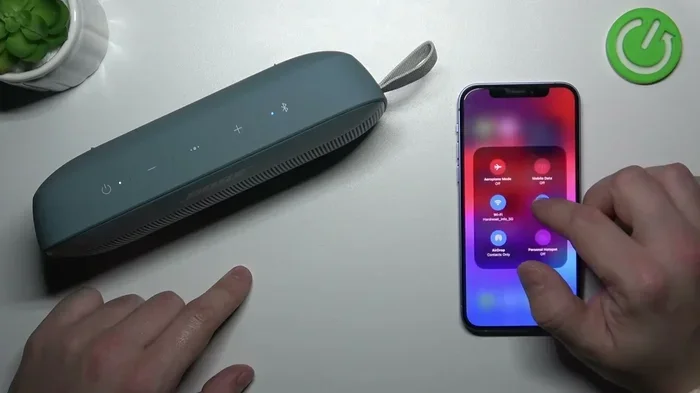
Pairing a Bluetooth speaker to your device is simple. First, you turn on the speaker and put it into Bluetooth pairing mode. Most speakers have a dedicated button for this. Then you go to your phone’s Bluetooth settings and select the speaker from the list of available devices. Once paired, the devices remember each other and reconnect automatically in the future.
Here’s what you need to know about Bluetooth pairing:
- Bluetooth pairing mode: This is a special state where your speaker is visible to other devices.
- Device discovery: Your phone scans for nearby Bluetooth devices during this process.
- Secure connection: Bluetooth uses encryption to keep your audio connection private.
- Auto-reconnect: Most modern speakers reconnect to previously paired devices automatically.
The process is similar to how Can I Use Bluetooth On My Hearing Aid devices connect. Both use the same core Bluetooth technology to establish a direct wireless link between devices.
Bluetooth vs Wi-Fi: Key Differences
Many people confuse Bluetooth with Wi-Fi because both are wireless technologies. However, they work very differently. Wi-Fi requires a router and an internet connection. Bluetooth does not. Wi-Fi is designed for high-speed data transfer over longer distances. Bluetooth is designed for short-range, low-power device-to-device connections.
Here’s a quick comparison:
- Wi-Fi: Needs a router, connects to the internet, has a longer range, and uses more power.
- Bluetooth: Works device-to-device, no internet needed, has a shorter range (about 30 feet), and uses very little power.
This is why your Bluetooth speaker can play music even when there’s no Wi-Fi available. The two technologies serve different purposes. Bluetooth handles local audio streaming while Wi-Fi handles internet access. They don’t interfere with each other either.
You might also be interested to know that Can Wi Fi Direct Be Used For Screen Mirroring is another example of Wi-Fi working differently than Bluetooth. Wi-Fi Direct still requires Wi-Fi hardware, while Bluetooth operates completely on its own protocol.
What You Can Do With Bluetooth Speakers Offline
One of the best things about Bluetooth speakers is how much you can do without Wi-Fi. Many people assume they need internet to use their speakers, but that’s not true. You can do plenty of things with just a Bluetooth connection and no router.
Playing Stored Music
You can play music that’s saved directly on your phone or device. This includes songs downloaded to your storage, playlists you’ve created offline, or music files you’ve transferred manually. Your Bluetooth speaker will play this audio perfectly without any internet connection.
This is great for road trips, camping trips, or any situation where you don’t have reliable internet. Just load up your phone with music before you leave, and you’re set. The audio quality depends on the file format and your speaker’s capabilities, but the connection itself won’t be affected by offline status.
Using FM Radio Features
Some Bluetooth speakers come with built-in FM radio receivers. This lets you listen to live radio stations without any internet connection at all. You just tune to your favorite frequency and enjoy. This feature is especially useful in areas with poor or no internet coverage.
You can also check out Can I Play Radio Using Bluetooth to learn more about how Bluetooth and radio work together for offline listening.
Connecting Multiple Devices
Most Bluetooth speakers can remember multiple paired devices. This means you can switch between your phone and a friend’s phone without needing to re-pair. Each device can play music independently. This works great for sharing music at gatherings where everyone has their own playlist ready to go.
Bluetooth Speaker Features That Don’t Need Wi-Fi
Bluetooth speakers come with many features that work entirely offline. Understanding these features helps you get the most out of your speaker without ever connecting to a Wi-Fi network.
Audio Quality and Bluetooth Versions
The audio quality of your Bluetooth speaker depends mainly on the Bluetooth version your device supports. Newer Bluetooth versions offer better audio quality and longer range. Here’s a quick look at how Bluetooth versions have improved over time:
- Bluetooth 4.0: Standard audio quality, about 30 feet range.
- Bluetooth 4.2: Slightly improved audio, faster pairing.
- Bluetooth 5.0: Better audio quality, up to 800 feet range in ideal conditions.
- Bluetooth 5.3: Latest standard with improved energy efficiency and audio performance.
You don’t need Wi-Fi to access any of these features. The Bluetooth version is determined by your phone or device’s hardware. When both your speaker and phone support the same Bluetooth version, you get the best possible audio quality.
Speaker Battery Life
Bluetooth speakers run on rechargeable batteries. Since they don’t need Wi-Fi, they actually use less power compared to Wi-Fi speakers. This means longer battery life for Bluetooth speakers. Most quality Bluetooth speakers offer 8 to 20 hours of playtime on a single charge.
To maximize your speaker’s battery life, keep these tips in mind:
- Turn off the speaker when not in use.
- Keep the volume at moderate levels.
- Avoid extreme temperatures.
- Charge the speaker fully before long trips.
Lower battery usage means you can enjoy wireless audio for longer periods without worrying about finding a power outlet.
Speakerphone and Microphone Features
Many Bluetooth speakers include a built-in microphone. This lets you take calls directly through the speaker. You can answer calls, have conversations, and use speakerphone features all without Wi-Fi. The microphone connects through the same Bluetooth link that plays your music.
This is similar to how Can I Use Alexa As A Bluetooth Speaker For My Tv works. Alexa can function as a Bluetooth speaker even when it’s not connected to Wi-Fi. The Bluetooth connection handles all audio input and output independently.
Common Misconceptions About Bluetooth Speakers and Wi-Fi
There are several misconceptions about Bluetooth speakers and Wi-Fi. Let’s clear up the most common ones so you can use your speaker with confidence.
Myth: Bluetooth Speakers Need Internet to Play Music
This is the biggest myth. Bluetooth speakers do not need internet to play music. They play audio from your device through a direct Bluetooth connection. The music comes from your phone’s storage or a downloaded playlist. The Bluetooth signal carries this audio to the speaker. No internet is involved at all.
Myth: Wi-Fi Speakers Are Always Better Than Bluetooth Speakers
Wi-Fi speakers like Sonos or Bose SoundTouch systems offer different advantages. They can stream from online services and often have higher audio quality. But Bluetooth speakers have their own strengths. They’re portable, battery-powered, and work anywhere. You don’t need to set up a network or enter passwords. Just turn it on and play.
Myth: Bluetooth and Wi-Fi Interfere With Each Other
Bluetooth and Wi-Fi operate on different frequencies and don’t interfere with each other in normal use. Both technologies coexist on your devices without problems. You can have Wi-Fi turned on while using your Bluetooth speaker. They work side by side without any conflict.
Tips for Getting the Best Bluetooth Speaker Experience
Want to get the most out of your Bluetooth speaker? Here are some practical tips that work whether you have Wi-Fi or not.
Keep Your Devices Close
Bluetooth has a limited range. Most speakers work best within 30 feet of your device. Walls, furniture, and other obstacles can reduce this range. For the best experience, keep your phone near the speaker. This ensures a strong and stable wireless connection.
Keep Your Speaker Charged
A low battery can affect audio quality and Bluetooth performance. Make it a habit to charge your speaker regularly. Most speakers have LED indicators that show battery level. Try to keep your speaker above 20% charge for consistent performance.
Update Your Device’s Bluetooth Software
Keeping your phone’s software updated ensures the best Bluetooth compatibility. Software updates often include improvements to Bluetooth performance and audio quality. You don’t need Wi-Fi for this either. You can update Bluetooth drivers and firmware over a cellular connection or when you’re near a Wi-Fi network.
Use High-Quality Audio Files
The quality of your audio files matters. High-quality MP3s, FLAC files, or lossless formats sound much better than compressed files. When you play these files through your Bluetooth speaker, the difference is noticeable. This is entirely independent of Wi-Fi since the files are stored locally on your device.
Reset Your Speaker When Needed
If your Bluetooth speaker won’t connect or has audio issues, try resetting it. Most speakers have a reset button or a specific button combination. This clears old pairings and fixes connection problems. Resetting is a quick fix that solves most Bluetooth issues without any internet connection.
Do You Need Wi-Fi for Smart Bluetooth Speakers?
Some Bluetooth speakers are also smart speakers with Wi-Fi capabilities. Devices like Amazon Echo or Google Nest Audio can work as Bluetooth speakers without Wi-Fi. But they offer more features when connected to Wi-Fi, such as voice assistants and online streaming.
Here’s how these dual-mode speakers work:
- Without Wi-Fi: They function as standard Bluetooth speakers. You can play local music and take calls.
- With Wi-Fi: They unlock voice control, online streaming, smart home integration, and more.
So even if you own a smart speaker, you can still use it without Wi-Fi. The Bluetooth mode works just like any other Bluetooth speaker. You get full offline functionality. The Wi-Fi features are simply bonuses that enhance the experience when available.
This dual functionality makes smart Bluetooth speakers very flexible. You get the best of both worlds. You can enjoy wireless audio anywhere, and when you’re home with Wi-Fi, you unlock additional smart features.
Frequently Asked Questions
Do Bluetooth speakers need Wi-Fi to connect to a phone?
No, Bluetooth speakers do not need Wi-Fi to connect to your phone. Bluetooth creates a direct wireless connection between your phone and the speaker. This connection works completely offline. You just need to pair the devices once, and they will communicate without any internet access.
Can I use a Bluetooth speaker in a place with no internet?
Yes, absolutely. Bluetooth speakers are perfect for places without internet. Whether you’re camping, hiking, or in a remote location, your Bluetooth speaker will work as long as it’s charged and within range of your device. The Bluetooth connection doesn’t rely on the internet at all.
Does Bluetooth use data?
No, Bluetooth does not use mobile data or internet data. It uses radio waves to transmit audio between devices. This means you can stream music through your Bluetooth speaker without using any of your data plan. It’s a completely separate wireless technology from your cellular or Wi-Fi connection.
Can I connect my Bluetooth speaker to multiple devices without Wi-Fi?
Yes, you can pair your Bluetooth speaker with multiple devices. Most speakers can remember several paired devices at once. You can switch between devices by disconnecting one and connecting another. This works entirely offline. No Wi-Fi is needed for any part of this process.
Why does my Bluetooth speaker sound better without Wi-Fi?
Your Bluetooth speaker doesn’t actually sound different with or without Wi-Fi. Bluetooth audio quality stays the same regardless of your Wi-Fi status. However, if you’re using a smart speaker, Wi-Fi allows access to higher-quality streaming services. When using Bluetooth alone, you’re limited to the audio files on your device.
How far can Bluetooth speakers work without Wi-Fi?
Most Bluetooth speakers work within 30 feet of your device. Newer Bluetooth versions can reach up to 800 feet in ideal conditions with no obstacles. Keep in mind that walls, furniture, and other objects can reduce this range. The distance has nothing to do with Wi-Fi availability.
Conclusion
Do Bluetooth speakers work without Wi-Fi? Yes, they do. Bluetooth speakers are designed to operate independently of any internet connection. They use their own wireless protocol to connect directly to your devices and play audio. Whether you have Wi-Fi or not makes no difference to your Bluetooth speaker’s core functionality.
This makes Bluetooth speakers incredibly versatile. You can take them anywhere and enjoy music, podcasts, and calls without worrying about finding a Wi-Fi network. The technology is simple, reliable, and built to work offline. From beach trips to road trips to backyard gatherings, your Bluetooth speaker has you covered.
Understanding how Bluetooth works helps you get the most from your speaker. Keep your devices paired, maintain good battery levels, and stay within range for the best experience. With these simple tips, your Bluetooth speaker will deliver great wireless audio anytime, anywhere, with or without Wi-Fi.